
PacketDiagram is a simple and intuitive Python library for creating packet diagrams. These diagrams allow you to visualize the structure of data packet fields, including nested subfields, and export them in SVG or PNG format.
📌 Features
- Packet Diagram Creation: Visualize the hierarchical structure of packets and their fields.
- Customizable Colors: Modify the colors of outlines, text, and parent lines.
- Flexible Export: Save your diagrams as SVG or PNG.
- Intuitive API: A simple and well-documented interface for quick adoption.
📦 Installation
Install PacketDiagram via pip :
pip install packetdiagram
🚀 Getting started
Here is a minimal example to create a basic diagram and to export it as a .png file
import packetdiagram

# Create a new diagram
my_diagram = packetdiagram.Diagram()

# Add a packet to the diagram
packet = my_diagram.add_new_packet("Ethernet Frame")

# Add fields to the packet
packet.add_field("Destination MAC", 7)
packet.add_field("Source MAC", 7)
packet.add_field("Ether-Field", 5)
parent_field = packet.add_field("Packet", 10)
packet.add_field("FCS", 2)

# Add another packet to the diagram
packet = my_diagram.add_new_packet("Ethernet Frame")

# Set packet parent field
packet.set_parent(parent_field)

# Add fields to the second packet
packet.add_field("Source IP", 6)
packet.add_field("Destination IP", 6)
packet.add_field("Protocol", 6)
packet.add_field("...", 4)
packet.add_field("Segment", 6)

# Draw the diagram and saves it
my_diagram.draw_to_file("ethernet_frame.png")
Result :
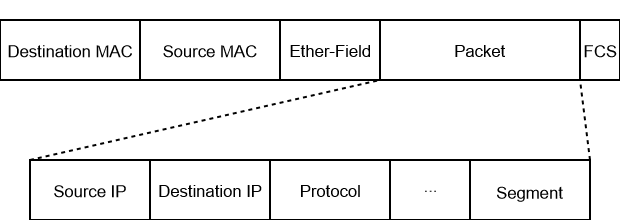
🤝 Contributing
Contributions are welcome! Here's how you can contribute:
- Report a Bug: Open an issue on GitHub.
- Suggest an Improvement: Open a pull request.
- Improve Documentation: Any help to improve this README or add examples is appreciated.
📄 License
This project is licensed under the MIT License. See the LICENSE file for more details.
1 maintainer

Metadata
1 maintainer
Release files for packetdiagram 0.0.1
For a detailed explanation of source distributions (sdists) and built distributions (wheels), please see the package formats documentation.
Source distribution (sdist)
| File | Size | Uploaded | |
|---|---|---|---|
| packetdiagram-0.0.1.tar.gz | 6.5 kB | Details |
Built distribution (wheel)
| File | Interpreter | ABI | Platform | Reset |
|---|---|---|---|---|
| packetdiagram-0.0.1-py3-none-any.whl | Python 3 | none | any | Details |
Total release size: 14.0 kB
Release files / packetdiagram-0.0.1.tar.gz
| Download URL | packetdiagram-0.0.1.tar.gz |
|---|---|
| Size | 6.5 kB |
| Tags | Source |
|
SHA-256 checksum How to use checksums |
314ae1f1a366b2ce89bd93249e54f862253fd50d328f94bb83b6564cbe7ec2c9
|
|
BLAKE2b-256 checksum How to use checksums |
e633c580800cb133afed9206abb90d7a104fb628758c752c181b24c73bcf45ca
|
| Upload date | |
|
Uploaded using Trusted Publishing? What is trusted publishing? |
No |
| Uploaded via |
twine/6.2.0 CPython/3.9.13
|
Release files / packetdiagram-0.0.1-py3-none-any.whl
| Download URL | packetdiagram-0.0.1-py3-none-any.whl |
|---|---|
| Size | 7.6 kB |
| Tags | Python 3 |
|
SHA-256 checksum How to use checksums |
a31ecd77502f2b7ef7ceeb4bf5a8f488fdef94fc5a6432cf6643cdd0b72e1dd8
|
|
BLAKE2b-256 checksum How to use checksums |
1bf0572170019e92954f71a673ddbefccc7660f9fe50f423cd8ea25d592b3e0a
|
| Upload date | |
|
Uploaded using Trusted Publishing? What is trusted publishing? |
No |
| Uploaded via |
twine/6.2.0 CPython/3.9.13
|













