
A Python implementation of the state machine defined in PackML / ISA 88 / IEC 61512

Project description
PackMLpy
A Python implementation of the state machine defined in PackML / ISA88 and in a similar way in IEC 61512. The state machine guarantees that only 'valid' transitions can be executed. Have a look at the following figure which depicts the state machine of PackML:
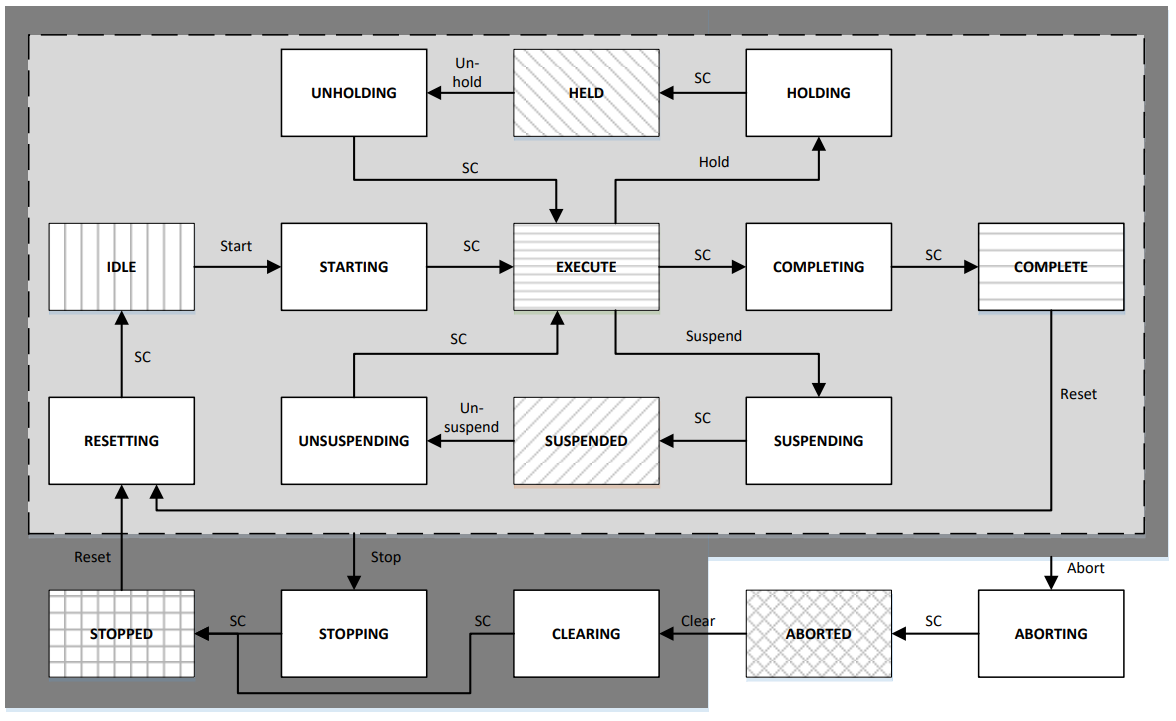
As you can see in the figure, the state machine defines states and transitions that can be fired on certain states. Here are some examples:
- A 'start'-transition only brings the state machine to the 'Starting' state when it is currently in 'Idle' state
- After production of an order has been completed, the state machine will change its current state to 'Complete'. It can only be reset from this state.
- When you fire a 'stop'-transition while being in 'Stopped' state, nothing happens The state machine makes sure that no invalid transitions can be fired.
❕ Note that this is basically a Python rewrite of this Java version of the PackML state machine ❕
Documentation
A simple state machine without actions
To use the simplest version of the state machine in your code, you simply obtain an instance from the state machine builder. This state machine will then be in 'Idle' state and you can invoke the transitions shown in the figure above. Note that this state machine cannot execute any actions while being in the active states and that it can just be used to simulate the state machine behavior.
# necessary imports
from packmlpy.statemachine.StateMachineBuilder import StateMachineBuilder

# somewhere in your code, you can setup the most simple state machine (initial state will be 'Idle')
builder = StateMachineBuilder()
stateMachine = builder.build()

# you can then invoke the PackML-transitions on this state machine:
stateMachine.start()
stateMachine.suspend()
stateMachine.stop()
# ...
# see figure for more transitions
You can also create a state machine with a different initial state than 'Idle'. This can be done with the withInitialState(s: State)-function of the builder. Simply pass in the state you want to have as the initial state to this function. The following example creates a state machine instance that start in the 'Stopped' state:
# necessary imports
from packmlpy.statemachine.StateMachineBuilder import StateMachineBuilder
from packmlpy.states.impl.StoppedState import StoppedState

stateMachine = StateMachineBuilder().withInitialState(StoppedState()).build()
As shown above, you can invoke transitions by calling the corresponing methods (start(), stop(), hold(), ...) on the state machine. Alternatively, you can also use this more dynamic version:
invokeTransition(transitionName: TransitionName)
This will invoke a transition with the given TransitionName.
A real state machine that executes actions
The state machine of PackML allows for executing actions in all active states. These active states are:
- Starting
- Execute
- Holding
- Unholding
- Suspending
- Unsuspending
- Completing
- Resetting
- Stopping
- Aborting
- Clearing
You can create arbitrary actions and pass them to the state machine to let the state machine execute these actions in the correct states. To implement your own actions, simply write a class that extends the provided class StateAction as shown here:
import asyncio
from packmlpy.states.StateAction import StateAction

class SleepAction(StateAction):
	""" Dummy action that just pauses the thread """

	async def execute(self):
		print("sleep")
		global state			# Used here to get a reference to a globally stored state
		print("sleeping in state ", state)
		await asyncio.sleep(dummyActionTime)
		print("sleeping over")
Your actions can be passed in while creating a state machine instance. For example, you could pass in this SleepAction as the action that is executed while the state machine is in state 'Starting':
stateMachine = StateMachineBuilder().withActionInStarting(SleepAction()).build()
You may use one or more of the following functions of the StateMachineBuilder to insert actions into the corresponding states:
withActionInStarting(action StateAction )
Sets action to be the action that is going to be executed when the state machine is in 'Starting' state.
withActionInExecute(action StateAction)
Sets action to be the action that is going to be executed when the state machine is in 'Execute' state.
withActionInCompleting(action StateAction)
Sets action to be the action that is going to be executed when the state machine is in 'Completing' state.
withActionInSuspending(action StateAction)
Sets action to be the action that is going to be executed when the state machine is in 'Suspending' state.
withActionInUnsuspending(action StateAction)
Sets action to be the action that is going to be executed when the state machine is in 'Unsuspending' state.
withActionInHolding(action StateAction)
Sets action to be the action that is going to be executed when the state machine is in 'Holding' state.
withActionInUnholding(action StateAction)
Sets action to be the action that is going to be executed when the state machine is in 'Unholding' state.
withActionInAborting(action StateAction)
Sets action to be the action that is going to be executed when the state machine is in 'Aborting' state.
withActionInClearing(action StateAction)
Sets action to be the action that is going to be executed when the state machine is in 'Clearing' state.
withActionInStopping(action StateAction)
Sets action to be the action that is going to be executed when the state machine is in 'Stopping' state.
withActionInResetting(action StateAction)
Sets action to be the action that is going to be executed when the state machine is in 'Resetting' state.
Alternatively, you can also use the more flexible way of adding actions to states:
withAction(action StateAction, stateName ActiveStateName)
You can pass in an action and the name of an active state to add this action to a state.
Getting notified on state changes
You can create an observer that is notified whenever the state machine changes its state. To do that, you have to create your observer that extends the class StateChangeObserver interface. This interface's method is called on every state change, you can do whatever you like in this function. Here's an example for such a class:
from packmlpy.statemachine.StateChangeObserver import StateChangeObserver

class ExampleObserver(StateChangeObserver):

	def __init__(self) -> None:
		super().__init__()
		self.observedStateName = "None"

	def onStateChanged(self,newState: 'State'):
		print("new state:")
		print(newState.__class__.__name__)
To add a new observer to the state machine simply call stateMachine.addStateChangeObserver(observer StateChangeObserver) passing in an instance of you observer class. In case an observer should no longer be notified on state changes, simply remove it by calling stateMachine.removeStateChangeObserver(observer StateChangeObserver).
Usage
With a build tool like Poetry, it's very easy to use this library in your own projects. In you project, simply install it using the following command:
poetry add packmlpy
Make changes to this project
This project is built with Poetry. You can simply make changes to this library installed. Clone or download this repository and run
poetry install from the project root. In case you want to give back to this project, I am always happy to accept suggestions or improvements through pull requests
Disclaimer
Please note that the figure above and all definitions of states and transitions have been taken from the OMAC PackML Implementation Guide for PackML.
Release history Release notifications | RSS feed


Download files
Download the file for your platform. If you're not sure which to choose, learn more about installing packages.
Source Distribution
Built Distribution
Filter files by name, interpreter, ABI, and platform.
If you're not sure about the file name format, learn more about wheel file names.
Copy a direct link to the current filters
File details
Details for the file packmlpy-1.0.0.tar.gz.
File metadata
- Download URL: packmlpy-1.0.0.tar.gz
- Upload date:
- Size: 7.8 kB
- Tags: Source
- Uploaded using Trusted Publishing? No
- Uploaded via: poetry/1.5.1 CPython/3.9.2 Windows/10
File hashes
| Algorithm | Hash digest | |
|---|---|---|
| SHA256 |
90f7a97de626cb3a091df75692b1088ecce3afb0b1808d793aab738164fbd245
|
|
| MD5 |
42735832ca46046ac5cd632a199adb8b
|
|
| BLAKE2b-256 |
9aa254f505b80a5c5f414910b380476a55db65dc530efe2d7b34005df99d43c9
|
File details
Details for the file packmlpy-1.0.0-py3-none-any.whl.
File metadata
- Download URL: packmlpy-1.0.0-py3-none-any.whl
- Upload date:
- Size: 8.4 kB
- Tags: Python 3
- Uploaded using Trusted Publishing? No
- Uploaded via: poetry/1.5.1 CPython/3.9.2 Windows/10
File hashes
| Algorithm | Hash digest | |
|---|---|---|
| SHA256 |
13facd0430d1605d7fa8c699e7ca38061734a00595488c771e511a5b819717f4
|
|
| MD5 |
6924c9751fb128fc2ec96d746fb5b78b
|
|
| BLAKE2b-256 |
15d7d20199516c2a5f8b0b8f514f13db44a81184c60156ffdc22a1c420a90171
|






