
🐀 A clean, human-readable CLI packet analyzer for .pcap files

Project description
packrat 🐀
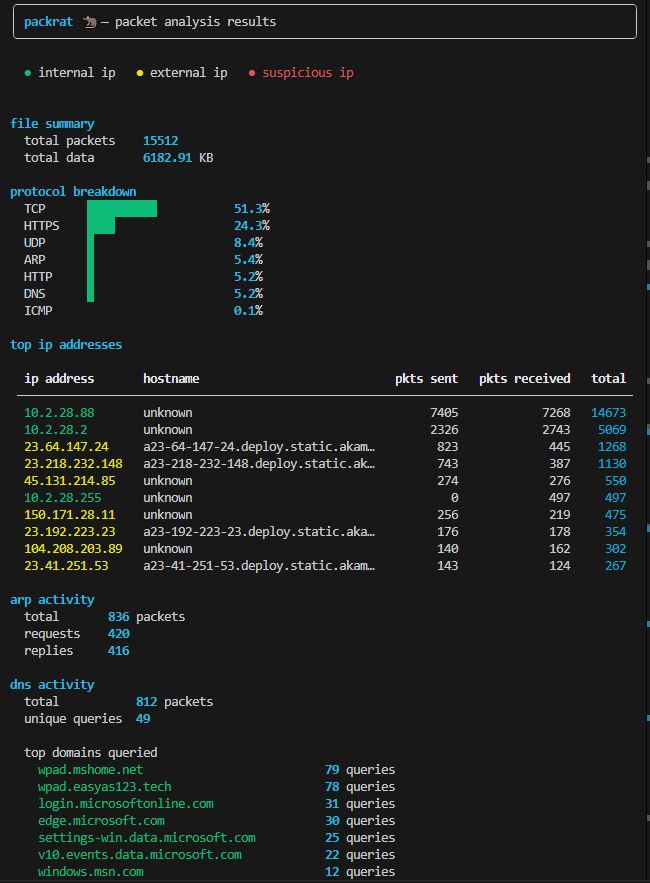
Packrat is an open source command-line packet analyzer that takes the pain out of reading raw .pcap files. Packrat gives you a clean, colorized summary of IP conversations, protocol breakdowns, and traffic detection.
After using tshark I just wanted something simpler. Something I could run and immediately understand what's happening in a capture without digging through documentation for flags.
If you are using this tool and have any suggestions, feel free to open an issue or reach out!
install
pip install packrat-cli
usage
# basic analysis
packrat capture.pcap

# filter by IP or protocol
packrat capture.pcap --filter 192.168.1.5
packrat capture.pcap --filter DNS

# export results
packrat capture.pcap --export json
packrat capture.pcap --export html
packrat capture.pcap --export txt

# skip DNS resolution (faster)
packrat capture.pcap --nd

# check version
packrat --version
Screenshot
features
- Protocol breakdown — TCP, UDP, DNS, HTTP, HTTPS, SSH, FTP, SMTP, IMAP, ARP
- Top IP addresses with hostname resolution and color coding
- DNS query analysis with top domains
- TLS/HTTPS handshake detection
- Anomaly detection — port scans, ARP floods, DNS tunneling, FTP plaintext
- Export to JSON, HTML, or TXT
changelog
v1.1.0 (most recent)
- Added threat detection engine with rules for SYN flood, ICMP flood, UDP flood, port scan, and ARP scan
- Refactored codebase into layered architecture (core API, CLI, detection)
v1.0.2
- Initial release
NOTE
Packrat reports HTTP at the packet level, not the transaction level. What this means is that since there is no TCP reassembly, A single HTTP request/response may span multiple packets. This can lead to a higher number of packets according to Wireshark or other Networking tools.

That being said, use Packrat for convenience not pin point accuracy.


Download files
Download the file for your platform. If you're not sure which to choose, learn more about installing packages.
Source Distribution
Built Distribution
Filter files by name, interpreter, ABI, and platform.
If you're not sure about the file name format, learn more about wheel file names.
Copy a direct link to the current filters
File details
Details for the file packrat_cli-1.1.2.tar.gz.
File metadata
- Download URL: packrat_cli-1.1.2.tar.gz
- Upload date:
- Size: 9.8 kB
- Tags: Source
- Uploaded using Trusted Publishing? No
- Uploaded via: twine/6.2.0 CPython/3.13.1
File hashes
| Algorithm | Hash digest | |
|---|---|---|
| SHA256 |
4006ffa64ac6cd2422d648718875fc3235e2ce245f3ca5a448ec4b9db0ba241c
|
|
| MD5 |
ece3c0088d094957d50d62ab81c2f60b
|
|
| BLAKE2b-256 |
db83d67c875236ea307f056755ef5b4875457cf817f94ecc8e9a08848145c49f
|
File details
Details for the file packrat_cli-1.1.2-py3-none-any.whl.
File metadata
- Download URL: packrat_cli-1.1.2-py3-none-any.whl
- Upload date:
- Size: 10.4 kB
- Tags: Python 3
- Uploaded using Trusted Publishing? No
- Uploaded via: twine/6.2.0 CPython/3.13.1
File hashes
| Algorithm | Hash digest | |
|---|---|---|
| SHA256 |
a7f35aa7abb0e9bb551ff696019281530f5a09dd54055849d4e9d21a612f56a6
|
|
| MD5 |
db33346c393e67d0b06c5c7cae5890eb
|
|
| BLAKE2b-256 |
be28b8b96995822413931f3c447a213a129d4745a5b20f7250654b3f65e41242
|






