
A secure CLI to manage secrets locally with encryption, master password, and clipboard support.
Verified details
These details have been verified by PyPIProject links
GitHub Statistics
Maintainers

Project description
🔐 pacli - Secrets Management CLI




pacli is a secure, local-first secrets manager that stores your passwords, API keys, and SSH credentials with encryption and master password protection - no cloud dependencies required.
Features
- Securely store and manage secrets locally
- Master password protection
- Support separate options for token, password, and SSH connections
- Add, retrieve, update, and delete secrets
- Copy secrets directly to your clipboard
- SSH connection management with key file support
- URL shortening with LinklyHQ integration
- Export list of secrets into JSON or CSV file
- Easy-to-use command-line interface
- Web UI for managing secrets through a modern web interface
Sonarqube Code Quality Metrics







Installation
Recommended: pipx (isolated, no conflicts)
pipx installs CLI tools in their own isolated environments and makes them available system-wide. This is the safest and cleanest approach.
# Install pipx if you don't have it
pip install pipx
pipx ensurepath

# Install pacli
pipx install pacli-tool
Standard pip
pip install pacli-tool
Note for Ubuntu 23+, Debian 12+, and other modern Linux distros: Your system Python may be externally managed (PEP 668) and block pip installs by default. Use one of the alternatives below.
Modern Linux (externally managed Python)
If you get an externally-managed-environment error, choose one of these:
# Use a virtual environment (safest for system Python)
python3 -m venv ~/.venv/pacli
~/.venv/pacli/bin/pip install pacli-tool

# Then add the binary to your PATH
echo 'export PATH="$HOME/.venv/pacli/bin:$PATH"' >> ~/.bashrc
source ~/.bashrc
Install from source
git clone https://github.com/imshakil/pacli.git
cd pacli
pip install -e .
Or directly from GitHub without cloning:
pip install git+https://github.com/imshakil/pacli.git
Verify installation
pacli --help
Usage
To see all available commands and options:
pacli --help
Common Commands
| Command | Description |
|---|---|
init |
Initialize pacli and set a master password |
add |
Add a secret with a label |
get |
Retrieve secrets by label |
get-by-id |
Retrieve a secret by its ID |
update |
Update old secret by label |
update-by-id |
Update old secret by its ID |
list |
List all saved secrets |
delete |
Delete a secret by label |
delete-by-id |
Delete a secret by its ID |
ssh |
Connect to SSH server using saved credentials |
short |
Shorten URLs using LinklyHQ service |
cc |
Copy stdin content to clipboard |
change-master-key |
Change the master password without losing data |
export |
Export secrets to JSON or CSV format |
web |
Launch/manage the Web UI for managing secrets |
version |
Show the current version of pacli |
Examples
Adding and Retrieving Secrets
# Initialize pacli (run once)
pacli init

# Add a password
pacli add --pass github

# Add a token
pacli add --token api-key

# Add SSH connection
pacli add --ssh ec2-vm user:192.168.1.100

# Add SSH connection with key file
pacli add --ssh ec2-vm user:192.168.1.100 --key ~/.ssh/id_rsa

# Retrieve a secret
pacli get github

# Connect via SSH
pacli ssh ec2-vm

# Export secrets to JSON
pacli export --format json --output my_secrets.json

# Export secrets to CSV
pacli export --format csv --output my_secrets.csv

# Shorten a URL
pacli short https://example.com/very/long/url

# Shorten with custom name and copy to clipboard
pacli short https://example.com -n "My Link" --clip

# Copy file content to clipboard
cat file.txt | pacli cc

# Copy command output to clipboard
echo "Hello World" | pacli cc

# Copy API response to clipboard
curl -s https://api.example.com/data | pacli cc
Web UI
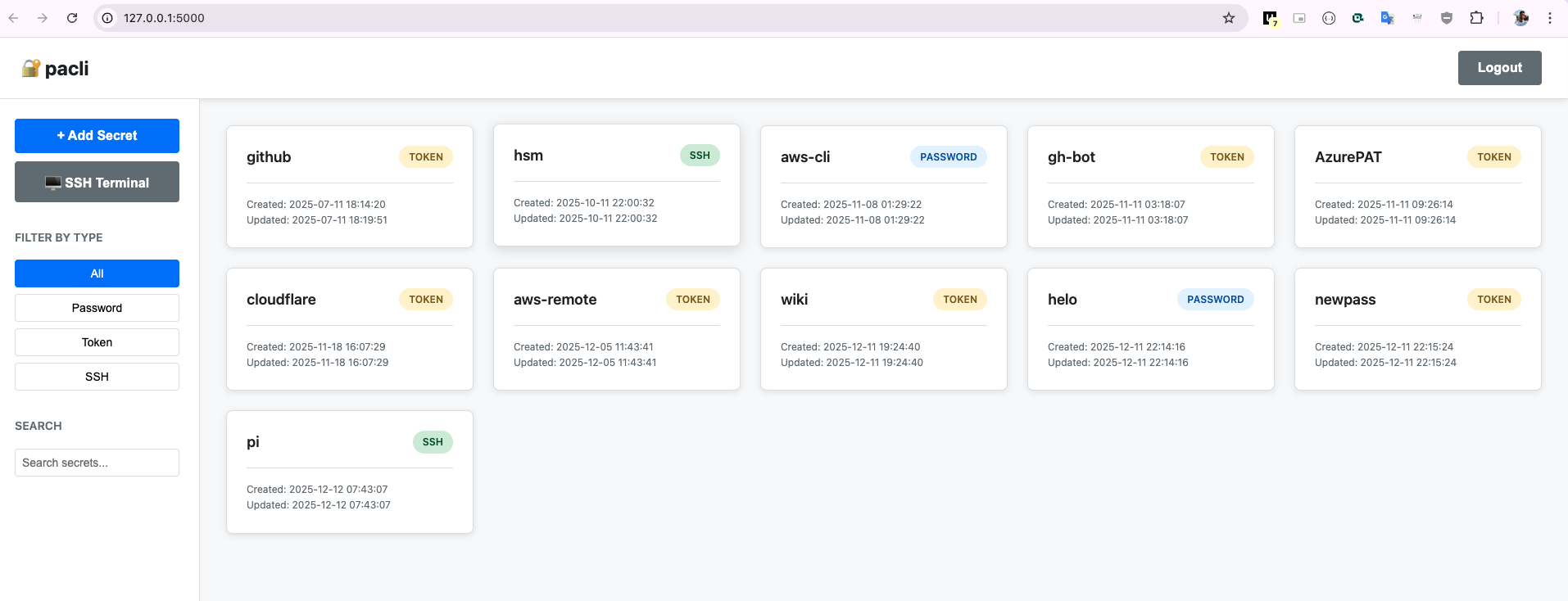
Launch the Web UI to manage your secrets through a modern, user-friendly interface:
# Start the Web UI (opens in your default browser)
pacli web

# Start in background mode
pacli web start

# Stop background mode
pacli web stop

# Check background status
pacli web status

# Start on a custom host and port
pacli web --host 0.0.0.0 --port 8080

# Start in background on custom host and port
pacli web start --host 0.0.0.0 --port 8080

# Start without opening browser
pacli web --no-browser

# Start in background without opening browser
pacli web start --no-browser
The Web UI provides:
- 🔐 Master password authentication
- 📋 View, add, edit, and delete secrets
- 🔍 Search and filter secrets by type
- 📋 Display secrets with creation/update timestamps
- 👁️ Toggle secret visibility
- 📋 Copy secrets to clipboard
- 🎨 Responsive design for desktop and mobile
Display Format
- Credentials are shown as:
username:password - SSH connections are shown as:
user:iporuser:ip (Key: /path/to/key)
Copy to Clipboard
To copy a secret directly to your clipboard, use the --clip option:
pacli get google --clip
Pipeline Usage
Use pacli cc to copy any command output or file content to clipboard:
# Copy file contents
cat ~/.ssh/id_rsa.pub | pacli cc

# Copy command output
ls -la | pacli cc

# Copy JSON response
curl -s https://api.github.com/user | pacli cc
For more information, use pacli --help or see the documentation.
Tips
Avoid Master Password Prompts
To avoid entering your master password repeatedly, you can set it as an environment variable:
# For current session only
export PACLI_MASTER_PASSWORD="your-master-password"

# Or add to your shell profile for permanent use
echo 'export PACLI_MASTER_PASSWORD="your-master-password"' >> ~/.bashrc  # For bash
echo 'export PACLI_MASTER_PASSWORD="your-master-password"' >> ~/.zshrc   # For zsh
Security Note: Adding the password to your shell profile makes it persistent but less secure. Use the session-only approach for better security.
URL Shortening Setup
To use the URL shortening feature, set up your LinklyHQ credentials as environment variables:
# Set LinklyHQ credentials
export PACLI_LINKLYHQ_KEY="your_api_key"
export PACLI_LINKLYHQ_WID="your_workspace_id"

# Add to your shell profile for permanent use
echo 'export PACLI_LINKLYHQ_KEY="your_api_key"' >> ~/.bashrc
echo 'export PACLI_LINKLYHQ_WID="your_workspace_id"' >> ~/.bashrc
Visits here to get your credentials.
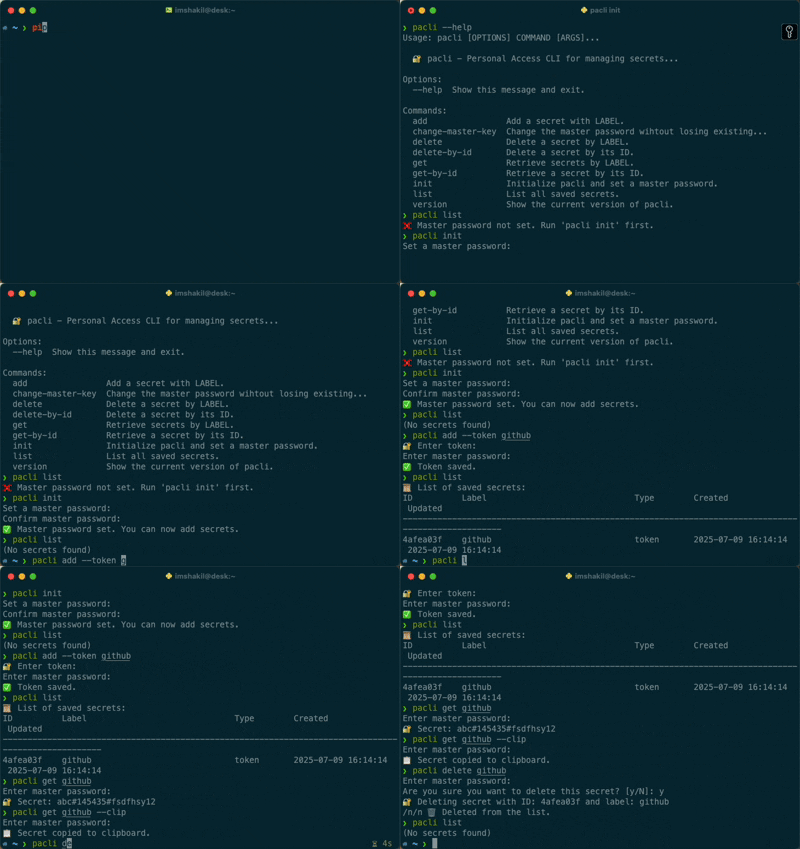
Demo
Project details
Verified details
These details have been verified by PyPIProject links
GitHub Statistics
Maintainers
Release history Release notifications | RSS feed


Download files
Download the file for your platform. If you're not sure which to choose, learn more about installing packages.
Source Distribution
Built Distribution
Filter files by name, interpreter, ABI, and platform.
If you're not sure about the file name format, learn more about wheel file names.
Copy a direct link to the current filters
File details
Details for the file pacli_tool-1.4.3.tar.gz.
File metadata
- Download URL: pacli_tool-1.4.3.tar.gz
- Upload date:
- Size: 142.4 kB
- Tags: Source
- Uploaded using Trusted Publishing? Yes
- Uploaded via: twine/6.1.0 CPython/3.13.12
File hashes
| Algorithm | Hash digest | |
|---|---|---|
| SHA256 |
99c1b798e224a8ee9fc27145fd84c53dc3a968f749a72bdfc731827649e9ab9a
|
|
| MD5 |
0ec938debc5dccc206ecafe339be258e
|
|
| BLAKE2b-256 |
8afc5682b596e62621d4b4e634b1c62abc9462d695f5830ff4863e2fc9ecdd1e
|
Provenance
The following attestation bundles were made for pacli_tool-1.4.3.tar.gz:
Publisher:
pypi-publish.yml on imShakil/pacli
-
Statement:
-
Statement type:
https://in-toto.io/Statement/v1 -
Predicate type:
https://docs.pypi.org/attestations/publish/v1 -
Subject name:
pacli_tool-1.4.3.tar.gz -
Subject digest:
99c1b798e224a8ee9fc27145fd84c53dc3a968f749a72bdfc731827649e9ab9a - Sigstore transparency entry: 1372302681
- Sigstore integration time:
-
Permalink:
imShakil/pacli@b7e032710a082fa9a5ca0dd9da050ecaa9d15d88 -
Branch / Tag:
refs/tags/v1.4.3 - Owner: https://github.com/imShakil
-
Access:
public
-
Token Issuer:
https://token.actions.githubusercontent.com -
Runner Environment:
github-hosted -
Publication workflow:
pypi-publish.yml@b7e032710a082fa9a5ca0dd9da050ecaa9d15d88 -
Trigger Event:
push
-
Statement type:
File details
Details for the file pacli_tool-1.4.3-py3-none-any.whl.
File metadata
- Download URL: pacli_tool-1.4.3-py3-none-any.whl
- Upload date:
- Size: 59.4 kB
- Tags: Python 3
- Uploaded using Trusted Publishing? Yes
- Uploaded via: twine/6.1.0 CPython/3.13.12
File hashes
| Algorithm | Hash digest | |
|---|---|---|
| SHA256 |
635dcbc0e2abcbfe097a061c155592a94b6e9f463df574cdaad41f962464a35c
|
|
| MD5 |
1e6463ca79c5195c7116bd32d0929dc3
|
|
| BLAKE2b-256 |
62a79e9c15b0d48a410ad4dfc529640a3cf8c38fcd786fe9d7aa6c85d7036eda
|
Provenance
The following attestation bundles were made for pacli_tool-1.4.3-py3-none-any.whl:
Publisher:
pypi-publish.yml on imShakil/pacli
-
Statement:
-
Statement type:
https://in-toto.io/Statement/v1 -
Predicate type:
https://docs.pypi.org/attestations/publish/v1 -
Subject name:
pacli_tool-1.4.3-py3-none-any.whl -
Subject digest:
635dcbc0e2abcbfe097a061c155592a94b6e9f463df574cdaad41f962464a35c - Sigstore transparency entry: 1372303251
- Sigstore integration time:
-
Permalink:
imShakil/pacli@b7e032710a082fa9a5ca0dd9da050ecaa9d15d88 -
Branch / Tag:
refs/tags/v1.4.3 - Owner: https://github.com/imShakil
-
Access:
public
-
Token Issuer:
https://token.actions.githubusercontent.com -
Runner Environment:
github-hosted -
Publication workflow:
pypi-publish.yml@b7e032710a082fa9a5ca0dd9da050ecaa9d15d88 -
Trigger Event:
push
-
Statement type:






