
Pagebreaks : Scope Boundaries for Jupyter Notebooks
Pagebreaks is a Jupyter Notebooks extension (with a supporting IPython plugin) which creates scope boundaries between groups of cells, allowing cells within a pagebreak to share state as usual, but keeping state isolated to that group. To use variables between Pagebreaks, they can be "exported" at the footer of the pagebreak in a read-only format to be used in all later cells.
The goal is to make it easier to keep variables organized in notebooks while changing as little as possible about how notebook programmers like to work. To do that, Pagebreaks allows users to organize their notebook state by organizing their cells within the notebook.
Participate in Research
My name is Eric Rawn. I’m a PhD student at UC Berkeley. To build the best system we can (and do some research along the way), we’re evaluating how our extension aids how real users program, and so we’re running a 4-6 week study with folks who use Jupyter notebooks regularly in their everyday programming. We're especially interested in how Pagebreaks might help data science programmers, so if that's you, we would really appreciate your insight!
The extension will log some usage data locally on your machine, which you'll send to me at the end of the study. We'll then spend about an hour chatting about your experience, the kind of work you do daily, how you use notebooks, and any other thoughts or feedback you have. Participants will be compensated for their time spent interviewing, at $30/hour, so expect $60-$90 overall. The consent form has detailed information about the study if you’re interested. I care a lot about protecting the privacy of my participants, and so a lot of the consent form (and our first chat together at the beginning of the study) is dedicated to explaining exactly what data will be collected, how it will be used, and addressing any questions or concerns.
A full open-source release will be out on PyPi after we can incorporate what we learned from the study, but you're welcome to keep using the extension after the study if you participate and find it helps you work!
If you’re interested in participating, please fill out this interest form
If you have any questions at all, feel free to send me an email at erawn@berkeley.edu, and feel free to forward this to anyone you think might be interested! Thanks!
Install
To install the extension, execute:
python -m pip install pagebreaks
Then, open Jupyter Lab jupyter lab and open a Notebook.
You should see a warning banner telling you to run %load_ext pagebreaksip, at which point the warning will disappear, and you'll be good to go. (You might have to restart the kernel and reload the webpage, just to be safe)
Overview
| Each "pagebreak" keeps top-level variables isolated, so that within a pagebreak you can reference variables between cells normally, but in the rest of the notebook those variables will be inaccessible: | 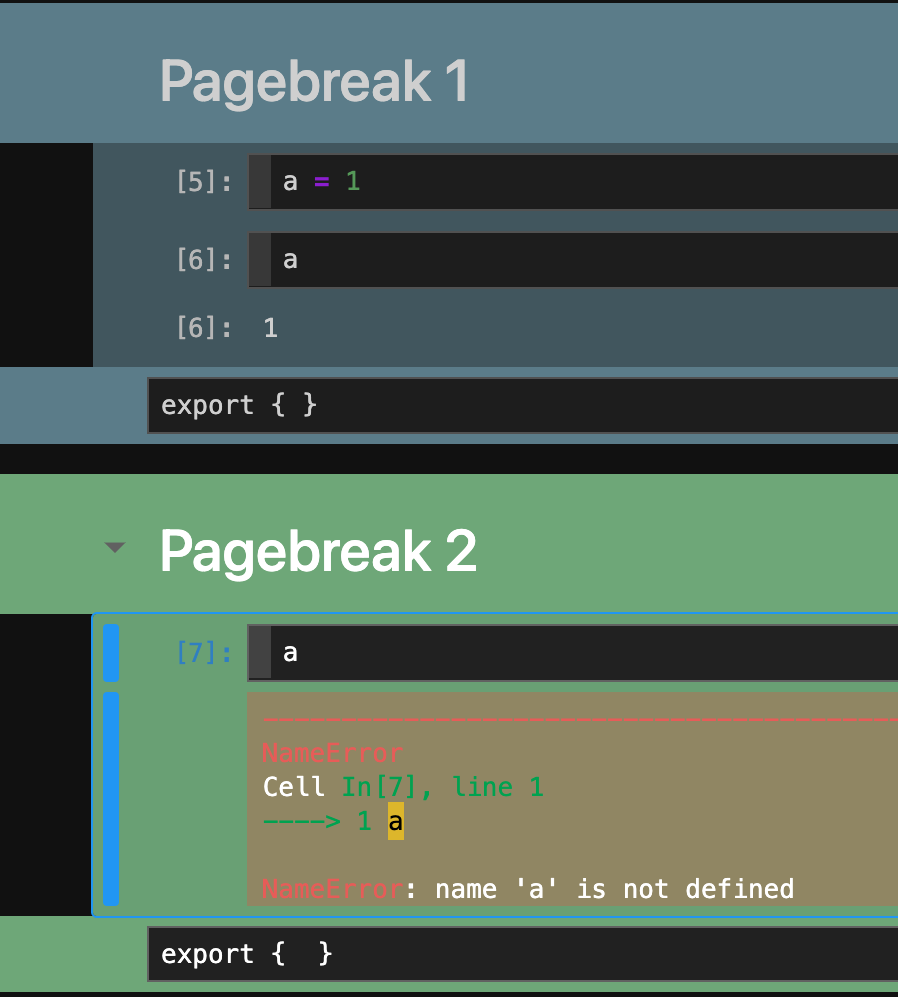
|
| To reference a variable defined in an earlier Pagebreak, add the variable to the “export” list at the bottom of the Pagebreak in which it was defined. Once it’s exported, later cells can read its value, but they can’t overwrite it. | 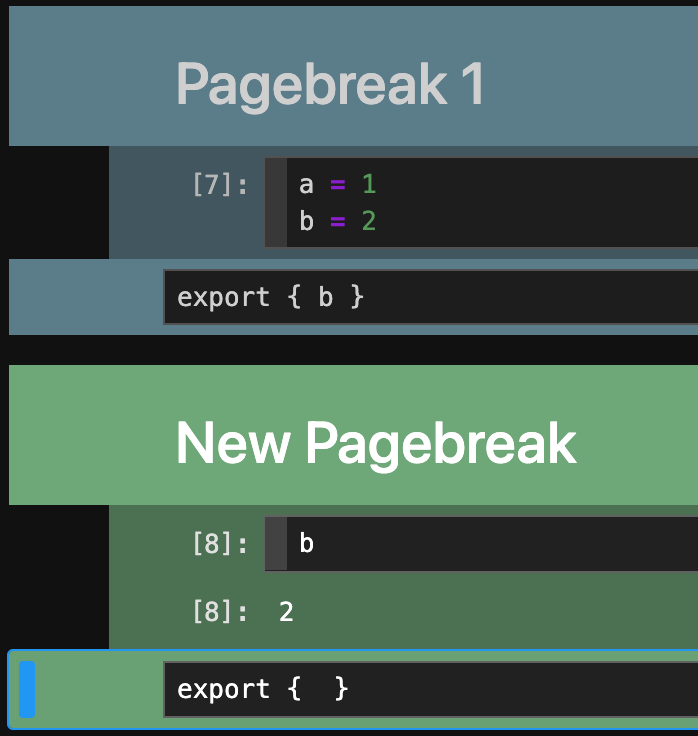
|
| Exported variables continue to be readable and writeable in their own Pagebreak, as usual. After that Pagebreak, later cells can read but not write the exported variable. Before that Pagebreak, cells can neither read nor write the exported variable. | 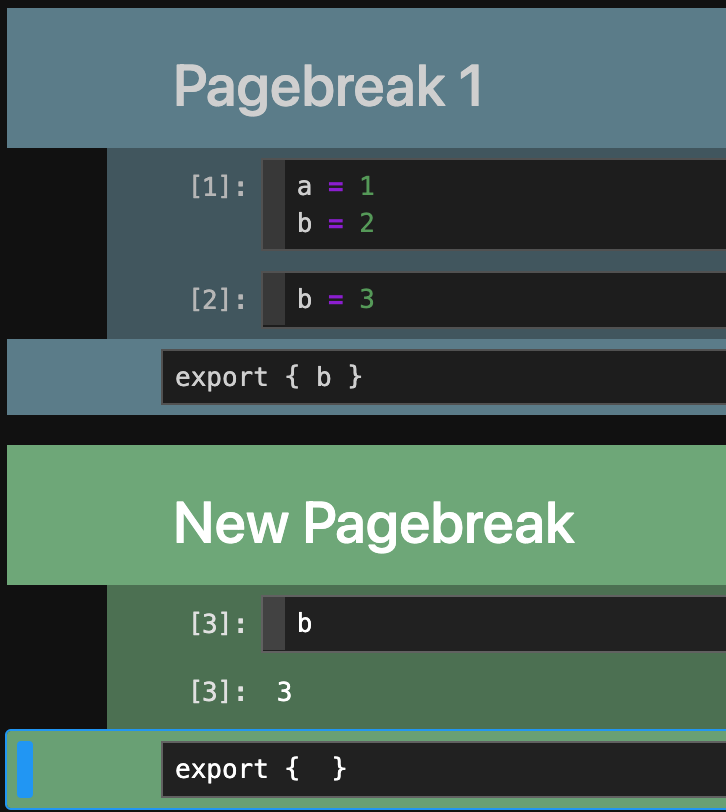
|
To check out the current state of the notebook, you can use the %who_pb IPython magic. If the magic is run in a Pagebreak in which an exported variable is available to be called (i.e. the variable is exported from a previous pagebreak, but not a later one), it will list under Export Exist? as True. |
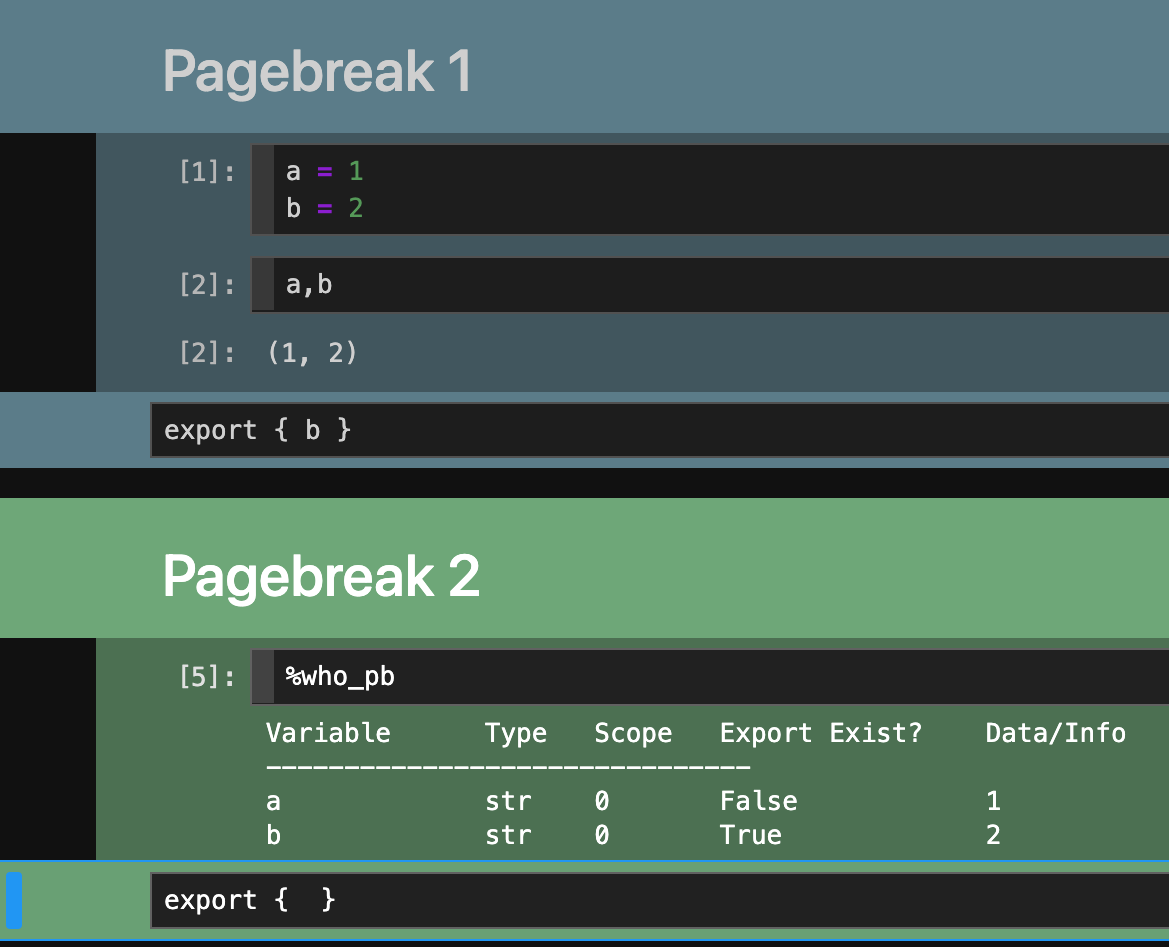
|
| Modules remain global, so you only have to import them once: | 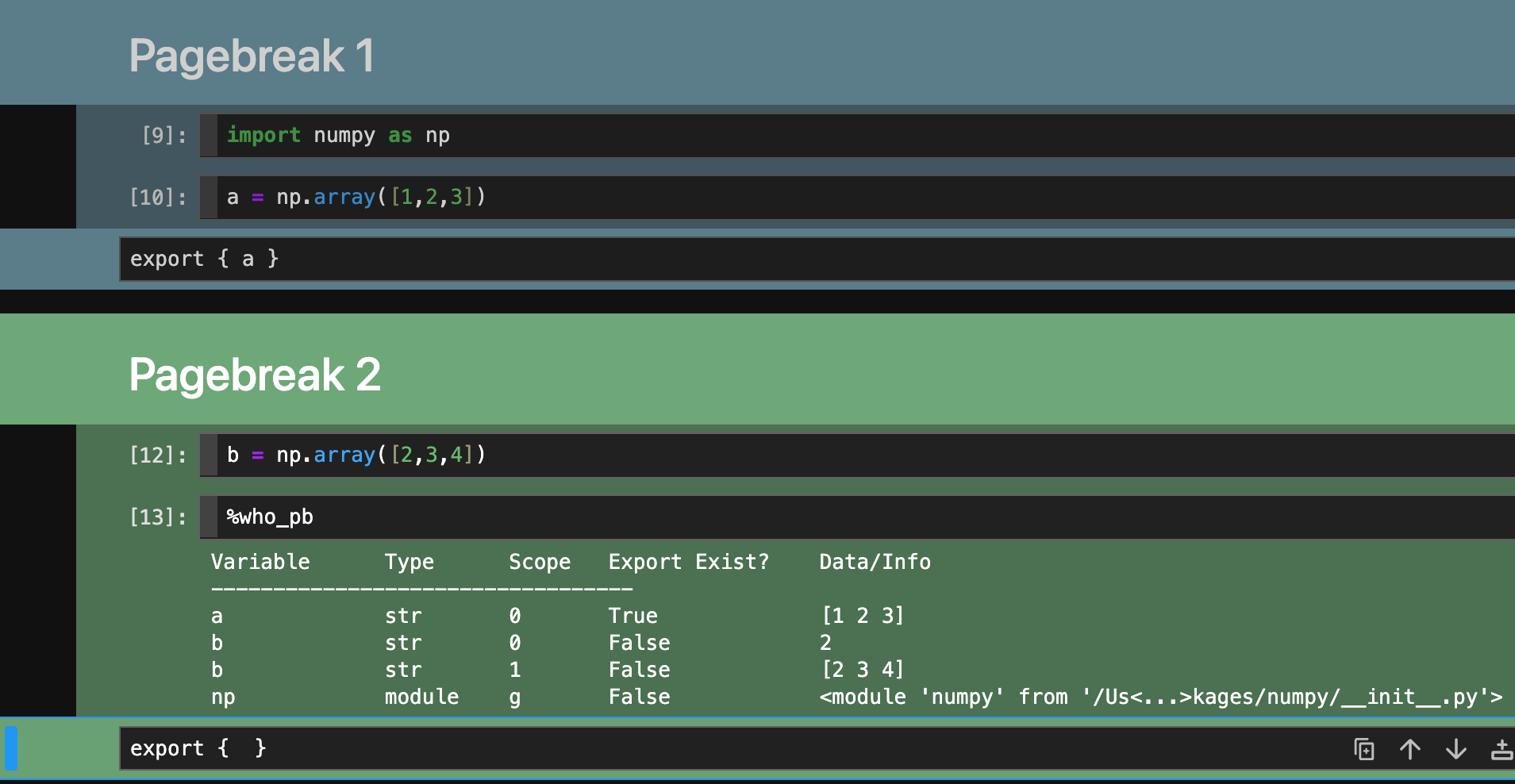
|
*Because Python doesn't have a built-in way to ensure read-only variables, we check for redefinitions at the AST level and dynamically after each cell run, checking to see if the value has changed.
Pagebreak Actions
Making a New Pagebreak
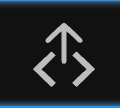
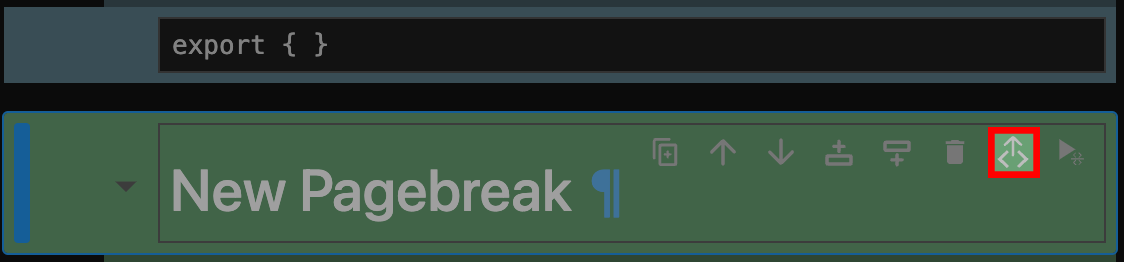
New pagebreaks are made by pressing this button: 

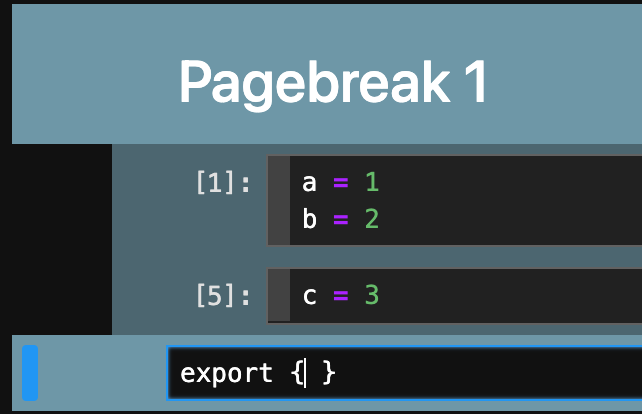
Merging Pagebreaks
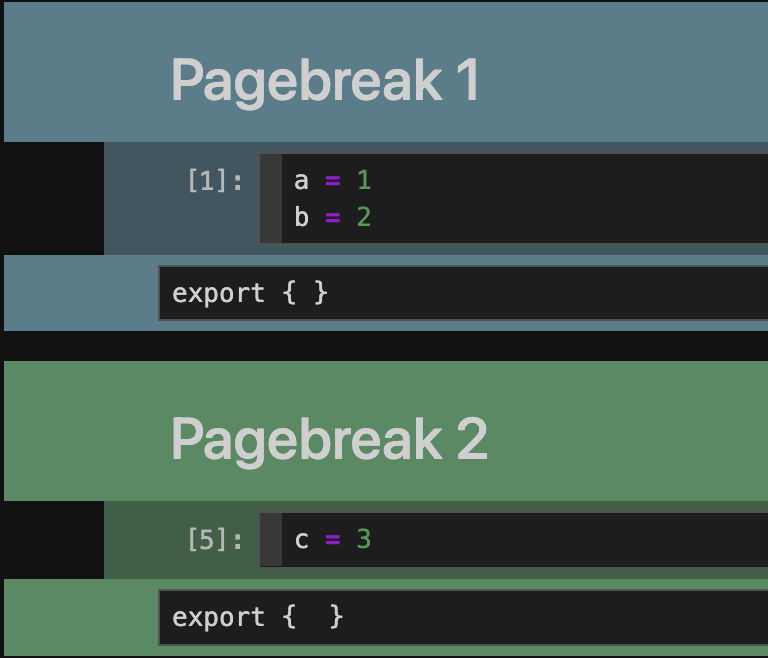
Instead of deleting Pagebreaks, you can merge the cells of a pagebreak into the one above it with:
For example:
| The bottom Pagebreak | ----> | Merges with the top |
| ----> | 
|
%who_pb
We've added the IPython magic %who_pb", which is a pagebreaks-specific version of %who_ls. %who_pb" prints out your notebook state by its pagebreak, listing whether each variable is currently being exported. Pagebreaks only generates the export variables it needs for each cell, so you won't see variables that are exported in later pagebreaks, because those are currently out of scope!
Autoloading the IPython Plugin
To avoid having to run %load_ext pagebreaksip each time you start your kernel, you can start it automatically by adding:
c.InteractiveShellApp.extensions.append('pagebreaksip') to your .ipython/profile/ipython_config.py file.
How it works
You shouldn't need to know what's going on under the hood to use Pagebreaks, but if you're curious, read on!
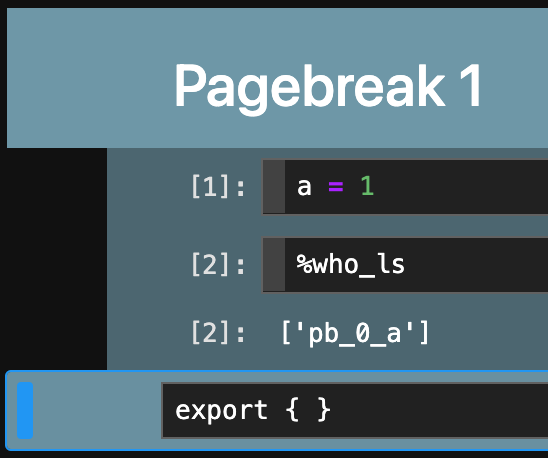
Rather than dynamically storing and reloading different global variables in your kernel, Pagebreaks manipulates the programs you write before they go to the interpreter, changing the names of variables under the hood.
For example, the variable a is actually stored as pb_0_a in the global state, because it is in Pagebreak 0. |
|
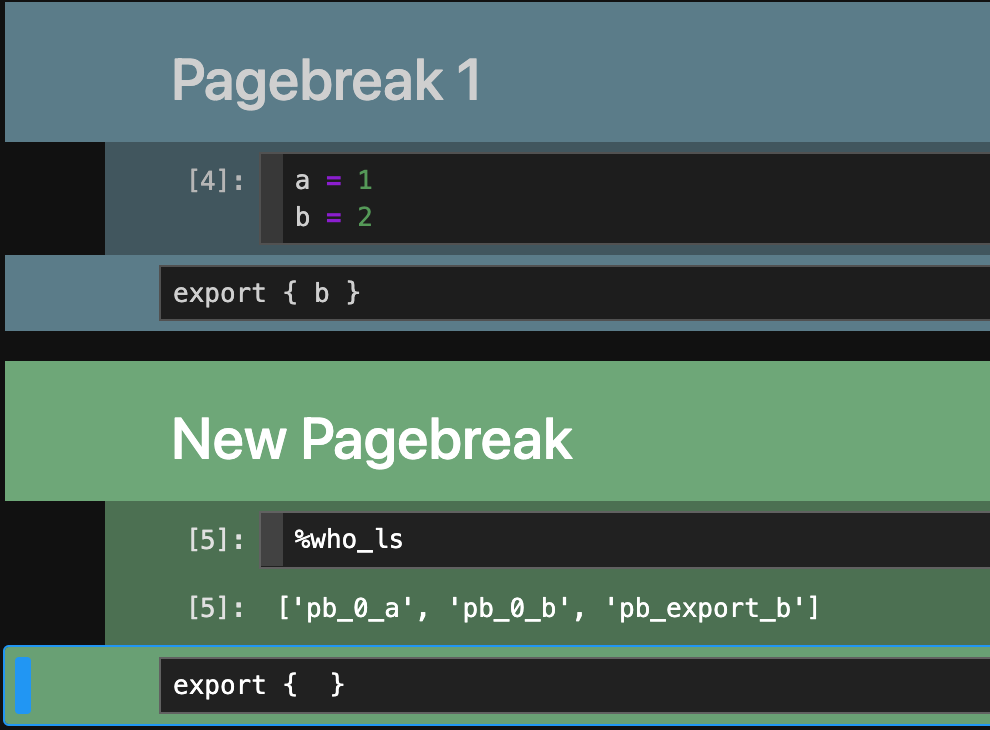
When a variable is exported to be used between pagebreaks, a new variable pb_export_b is generated for each cell run (as a user, you don't have to worry about any of this, you can just use a and b as normal!). Because Python doesn't have a way to enforce that variables are read-only at compile time, Pagebreaks will check after your cell has run that the pb_export_b variable still matches the original pb_0_b variable. If it doesn't, Pagebreaks will revert the variables in your current pagebreak back to what they were before you ran the cell.
Because b is accessible in the second pagebreak because it's been exported, a pb_export_b varaible is generated for later cells to reference, preventing those cells from modifying our real b variable, which is pb_0_b |
|
Requirements
- JupyterLab >= 4.0.0
- Pagebreaks is currently only available for IPython notebooks in Jupyter.
Uninstall
To remove the extension, execute:
pip uninstall pagebreaks
1 maintainer

Metadata
1 maintainer
Release files for pagebreaks 0.1.13
For a detailed explanation of source distributions (sdists) and built distributions (wheels), please see the package formats documentation.
Source distribution (sdist)
| File | Size | Uploaded | Provenance | Actions |
|---|---|---|---|---|
| pagebreaks-0.1.13.tar.gz | 264.1 kB | Without provenance | Details for pagebreaks-0.1.13.tar.gz |
Built distribution (wheel)
| File | Interpreter | ABI | Platform | Actions Reset |
|---|---|---|---|---|
| pagebreaks-0.1.13-py3-none-any.whl | Python 3 | none | any | Details for pagebreaks-0.1.13-py3-none-any.whl |
Total release size: 324.5 kB
Release files / pagebreaks-0.1.13.tar.gz
| Download URL | pagebreaks-0.1.13.tar.gz |
|---|---|
| Size | 264.1 kB |
| Tags | Source |
|
SHA-256 checksum How to use checksums |
b04a8de6ddadb1f88d9db51da76c608d062525b8bda60b828b5e3fcb97a99764
|
|
BLAKE2b-256 checksum How to use checksums |
08a67e60338d16e2dadee36c34d6ad48f1476178bea473cddfd1c1983c32ce04
|
| Upload date | |
|
Uploaded using Trusted Publishing? What is trusted publishing? |
No |
| Uploaded via |
twine/5.1.1 CPython/3.12.3
|
Release files / pagebreaks-0.1.13-py3-none-any.whl
| Download URL | pagebreaks-0.1.13-py3-none-any.whl |
|---|---|
| Size | 60.4 kB |
| Tags | Python 3 |
|
SHA-256 checksum How to use checksums |
89a077c845e1530e3ce13cfae2deb2c7651d5b6cfcf4b8add4049bac820e99da
|
|
BLAKE2b-256 checksum How to use checksums |
eb543f8dbf10d2308c7389e4c3abc6c72918814156bc084b074cfc576f7038f0
|
| Upload date | |
|
Uploaded using Trusted Publishing? What is trusted publishing? |
No |
| Uploaded via |
twine/5.1.1 CPython/3.12.3
|
Security for pagebreaks 0.1.13
Provenance
Provenance describes where a file came from. On PyPI, provenance is shared via attestations, which provide a verifiable record of the build or publishing details. View details, limitations and caveats.
No provenance found
None of the files in this release were uploaded with provenance metadata.
A note on package security
PyPI is a repository for distributing packages, not a service for auditing them. While third-party security researchers and our staff do their best to detect and remove malicious packages, PyPI cannot guarantee the quality, security or suitability of any given package.
To learn more about protecting yourself from malicious actors, visit our package security documentation.














