


PageIndex: Vectorless, Reasoning-based RAG
Reasoning-based RAG ◦ No Vector DB, No Chunking ◦ Context-Aware Retrieval ◦ Reads Like a Human
🌐 Website • 🖥️ Chat Platform • 🔌 MCP & API • 📖 Docs • 💬 Discord • ✉️ Contact
Updates
- [2026/08] 🔥 PageIndex SDK —
pip install -U pageindexnow ships local mode: index, retrieve, and chat entirely on your machine with your own LLM key, or point the same client at PageIndex Cloud with an API key. - [2026/08] ⚡ PageIndex Flash — tree structure generation from PDFs in seconds, with structure extracted heuristically instead of by an LLM.
- PageIndex Chat — a human-like document analysis agent for long professional documents. Also available via MCP or API.
What is PageIndex?
Are you frustrated with vector database retrieval accuracy for long and complex documents? Vector-based RAG retrieves by semantic similarity. But similarity ≠ relevance — what retrieval actually needs is relevance, and relevance requires reasoning. On professional documents that demand contextual understanding, domain expertise, and multi-step reasoning, similarity search misses what is relevant but not similar, and returns what is similar but not relevant.
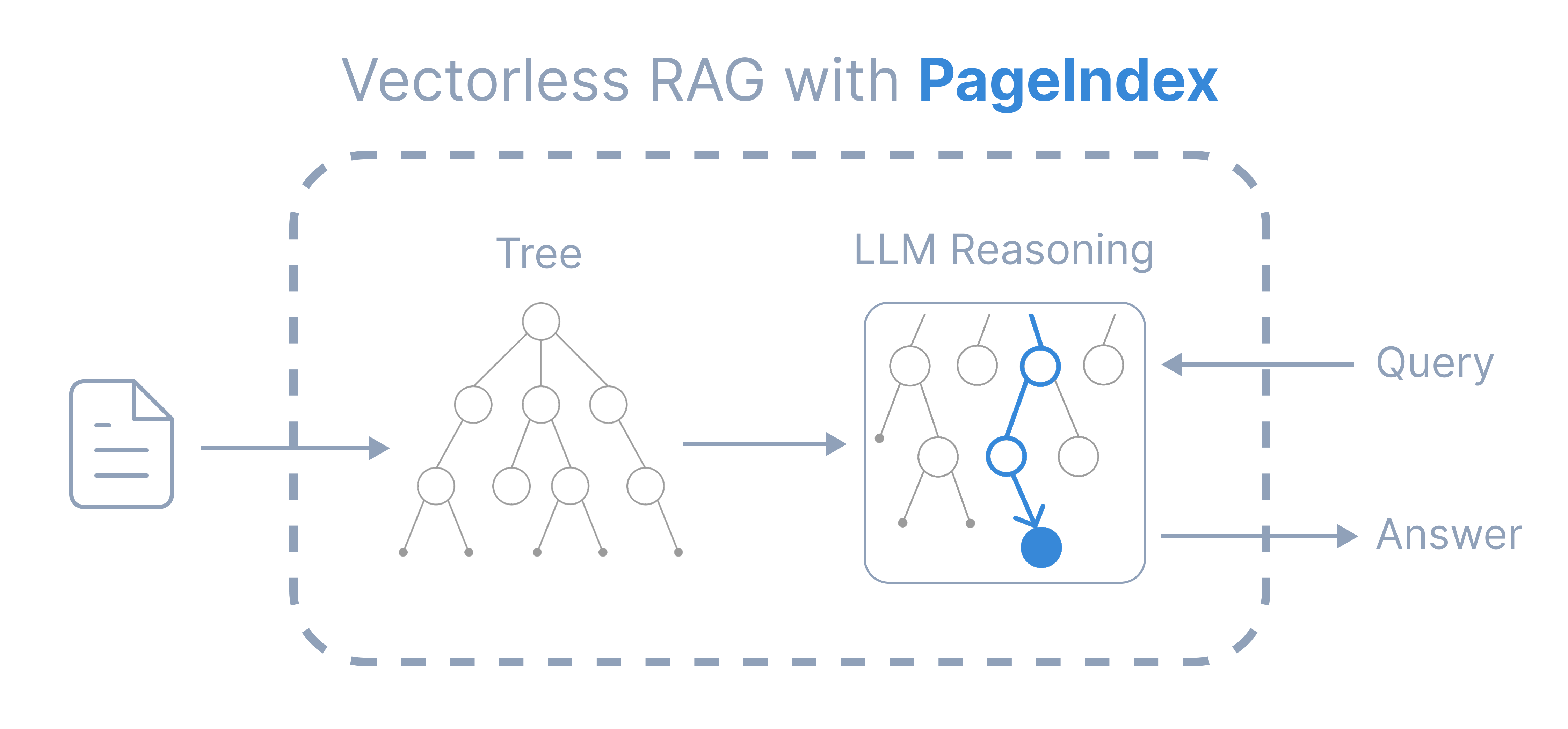
Inspired by AlphaGo, PageIndex replaces the vector index with a hierarchical tree index and lets an LLM reason its way through it — the way a human expert flips to the right section of a long report. Retrieval happens in two steps:
- Index — generate a tree-structure index for each document
- Retrieve — retrieve information via LLM-based tree search
Compare with Vector RAG
| Vector RAG | PageIndex | |
|---|---|---|
| Index | vector index | tree index |
| Unit | fixed-size chunks | natural sections |
| Retrieval | semantic similarity search | LLM-based relevance search |
| Result | opaque, “vibe retrieval” | traceable to explicit references |
| Context | query embedding only | full context: conversation history, domain knowledge |
It is ideal for financial reports, legal documents, regulatory filings, technical manuals, medical literature, academic textbooks — any long, complex professional document.
PageIndex achieved state-of-the-art 98.7% accuracy on FinanceBench (financial document QA benchmark), vastly outperforming vector-based RAG — see Benchmarks.
Quickstart
pip install -U pageindex
import os
from pageindex import PageIndexClient

os.environ["OPENAI_API_KEY"] = "your-openai-key"

client = PageIndexClient(
    index_model="gpt-5.6-luna",               # model to build the tree index
    chat_model="gpt-5.6-sol",                 # model to search the tree
)
doc_id = client.submit_document("report.pdf")["doc_id"]

answer = client.chat("What was the 2023 operating margin, and where is it stated?",
                     doc_id=doc_id)
print(answer)
Model Recommendations
index_model— a basic model is sufficient. The index model generates the document's tree index. A basic model is sufficient to produce a good tree structure.chat_model— use the best model you can afford. The chat model searches the tree to retrieve information. See Query cost and accuracy.
See the Detailed Usage Guide to configure other models and integrate PageIndex with your own agent.
Benchmarks
Indexing cost
Building a tree locally runs about $0.001 per page with index_model="gpt-5.6-luna" — so a 1,000-page textbook costs a little over a dollar and a few minutes, once, and every later question reuses it. PageIndex is designed not to rely heavily on the model used at index time, so in our experiments a basic model does not hurt quality.

Query cost and accuracy
PageIndex-OSS-Benchmark measures exactly the setup in the quickstart above — PageIndexClient() in local mode, flash indexing, no OCR — on 62 lookup questions over 34 PDFs (1,945 pages) drawn from MMLongBench-Doc-V2. Every question's answer is a fact stated in running text, so a wrong answer is a retrieval or reading failure, not a reasoning one.

Full results, data, and the runner are in the benchmark repo.
Detailed Usage Guide
⚙️ Step 1: Initialize the client
Create a local client and choose the models used for indexing and retrieval:
from pageindex import PageIndexClient
import os

client = PageIndexClient(
    index_model="gpt-5.6-luna",
    chat_model="gpt-5.6-sol",
    storage_path=".pageindex",
)
-
index_modelbuilds the tree index. A basic model is sufficient. -
chat_modelsearches the tree and answers questions. Use the best model you can afford. -
storage_pathspecifies where indexed documents are stored locally.
Model naming conventions
Model names follow LiteLLM's naming convention. Choose the format that matches your provider:
OpenAI — use the model name directly and set OPENAI_API_KEY:
os.environ["OPENAI_API_KEY"] = "your-openai-api-key"
chat_model = "gpt-5.6-sol"
Anthropic — prefix the model name with anthropic/ and set ANTHROPIC_API_KEY:
os.environ["ANTHROPIC_API_KEY"] = "your-anthropic-api-key"
chat_model = "anthropic/claude-sonnet-4-6"
OpenRouter — prefix the provider and model name with openrouter/ and set OPENROUTER_API_KEY:
os.environ["OPENROUTER_API_KEY"] = "your-openrouter-api-key"
chat_model = "openrouter/anthropic/claude-sonnet-4-6"
For model names and API key settings for other providers, see the LiteLLM provider documentation.
🌲 Step 2: Build the tree index
submit_document defaults to Flash indexing: the structure is extracted from the PDF's own layout (no LLM), and a model is called only for node summaries and the tree-optimization expansion pass. It takes seconds.
doc_id = client.submit_document("report.pdf")["doc_id"]
Inspect what you got:
tree = client.get_document_structure(doc_id)    # titles, page ranges, summaries — no text
client.list_documents()                         # everything you have indexed
A PageIndex tree looks like this — a table of contents optimized for LLMs and agents:
{
  "title": "Financial Stability",
  "node_id": "0006",
  "start_index": 21,
  "end_index": 22,
  "summary": "The Federal Reserve ...",
  "nodes": [
    {
      "title": "Monitoring Financial Vulnerabilities",
      "node_id": "0007",
      "start_index": 22,
      "end_index": 28,
      "summary": "The Federal Reserve's monitoring ..."
    },
    {
      "title": "Domestic and International Cooperation and Coordination",
      "node_id": "0008",
      "start_index": 28,
      "end_index": 31,
      "summary": "In 2023, the Federal Reserve collaborated ..."
    }
  ]
}
See more example documents and generated tree structures.
💬 Step 3: Ask questions
chat() is the one-line surface. Underneath it is a document-QA agent, and you can talk to it over whichever protocol your stack already speaks:
Get a simple answer with chat():
client.chat("What changed in the risk factors?", doc_id=doc_id)
Pass a string or role/content history and get the answer back.
Stream the answer:
client.chat(question, doc_id=doc_id, stream=True)
Returns the answer as text chunks.
Use the OpenAI Chat Completions format:
client.chat_completions(messages, doc_id=doc_id)
Returns the full envelope, including token usage, streaming metadata, and finish_reason.
Use the OpenAI Responses format:
client.responses("...", doc_id=doc_id, reasoning={"effort": "high"})
Returns the agent's process transcript in items. Append those items to the next call's input to preserve memory and benefit from provider prompt caching. This requires a Responses-compatible backend in local mode.
Use the Anthropic Messages format:
client.messages("...", model="claude-sonnet-4-6", doc_id=doc_id)
Uses Anthropic's native Messages API and tool runner. Install it with pip install 'pageindex[anthropic]'.
Pass a list of ids to doc_id to search several documents at once, and keep it identical across a conversation's calls.
🤖 Integrate PageIndex with your own agent
Instead of calling PageIndex's agent, hand PageIndex's tools to yours. One call fills every slot:
OpenAI Agents SDK:
from agents import Agent, Runner

agent = Agent(**client.openai_agent_config(doc_id=doc_id))
result = Runner.run_sync(agent, "Summarize the auditor's concerns.")
openai_agent_config() provides the instructions and tools required by an OpenAI agent.
Anthropic SDK tool runner:
runner = anthropic_client.beta.messages.tool_runner(
    **client.anthropic_runner_config(model="claude-sonnet-4-6", doc_id=doc_id),
    messages=[{"role": "user", "content": "Summarize the auditor's concerns."}],
)
anthropic_runner_config() configures Anthropic's native tool runner. Install the integration with pip install 'pageindex[anthropic]'.
Claude Agent SDK:
options = ClaudeAgentOptions(**client.claude_agent_config(doc_id=doc_id))
claude_agent_config() creates the options for the Claude Agent SDK. Install the integration with pip install 'pageindex[claude]'.
Other agent frameworks:
tools = client.agent_tools()
agent_tools() returns plain Python functions that work with LangChain, PydanticAI, and other agent frameworks.
Each *_config helper is sugar over the explicit pieces — client.agent_instructions() for the system prompt and client.as_openai_tools() / as_anthropic_tools() / as_claude_mcp() for the tools — so you can swap in your own prompt whenever you need to. Locally, doc_id is enforced at the tool layer, not just prompted: out-of-scope lookups return NOT_FOUND.
PageIndex Cloud
The open-source version is designed for text-heavy PDFs. For scanned documents or PDFs with many images, use PageIndex Cloud.
Same client, same methods — pass a PageIndex API key and the work happens on our servers, with the production OCR, tree-building, and retrieval pipeline behind it:
client = PageIndexClient(api_key="pi-...")
doc_id = client.submit_document("report.pdf", wait=True)["doc_id"]
print(client.chat("What was the 2023 operating margin?", doc_id=doc_id))
| Local (this repo) | Cloud (API key) | |
|---|---|---|
| Parsing | text extraction | hosted OCR |
| Data storage | local | cloud |
| Citations & references | page-level | line-level |
| Image retrieval & understanding | — | ✅ |
| PageIndex File System | — | ✅ |
| MCP server | — | ✅ |
More About PageIndex Cloud
- Scale PageIndex to Millions of Documents — PageIndex File System is a Cloud-only, file-level tree indexing layer that lets PageIndex reason over an entire corpus, not just a single document.
- Developer Dashboard — manage your API keys and projects.
- PageIndex Cloud documentation — explore API guides and reference documentation.
For dedicated or private deployment (VPC, on-prem), contact us or book a demo.
⭐ Support Us
Leave us a star 🌟 if you like our project. Thank you!
Please cite this work as:
Mingtian Zhang, Yu Tang and PageIndex Team,
"PageIndex: Next-Generation Vectorless, Reasoning-based RAG",
PageIndex Blog, Sep 2025.
Or use the BibTeX citation.
@article{zhang2025pageindex,
  author = {Mingtian Zhang and Yu Tang and PageIndex Team},
  title = {PageIndex: Next-Generation Vectorless, Reasoning-based RAG},
  journal = {PageIndex Blog},
  year = {2025},
  month = {September},
  note = {https://pageindex.ai/blog/pageindex-intro},
}
Connect with Us






© 2026 Vectify AI
1 maintainer

Metadata
1 maintainer
Release files for pageindex 0.2.11
For a detailed explanation of source distributions (sdists) and built distributions (wheels), please see the package formats documentation.
Source distribution (sdist)
| File | Size | Uploaded | |
|---|---|---|---|
| pageindex-0.2.11.tar.gz | 502.2 kB | Details |
Built distribution (wheel)
| File | Interpreter | ABI | Platform | Reset |
|---|---|---|---|---|
| pageindex-0.2.11-py3-none-any.whl | Python 3 | none | any | Details |
Total release size: 1.1 MB
Release files / pageindex-0.2.11.tar.gz
| Download URL | pageindex-0.2.11.tar.gz |
|---|---|
| Size | 502.2 kB |
| Tags | Source |
|
SHA-256 checksum How to use checksums |
8340a48f276badbd637111576fcc9fae894b0e9ed01b62f62352563b9eec5c78
|
|
BLAKE2b-256 checksum How to use checksums |
c81b53374d48f91b5dde6217e50ae4b516553fd4ca71b255817af2352f278606
|
| Upload date | |
|
Uploaded using Trusted Publishing? What is trusted publishing? |
Yes |
| Uploaded via |
twine/6.1.0 CPython/3.13.13
|
Provenance
Provenance describes where a file came from. On PyPI, provenance is shared via attestations, which provide a verifiable record of the build or publishing details. View details, limitations and caveats.


PyPI Publish Attestation
PyPI verified that this artifact, at this checksum, originated from the publisher listed below.
Signed by GitHub Actions, verified by PyPI on Aug 25, 2026.
Transparency logRelease files / pageindex-0.2.11-py3-none-any.whl
| Download URL | pageindex-0.2.11-py3-none-any.whl |
|---|---|
| Size | 559.2 kB |
| Tags | Python 3 |
|
SHA-256 checksum How to use checksums |
99a1d1e3b90e61819d0ebf4bd6d61376695cdb7853955453cbd90ef69ec9ddbb
|
|
BLAKE2b-256 checksum How to use checksums |
2f837b3b1cb30a0bf1b5820cf26f6cc2fdaf5d0f1edcc54be246138ef2a40be8
|
| Upload date | |
|
Uploaded using Trusted Publishing? What is trusted publishing? |
Yes |
| Uploaded via |
twine/6.1.0 CPython/3.13.13
|
Provenance
Provenance describes where a file came from. On PyPI, provenance is shared via attestations, which provide a verifiable record of the build or publishing details. View details, limitations and caveats.
PyPI Publish Attestation
PyPI verified that this artifact, at this checksum, originated from the publisher listed below.
Signed by GitHub Actions, verified by PyPI on Aug 25, 2026.
Transparency log













