
Alibaba Cloud PAI MLflow Plugin

Project description
AlibabaCloud PAI MLflow Plugin
What is MLflow
Mlflow is an open source platform to manage the ML lifecycle, including experimentation, reproducibility, deployment, and a central model registry.
AlibabaCloud PAI MLflow Plugin integrated MLflow capacities with AlibabaCloud Machine Learning Platform for AI. You can manage your machine learning task by using MLflow SDK.
Installing
pip install pai-mlflow
Usage
AlibabaCloud PAI MLflow Plugin including 3 main components:PaiTrackingStore、PaiModelRegistryStore and OssArtifactRepository.
PaiTrackingStore tracking and recording machine learning tasks,logging parameters, metrics and artifacts。
PaiModelRegistryStore registering generated model, and offering model version management。
OssArtifactRepository storing artifacts
via AlibabaCloud Object Storage Service
PaiTrackingStore & PaiModelRegistryStore
Set AccessKey via environment
export PAI_ACCESS_KEY_ID=LTAIxxxxxxxxxxxxxx;
export PAI_ACCESS_KEY_SECRET=asdfxxxxxxxxxxxxxxxxxxxxxxxxxxxx;
More about AccessKey, please reference create an AccessKey pair
Set MLflow tracking uri to PAI tracking uri.
import mlflow

mlflow.set_tracking_uri(
    "pai://mlflow.{regionId}.aliyuncs.com")  # replace {regionId} with the real one, likes 'cn-hangzhou'
Start training
import mlflow

"""
some pre-conditions code...
"""
with mlflow.start_run():
    mlflow.log_param("param1", randint(0, 100))
    """
    some training code...
    """

    mlflow.log_metric("foo", random())
    mlflow.log_metric("foo", random() + 1)
    mlflow.log_metric("foo", random() + 2)
More about MLflow API,please reference MLflow Docs
View Results
TODO
OssArtifactRepository
Set AccessKey via environment
You can skip this step if you already set AccessKey before using PaiTrackingStore. Try code below if you want
to specify an AccessKey differ from PaiTrackingStore。
# AccessKey used by OssArtifactRepository
export MLFLOW_OSS_KEY_ID=LTAIxxxxxxxxxxxxxx;
export MLFLOW_OSS_KEY_SECRET=asdfxxxxxxxxxxxxxxxxxxxxxxxxxxxx;

# AccessKey used by PaiTrackingStore and PaiModelRegistryStore
#export PAI_ACCESS_KEY_ID=LTAIxxxxxxxxxxxxxx;
#export PAI_ACCESS_KEY_SECRET=asdfxxxxxxxxxxxxxxxxxxxxxxxxxxxx;
Save Artifacts
import mlflow

uri = "oss://your-bucket.oss-cn-hangzhou.aliyuncs.com/path/to/artifact"

exp_id = mlflow.create_experiment("exp_name", artifact_location=uri)
"""
some pre-conditions code...
"""
with mlflow.start_run(experiment_id=exp_id):
    """
    some training code...
    """
    mlflow.log_artifact("/local_path/to/artifact")
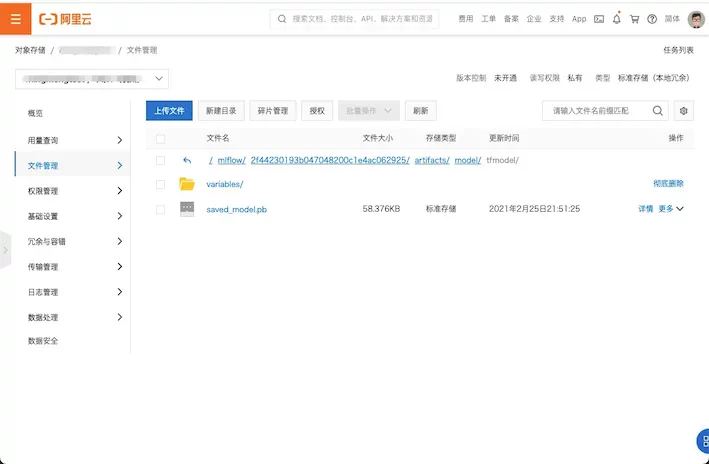
Check the artifact from OSS console
Release history Release notifications | RSS feed

Download files
Download the file for your platform. If you're not sure which to choose, learn more about installing packages.
Source Distribution
Built Distribution
Filter files by name, interpreter, ABI, and platform.
If you're not sure about the file name format, learn more about wheel file names.
Copy a direct link to the current filters
File details
Details for the file pai_mlflow_test-0.0.1.tar.gz.
File metadata
- Download URL: pai_mlflow_test-0.0.1.tar.gz
- Upload date:
- Size: 29.2 kB
- Tags: Source
- Uploaded using Trusted Publishing? No
- Uploaded via: twine/5.1.1 CPython/3.12.2
File hashes
| Algorithm | Hash digest | |
|---|---|---|
| SHA256 |
be88fc2ce37b235f6f8f02232301272398f0995da4e5d11d46b7b9600e89471a
|
|
| MD5 |
62b05ac1b7f974d9cc711d9c5a48b424
|
|
| BLAKE2b-256 |
ba6bb62cb35e7273b9c61cf14e82b86b237fb035cc4625bbdd67bdcb3906bb7f
|
File details
Details for the file pai_mlflow_test-0.0.1-py3-none-any.whl.
File metadata
- Download URL: pai_mlflow_test-0.0.1-py3-none-any.whl
- Upload date:
- Size: 33.3 kB
- Tags: Python 3
- Uploaded using Trusted Publishing? No
- Uploaded via: twine/5.1.1 CPython/3.12.2
File hashes
| Algorithm | Hash digest | |
|---|---|---|
| SHA256 |
525535593a60af2229d14ac60cef10d25e10ca0c54ad9e083703640f61b03e7b
|
|
| MD5 |
7fc825f64d28cdf63a5fbc20c639dca2
|
|
| BLAKE2b-256 |
1a71cb242ddfe5663153c89ca12db875f38c93d98b8c35867c9e294bc637f012
|






