
Painter



Artwork courtesy of Open Clip Art Library
Introduction
Painter is an ANSI coloring library based on the excellent chalk and colors.js libraries for Node.js. However, painter attempts to provide an even more expressive API which reads like English.
Painter is fully tested with 100% coverage and also completely Flake8 compliant too!
Quick Start
Install Painter in your virtualenv as follows:
pip install painterAnd now, go ahead and use it to output colors to your terminal:
from __future__ import print_function

from painter import paint

# Simple printing of colors
print('Welcome to Painter!', paint.red('I can paint things red'),
      paint.blue('and blue'))

# Chaining colors and styles
print(paint.blue.on_red.bold.underline('and far more complex combos too'))
print()

# Using color patterns
print(paint.rainbow('Awww look, a pretty rainbow :)'))
print(paint.zebra('and a scary looking zebra!'))
print()

# Nested painting
print(paint.on_red('I can also use a background color across',
                   paint.blue('multiple'),
                   paint.yellow('foreground colors')))

# Custom separator
print(paint('and', 'allow', 'you to use', paint.red('custom separators'),
      sep='-'))
print()

# Creating themes
cool_theme = paint.green.on_red.underline.bold
print('Creating', cool_theme('your own theme'), 'is easy')

# Easily disable painting of colors
paint.enabled = False
print('and I allow you to easily', paint.red('disable'), paint.blue('me'))
print()

paint.enabled = True
print('Hope you have a', paint.blue('lovely day!'), paint.green(':)'))
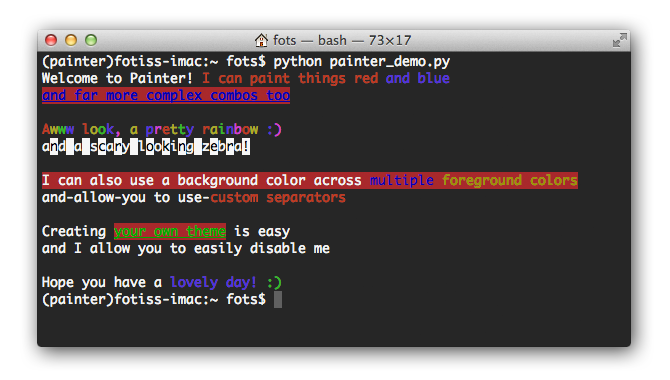
The output of the script above looks something like this:
Documentation
Please check out the Painter Usage documentation.
Running Tests
You may run the unit tests as follows:
git clone https://codeberg.org/fgimian/painter.git
cd painter
python setup.py test
You may validate Flake8 compatibility as follows:
python setup.py flake8License
Painter is released under the MIT license. Please see the LICENSE file for more details.
1 maintainer

Metadata
1 maintainer
Release files for painter 0.3.2
For a detailed explanation of source distributions (sdists) and built distributions (wheels), please see the package formats documentation.
Source distribution (sdist)
| File | Size | Uploaded | Provenance | Actions |
|---|---|---|---|---|
| painter-0.3.2.tar.gz | 10.5 kB | Without provenance | Details for painter-0.3.2.tar.gz |
Release files / painter-0.3.2.tar.gz
| Download URL | painter-0.3.2.tar.gz |
|---|---|
| Size | 10.5 kB |
| Tags | Source |
|
SHA-256 checksum How to use checksums |
842973ef33f58989d3bb8e38c47b6f523c870916b50cb8f3c427a1828442d47c
|
|
BLAKE2b-256 checksum How to use checksums |
0c6b36f80f444624d56615b3bd649f04a0cbfae4adcdf314f182d287dc58ac1e
|
| Upload date | |
|
Uploaded using Trusted Publishing? What is trusted publishing? |
No |
| Uploaded via |
twine/7.0.0 CPython/3.14.7
|
Security for painter 0.3.2
Provenance
Provenance describes where a file came from. On PyPI, provenance is shared via attestations, which provide a verifiable record of the build or publishing details. View details, limitations and caveats.
No provenance found
None of the files in this release were uploaded with provenance metadata.
A note on package security
PyPI is a repository for distributing packages, not a service for auditing them. While third-party security researchers and our staff do their best to detect and remove malicious packages, PyPI cannot guarantee the quality, security or suitability of any given package.
To learn more about protecting yourself from malicious actors, visit our package security documentation.














