
Welcome to Paka

Get your LLM applications to the cloud with ease. Paka handles failure recovery, autoscaling, and monitoring, freeing you to concentrate on crafting your applications.
🚀 Bring LLM models to the cloud in minutes
💰 Cut 50% cost with spot instances, backed by on-demand instances for reliable service quality.
| Model | Parameters | Quantization | GPU | On-Demand | Spot | AWS Node (us-west-2) |
|---|---|---|---|---|---|---|
| Llama 3 | 70B | BF16 | A10G x 8 | $16.2880 | $4.8169 | g5.48xlarge |
| Llama 3 | 70B | GPTQ 4bit | T4 x 4 | $3.9120 | $1.6790 | g4dn.12xlarge |
| Llama 3 | 8B | BF16 | L4 x 1 | $0.8048 | $0.1100 | g6.xlarge |
| Llama 2 | 7B | GPTQ 4bit | T4 x 1 | $0.526 | $0.2584 | g4dn.xlarge |
| Mistral | 7B | BF16 | T4 x 1 | $0.526 | $0.2584 | g4dn.xlarge |
| Phi3 Mini | 3.8B | BF16 | T4 x 1 | $0.526 | $0.2584 | g4dn.xlarge |
Note: Prices are based on us-west-2 region and are in USD per hour. Spot prices change frequently. See Launch Templates for more details.
🏃 Effortlessly Launch RAG Applications
You only need to take care of the application code. Build the RAG application with your favorite languages (python, TS) and frameworks (Langchain, LlamaIndex) and let Paka handles the rest.
Support for Vector Store
- A fast vector store (qdrant) for storing embeddings.
- Tunable for performance and cost.
Serverless Deployment
- Deploy your application as a serverless container.
- Autoscaling and monitoring built-in.
📈 Monitoring
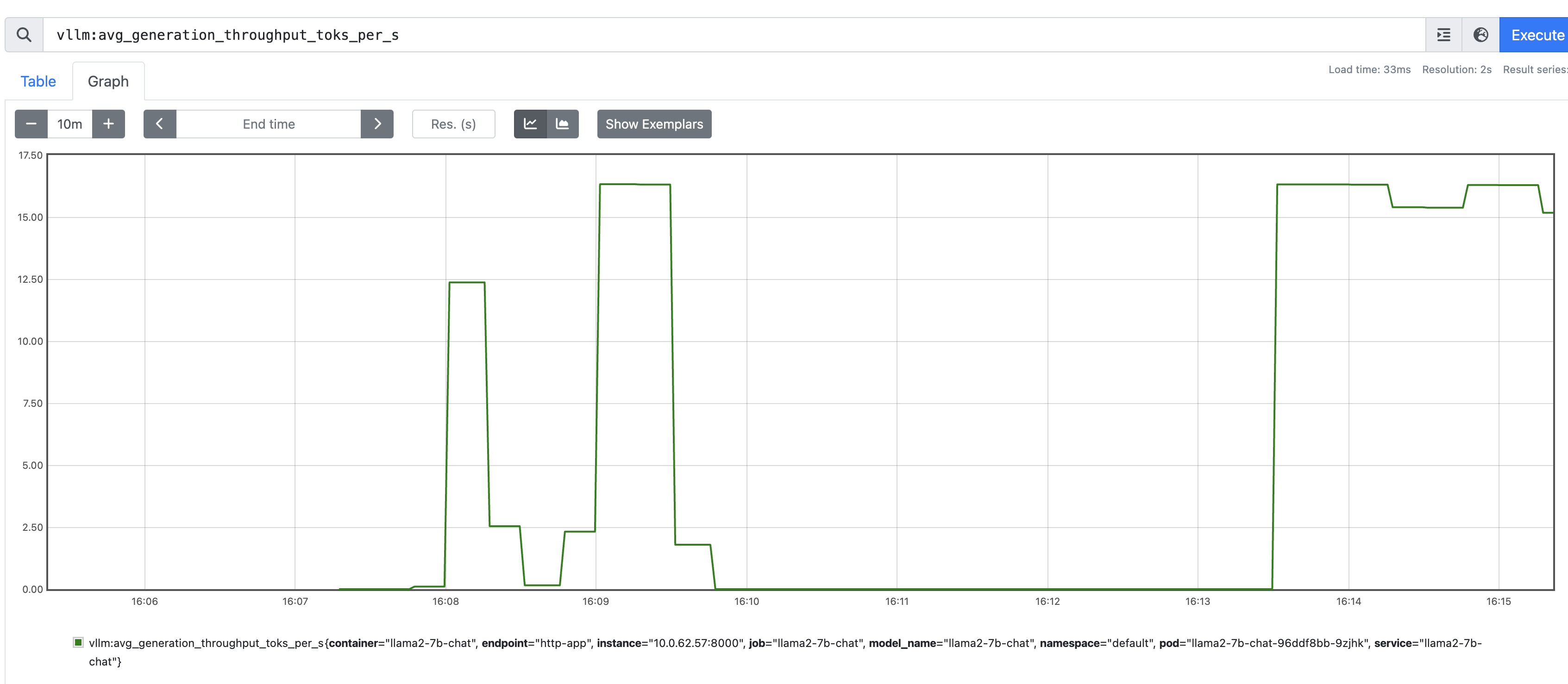
Paka comes with built-in support for monitoring and tracing. Metrics are collected via Prometheus. Users can also enable Prometheus Alertmanager for alerting.
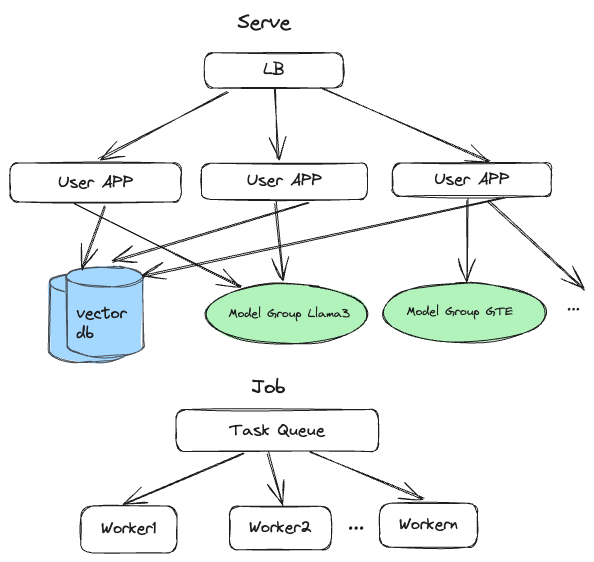
⚙️ Architecture
📜 Roadmap
- (Multi-cloud) AWS support
- (Backend) vLLM
- (Backend) llama.cpp
- (Platform) Windows support
- (Accelerator) Nvidia GPU support
- (Multi-cloud) GCP support
- (Backend) TGI
- (Accelerator) AMD GPU support
- (Accelerator) Inferentia support
🎬 Getting Started
Dependencies
- docker daemon and CLI
- AWS CLI
# Ensure your AWS credentials are correctly configured.
aws configure
Install Paka
pip install paka
Provisioning the cluster
Create a cluster.yaml file with the following content:
version: "1.2"
aws:
  cluster:
    name: my-awesome-cluster
    region: us-west-2
    namespace: default
    nodeType: t3a.medium
    minNodes: 2
    maxNodes: 4
  prometheus:
    enabled: true
  modelGroups:
    - name: llama2-7b-chat
      nodeType: g4dn.xlarge
      isPublic: true
      minInstances: 1
      maxInstances: 1
      name: llama3-70b-instruct
      runtime:
        image: vllm/vllm-openai:v0.4.2
      model:
        hfRepoId: TheBloke/Llama-2-7B-Chat-GPTQ
        useModelStore: false
      gpu:
        enabled: true
        diskSize: 50
Bring up the cluster with the following command:
paka cluster up -f cluster.yaml
Code up the application
Use your favorite language and framework to build the application. Here is an example of a Python application using Langchain:
With Paka, you can effortlessly build your source code and deploy it as a serverless function, no Dockerfile needed. Just ensure the following:
- Procfile: Defines the entrypoint for your application. See Procfile.
- .cnignore file: Excludes any files that shouldn't be included in the build. See .cnignore.
- runtime.txt: Pins the version of the runtime your application uses. See runtime.txt.
- requirements.txt or package.json: Lists all necessary packages for your application.
Deploy the App
paka function deploy --name invoice-extraction --source . --entrypoint serve
📖 Documentation
Contributing
- code changes
make check-all- Open a PR
1 maintainer

Metadata
1 maintainer
Release files for paka 0.1.11
For a detailed explanation of source distributions (sdists) and built distributions (wheels), please see the package formats documentation.
Source distribution (sdist)
| File | Size | Uploaded | Provenance | Actions |
|---|---|---|---|---|
| paka-0.1.11.tar.gz | 70.1 kB | Without provenance | Details for paka-0.1.11.tar.gz |
Built distribution (wheel)
| File | Interpreter | ABI | Platform | Actions Reset |
|---|---|---|---|---|
| paka-0.1.11-py3-none-any.whl | Python 3 | none | any | Details for paka-0.1.11-py3-none-any.whl |
Total release size: 164.6 kB
Release files / paka-0.1.11.tar.gz
| Download URL | paka-0.1.11.tar.gz |
|---|---|
| Size | 70.1 kB |
| Tags | Source |
|
SHA-256 checksum How to use checksums |
70bb612f005652e81dffa8522659c9ae67b6189a38992fddea4f01c25786609e
|
|
BLAKE2b-256 checksum How to use checksums |
7124d066d051303e1ffc0bb8312e5f850e7c2d5443e8c2e8f1e56ab8f5a808a7
|
| Upload date | |
|
Uploaded using Trusted Publishing? What is trusted publishing? |
Yes |
| Uploaded via |
twine/5.1.0 CPython/3.12.4
|
Release files / paka-0.1.11-py3-none-any.whl
| Download URL | paka-0.1.11-py3-none-any.whl |
|---|---|
| Size | 94.6 kB |
| Tags | Python 3 |
|
SHA-256 checksum How to use checksums |
5884a7bd7355c414e67bf8245658b285013d126310a02560b4aeb695ba4bb91e
|
|
BLAKE2b-256 checksum How to use checksums |
177a4506ec88687860ee30aaf88cdc287e2864d1dddc9bf2aa74ff9ffb6e55d5
|
| Upload date | |
|
Uploaded using Trusted Publishing? What is trusted publishing? |
Yes |
| Uploaded via |
twine/5.1.0 CPython/3.12.4
|
Security for paka 0.1.11
Provenance
Provenance describes where a file came from. On PyPI, provenance is shared via attestations, which provide a verifiable record of the build or publishing details. View details, limitations and caveats.
No provenance found
None of the files in this release were uploaded with provenance metadata.
A note on package security
PyPI is a repository for distributing packages, not a service for auditing them. While third-party security researchers and our staff do their best to detect and remove malicious packages, PyPI cannot guarantee the quality, security or suitability of any given package.
To learn more about protecting yourself from malicious actors, visit our package security documentation.














