
Look into Palanteer and get an omniscient view of your program
Palanteer is a set of lean and efficient tools to improve the quality of software for Python programs (and C++).
Simple code instrumentation, mostly automatic in Python, delivers powerful features:
- Collection of meaningful atomic events on timings, memory, locks wait and usage, context switches, data values..
- Visual and interactive observation of records: hierarchical logs, timeline, plot, histogram, flame graph...
- Remote command call and events observation can be scripted in Python: deep testing has never been simpler
Execution of unmodified Python programs can be analyzed directly with a syntax similar to the one of cProfile:
- Functions enter/leave
- Interpreter memory allocations
- All raised exceptions
- Garbage collection runs
- Support of multithread, coroutines, asyncio/gevent
The collected events can either be processed automatically by an online script, or analyzed with the separate viewer (see last section):
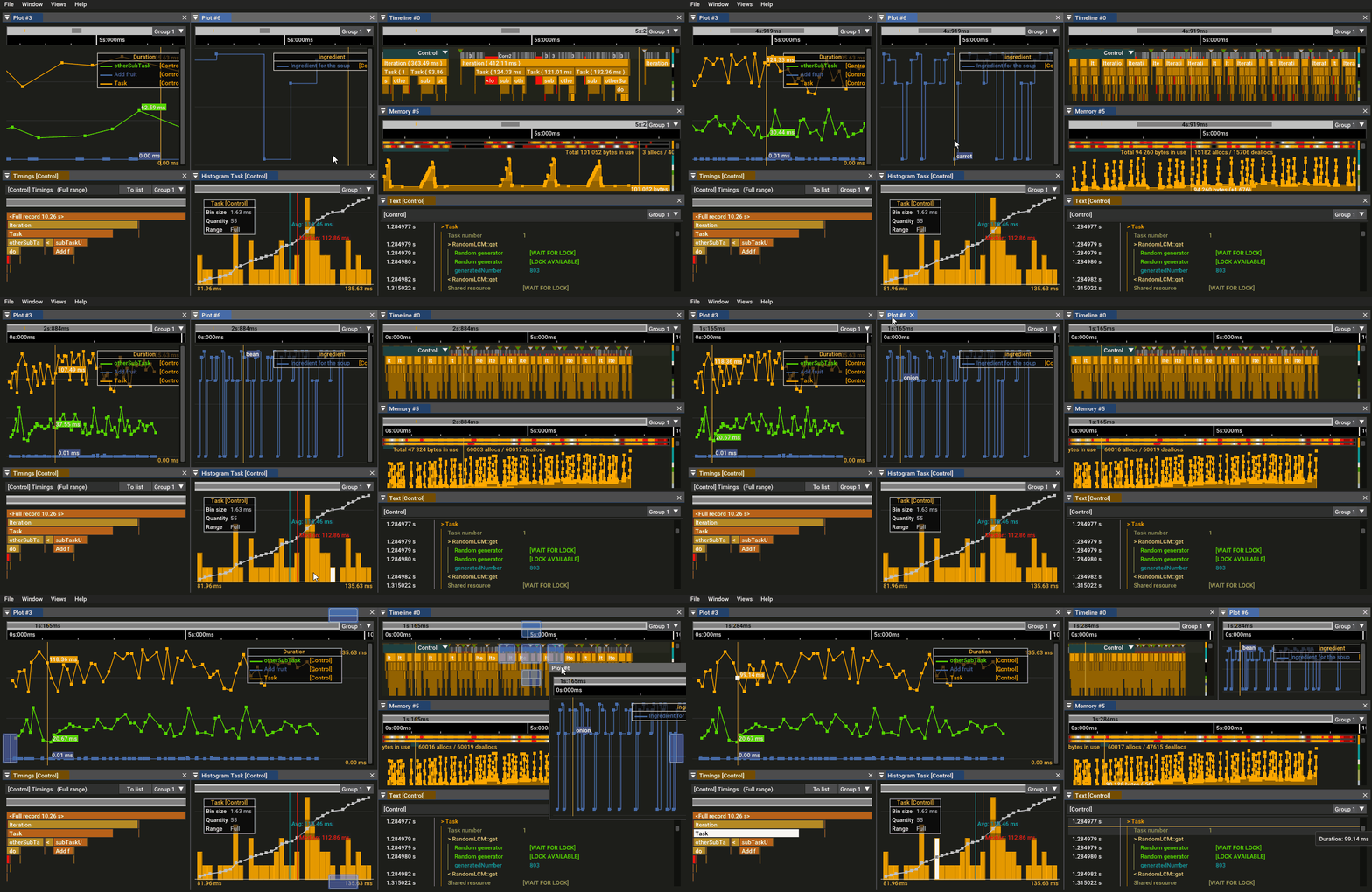
Palanteer is an efficient, lean and comprehensive solution for better and enjoyable software development!
Usage
Profiling and monitoring can be done:
-
With unmodified code:
python -m palanteer [options] <your script>This syntax is similar to the
cProfileusage and no script modification is required.
By default, it tries to connect to a Palanteer server. With options, offline profiling can be selected.
Launchpython -m palanteerfor help or refer to the documentation. -
With code instrumentation:
Please refer to the documentation for details.
Manual instrumentation can provide additional valuable information compared to just the automatic function profiling, like data, locks, ...
The manual instrumentation may also include remotely callable commands (Command Line Interface, aka CLI), useful for configuration and testing.
Here is a working example:
#! /usr/bin/env python3
import sys
import random
from palanteer import *

globalMinValue, globalMaxValue =  0, 10

# Handler (=implementation) of the example CLI, which sets the range
def setBoundsCliHandler(minValue, maxValue):              # 2 parameters (both integer) as declared
    global globalMinValue, globalMaxValue
    if minValue>maxValue:                                 # Case where the CLI execution fails (non null status). The text answer contains some information about it
        return 1, "Minimum value (%d) shall be lower than the maximum value (%d)" % (minValue, maxValue)

    # Modify the state of the program
    globalMinValue, globalMaxValue = minValue, maxValue
    # CLI execution was successful (null status)
    return 0, ""


def main(argv):
    global globalMinValue, globalMaxValue

    plInitAndStart("example")                             # Start the instrumentation
    plDeclareThread("Main")                               # Declare the current thread as "Main", so that it can be identified more easily in the script
    plRegisterCli(setBoundsCliHandler, "config:setRange", "min=int max=int", "Sets the value bounds of the random generator")  # Declare the CLI
    plFreezePoint()                                       # Add a freeze point here to be able to configure the program at a controlled moment

    plBegin("Generate some random values")
    for i in range(100000):
        value = int(globalMinValue + random.random()*(globalMaxValue+1-globalMinValue))
        plData("random data", value)                      # Here are the "useful" values
    plEnd("")                                             # Shortcut for plEnd("Generate some random values")

    plStopAndUninit()                                     # Stop and uninitialize the instrumentation

# Bootstrap
if __name__ == "__main__":
    main(sys.argv)
Installation of the instrumentation module
Latest official release directly from the PyPI storage (from sources on Linux, binary on Windows)
pip install palanteer
Directly from GitHub sources (top of tree, may be unstable)
pip install "git+https://github.com/dfeneyrou/palanteer#egg=palanteer&subdirectory=python"
From locally retrieved sources
This method ensures that the viewer and scripting module are consistent with the intrumentation libraries.
Get the sources:
git clone https://github.com/dfeneyrou/palanteer
cd palanteer
mkdir build
cd build
Build on Linux:
cmake .. -DCMAKE_BUILD_TYPE=Release
make -j$(nproc) install
Build on Windows:
(vcvarsall.bat or equivalent shall be called beforehand, so that the MSVC compiler is accessible)
cmake .. -DCMAKE_BUILD_TYPE=Release -G "NMake Makefiles"
nmake install
Important!
To be useful, this module requires at least a "server side":
- the graphical viewer
- for visual analysis (online or offline) of the collected events
- the Python scripting module
palanteer_scripting- for automated remote usage of the collected events: KPI extraction, tests, monitoring...
NOTE 1: Installing from local sources provide all components: instrumentation module, scripting module, graphical viewer, test examples and documentation.
NOTE 2: It is strongly recommended to have matching versions between the server and the instrumentation sides
1 maintainer

Metadata
1 maintainer
Release files for palanteer 0.8.0
For a detailed explanation of source distributions (sdists) and built distributions (wheels), please see the package formats documentation.
Source distribution (sdist)
| File | Size | Uploaded | |
|---|---|---|---|
| palanteer-0.8.0.tar.gz | 80.7 kB | Details |
Built distributions (wheels)
| File | Reset | |||
|---|---|---|---|---|
| palanteer-0.8.0-cp313-cp313-win_amd64.whl | CPython 3.13 | CPython 3.13 | Windows x86-64 | Details |
| palanteer-0.8.0-cp312-cp312-win_amd64.whl | CPython 3.12 | CPython 3.12 | Windows x86-64 | Details |
| palanteer-0.8.0-cp311-cp311-win_amd64.whl | CPython 3.11 | CPython 3.11 | Windows x86-64 | Details |
| palanteer-0.8.0-cp310-cp310-win_amd64.whl | CPython 3.10 | CPython 3.10 | Windows x86-64 | Details |
| palanteer-0.8.0-cp39-cp39-win_amd64.whl | CPython 3.9 | CPython 3.9 | Windows x86-64 | Details |
| palanteer-0.8.0-cp38-cp38-win_amd64.whl | CPython 3.8 | CPython 3.8 | Windows x86-64 | Details |
| palanteer-0.8.0-cp37-cp37m-win_amd64.whl | CPython 3.7 | CPython 3.7 pymalloc | Windows x86-64 | Details |
Total release size: 522.0 kB
Release files / palanteer-0.8.0.tar.gz
| Download URL | palanteer-0.8.0.tar.gz |
|---|---|
| Size | 80.7 kB |
| Tags | Source |
|
SHA-256 checksum How to use checksums |
abf0a4c78477cd0d04f17b28e726624cdc526571f00a991d7665559e80430a16
|
|
BLAKE2b-256 checksum How to use checksums |
963b0068ffdb46ea7fe261d6397672667c8678bcc4dcaf75d13becb9e4a5a7d5
|
| Upload date | |
|
Uploaded using Trusted Publishing? What is trusted publishing? |
No |
| Uploaded via |
twine/6.0.1 CPython/3.12.3
|
Release files / palanteer-0.8.0-cp313-cp313-win_amd64.whl
| Download URL | palanteer-0.8.0-cp313-cp313-win_amd64.whl |
|---|---|
| Size | 62.5 kB |
| Tags | CPython 3.13 Windows x86-64 |
|
SHA-256 checksum How to use checksums |
4fdee1697ef901264424a4600ebc84296a89ce56e0653f44d8ea50ff115c6fc9
|
|
BLAKE2b-256 checksum How to use checksums |
71c4c0f370c27b33b4ce57ac8aeace33a96a3a767c14d5104fe5401d38d12ef6
|
| Upload date | |
|
Uploaded using Trusted Publishing? What is trusted publishing? |
No |
| Uploaded via |
twine/6.0.1 CPython/3.12.3
|
Release files / palanteer-0.8.0-cp312-cp312-win_amd64.whl
| Download URL | palanteer-0.8.0-cp312-cp312-win_amd64.whl |
|---|---|
| Size | 62.5 kB |
| Tags | CPython 3.12 Windows x86-64 |
|
SHA-256 checksum How to use checksums |
4478c210ef2e728053697761388784222e90bf60288ef8282eff23fc5f26d7a9
|
|
BLAKE2b-256 checksum How to use checksums |
3666cc636ca1f069814c4922a2ea5e60b1c553bb2f03425205bb25b2d5e3239e
|
| Upload date | |
|
Uploaded using Trusted Publishing? What is trusted publishing? |
No |
| Uploaded via |
twine/6.0.1 CPython/3.12.3
|
Release files / palanteer-0.8.0-cp311-cp311-win_amd64.whl
| Download URL | palanteer-0.8.0-cp311-cp311-win_amd64.whl |
|---|---|
| Size | 63.4 kB |
| Tags | CPython 3.11 Windows x86-64 |
|
SHA-256 checksum How to use checksums |
61e3f5ed327c17575bcb3610c2cd7638628112c4ddd7bab00cc6e902b97f6f0e
|
|
BLAKE2b-256 checksum How to use checksums |
c1aee6c6a903e32aab9425582392f7297c47ed4fe1ab26794ebb412e333f06e8
|
| Upload date | |
|
Uploaded using Trusted Publishing? What is trusted publishing? |
No |
| Uploaded via |
twine/6.0.1 CPython/3.12.3
|
Release files / palanteer-0.8.0-cp310-cp310-win_amd64.whl
| Download URL | palanteer-0.8.0-cp310-cp310-win_amd64.whl |
|---|---|
| Size | 63.3 kB |
| Tags | CPython 3.10 Windows x86-64 |
|
SHA-256 checksum How to use checksums |
d726b2976aded648ab73db974c9bded712e0568ea56ac87bd28322b5766a93b3
|
|
BLAKE2b-256 checksum How to use checksums |
7cbaf05c9c24e454d5fe7133b05162b101018719edd7ee7d9a964f3e7a5a0517
|
| Upload date | |
|
Uploaded using Trusted Publishing? What is trusted publishing? |
No |
| Uploaded via |
twine/6.0.1 CPython/3.12.3
|
Release files / palanteer-0.8.0-cp39-cp39-win_amd64.whl
| Download URL | palanteer-0.8.0-cp39-cp39-win_amd64.whl |
|---|---|
| Size | 63.3 kB |
| Tags | CPython 3.9 Windows x86-64 |
|
SHA-256 checksum How to use checksums |
8421dbfb14aa6450220ff3483053f0627020d0c24b859ab50e5b4df02f195349
|
|
BLAKE2b-256 checksum How to use checksums |
46cdc1c0f20b547a09e114c894b9b9dc4704b8b17f18750b0cd19001e45d417a
|
| Upload date | |
|
Uploaded using Trusted Publishing? What is trusted publishing? |
No |
| Uploaded via |
twine/6.0.1 CPython/3.12.3
|
Release files / palanteer-0.8.0-cp38-cp38-win_amd64.whl
| Download URL | palanteer-0.8.0-cp38-cp38-win_amd64.whl |
|---|---|
| Size | 63.2 kB |
| Tags | CPython 3.8 Windows x86-64 |
|
SHA-256 checksum How to use checksums |
9790445d0dd5971bc181bef09a75c78a962b36e01b69178880bd27c8999f99e0
|
|
BLAKE2b-256 checksum How to use checksums |
4a1c01dae3d0742c35cf9d470685145740ce5ef16afc0c6a6ea3d9196a423508
|
| Upload date | |
|
Uploaded using Trusted Publishing? What is trusted publishing? |
No |
| Uploaded via |
twine/6.0.1 CPython/3.12.3
|
Release files / palanteer-0.8.0-cp37-cp37m-win_amd64.whl
| Download URL | palanteer-0.8.0-cp37-cp37m-win_amd64.whl |
|---|---|
| Size | 63.2 kB |
| Tags | CPython 3.7 CPython 3.7 pymalloc Windows x86-64 |
|
SHA-256 checksum How to use checksums |
18c1adc56a718e6492d09d8c8188faeb30bc87c7fe6b4abc8c93debc29a0bf04
|
|
BLAKE2b-256 checksum How to use checksums |
6bbc8f09981c146b63145f00032680bacb305f4a016bdf897e8953471525a3af
|
| Upload date | |
|
Uploaded using Trusted Publishing? What is trusted publishing? |
No |
| Uploaded via |
twine/6.0.1 CPython/3.12.3
|














