
Paleta 
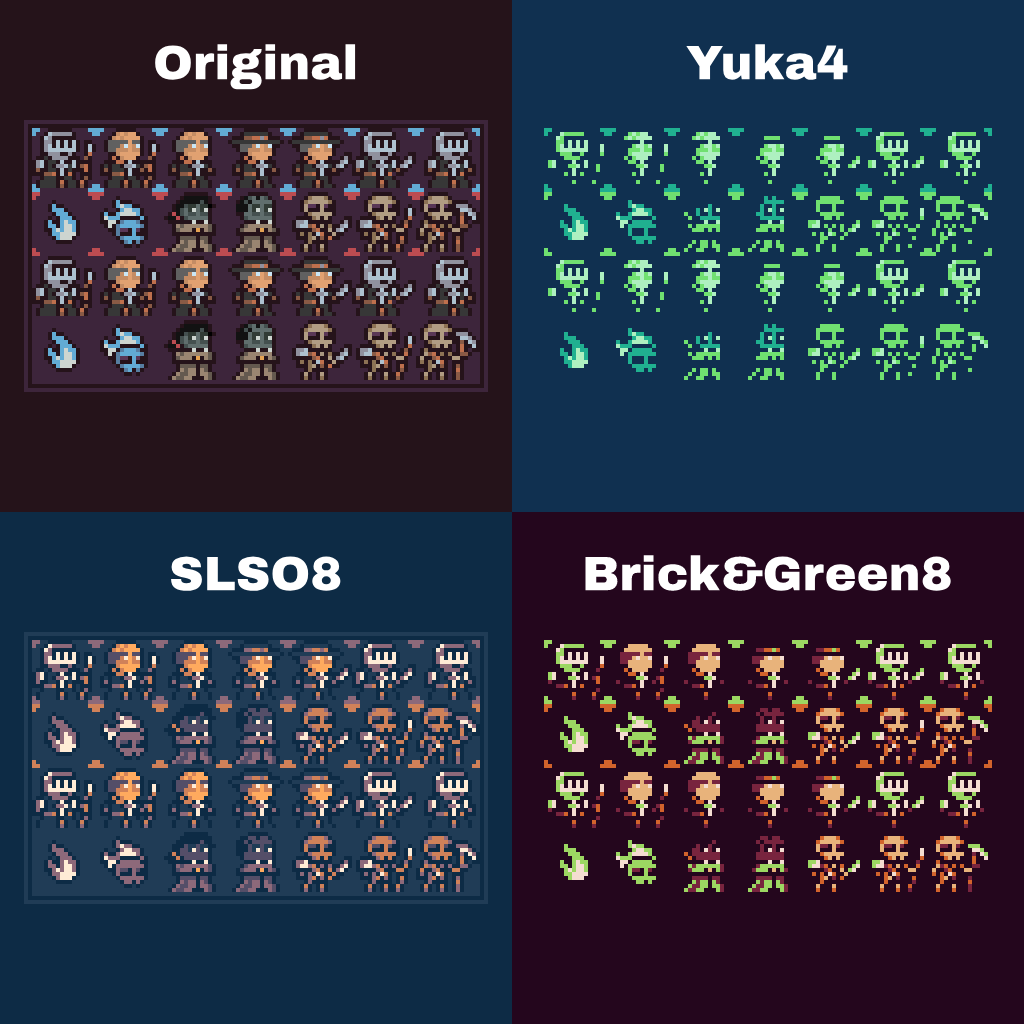
Paleta is a Color Pallet Extraction and Management Tool that is focused on enhancing Visual Game Assets. It supports pallet conversion, mixing, minimizing, and matching in any way possible.
Quick Guide
from paleta.color import Color
from paleta.palette import Palette
from paleta.image import export_palette, extract_convert_palette

# Initializing Colors
red = Color.from_hex("#F00")
green = Color.from_hex("#0F0")
blue = Color.from_hex("#00F")

# Operations on Color
magenta = red + blue
yellow = red + green
cyan = green + blue

print(magenta.rgba)  # Get RGBA value
print(yellow.to_lightness())  # To 0...255 Value
print(cyan.to_hsl())  # Get HSL Value

magenta += 10  # Add 10 across values of RGB
cyan -= (10, 0, 10)  # Subtract 10 across R and B value

twilight_5 = Palette(
    Color.from_hex("fbbbad"),
    Color.from_hex("ee8695"),
    Color.from_hex("4a7a96"),
    Color.from_hex("333f58"),
    Color.from_hex("292831")
)  # Create a Palette Class

tw = Palette.from_lospec("twilight-5")  # Or use the Lospec API

assert (twilight_5.colors == tw.colors)  # They're the same

twilight_5.add(yellow)  # Add yellow to the palette
twilight_5.remove(yellow)  # And Remove it

warm_ochre = Palette.from_lospec("warm-ochre")
the_after = Palette.from_lospec("the-after")

twilight_5.union(warm_ochre)  # Combine Palette Sets
twilight_5.intersection(the_after)  # Or find where they intersect

extract_convert_palette("ref.png", "palette.png", f_out="new_ref.png")  # Map a Palette to an Image
export_palette(warm_ochre, f="warm-ochre.png")  # Export a Created or Imported Palette
The script above shows the basics for simple use of this package. Simply, it treats Colors as a Vector(R, G, B, Alpha[Optional=255]) and a Palette as a Set of Colors with all basic set operations.
Going Deeper
Mapping Palettes
from paleta.palette import Palette
from paleta.palette import ConversionPalette
from paleta.metric import euclidean_distance, cosine_distance, cosine_similarity

warm_ochre = Palette.from_lospec("warm-ochre")
the_after = Palette.from_lospec("the-after")

# Will create a Dictionary of how Palette (Warm Ochre) be mapped with Palette (The After)
# Using a Euclidean Distance Function and the Metric of Minimum Distance
cmap = ConversionPalette.map(warm_ochre, the_after, algo=euclidean_distance, metric=min)
print(cmap.to_dict())


# Making your own function works
def some_distance_function() -> float:
    # Map by distance
    return float()


def some_metric_function() -> object:
    # Find Max Value
    return max()


cmap2 = ConversionPalette.map(warm_ochre, the_after, algo=some_metric_function, metric=some_metric_function)
print(cmap2.to_dict())

# Randomize the Mapping
cmap3 = ConversionPalette.random(warm_ochre, the_after)
print(cmap3.to_dict())
Minimize or Maximize Palette
from paleta.palette import Palette
from paleta.palette import minimize_by_average, maximize_by_average

warm_ochre = Palette.from_lospec("warm-ochre")
the_after = Palette.from_lospec("the-after")

# Reduce the Palette by Averaging Neighboring Colors
min_warm_ochre = minimize_by_average(warm_ochre)
print(warm_ochre.color_set)
print(minimize_by_average(warm_ochre).color_set)
print(len(min_warm_ochre))

# Increase the Palette by Adding the Averaging of Neighboring Colors
max_the_after = minimize_by_average(the_after)
print(the_after.color_set)
print(minimize_by_average(the_after).color_set)
print(len(max_the_after))
1 maintainer

Metadata
1 maintainer
Release files for paleta 1.0.1
For a detailed explanation of source distributions (sdists) and built distributions (wheels), please see the package formats documentation.
Source distribution (sdist)
| File | Size | Uploaded | Provenance | Actions |
|---|---|---|---|---|
| paleta-1.0.1.tar.gz | 11.9 kB | Without provenance | Details for paleta-1.0.1.tar.gz |
Built distribution (wheel)
| File | Interpreter | ABI | Platform | Actions Reset |
|---|---|---|---|---|
| paleta-1.0.1-py3-none-any.whl | Python 3 | none | any | Details for paleta-1.0.1-py3-none-any.whl |
Total release size: 21.1 kB
Release files / paleta-1.0.1.tar.gz
| Download URL | paleta-1.0.1.tar.gz |
|---|---|
| Size | 11.9 kB |
| Tags | Source |
|
SHA-256 checksum How to use checksums |
740533dde716d29ea4d021afb87c978f56e6b953677c3f81a7a716fb443bda90
|
|
BLAKE2b-256 checksum How to use checksums |
c7858f0b041f1f87d79c1df713aa197a175e9c4cfd1d60ac2de2a7e0b012b383
|
| Upload date | |
|
Uploaded using Trusted Publishing? What is trusted publishing? |
No |
| Uploaded via |
twine/5.0.0 CPython/3.9.6
|
Release files / paleta-1.0.1-py3-none-any.whl
| Download URL | paleta-1.0.1-py3-none-any.whl |
|---|---|
| Size | 9.2 kB |
| Tags | Python 3 |
|
SHA-256 checksum How to use checksums |
1da0b2598b7d854242ebc4a86d883ec1e7c8699916a2a9eed300d063652054c7
|
|
BLAKE2b-256 checksum How to use checksums |
ed11c9f393a892c279a5d55c5d8fdc353e9fc5939a8edebf42e90587deff4bbc
|
| Upload date | |
|
Uploaded using Trusted Publishing? What is trusted publishing? |
No |
| Uploaded via |
twine/5.0.0 CPython/3.9.6
|
Security for paleta 1.0.1
Provenance
Provenance describes where a file came from. On PyPI, provenance is shared via attestations, which provide a verifiable record of the build or publishing details. View details, limitations and caveats.
No provenance found
None of the files in this release were uploaded with provenance metadata.
A note on package security
PyPI is a repository for distributing packages, not a service for auditing them. While third-party security researchers and our staff do their best to detect and remove malicious packages, PyPI cannot guarantee the quality, security or suitability of any given package.
To learn more about protecting yourself from malicious actors, visit our package security documentation.














