
palm_roi - A region-of-interest extraction tool 🖐️
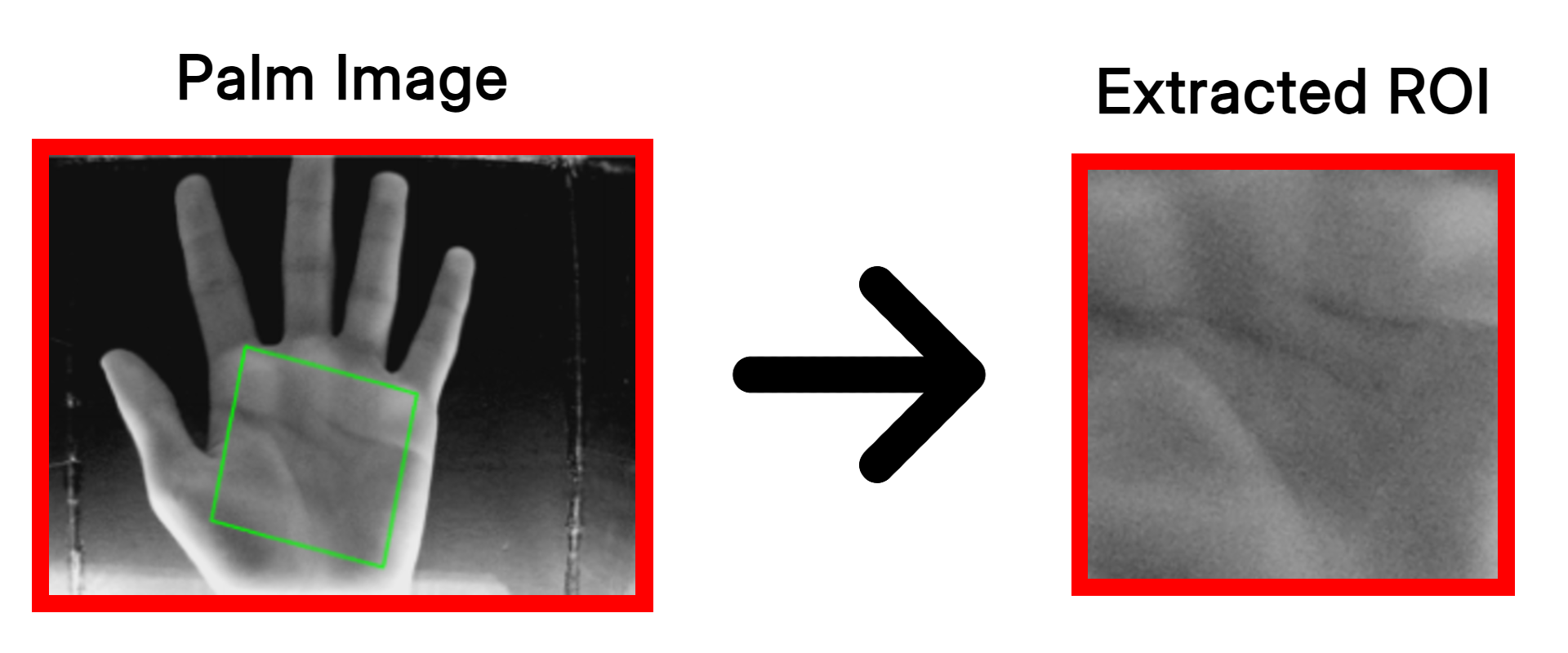
A lightweight palm region-of-interest (ROI) extraction Python library, originally built for use in a palm-vein biometric imaging device. It makes use of OpenCV and hand landmarks (using tools like MediaPipe) to compute an ROI of a palm in an image, calculate a rotation matrix to straighten it out, and process coordinates.
The original Raspberry Pi example with a live camera feed has been moved to the
examples/directory. Check out the example's README.md for details on how to set it up!
Installation
You can install palm_roi easily via pip:
pip install palm_roi
Note: Depending on your setup (e.g., using MediaPipe to get the hand landmarks), your Python version compatibility will be constrained. The
palm_roilibrary currently works with Python 3.8+, but MediaPipe currently requires Python <3.13.
Usage
Here's an example using Mediapipe hands with palm_roi to extract hand landmarks and perform ROI computation:
import palm_roi
import cv2
import mediapipe as mp

# 1. Provide an image and get hand landmarks from MediaPipe (or another tool)
image = # - your image data - #
hands = mp.solutions.hands.Hands(static_image_mode=True, max_num_hands=1)
results = hands.process(cv2.cvtColor(image, cv2.COLOR_GRAY2RGB))

if results.multi_hand_landmarks:
    INDEX_FINGER_MCP = results.multi_hand_landmarks[0].landmark[5]
    PINKY_MCP = results.multi_hand_landmarks[0].landmark[17]
    WRIST = results.multi_hand_landmarks[0].landmark[0]

    # 2. Apply padding, rotation, and cropping to your image automatically.
    output, error = palm_roi.extract(image, INDEX_FINGER_MCP, PINKY_MCP, WRIST)

    # Note: If you do not have or prefer not to provide a wrist landmark, pass `upside_down=True` or `False` directly:
    # output, error = palm_roi.extract(image, INDEX_FINGER_MCP, PINKY_MCP, upside_down=False)

    if not error:
        cv2.imwrite(f"output.png", output) # Save your processed ROI!

    # Alternatively, get the ROI boundaries, rotation matrix, and orientation for manual application.
    R, roi_height, l1, l2, upside_down = palm_roi.get_coords(image, INDEX_FINGER_MCP, PINKY_MCP, WRIST)
    # R, roi_height, l1, l2, upside_down = palm_roi.get_coords(image, INDEX_FINGER_MCP, PINKY_MCP, upside_down=False)
The landmark parameters (INDEX_FINGER_MCP, PINKY_MCP, and WRIST) accept standard (x, y) coordinate tuples, lists, as well as direct landmark objects from tools like MediaPipe.
See examples/main.py for a full implementation demonstrating real-time camera processing and Mediapipe.
1 maintainer

Metadata
1 maintainer
Release files for palm-roi 0.1.2
For a detailed explanation of source distributions (sdists) and built distributions (wheels), please see the package formats documentation.
Source distribution (sdist)
| File | Size | Uploaded | |
|---|---|---|---|
| palm_roi-0.1.2.tar.gz | 484.0 kB | Details |
Built distribution (wheel)
| File | Interpreter | ABI | Platform | Reset |
|---|---|---|---|---|
| palm_roi-0.1.2-py3-none-any.whl | Python 3 | none | any | Details |
Total release size: 489.9 kB
Release files / palm_roi-0.1.2.tar.gz
| Download URL | palm_roi-0.1.2.tar.gz |
|---|---|
| Size | 484.0 kB |
| Tags | Source |
|
SHA-256 checksum How to use checksums |
ec0d0515e90883b03efcc08078191df4762906a4589c1eeb694313e32983bf2e
|
|
BLAKE2b-256 checksum How to use checksums |
4c253b0ea61f6519d7699dbead5db7325fe659be60e206ce5ad637c87476c40c
|
| Upload date | |
|
Uploaded using Trusted Publishing? What is trusted publishing? |
No |
| Uploaded via |
twine/6.2.0 CPython/3.12.0
|
Release files / palm_roi-0.1.2-py3-none-any.whl
| Download URL | palm_roi-0.1.2-py3-none-any.whl |
|---|---|
| Size | 5.9 kB |
| Tags | Python 3 |
|
SHA-256 checksum How to use checksums |
64dbb7fed9041cefce0a7e933ca11ef36a1e200858671c2aef12bffa6daf25c3
|
|
BLAKE2b-256 checksum How to use checksums |
bf4beefcf7c2bf99a354841b965a8af47831cd8de84d266dc7aae6a293eeb60c
|
| Upload date | |
|
Uploaded using Trusted Publishing? What is trusted publishing? |
No |
| Uploaded via |
twine/6.2.0 CPython/3.12.0
|














