
PancakeKit
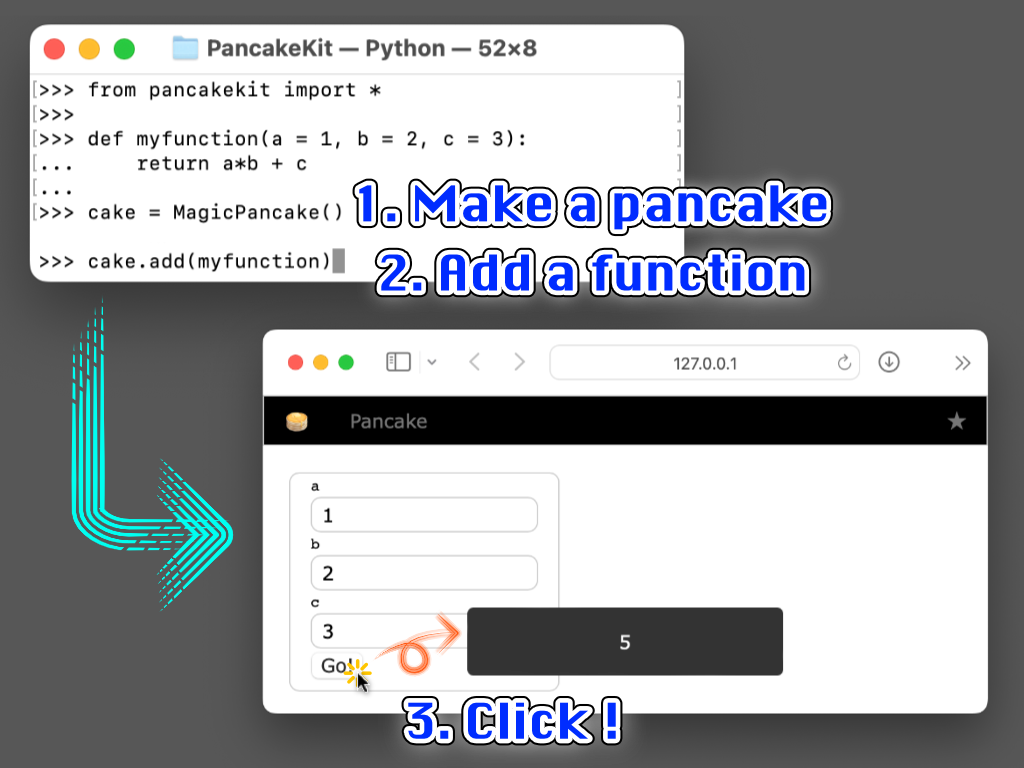
PancakeKit is a lightweight browser UI for Python scripts. Add small UI components (“toppings”) to a page (Pancake), then serve it locally.
Installation
pip install pancakekit
Quick start
from pancakekit import Pancake

def fibonacci(n=10):
    return (fibonacci(n - 1) + fibonacci(n - 2)) if n >= 2 else n

cake = Pancake()     # 1) create a page
cake.add(fibonacci)  # 2) add a function (auto UI)
cake.serve()         # 3) start the server
Open http://127.0.0.1:8000/.
Interactive mode
In interactive environments (REPL/IPython), Pancake() starts the server automatically by default.
from pancakekit import *

cake = Pancake()  # auto-serve in interactive mode

# To opt out:
# cake = Pancake(auto_serve_in_interactive_mode=False)
# cake.serve()
You can also start a ready-to-use interactive session from the command line:
python -m pancakekit
Or load an existing script and auto-register callables:
python -m pancakekit path/to/your_script.py
Values and events
Most toppings expose their state through .value.
from pancakekit import *

cake = Pancake()
age = cake.add(Input("Age", default=20), name="age")
age.value_changed = lambda v: cake.show_message({"age": v})
You can access toppings by name:
from pancakekit import *

cake = Pancake()
cake.add(Input("Count", default=0), name="count")
cake["count"].value += 1
Buttons: clicked and long-press pressed
from pancakekit import *

cake = Pancake()
btn = cake.add(Button("Hold me"))

btn.clicked = lambda _v: cake.show_message("clicked")
btn.pressed = lambda _v: cake.show_message("pressed")
Long-press behavior:
pressedstarts after ~0.5s hold, then repeats while held down- repeats after the previous handler finishes, with ~0.1s delay
- if
clickedis not set butpressedis set,pressedfires immediately on pointer down
Honeycomb (script editor)
Each Pancake has a built-in Honeycomb card.
- Toggle:
Shift + Enter - Run:
Cmd/Ctrl + Enter - Recall saved scripts:
Cmd/Ctrl + ↑ / ↓(when Honeycomb is open)
Inside Honeycomb, the current page is available as the reserved name cake.
Built-in toppings
Inputs
Input(label, default=None, placeholder=None)DictInput(default: dict, horizontal: bool = False)Slider(label, range_min, range_max, value=None, step=1.0)Select(label, options, value=None, placeholder=None, with_clear=False, allow_none=None, disabled=False)Switch(label="", value=False, disabled=False)RadioGroup(label, options, value=None, orientation="vertical", appearance=None, allow_none=False, disabled=False)
Display
Label(text=""),Text(text=""),Paragraph(text="")ImageView(image: PIL.Image | str),ImageCard(image: PIL.Image | str)Table(df: pandas.DataFrame | dict)ProgressBar(value=0, label=None, max_value=100, show_value=True)
Layout / containers
Row(),Column(),Group(...)Card(...),FloatingCard(...)(floating draggable cards)GridPanel(size=(rows, cols), status_dict=None, style=None)
Multiple pages with Plate
from pancakekit import *

plate = Plate()

class Crape(Pancake):
    def decorate(self):
        b = self.add(Button("Go to Waffle"))
        b.clicked = lambda _v: plate.go_to("Waffle")

class Waffle(Pancake):
    def decorate(self):
        b = self.add(Button("Go to Crape"))
        b.clicked = lambda _v: plate.go_to("Crape")

Crape(plate)
Waffle(plate)
plate.serve()
Making a custom topping
from pancakekit import Topping, Tag

class MyLabel(Topping):
    def prepare(self, text):
        self.value = text
        self.label = Tag("label", style={"text-shadow": "1px 1px 1px #bbb"}, value_ref=self)

    def html(self):
        return self.label.render()
Useful hooks:
prepare(self, *args, **kwargs)(one-time setup)html(self)(render HTML)value_getter(self)/value_preprocessor(self, value)/web_value_proprocessor(self, tag, value)event_preprocessor(self, event)
1 maintainer

Download files
Download the file for your platform. If you're not sure which to choose, learn more about installing packages.
Source Distribution
File details
Details for the file pancakekit-0.3.0.tar.gz.
File metadata
- Download URL: pancakekit-0.3.0.tar.gz
- Upload date:
- Size: 120.8 kB
- Tags: Source
- Uploaded using Trusted Publishing? No
- Uploaded via:
twine/6.2.0 CPython/3.12.9
File hashes
| Algorithm | Hash digest | |
|---|---|---|
| SHA256 |
617e40a04deb633be86c68c73834a345814c6e86886860581c8837b6c5ac4edf
|
|
| MD5 |
134fba154075b9770dc2169560fbf9bd
|
|
| BLAKE2b-256 |
bd9262d425507383af44d54997a5e0f492ee587f250c85de2b9d0df8f38c2d1a
|














