
panda3d_viewer
A simple 3D geometry viewer based on Panda3D game engine.




Install
Using pip
pip install panda3d_viewer
From source code
git clone https://github.com/ikalevatykh/panda3d_viewer.git
cd panda3d_viewer
python setup.py install
Examples
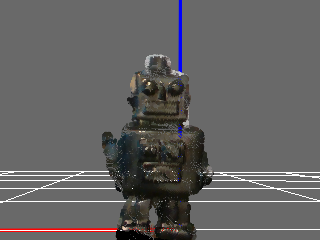
A simple scene in a GUI window
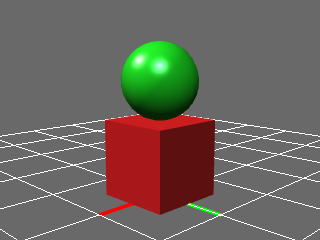
from panda3d_viewer import Viewer, ViewerConfig

config = ViewerConfig()
config.set_window_size(320, 240)
config.enable_antialiasing(True, multisamples=4)

with Viewer(window_type='onscreen', window_title='example', config=config) as viewer:

    viewer.append_group('root')
    viewer.append_box('root', 'box_node', size=(1, 1, 1))
    viewer.append_sphere('root', 'sphere_node', radius=0.5)

    viewer.set_material('root', 'box_node', color_rgba=(0.7, 0.1, 0.1, 1))
    viewer.set_material('root', 'sphere_node', color_rgba=(0.1, 0.7, 0.1, 1))

    viewer.move_nodes('root', {
        'box_node': ((0, 0, 0.5), (1, 0, 0, 0)),
        'sphere_node': ((0, 0, 1.5), (1, 0, 0, 0))})

    viewer.reset_camera(pos=(4, 4, 2), look_at=(0, 0, 1))
    viewer.save_screenshot(filename='box_and_sphere.png')
Render an animation offscreen
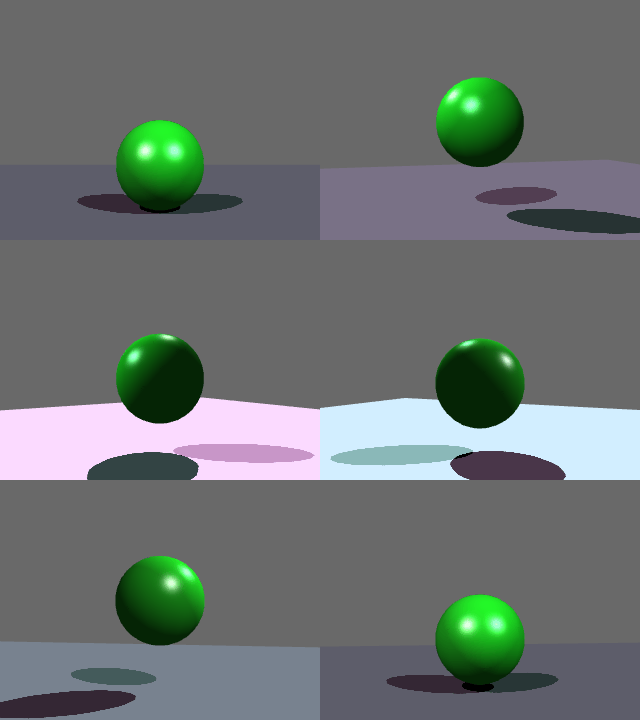
from math import cos, sin, pi
import imageio # install imageio: pip install imageio

from panda3d_viewer import Viewer, ViewerConfig

config = ViewerConfig()
config.set_window_size(320, 240)
config.enable_antialiasing(True, multisamples=4)
config.enable_shadow(True)
config.show_axes(False)
config.show_grid(False)
config.show_floor(True)

viewer = Viewer(window_type='offscreen', config=config)

viewer.append_group('root')
viewer.append_sphere('root', 'sphere_node', radius=0.5)
viewer.set_material('root', 'sphere_node', color_rgba=(0.1, 0.7, 0.1, 1))

with imageio.get_writer('sphere_anim.gif', mode='I') as writer:
    for i in range(50):
        angle = 2 * pi * i / 50
        x = 4 * cos(angle)
        y = 4 * sin(angle)
        z = 0.5 + 0.5 * abs(sin(angle))

        viewer.move_nodes('root', {'sphere_node': ((0, 0, z), (1, 0, 0, 0))})
        viewer.reset_camera(pos=(x, y, 2), look_at=(0, 0, 1))

        image_rgb = viewer.get_screenshot(requested_format='RGB')
        writer.append_data(image_rgb)
Render a point cloud
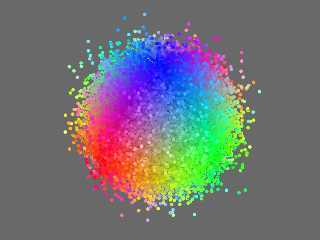
import numpy as np
import time

from panda3d_viewer import Viewer, ViewerConfig

with Viewer(show_grid=False) as viewer:
    viewer.reset_camera((10, 10, 15), look_at=(0, 0, 0))
    viewer.append_group('root')
    viewer.append_cloud('root', 'cloud', thickness=4)

    while True:
        vertices = np.random.randn(300000, 3).astype(np.float32)
        colors = np.ones((300000, 4), np.float32)
        colors[:, :3] = np.clip(np.abs(vertices), 0, 3) / 3
        viewer.set_cloud_data('root', 'cloud', vertices, colors)
        time.sleep(0.03)
Robotic examples
Using with Pinocchio
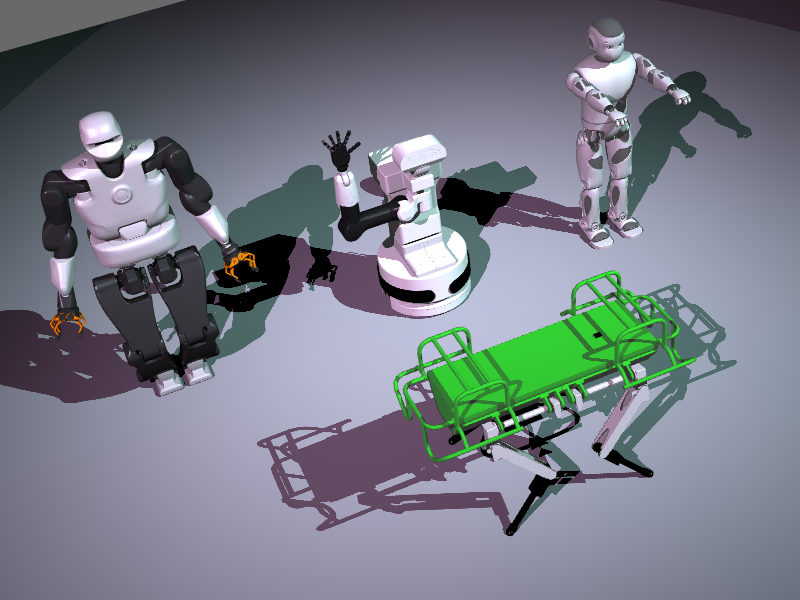
Pinocchio is a library for rigid multi-body dynamics computation. To see how to use this package with Pinocchio see example 1, example 2.
Visualize the point cloud from a RealSense camera
import numpy as np
import pyrealsense2 as rs
from panda3d_viewer import Viewer, ViewerConfig

config = rs.config()
config.enable_stream(rs.stream.depth, 640, 480, rs.format.z16, 30)
config.enable_stream(rs.stream.color, 640, 480, rs.format.bgr8, 30)

pipeline = rs.pipeline()
pipeline.start(config)
pc = rs.pointcloud()

camera_frame = (0, 0, 0.2), (0.7071, -0.7071, 0, 0)

with Viewer(window_title='RealSense') as viewer:
    viewer.append_group('root', scale=2)
    viewer.append_cloud('root', 'camera', thickness=4, frame=camera_frame)

    while True:
        frames = pipeline.wait_for_frames()
        color = frames.get_color_frame()
        depth = frames.get_depth_frame()
        if color and depth:
            pc.map_to(color)
            points = pc.calculate(depth)
            vertices = np.asarray(points.get_vertices())
            texture_coords = np.asanyarray(points.get_texture_coordinates())
            texture_image = np.asanyarray(color.get_data())

            viewer.set_cloud_data(
                'root', 'camera',
                vertices=vertices,
                texture_coords=texture_coords,
                texture_image=texture_image)
API
Viewer
This package contains Viewer, a thin wrapper on top of Panda3D ShowBase, an application framework responsible for opening a graphical display, setting up input devices and creating the scene graph.
Viewer constructor takes window_type parameter wich should be one of 'onscreen', 'offscreen'. When selected 'onscreen' the viewer open a GUI window. When selected 'offscreen' the viewer render to an offscreen buffer.
Optional config parameter allows manage the viewer appearance. Configuration provided by ViewerConfig class, which contains methods:
set_window_sizeset window size (default: 800x600)set_window_fixeddisable window resizing (default: on)enable_antialiasingturn antialiasing on or off and specify number of MSAA multisamples: 2,4,8,16 (default: off)enable_lightsturn lighting on or off (default: on)enable_shadowturn shadows rendering on or off (default: off)enable_hdrturn HDR effect on or off (default: off)enable_fogturn fog rendering on or off (default: off)show_axesturn the axes rendering on or off (default: on)show_gridturn the grid rendering on or off (default: on)show_floorturn the floor plane rendering on or off (default: off)
To stop the viewer use stop method. Use join method to wait until a user close the window.
Managing 3D scene
All scene geometries organized in named groups. Each group contains arbitrary number of nodes. To manage the groups use append_group and remove_group. To hide or show all geometries inside a group use show_group.
To append a mesh node to a group use append_mesh, to append a primitive geometry node use append_capsule, append_cylinder, append_box, append_plane, append_sphere. To modify material of a node use set_material.
To specify nodes position in the space use move_nodes function. It takes a dictionary with node_name - position, quaternion pairs, so you can specify the position of all/any nodes in a group simultaneously.
Render to file or memory buffer
To capture an image and save it on the disk use save_screenshot. Specify path to the image file with extention in a filename parameter. If the filename is ommited it will be generated automatically based on the current date time.
To capture an image to a memory buffer use get_screenshot. Specify the color channels order in requested_format parameter. Default format is BGRA, allow any combinations of R,G,B,A channels. The function returns an image as a numpy array.
Scene appearance
To move the camera use reset_camera method which takes the desired camera position and target point.
Viewer provide several methods to manage visual appearance:
set_background_colorchange background colorenable_lightsturn lighting on or offenable_shadowturn shadows rendering on or offenable_hdrturn HDR effect on or offenable_fogturn fog rendering on or offshow_axesturn the axes rendering on or offshow_gridturn the grid rendering on or offshow_floorturn the floor plane rendering on or off
Window control
Keyboard shortcuts:
- Show help: F1, h
- Quit window: Escape, q
- Screenshot: Space
- Toggle axes: a
- Toggle HDR: d
- Toggle grid: g
- Toggle fps meter: f
- Toggle lighting: l
- Toggle fog: o
- Toggle plane: p
- Reset camera: r
- Toggle shadows: s
- Toggle texture: t
- Toggle wireframe: w
Mouse control:
- Move: LMB
- Scale: RMB, Ctrl+LMB
- Rotate: LMB+RMB, Alt+LMB
- Tilt: Alt+Ctrl+LMB
License
panda3d_viewer is licensed under the MIT License - see the LICENSE file for details
1 maintainer

Metadata
1 maintainer
Release files for panda3d-viewer 0.4.1
For a detailed explanation of source distributions (sdists) and built distributions (wheels), please see the package formats documentation.
Source distribution (sdist)
| File | Size | Uploaded | |
|---|---|---|---|
| panda3d_viewer-0.4.1.tar.gz | 746.6 kB | Details |
Built distribution (wheel)
| File | Interpreter | ABI | Platform | Reset |
|---|---|---|---|---|
| panda3d_viewer-0.4.1-py2.py3-none-any.whl | Python 2, Python 3 | none | any | Details |
Total release size: 765.7 kB
Release files / panda3d_viewer-0.4.1.tar.gz
| Download URL | panda3d_viewer-0.4.1.tar.gz |
|---|---|
| Size | 746.6 kB |
| Tags | Source |
|
SHA-256 checksum How to use checksums |
623842303b9f568d80f5a300d35079738f578917916394abaca03ac4fa7c130a
|
|
BLAKE2b-256 checksum How to use checksums |
4d7d061ce7dd13b7367cd4793a0eb53647b986cf1d1315736a1f40cabfbad764
|
| Upload date | |
|
Uploaded using Trusted Publishing? What is trusted publishing? |
No |
| Uploaded via |
twine/1.15.0 pkginfo/1.6.1 requests/2.24.0 setuptools/44.1.1 requests-toolbelt/0.9.1 tqdm/4.51.0 CPython/2.7.15
|
Release files / panda3d_viewer-0.4.1-py2.py3-none-any.whl
| Download URL | panda3d_viewer-0.4.1-py2.py3-none-any.whl |
|---|---|
| Size | 19.1 kB |
| Tags | Python 2 Python 3 |
|
SHA-256 checksum How to use checksums |
61e696ba40acb796f59c3b96e20de25eb87edf3b2d520f4eb3d97b354f727bda
|
|
BLAKE2b-256 checksum How to use checksums |
9c7407ee491e03446004ba8a368de33b00e78afbac07d6ff883bca369c1bb488
|
| Upload date | |
|
Uploaded using Trusted Publishing? What is trusted publishing? |
No |
| Uploaded via |
twine/1.15.0 pkginfo/1.6.1 requests/2.24.0 setuptools/44.1.1 requests-toolbelt/0.9.1 tqdm/4.51.0 CPython/2.7.15
|














