
pandas-doctor
pandas-doctor finds the slow pandas lines in your code, rewrites them, and checks on your own data that the result is exactly the same. Then it tells you how much faster the rewrite was, measured, not guessed.
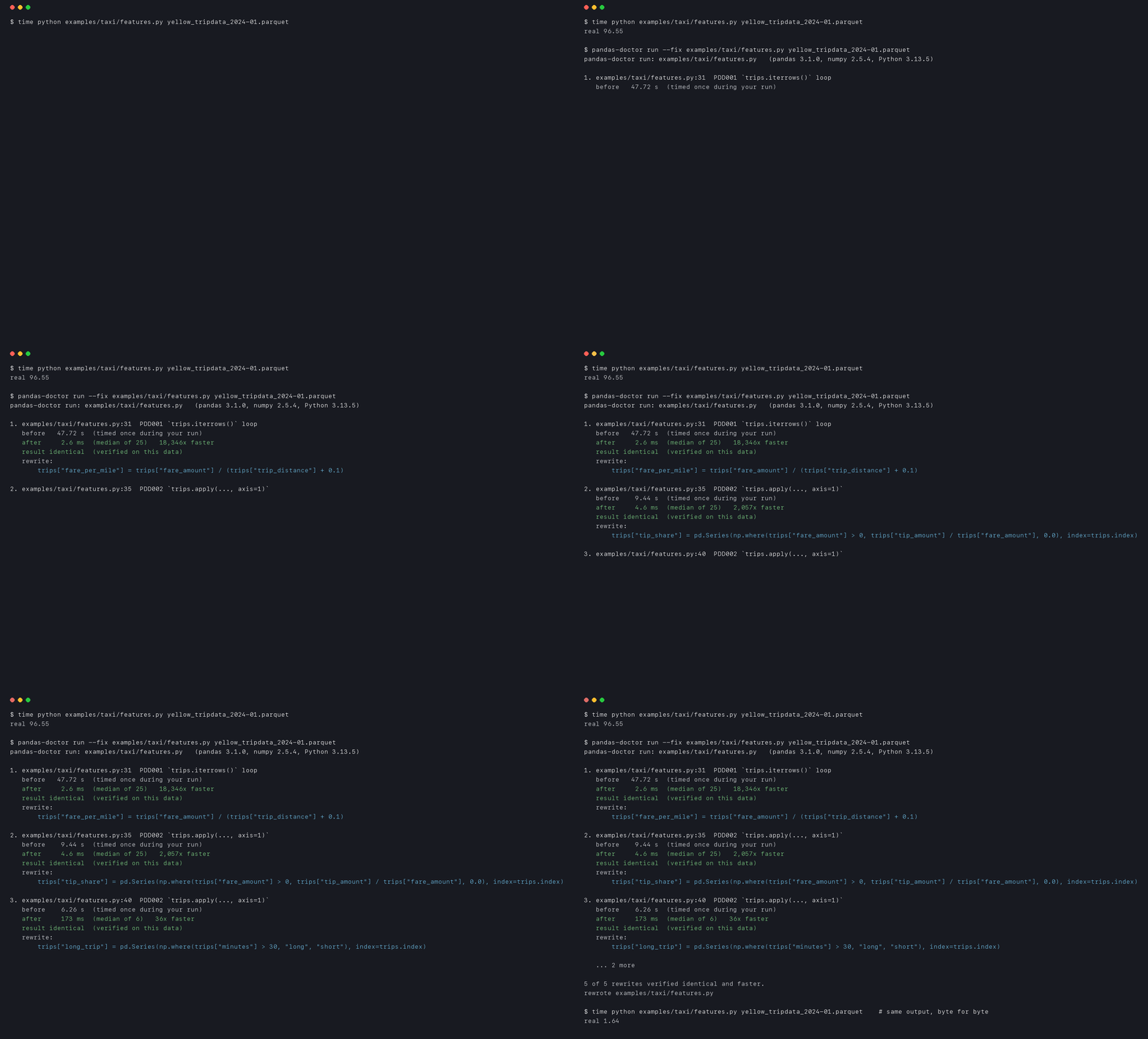
That's a real run on real data: examples/taxi/features.py on January 2024 of the NYC TLC yellow taxi trips (2.96 million rows), with the kind of loops a lot of notebooks have. The script took 96.6 s (M4 Pro, pandas 3.1.0 with pyarrow). pandas-doctor checked 5 rewrites on the script's own data, all identical and faster. After --fix the whole script runs in 1.64 s and prints exactly the same output. Full report in docs/taxi-run-full.txt.
No download needed for examples/hero/features.py, the same script on 1M seeded synthetic trips: 27.9 s before, 1.01 s after (report).
Try it
pip install pandas-doctor
pandas-doctor run your_script.py
Or try it in your browser first, nothing to install:

run executes your script normally. Wherever it spots a slow pattern, it copies that code's inputs, lets your code run as usual, then runs the rewrite on the copies and compares the outputs. --diff shows the verified rewrites as a patch, and --fix writes them into the file.
In a notebook:
%load_ext pandas_doctor
%%doctor
for i, row in df.iterrows():
    df.at[i, "total"] = row["price"] * row["qty"]
%%doctor --rewrite drops the verified version into a new cell below.
What "identical" means
Two results count as identical only when they have:
- the same type, down to each value (
numpy.float64is notfloat) - the same dtype, index and columns, labels and names included
- missing values in the same places
- exactly equal values
Every check ends in one of four verdicts:
| Verdict | What it means | Does run apply it? |
|---|---|---|
| identical | everything above matches | yes |
| equal values, different scalar types | every value is exactly equal, but some are numpy scalars where the original had Python ones, or the other way round. The report names the types. | yes, and the report says so. --strict-types turns this off. |
| equal within tolerance | floats differ by at most --rtol, usually from summing in a different order. The largest difference is shown. |
only with --rtol |
| different | anything else, with the first place it differs | no |
That's stricter than it sounds, and it catches real differences:
iterrowshands you each row as a Series, so an int column turns into floats when the frame also has float columns. The obvious rewrite keeps the ints, and the dtype changes: different.- In an all-numeric frame, collecting
row["x"] * 2into a list gives numpy floats; the same thing via.tolist()gives Python floats: equal values, different scalar types. That rarely matters, but it can:json.dumpscan't handle anumpy.int64. - Summing in a different order changes the last few bits of a float: equal within tolerance.
When the plain rewrite isn't accepted, pandas-doctor tries a few more faithful versions: the row dtype iterrows used, numpy scalars, the same summation order. It keeps the plainest one that's accepted, and between equally plain ones it prefers identical. If none is accepted, it tells you why and changes nothing.
A rewrite that is identical but not faster isn't recommended either. That happens: on python-backed strings, .str.lower() can be slower than .apply(lambda x: x.lower()).
"Verified" always means on this data. It's a strong check, not a proof for every possible input.
Why not just ask an AI?
An assistant can suggest the same rewrites, but it can't tell you whether they give the same result on your data, and as the examples above show, they often don't. pandas-doctor runs both versions and compares them. If you do use an assistant, it can call pandas-doctor to check its own edits (see AI assistants).
Three commands
| Command | What it does | Runs your code? |
|---|---|---|
pandas-doctor check PATH |
Finds slow patterns in .py files and notebooks, prints suggested rewrites. Fast, for CI and pre-commit. |
No |
pandas-doctor run script.py |
Runs the script, checks each rewrite on its data, times both versions, and can apply the verified ones. | Yes, that's the point |
pandas-doctor verify |
Bring your own rewrite: give it the original, the candidate and setup code that builds the inputs. | Only those snippets |
pandas-doctor verify --setup setup.py --original slow.py --candidate fast.py
verify exits 0 when the rewrite is identical or equal up to scalar types, unless you pass --strict-types; --accept-tolerance also lets equal within tolerance pass. With --format json (and run --json), the verdict is one of identical, scalar_types, within_tolerance or different, with the details next to it.
What it looks for
| Rule | Slow pattern | Rewrite | Measured, 100k rows | Result |
|---|---|---|---|---|
| PDD001 | for i, row in df.iterrows(): ... |
column expression, .sum(), .extend(...) |
1.13 s → 79 µs (14,239x) | identical |
| PDD002 | df.apply(f, axis=1) with column maths |
column expression or np.where |
192 ms → 92 µs (2,091x) | identical |
| PDD003 | X = pd.concat([X, part]) in a loop |
collect parts, one pd.concat (unsafe fix) |
65.5 ms → 2.3 ms (29x) | identical |
| PDD004 | s.apply(lambda x: ...), .map(lambda ...) |
.str / .dt / arithmetic |
27.8 ms → 403 µs (69x) | identical |
| PDD005 | groupby(...).apply(lambda g: g[c].count()) |
groupby(...)[c].count() |
4.2 ms → 479 µs (8.8x) | identical |
| PDD006 | per-column astype loop (run only) |
one astype call |
102 ms → 111 ms (1.1x slower) | identical |
| PDD007 | df.at[i, c] = ... in a loop over the index |
whole-column assignment | 844 ms → 64 µs (13,283x) | identical |
| PDD008 | text columns with few distinct values (run only) |
category |
memory: 52.8 MB → 1.0 MB on 1M rows | suggestion only |
Measured with benchmarks/ on an Apple M4 Pro, Python 3.13.5, pandas 3.1.0, numpy 2.5.4 (full results for pandas 2.2.3 and with pyarrow are in benchmarks/results/). Each row is one example of the pattern; your speedup depends on your data and what the loop does.
Two results worth knowing:
- String methods depend on the string backend.
.apply(lambda x: x.strip().lower())→.str.strip().str.lower()was 5.6 ms → 8.7 ms (1.5x slower) without pyarrow, but 8.0 ms → 1.9 ms (4.2x) with pyarrow installed. pandas-doctor measures before recommending it. - groupby sums aren't bit-identical.
groupby.apply(lambda g: g[c].sum())→groupby[c].sum()is 5.7 ms → 613 µs (9.3x), but pandas' built-in sum uses compensated summation, so the result matches only to within a relative 2.2e-16. pandas-doctor reports that and only applies it with--rtol.
PDD006 and PDD008 need the data, so only run reports them. PDD006 shows up only when one astype call really is faster; on today's pandas releases it usually isn't.
Findings come at two levels:
- warning: a slow pattern worth fixing.
checkexits 1 when it finds one (--exit-zeroto only report). - info: an
iterrowsloop that no vectorised rewrite matches, usually one that plots, prints or calls something for each row. All 99iterrowsfindings in the corpus check below were like that. Info findings are listed (as notices in the GitHub Action) and never failcheck.
check --fix never changes behaviour on its own. The concat rewrite (PDD003) is identical only when every part has the same columns and dtypes; the property tests found frames where it isn't. So it's an unsafe fix that needs --unsafe-fixes, and run checks it on your data.
Before release, check was run over 8,419 files from 13 public repos (pandas, statsmodels, Kaggle courses, popular notebook collections) to hunt for false positives. The results and fixes are in docs/corpus.md. Slow lines it found in well-known teaching notebooks, re-measured, are in the speedup gallery.
In CI
pre-commit:
- repo: https://github.com/furqan-khan07/pandas-doctor
  rev: v0.1.0
  hooks:
    - id: pandas-doctor
GitHub Action. It annotates the diff and keeps one summary comment on the PR:
- uses: furqan-khan07/pandas-doctor@v0.1.0
  with:
    paths: src notebooks
The comment needs permissions: pull-requests: write. check --format json works with anything else.
AI assistants
pandas-doctor mcp serves three tools over MCP: check_code, verify_rewrite and list_rules. Install it with pip install "pandas-doctor[mcp]", or let uvx fetch it. In Claude Code:
claude mcp add pandas-doctor -- uvx --from "pandas-doctor[mcp]" pandas-doctor mcp
In Cursor, Claude Desktop or any other client that takes an mcpServers config:
{
  "mcpServers": {
    "pandas-doctor": {
      "command": "uvx",
      "args": ["--from", "pandas-doctor[mcp]", "pandas-doctor", "mcp"]
    }
  }
}
It's also in the MCP Registry as io.github.furqan-khan07/pandas-doctor.
For Claude Code there's also a plugin with a skill that tells the assistant to verify before claiming a speedup:
/plugin marketplace add furqan-khan07/pandas-doctor
/plugin install pandas-doctor@pandas-doctor
Limits
runexecutes your script once, aspython script.pywould. Flagged blocks that are plain computation (no files, network or randomness) are re-run on copies to get a stable median. Slower blocks are timed once, during your run, and the report says so.- Each flagged spot is checked on its first call. Inputs over 2 GB aren't copied, so they aren't checked.
- Rewrites exist only for the shapes in the table. Anything else gets a note, not a guess.
- No network calls, no telemetry.
- Supports Python 3.11+ and pandas 2.2+, tested on pandas 2.2 through 3.1.
Contributing
Found a false positive, or a slow pattern it should know? Open an issue with a small snippet. Patterns that come with a before/after test and a benchmark are the easiest to add.
Made by Furqan Khan, a pandas contributor whose DST plotting fix (pandas-dev/pandas#69960) is merged and ships in pandas 3.2. MIT licensed.
1 maintainer

Metadata
1 maintainer
Release files for pandas-doctor 0.1.1
For a detailed explanation of source distributions (sdists) and built distributions (wheels), please see the package formats documentation.
Source distribution (sdist)
| File | Size | Uploaded | Provenance | Actions |
|---|---|---|---|---|
| pandas_doctor-0.1.1.tar.gz | 84.2 kB | With provenance | Details for pandas_doctor-0.1.1.tar.gz |
Built distribution (wheel)
| File | Interpreter | ABI | Platform | Actions Reset |
|---|---|---|---|---|
| pandas_doctor-0.1.1-py3-none-any.whl | Python 3 | none | any | Details for pandas_doctor-0.1.1-py3-none-any.whl |
Total release size: 169.9 kB
Release files / pandas_doctor-0.1.1.tar.gz
| Download URL | pandas_doctor-0.1.1.tar.gz |
|---|---|
| Size | 84.2 kB |
| Tags | Source |
|
SHA-256 checksum How to use checksums |
7a8b7e27ee2e416e10a1c4aa3eefa020d4470c47d382b44e3bb830397060b1c6
|
|
BLAKE2b-256 checksum How to use checksums |
9b6b29f696e49947597ecb6261d3c70c16559f876e05c5cfb3c8ba6151e35bc7
|
| Upload date | |
|
Uploaded using Trusted Publishing? What is trusted publishing? |
Yes |
| Uploaded via |
twine/7.0.0 CPython/3.13.16
|
Provenance
Provenance describes where a file came from. On PyPI, provenance is shared via attestations, which provide a verifiable record of the build or publishing details. View details, limitations and caveats.


PyPI Publish Attestation
PyPI verified that this artifact, at this checksum, originated from the publisher listed below.
Signed by GitHub Actions, verified by PyPI on Nov 12, 2026.
Transparency logRelease files / pandas_doctor-0.1.1-py3-none-any.whl
| Download URL | pandas_doctor-0.1.1-py3-none-any.whl |
|---|---|
| Size | 85.7 kB |
| Tags | Python 3 |
|
SHA-256 checksum How to use checksums |
d0e772bec2bef4b8c8026fdd7d1f03543ee8678231fc5879aee06fb0d4ac0dc3
|
|
BLAKE2b-256 checksum How to use checksums |
d198429f787fba6e9d0682c3999342d2c824cc4f6717eab252bf661183ca3264
|
| Upload date | |
|
Uploaded using Trusted Publishing? What is trusted publishing? |
Yes |
| Uploaded via |
twine/7.0.0 CPython/3.13.16
|
Provenance
Provenance describes where a file came from. On PyPI, provenance is shared via attestations, which provide a verifiable record of the build or publishing details. View details, limitations and caveats.
PyPI Publish Attestation
PyPI verified that this artifact, at this checksum, originated from the publisher listed below.
Signed by GitHub Actions, verified by PyPI on Nov 12, 2026.
Transparency logSecurity for pandas-doctor 0.1.1
Provenance
Provenance describes where a file came from. On PyPI, provenance is shared via attestations, which provide a verifiable record of the build or publishing details. View details, limitations and caveats.
Full provenance
Both files in this release have been uploaded with provenance metadata.
Attestation for pandas_doctor-0.1.1.tar.gz
PyPI Publish Attestation
PyPI verified that this artifact, at this checksum, originated from the publisher listed below.
Signed by GitHub Actions, verified by PyPI on Nov 12, 2026.
Transparency logA note on package security
PyPI is a repository for distributing packages, not a service for auditing them. While third-party security researchers and our staff do their best to detect and remove malicious packages, PyPI cannot guarantee the quality, security or suitability of any given package.
To learn more about protecting yourself from malicious actors, visit our package security documentation.














