
Evaluate pandas DataFrames to see whether their memory usage can be reduced without losing information

Project description
pandas_dtype_efficiency
About
pandas_dtype_efficiency is a Python package to help reduce the memory size of pandas DataFrames without changing the underlying data (lossless compression). It is intended to make your code more efficient and reduce the likelihood of running out of memory.
This is achieved by checking every column to see whether it fits one of the following criteria:
- Float values where the user is comfortable with lower precision e.g. a numpy.float16 vs the pandas default of numpy.float64
- Integer values which can be represented by a smaller integer types e.g. values which fall between -128 and 127 can be accommodated with a numpy.int8
- String values which fall within a small list of set values and could be represented by the pandas.Categorical data type instead
Installation
You will need Python 3.7 or higher, which comes with pip included in the installation.
The simplest method of installation is via pip:
pip install pandas_dtype_efficiency
However, the package can also be installed directly from GitHub:
# Option 1: HTTPS
pip install git+https://github.com/osulki01/pandas_dtype_efficiency#egg=pandas_dtype_efficiency

# Option 2: SSH
pip install git+ssh://github.com/osulki01/pandas_dtype_efficiency#egg=pandas_dtype_efficiency

# Option 3: HTTP, discouraged because HTTP is insecure due to lack of TLS based encryption
pip install git+http://github.com/osulki01/pandas_dtype_efficiency#egg=pandas_dtype_efficiency
Example Usage
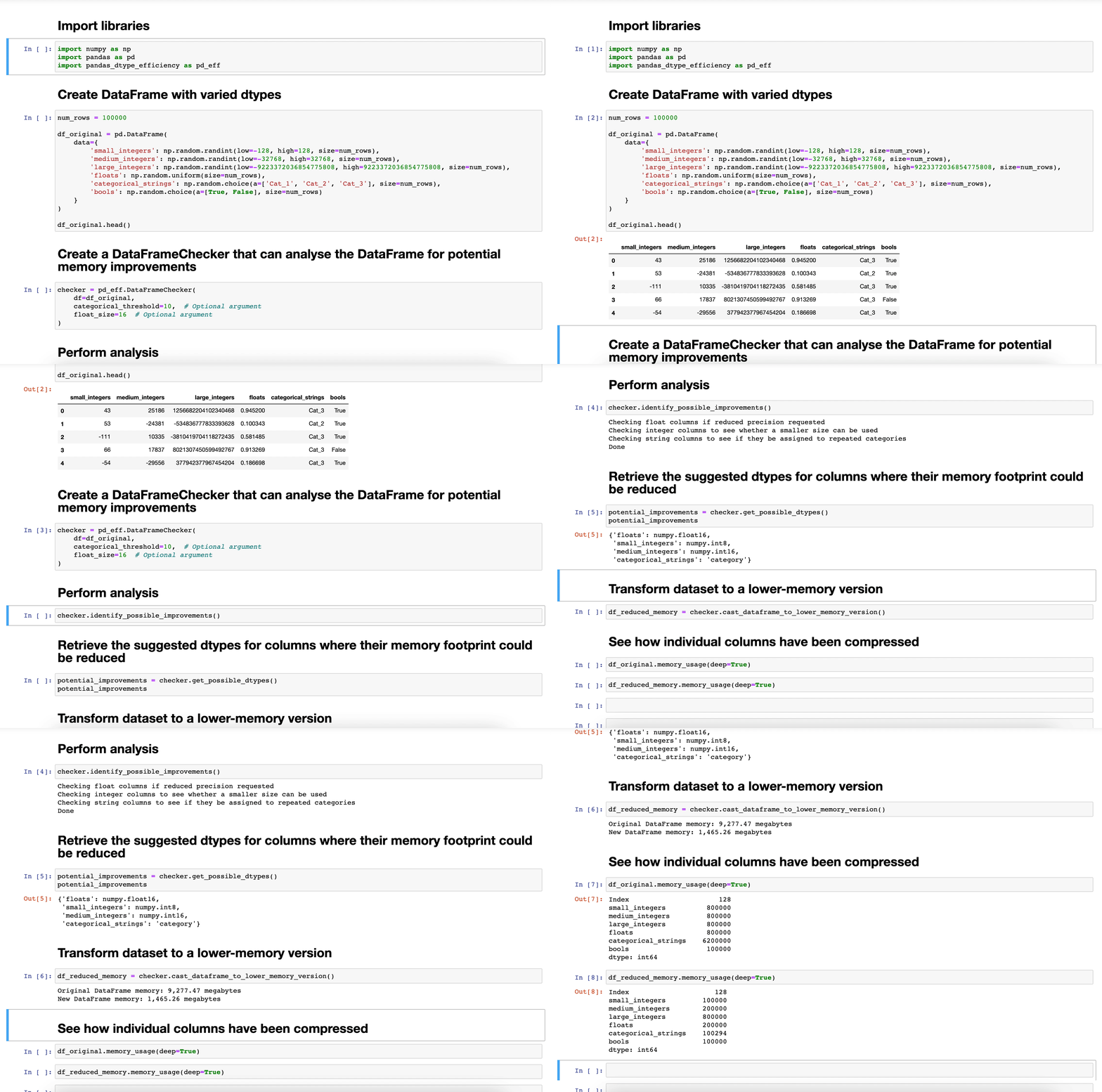
First, let's create a pandas DataFrame made up of various data types. All of the code in this section is Python.
import numpy as np
import pandas as pd

num_rows = 100000

df_original = pd.DataFrame(
    data={
        'small_integers': np.random.randint(low=-128, high=128, size=num_rows),
        'medium_integers': np.random.randint(low=-32768, high=32768, size=num_rows),
        'large_integers': np.random.randint(low=-9223372036854775808, high=9223372036854775808, size=num_rows),
        'floats': np.random.rand(size=num_rows),
        'categorical_strings': np.random.choice(a=['Cat_1', 'Cat_2', 'Cat_3'], size=num_rows),
        'bools': np.random.choice(a=[True, False], size=num_rows)
    }
)
Next, we create a DataFrameChecker that can analyse the DataFrame for potential memory improvements.
The optional arguments are:
- categorical_threshold; the maximum number of distinct values in a column of strings to suggest transforming it into a categorical column. In this case, if a column made up of strings has less than or equal to 10 distinct values, it will be flagged as a potential categorical column.
- float_size; the desired numpy float type; 16: numpy float16, 32: numpy float23, 64: numpy float64 (the pandas default). If this argument is set to 64, then float columns are not analysed. If you do not need decimals stored to the level of precision in the pandas default of numpy.float64, then make use of this compression.
import pandas_dtype_efficiency as pd_eff

checker = pd_eff.DataFrameChecker(
    df=df_original,
    categorical_threshold=10,  # Optional argument
    float_size=16  # Optional argument
)
The checker can then be used to evaluate the DataFrame and find any columns with potential for reduced memory:
# Analyse DataFrame
checker.identify_possible_improvements()

# Retrieve the suggested dtypes for columns where their memory footprint could be reduced
# If no improvements are found, this will return an empty dictionary
potential_improvements = checker.get_possible_dtypes()
The suggested improvements can be used to produce a new DataFrame with reduced memory usage:
df_reduced_memory = checker.cast_dataframe_to_lower_memory_version()

# The checker will tell you how much memory has been saved overall but you can view this at a column level too
df_original.memory_usage(deep=True)
df_reduced_memory.memory_usage(deep=True)
The potential improvements indicated by checker.get_possible_dtypes() can also used at the point of reading in data from a local file rather than loading it all into memory and then transforming the data.
df_reduced_memory_on_load = pd.read_csv('my_data.csv', dtype=potential_improvements)
Watch-outs
- If you are preparing data for a machine learning algorithm, the machine learning library may cast the data to fixed data type regardless of how it has been provided, so this exercise would redundant in these cases if the next step will undo the compression performed.
- The method cast_dataframe_to_lower_memory_version creates a whole new DataFrame rather than updating the existing one (to avoid unwanted mutation). If your DataFrame is already close to the memory limit for your machine then you could run out of memory by having two large DataFrames, even if one of them has been compressed.
Contributing
Any suggestions or contributions are welcome via email or pull request.
Development environment
If you would like to experiment with the code or make changes, you can set up the development environment as per the steps below. In advance, you will need Docker and Docker Compose installed on your machine.
# Build the Docker image (if running for the first time)
docker-compose build

# Create container
docker-compose up -d

# Run tests to make sure code is functional
docker exec pandas_dtype_efficiency_dev pytest --verbose tests/
Release history Release notifications | RSS feed

Download files
Download the file for your platform. If you're not sure which to choose, learn more about installing packages.
Source Distribution
Built Distribution
Filter files by name, interpreter, ABI, and platform.
If you're not sure about the file name format, learn more about wheel file names.
Copy a direct link to the current filters
File details
Details for the file pandas_dtype_efficiency-0.0.1.tar.gz.
File metadata
- Download URL: pandas_dtype_efficiency-0.0.1.tar.gz
- Upload date:
- Size: 6.2 kB
- Tags: Source
- Uploaded using Trusted Publishing? No
- Uploaded via: twine/3.4.1 importlib_metadata/4.0.1 pkginfo/1.7.0 requests/2.25.1 requests-toolbelt/0.9.1 tqdm/4.60.0 CPython/3.7.9
File hashes
| Algorithm | Hash digest | |
|---|---|---|
| SHA256 |
7ddc7b8b050f5f984f7a815b5daf76c7dafe83535d532af2370bc536038ccebc
|
|
| MD5 |
d6c37b2c723c3a7c35cf3395ed7d9aa7
|
|
| BLAKE2b-256 |
d96aad4c8bab8dab4afe9c74b29148bbaf458a76caf87339e060aa9fba23e828
|
File details
Details for the file pandas_dtype_efficiency-0.0.1-py3-none-any.whl.
File metadata
- Download URL: pandas_dtype_efficiency-0.0.1-py3-none-any.whl
- Upload date:
- Size: 7.1 kB
- Tags: Python 3
- Uploaded using Trusted Publishing? No
- Uploaded via: twine/3.4.1 importlib_metadata/4.0.1 pkginfo/1.7.0 requests/2.25.1 requests-toolbelt/0.9.1 tqdm/4.60.0 CPython/3.7.9
File hashes
| Algorithm | Hash digest | |
|---|---|---|
| SHA256 |
8d0404d8c07d7eadeecafbb811d96bdfe08132037efe354132a86d6d265de642
|
|
| MD5 |
292835a83e4b9b689ef731e6ff13a607
|
|
| BLAKE2b-256 |
ddd744305d703ef2ab3f8c5bb48db8ed7b1fddb1bdba73a2ea86805d4d4b6aaf
|






