
п»ї# pandas-illustrated






This repo contains code for a number of helper functions mentioned in the Pandas Illustrated guide.
Installation:
pip install pandas-illustrated
Contents
Basic operations:
find(s, x, pos=False)findall(s, x, pos=False)insert(dst, pos, value, label, axis=0, ignore_index = False, order=None, allow_duplicates=False, inplace=False)append(dst, value, label = lib.no_default, axis=0, ignore_index = False, order=None, allow_duplicates: bool = False, inplace=False)drop(obj, items=None, like=None, regex=None, axis=None)move(obj, pos, label=None, column=None, index=None, axis=None, reset_index=False)join(dfs, on=None, how="left", suffixes=None)
Visualization improvements:
patch_series_repr(footer=True)unpatch_series_repr()sidebyside(*dfs, names=[], index=True, valign="top")sbs = sidebyside
MultiIndex helpers:
patch_mi_co()from_dict(d)from_kw(**kwargs)
Locking columns order:
locked(obj, level=None, axis=None, categories=None, inplace=False)lock = locked with inplace=Truevis_lock(obj, checkmark="вњ“")vis_patch()vis_unpatch()from_product(iterables, sortorder=None, names=lib.no_default, lock=True)
MultiIndex manipulations:
get_level(obj, level_id, axis=None)set_level(obj, level_id, labels, name=lib.no_default, axis=None, inplace=False)move_level(obj, src, dst, axis=None, inplace=False, sort=False)insert_level(obj, pos, labels, name=lib.no_default, axis=None, inplace=False, sort=False)drop_level(obj, level_id, axis=None, inplace=False)swap_levels(obj, i: Axis = -2, j: Axis = -1, axis: Axis = None, inplace=False, sort=False)join_levels(obj, name=None, sep="_", axis=None, inplace=False)split_level(obj, names=None, sep="_", axis=None, inplace=False)rename_level(obj, mapping, level_id=None, axis=None, inplace=False)
Usage
find and findall
By default find(series, value) looks for the first occurrence of the given value in a series and returns the corresponsing index label.
>>> import pandas as pd
>>> import pdi

>>> s = pd.Series([4, 2, 4, 6], index=['cat', 'penguin', 'dog', 'butterfly'])

>>> pdi.find(s, 2)
'penguin'

>>> pdi.find(s, 4)
'cat'
When the value is not found raises a ValueError.
findall(series, value) returns a (possibly empty) index of all matching occurrences:
>>> pdi.findall(s, 4)
Index(['cat', 'dog'], dtype='object')
With pos=True keyword argument find() and findall() return the positional index instead:
>>> pdi.find(s, 2, pos=True)
1

>>> pdi.find(s, 4, pos=True)
0
There is a number of ways to find index label for a given value. The most efficient of them are:
— s.index[s.tolist().index(x)]       # faster for Series with less than 1000 elements
— s.index[np.where(s == x)[0][0]]    # faster for Series with over 1000 elements
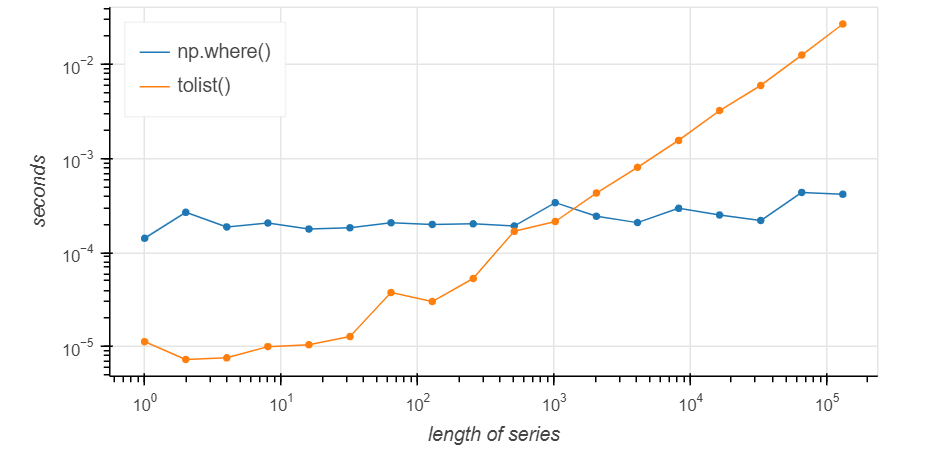
find() chooses optimal implementation depending on the series size; findall() always uses the where implementation.
Improving Series Representation
Run pdi.patch_series_repr() to make Series look better:
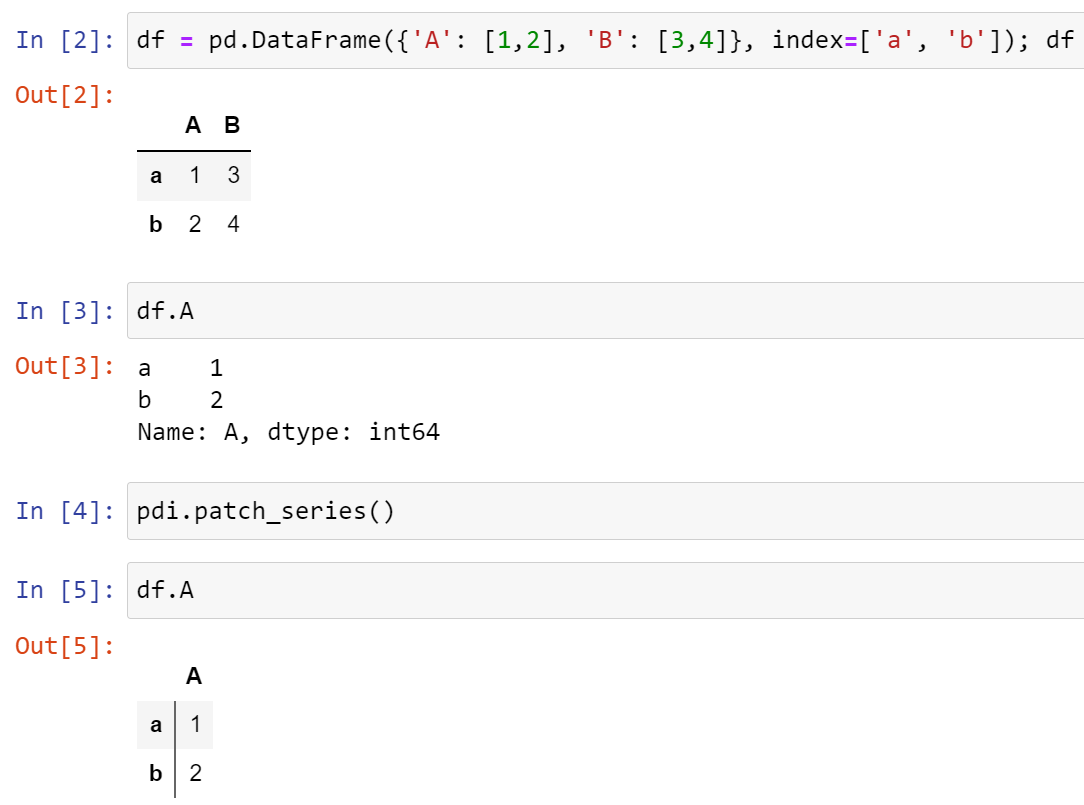
If you want to display several Series from one cell, call display(s) for each.
Displaying several Pandas objects side vy side
To display several dataframes, series or indices side by side run pdi.sidebyside(s1, s2, ...)

Testing
Run pytest in the project root.
1 maintainer

Metadata
1 maintainer
Release files for pandas-illustrated 0.6
For a detailed explanation of source distributions (sdists) and built distributions (wheels), please see the package formats documentation.
Source distribution (sdist)
| File | Size | Uploaded | Provenance | |
|---|---|---|---|---|
| pandas-illustrated-0.6.tar.gz | 16.8 kB | Without provenance | Details |
Built distribution (wheel)
| File | Interpreter | ABI | Platform | Reset |
|---|---|---|---|---|
| pandas_illustrated-0.6-py3-none-any.whl | Python 3 | none | any | Details |
Total release size: 35.1 kB
Release files / pandas-illustrated-0.6.tar.gz
| Download URL | pandas-illustrated-0.6.tar.gz |
|---|---|
| Size | 16.8 kB |
| Tags | Source |
|
SHA-256 checksum How to use checksums |
cae78b65d513ef5c2c3533981ead204ed249d27ee513b4a44cb76ebb9c434847
|
|
BLAKE2b-256 checksum How to use checksums |
fe02b1b2fe9c4238f487e042fad29acba8e6da7cb468edb96b726701289b3318
|
| Upload date | |
|
Uploaded using Trusted Publishing? What is trusted publishing? |
No |
| Uploaded via |
twine/4.0.2 CPython/3.10.1
|
Release files / pandas_illustrated-0.6-py3-none-any.whl
| Download URL | pandas_illustrated-0.6-py3-none-any.whl |
|---|---|
| Size | 18.3 kB |
| Tags | Python 3 |
|
SHA-256 checksum How to use checksums |
353d56485986a6e77f6b69382ce985513245ae13ec9b967e2a38d3c28fa9a81e
|
|
BLAKE2b-256 checksum How to use checksums |
acf516f466f2ec822785a540ed64b8ca4f5090cf58c05a1173405a909b96a4a6
|
| Upload date | |
|
Uploaded using Trusted Publishing? What is trusted publishing? |
No |
| Uploaded via |
twine/4.0.2 CPython/3.10.1
|
Security for pandas-illustrated 0.6
Provenance
Provenance describes where a file came from. On PyPI, provenance is shared via attestations, which provide a verifiable record of the build or publishing details. View details, limitations and caveats.
No provenance found
None of the files in this release were uploaded with provenance metadata.
A note on package security
PyPI is a repository for distributing packages, not a service for auditing them. While third-party security researchers and our staff do their best to detect and remove malicious packages, PyPI cannot guarantee the quality, security or suitability of any given package.
To learn more about protecting yourself from malicious actors, visit our package security documentation.














