
Image methods for pandas dataframes using Pillow

Project description
Pandas Image Methods
Image methods for pandas dataframes using Pillow.
Features:
- Use
PIL.Imageobjects in pandas dataframes - Call
PIL.Imagemethods like.rotate()on a column - Save dataframes with
PIL.Imageobjects to Parquet
Installation
pip install pandas-image-methods
Usage
You can open images as PIL.Image objects using the .open() method.
Once the images are opened, you can call any PIL Image method:
import pandas as pd
from pandas_image_methods import PILMethods

pd.api.extensions.register_series_accessor("pil")(PILMethods)

df = pd.DataFrame({"image": ["path/to/image.png"]})
df["image"] = df["image"].pil.open()
df["image"] = df["image"].pil.rotate(90)
# 0    <PIL.Image.Image size=200x200>
# Name: image, dtype: object, PIL methods enabled
Here is how to enable PIL methods for PIL Images created manually:
df = pd.DataFrame({"image": [PIL.Image.open("path/to/image.png")]})
df["image"] = df["image"].pil.enable()
df["image"] = df["image"].pil.rotate(90)
# 0    <PIL.Image.Image size=200x200>
# Name: image, dtype: object, PIL methods enabled
Save
You can save a dataset of PIL Images to Parquet:
# Save
df = pd.DataFrame({"image": ["path/to/image.png"]})
df["image"] = df["image"].pil.open()
df.to_parquet("data.parquet")

# Later
df = pd.read_parquet("data.parquet")
df["image"] = df["image"].pil.open()
This doesn't just save the paths to the image files, but the actual images themselves !
Under the hood it saves dictionaries of {"bytes": <bytes of the image file>, "path": <path or name of the image file>}.
The images are saved as bytes using their image encoding or PNG by default. Anyone can load the Parquet data even without pandas-image-methods since it doesn't rely on extension types.
Note: if you created the PIL Images manually, don't forget to enable the PIL methods to enable saving to Parquet.
Hugging Face support
Most image datasets in Parquet format on Hugging Face are compatible with pandas-image-methods. For example you can load the CIFAR-100 dataset:
df = pd.read_parquet("hf://datasets/uoft-cs/cifar100/cifar100/train-00000-of-00001.parquet")
df["image"] = df["image"].pil.open()
Datasets created with pandas-image-methods and saved to Parquet are compatible with the Dataset Viewer on Hugging Face and the datasets library.
Display in Notebooks
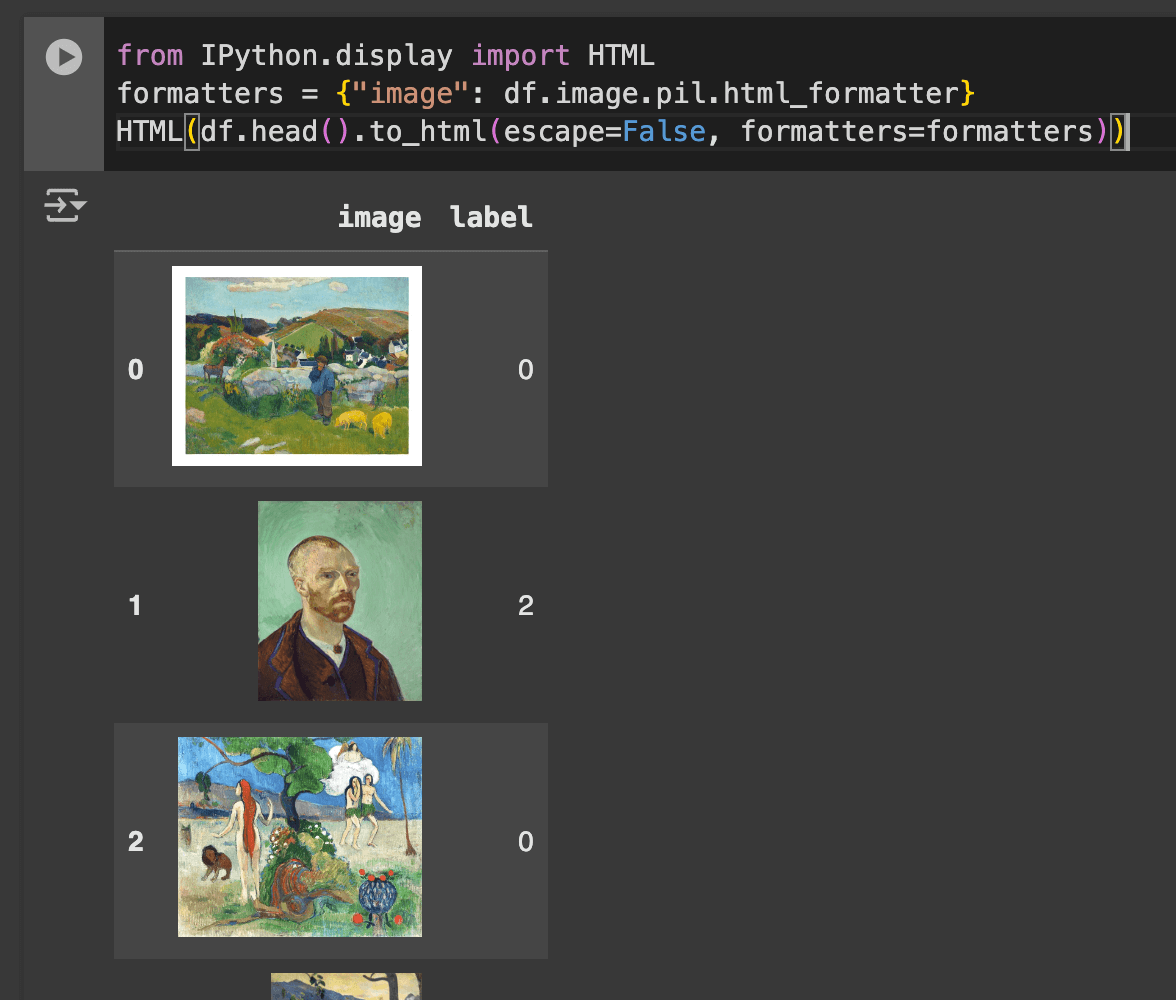
You can display a pandas dataframe of images in a Jupyter Notebook or on Google Colab in HTML:
from IPython.display import HTML
HTML(df.head().to_html(escape=False, formatters={"image": df.image.pil.html_formatter}))
Example on the julien-c/impressionists dataset for painting classification:


Download files
Download the file for your platform. If you're not sure which to choose, learn more about installing packages.
Source Distribution
Built Distribution
Filter files by name, interpreter, ABI, and platform.
If you're not sure about the file name format, learn more about wheel file names.
Copy a direct link to the current filters
File details
Details for the file pandas_image_methods-0.1.1.tar.gz.
File metadata
- Download URL: pandas_image_methods-0.1.1.tar.gz
- Upload date:
- Size: 7.9 kB
- Tags: Source
- Uploaded using Trusted Publishing? No
- Uploaded via: poetry/1.8.5 CPython/3.12.2 Darwin/23.4.0
File hashes
| Algorithm | Hash digest | |
|---|---|---|
| SHA256 |
8860f0feffd1cb6702b9110f9b845c9f976b7b7caa31f5e3151349efdad85182
|
|
| MD5 |
c26a74cf1609fe08bedde8c7c57e4868
|
|
| BLAKE2b-256 |
b5bf6781d78ce72b5e56ce2b2489eed073a713ddb7c33493f90588a2d893ebb2
|
File details
Details for the file pandas_image_methods-0.1.1-py3-none-any.whl.
File metadata
- Download URL: pandas_image_methods-0.1.1-py3-none-any.whl
- Upload date:
- Size: 8.9 kB
- Tags: Python 3
- Uploaded using Trusted Publishing? No
- Uploaded via: poetry/1.8.5 CPython/3.12.2 Darwin/23.4.0
File hashes
| Algorithm | Hash digest | |
|---|---|---|
| SHA256 |
bb2d78d70be57a788b8af2c636358d887b7818e6a168c191031f0b2480ebe546
|
|
| MD5 |
e21b935665942a2f5f8cd54b5f1518ee
|
|
| BLAKE2b-256 |
b0b5feed77f6751844b624410031bebd365cd16f7d5bc5d86121a52f46ca0ba0
|






