
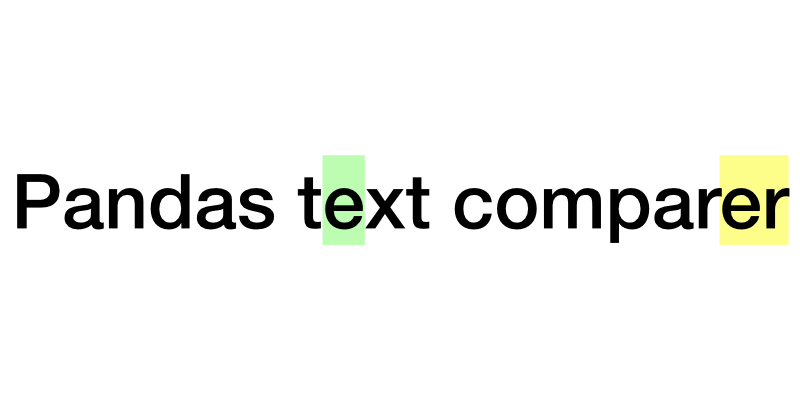
A library designed to compare texts within a pandas DataFrame, highlighting changes and computing similarity ratios. It utilizes difflib.SequenceMatcher to perform detailed comparisons and generate results that can be easily interpreted and displayed in HTML format.
Features
Medium.com - How to compare texts in Pandas
- HTML Output: Generate an HTML representation of the comparison results, which highlights
additions,deletions, andmodificationsin the text. - Similarity Assessment: Compute a similarity ratio for each pair of compared texts, allowing quick assessment of text changes.
- Flexible Integration: Designed to work directly with pandas DataFrames, making it easy to integrate into existing data processing pipelines.
Usage
Installation:
pip install pandas-text-comparer
Necessary imports:
from IPython import display
import pandas as pd
from pandas_text_comparer import TextComparer
Nice-to-haves (not required). Read more here and here
from pandarallel import pandarallel  # multi-core processing
from tqdm.auto import tqdm  # progress bar

tqdm.pandas()
pandarallel.initialize(progress_bar=True)
1. Run the comparison
Specify the names of your columns and run the computation.
# A toy GPT-4 generated dataset. Replace with your data
df = pd.read_csv("https://github.com/n-splv/pandas-text-comparer/raw/main/data/demo/review-responses.csv.gz")

comparer = TextComparer(df, column_a="llm_response", column_b="human_response")
comparer.run()
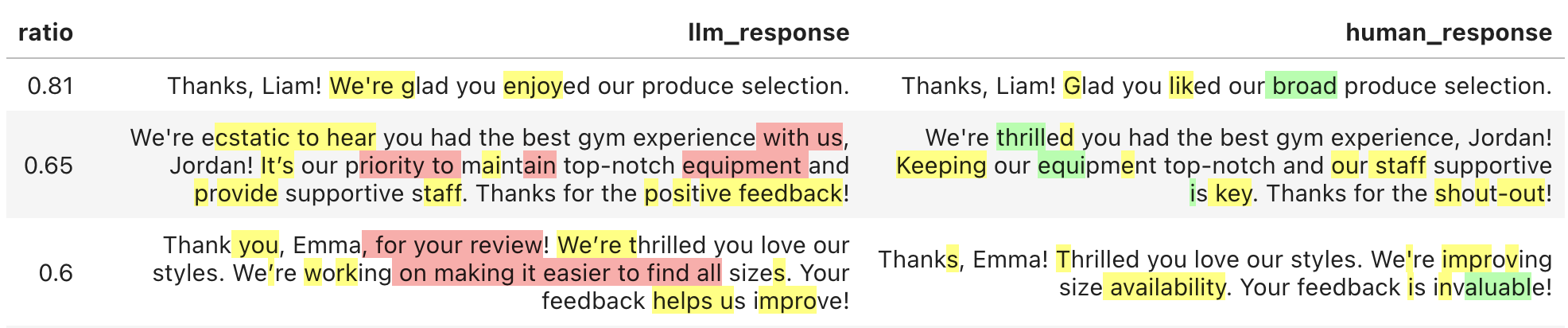
2. Explore the difference
Generate an HTML table. It can be viewed with IPython.display in Jupyter.
Alternatively, you can write it to a file and open in any web browser.
html = comparer.get_html()
display.HTML(html)
3. Sort by the severity of edits
Sort the result by ratio - difflib.SequenceMatcher's metric of similarity between two texts, on the scale from 0 to 1. Higher values mean
that the texts are more similar.
html = comparer.get_html(sort_by_ratio="desc") # or "asc"
4. Add columns to the view
Add any columns from the original data to the HTML by simply passing a slice of
the DataFrame to get_html method.
columns = ["review_id", "company_name"]
html = comparer.get_html(df[columns])
5. Filter rows to display
When you provide any pandas object with an index (i.e. pd.DataFrame, pd.Series or pd.Indes) as an argument to get_html,
it is also used to filter the rows.
filt = df.company_name == "FitFusion"

# Filter rows & add columns
html = comparer.get_html(df[filt])

# Just filter rows
html = comparer.get_html(df[filt].index)
6. Save and load the results
A comparer stores its results in a DataFrame - comparer.result. This data can be persisted and used later on to create
a new comparer. This way, you avoid the re-computation:
result_filepath = "data/comparer_result.csv"
comparer.result.to_csv(result_filepath)

# Don't forget to specify the index column
loaded_result = pd.read_csv(result_filepath, index_col=0)
new_comparer = TextComparer.from_result(loaded_result)
Also, if you need to further process your data based on the computed similarities of texts, just grab this column from the result:
df["similarity_ratio"] = comparer.result.ratio
1 maintainer

Download files
Download the file for your platform. If you're not sure which to choose, learn more about installing packages.
Source Distribution
Built Distribution
Filter files by name, interpreter, ABI, and platform.
If you're not sure about the file name format, learn more about wheel file names.
Copy a direct link to the current filters
File details
Details for the file pandas_text_comparer-0.1.1.tar.gz.
File metadata
- Download URL: pandas_text_comparer-0.1.1.tar.gz
- Upload date:
- Size: 5.8 kB
- Tags: Source
- Uploaded using Trusted Publishing? No
- Uploaded via:
poetry/1.8.2 CPython/3.10.3 Darwin/23.4.0
File hashes
| Algorithm | Hash digest | |
|---|---|---|
| SHA256 |
0461f3941ca9667b5902ea4b76f15848d3215cff46e995f28cf05acbf61e8879
|
|
| MD5 |
c9e744fa6a6e494216c49ff4fd88dfd4
|
|
| BLAKE2b-256 |
e324e23bc78336411562ccfd3068360ec36baeea5a9ba2d50e13b41ed7e89c42
|
File details
Details for the file pandas_text_comparer-0.1.1-py3-none-any.whl.
File metadata
- Download URL: pandas_text_comparer-0.1.1-py3-none-any.whl
- Upload date:
- Size: 6.6 kB
- Tags: Python 3
- Uploaded using Trusted Publishing? No
- Uploaded via:
poetry/1.8.2 CPython/3.10.3 Darwin/23.4.0
File hashes
| Algorithm | Hash digest | |
|---|---|---|
| SHA256 |
e7470d4ca47576ae7ab1933dadd59900cb5db2ed8d6d5081b7417aa4e0b29a33
|
|
| MD5 |
f53ff13938faeade933684a14dcb8a1d
|
|
| BLAKE2b-256 |
bf20e299240a34d17e9747915062dec1fe1a28965b9ac782fd4e73df62afdc58
|













