
pandas-xlsx-tables
Even though you might not like it, Excel isn't going anywhere. And Excel with tables is a lot better than without. Some highlights are: better performance, column references by name (instead of named ranges), sticky headers (instead of freeze panes), stricter typing (instead of random types), and sort/filter dropdowns.
By default, Pandas provides read and write functionality for Excel, but it cannot create native Excel tables (the result is only formatted like one). This is where pandas-xlsx-tables comes in: it converts Excel tables to dataframes and vice versa while mostly preserving data types. The API has been kept deliberately simple to provide useful functionality out of the box.
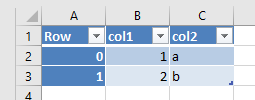
>>> from pandas_xlsx_tables import xlsx_table_to_df
>>> df = xlsx_table_to_df("my_file.xlsx", "Table1")
>>> df
     col1 col2
Row
0       1    a
1       2    b
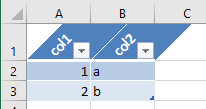
And the reverse process:
>>> from pandas_xlsx_tables import df_to_xlsx_table
>>> df_to_xlsx_table(df, "my_table", header_orientation="diagonal", index=False)
Why not integrate this in Pandas directly?
Due to the complexity of Pandas and the large number of users, it is very difficult to significantly change the current excel implementation. Additionally, the available extension points for different engines are limited. Basically I tried and gave up (but of course I would prefer having this built into Pandas).
1 maintainer

Metadata
1 maintainer
Release files for pandas-xlsx-tables 1.1.2
For a detailed explanation of source distributions (sdists) and built distributions (wheels), please see the package formats documentation.
Source distribution (sdist)
| File | Size | Uploaded | Provenance | |
|---|---|---|---|---|
| pandas_xlsx_tables-1.1.2.tar.gz | 32.8 kB | Without provenance | Details |
Built distribution (wheel)
| File | Interpreter | ABI | Platform | Reset |
|---|---|---|---|---|
| pandas_xlsx_tables-1.1.2-py2.py3-none-any.whl | Python 2, Python 3 | none | any | Details |
Total release size: 41.0 kB
Release files / pandas_xlsx_tables-1.1.2.tar.gz
| Download URL | pandas_xlsx_tables-1.1.2.tar.gz |
|---|---|
| Size | 32.8 kB |
| Tags | Source |
|
SHA-256 checksum How to use checksums |
4555dc5d8c6265c7d07b51e3993a5f8e68336214ba72f32fef609bec786e39e1
|
|
BLAKE2b-256 checksum How to use checksums |
d965d933a680915ba4af1bc0415d5513c6da6a78c608ba3dc7fc647bb4668fc8
|
| Upload date | |
|
Uploaded using Trusted Publishing? What is trusted publishing? |
No |
| Uploaded via |
twine/6.2.0 CPython/3.10.20
|
Release files / pandas_xlsx_tables-1.1.2-py2.py3-none-any.whl
| Download URL | pandas_xlsx_tables-1.1.2-py2.py3-none-any.whl |
|---|---|
| Size | 8.2 kB |
| Tags | Python 2 Python 3 |
|
SHA-256 checksum How to use checksums |
ef10fe80668041bc9846a43cb7009c01d39fed0312bb31caae2d43a20efa7101
|
|
BLAKE2b-256 checksum How to use checksums |
397cf419202103f4d7e2dea3439dbdf15dc8c4eb583543968c3bfa06eff27f96
|
| Upload date | |
|
Uploaded using Trusted Publishing? What is trusted publishing? |
No |
| Uploaded via |
twine/6.2.0 CPython/3.10.20
|
Security for pandas-xlsx-tables 1.1.2
Provenance
Provenance describes where a file came from. On PyPI, provenance is shared via attestations, which provide a verifiable record of the build or publishing details. View details, limitations and caveats.
No provenance found
None of the files in this release were uploaded with provenance metadata.
A note on package security
PyPI is a repository for distributing packages, not a service for auditing them. While third-party security researchers and our staff do their best to detect and remove malicious packages, PyPI cannot guarantee the quality, security or suitability of any given package.
To learn more about protecting yourself from malicious actors, visit our package security documentation.














