
This release is a pre-release and may not be stable for production use.
✨ Welcome to panel-material-ui
| Downloads |  |
| Build Status |  |
| Coverage |  |
| Latest dev release |   |
| Latest release |     |
| Docs |  
|
| Support |  
|
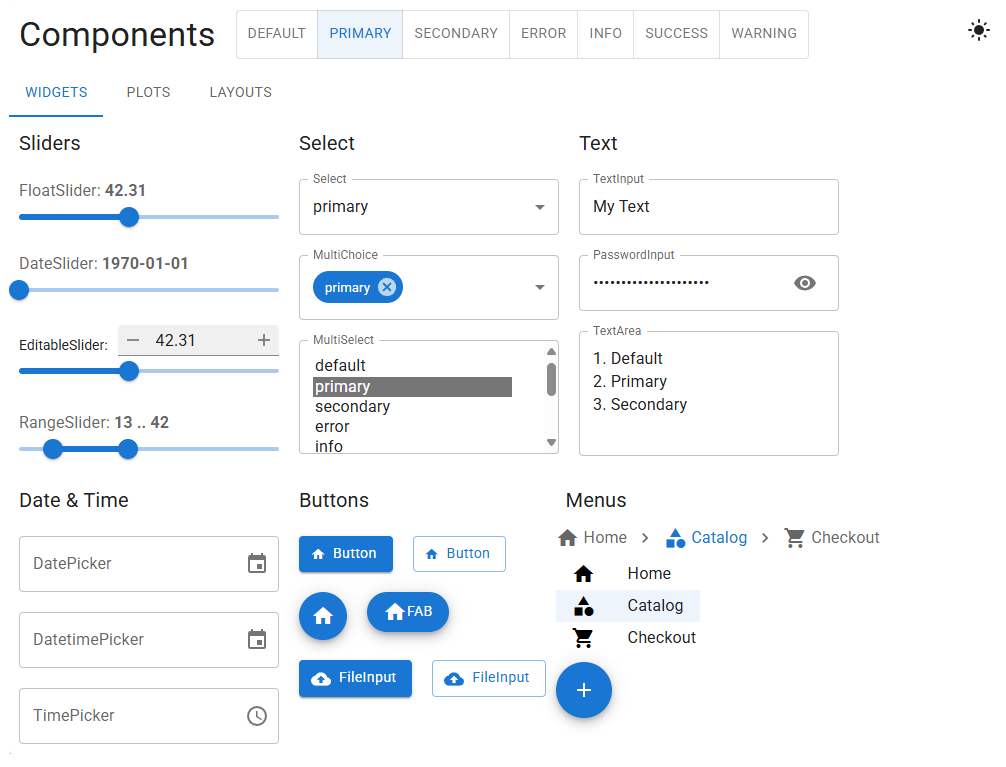
Welcome to Panel Material UI – a library that brings the sleek design and comprehensive component set of Material UI into the world of Panel.
Why Panel Material UI?
-
Consistent Look & Feel Panel Material UI leverages Material UI’s design principles to give your Panel dashboards and applications a modern, cohesive style.
-
Easy Theming & Styling Take control of your UI using Material UI’s theming concepts. Customize colors, typography, spacing, and more with minimal configuration. Quickly modify styling for one-off situations using the sx parameter or create global overrides via theme_config.
-
Seamless Dark Mode Effortlessly toggle between light and dark palettes. Whether you want a permanently dark dashboard, a user-driven switch, or to match the system preference, Panel Material UI has you covered.
-
Familiar Panel API All components provide a similar API to native Panel widgets, ensuring a smooth developer experience. Pass parameters, bind widgets to reactive functions, and lay them out using Panel’s layout system.
-
Rich Component Set Access a growing collection of Material UI–inspired components (Buttons, Sliders, Cards, Dialogs, and more), all adapted to work with Panel. Spend less time building UI from scratch and more time showcasing your data.
-
Powerful Theming Inheritance Define a theme at a parent level and let it automatically apply to child components without extra configuration, reducing repetitive code while maintaining consistent branding.
Thanks for your support as we (and maybe you?) keep making Panel Material UI even better!
Want to get involved? Contribute on GitHub or share your feedback - we’d love to hear from you.
Installation
Install panel-material-ui via pip:
pip install panel-material-ui
or from conda-forge:
conda install -c conda-forge panel-material-ui
Documentation
You can find the documentation here.
❤️ Contributions
Contributions and co-maintainers are very welcome! Please submit issues or pull requests to the GitHub repository. Check out the DEVELOPER_GUIDE for more information.
1 maintainer

Release files for panel-material-ui 0.15.0rc0
For a detailed explanation of source distributions (sdists) and built distributions (wheels), please see the package formats documentation.
Source distribution (sdist)
| File | Size | Uploaded | |
|---|---|---|---|
| panel_material_ui-0.15.0rc0.tar.gz | 4.0 MB | Details |
Built distribution (wheel)
| File | Interpreter | ABI | Platform | Reset |
|---|---|---|---|---|
| panel_material_ui-0.15.0rc0-py3-none-any.whl | Python 3 | none | any | Details |
Total release size: 5.8 MB
Release files / panel_material_ui-0.15.0rc0.tar.gz
| Download URL | panel_material_ui-0.15.0rc0.tar.gz |
|---|---|
| Size | 4.0 MB |
| Tags | Source |
|
SHA-256 checksum How to use checksums |
e1253c73e349c5ff9f89014b231f5dc2c61d3c2814300f042937ee7764986504
|
|
BLAKE2b-256 checksum How to use checksums |
2081b8205143e6b1db09cd105b69a691f46f688605f55c8309724b680824f0b7
|
| Upload date | |
|
Uploaded using Trusted Publishing? What is trusted publishing? |
Yes |
| Uploaded via |
twine/7.0.0 CPython/3.13.14
|
Provenance
Provenance describes where a file came from. On PyPI, provenance is shared via attestations, which provide a verifiable record of the build or publishing details. View details, limitations and caveats.


PyPI Publish Attestation
PyPI verified that this artifact, at this checksum, originated from the publisher listed below.
Signed by GitHub Actions, verified by PyPI on Sep 8, 2026.
Transparency logRelease files / panel_material_ui-0.15.0rc0-py3-none-any.whl
| Download URL | panel_material_ui-0.15.0rc0-py3-none-any.whl |
|---|---|
| Size | 1.8 MB |
| Tags | Python 3 |
|
SHA-256 checksum How to use checksums |
253a28e10a99bcd7ea941106c0a0e5b293bd18db17d6f32f23bc3ac76b9807fd
|
|
BLAKE2b-256 checksum How to use checksums |
6727bb853243e448b49e43d9915d2a178ff6bc7f5cc3ba889992872717a13e4c
|
| Upload date | |
|
Uploaded using Trusted Publishing? What is trusted publishing? |
Yes |
| Uploaded via |
twine/7.0.0 CPython/3.13.14
|
Provenance
Provenance describes where a file came from. On PyPI, provenance is shared via attestations, which provide a verifiable record of the build or publishing details. View details, limitations and caveats.
PyPI Publish Attestation
PyPI verified that this artifact, at this checksum, originated from the publisher listed below.
Signed by GitHub Actions, verified by PyPI on Sep 8, 2026.
Transparency log













