
Panel extension to auto-generate Forms from OpenAPI schemas.
Verified details
These details have been verified by PyPIProject links
GitHub Statistics
Maintainers

Project description
✨ panel-openapi




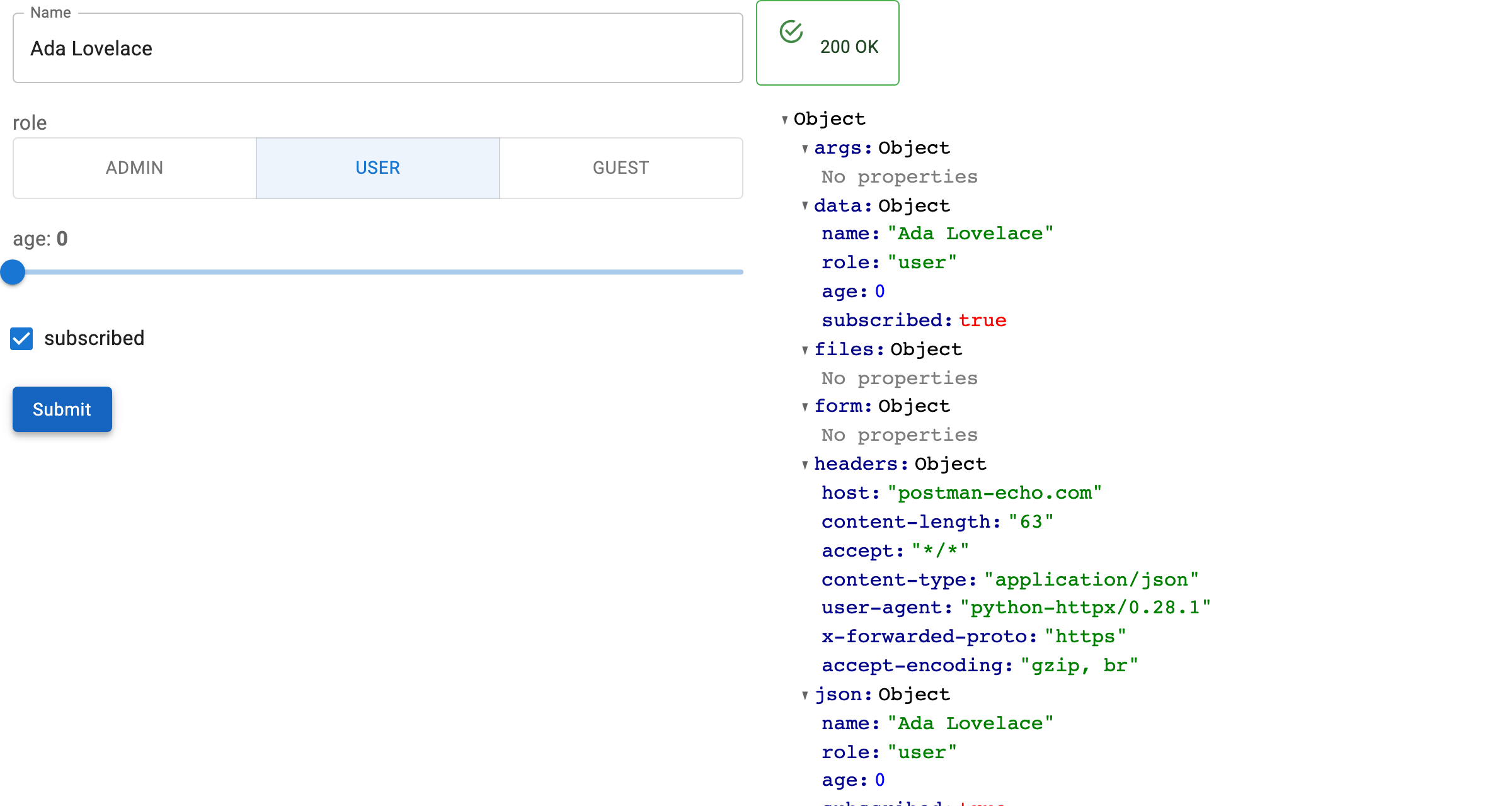
Give it an OpenAPI document, a path and a method, and get a working Panel form: a widget per parameter, a real HTTP request on submit, and the response rendered.
There is no form to write, no request to assemble, and nothing to keep in sync when the API changes. The schema already says what the inputs are.
Features
- No form code — every path, query, header and body field becomes a widget,
chosen from its schema: enums become radio buttons or selects, bounded numbers
become sliders,
format: datebecomes a date picker. - Any spec source — a URL, a plain dict, or a FastAPI app's
api.openapi(). OpenAPI 3.0 and 3.1 both work. - Real requests — submit issues the call with
httpxand renders the status and body. Required fields are enforced from the document. - Reactive targeting —
path,methodandbase_urlare parameters, so one form can serve any operation in the document. - Record editing —
OpenAPIRecordEditorloads a record from aGETand sends the edits to the matchingPATCH/PUT/POST. APATCHsends only the fields that changed,readOnlyfields are never sent, and an optional dialog shows the diff before anything leaves the browser. - Yours to rearrange —
formandresponseare plain Panel containers, and the introspection helpers (load_openapi,collect_fields,schema_to_widget) are public if you would rather build the form yourself.
📖 Documentation — quickstart, how-to guides and API reference.
Pin your version!
This project is in its early stages, so if you find a version that suits your needs, it’s recommended to pin your version, as updates may introduce changes.
Installation
Install it via pip:
pip install panel-openapi
Usage
Point a form at one operation of a document:
import panel as pn

from panel_openapi import OpenAPIForm

pn.extension()

form = OpenAPIForm(
    "https://petstore3.swagger.io/api/v3/openapi.json",
    base_url="https://petstore3.swagger.io/api/v3",
    path="/pet/{petId}",
    method="get",
)

form.servable()
panel serve app.py --show
Or load a record and edit it, sending only what changed:
from panel_openapi import OpenAPIRecordEditor

editor = OpenAPIRecordEditor(
    spec,
    base_url="https://api.example.com",
    path="/articles/{article_id}",   # GET to read, PATCH found automatically
    confirm=True,                    # show the diff before saving
)

editor.servable()
See examples/ for runnable scripts against real APIs, and the
documentation for how-to
guides.
Development
git clone https://github.com/panel-extensions/panel-openapi
cd panel-openapi
For a simple setup use uv:
uv venv
source .venv/bin/activate # on linux. Similar commands for windows and osx
uv pip install -e .[dev]
pre-commit run install
pytest tests
For the full Github Actions setup use pixi:
pixi run pre-commit-install
pixi run postinstall
pixi run test
This repository is based on copier-template-panel-extension (you can create your own Panel extension with it)!
To update to the latest template version run:
pixi exec --spec copier --spec ruamel.yaml -- copier update --defaults --trust
Note: copier will show Conflict for files with manual changes during an update. This is normal. As long as there are no merge conflict markers, all patches applied cleanly.
❤️ Contributing
Contributions are welcome! Please follow these steps to contribute:
- Fork the repository.
- Create a new branch:
git checkout -b feature/YourFeature. - Make your changes and commit them:
git commit -m 'Add some feature'. - Push to the branch:
git push origin feature/YourFeature. - Open a pull request.
Please ensure your code adheres to the project's coding standards and passes all tests.
Project details
Verified details
These details have been verified by PyPIProject links
GitHub Statistics
Maintainers
Release history Release notifications | RSS feed

Download files
Download the file for your platform. If you're not sure which to choose, learn more about installing packages.
Source Distribution
Built Distribution
Filter files by name, interpreter, ABI, and platform.
If you're not sure about the file name format, learn more about wheel file names.
Copy a direct link to the current filters
File details
Details for the file panel_openapi-0.1.0a0.tar.gz.
File metadata
- Download URL: panel_openapi-0.1.0a0.tar.gz
- Upload date:
- Size: 669.9 kB
- Tags: Source
- Uploaded using Trusted Publishing? Yes
- Uploaded via: twine/6.1.0 CPython/3.13.14
File hashes
| Algorithm | Hash digest | |
|---|---|---|
| SHA256 |
2e8267bedfeb35ccf5ebc9251b7873d6516cdd73349344977f910487416d0b54
|
|
| MD5 |
86cb7c69b64524e7107ae2d52bed9af3
|
|
| BLAKE2b-256 |
41a00fc6dcd6f3f75948d173d84cd1e0e13932242451d27968a4971160a2690c
|
Provenance
The following attestation bundles were made for panel_openapi-0.1.0a0.tar.gz:
Publisher:
build.yml on panel-extensions/panel-openapi
-
Statement:
-
Statement type:
https://in-toto.io/Statement/v1 -
Predicate type:
https://docs.pypi.org/attestations/publish/v1 -
Subject name:
panel_openapi-0.1.0a0.tar.gz -
Subject digest:
2e8267bedfeb35ccf5ebc9251b7873d6516cdd73349344977f910487416d0b54 - Sigstore transparency entry: 2280825822
- Sigstore integration time:
-
Permalink:
panel-extensions/panel-openapi@d51f4e4a09ccdf214b4e49964461f82fcd48b752 -
Branch / Tag:
refs/tags/v0.1.0a0 - Owner: https://github.com/panel-extensions
-
Access:
public
-
Token Issuer:
https://token.actions.githubusercontent.com -
Runner Environment:
github-hosted -
Publication workflow:
build.yml@d51f4e4a09ccdf214b4e49964461f82fcd48b752 -
Trigger Event:
push
-
Statement type:
File details
Details for the file panel_openapi-0.1.0a0-py3-none-any.whl.
File metadata
- Download URL: panel_openapi-0.1.0a0-py3-none-any.whl
- Upload date:
- Size: 22.7 kB
- Tags: Python 3
- Uploaded using Trusted Publishing? Yes
- Uploaded via: twine/6.1.0 CPython/3.13.14
File hashes
| Algorithm | Hash digest | |
|---|---|---|
| SHA256 |
e21a3a093e49d6f4be5976279ef04809daa03174bef4799f198088c66c5acf34
|
|
| MD5 |
47d37dcb8c93e6b525dcd7f5a173f859
|
|
| BLAKE2b-256 |
db8e4fc0ed9d3d4a7cdf241e3728b1bb15bcc6467d61151e3899bb2f35002adf
|
Provenance
The following attestation bundles were made for panel_openapi-0.1.0a0-py3-none-any.whl:
Publisher:
build.yml on panel-extensions/panel-openapi
-
Statement:
-
Statement type:
https://in-toto.io/Statement/v1 -
Predicate type:
https://docs.pypi.org/attestations/publish/v1 -
Subject name:
panel_openapi-0.1.0a0-py3-none-any.whl -
Subject digest:
e21a3a093e49d6f4be5976279ef04809daa03174bef4799f198088c66c5acf34 - Sigstore transparency entry: 2280825824
- Sigstore integration time:
-
Permalink:
panel-extensions/panel-openapi@d51f4e4a09ccdf214b4e49964461f82fcd48b752 -
Branch / Tag:
refs/tags/v0.1.0a0 - Owner: https://github.com/panel-extensions
-
Access:
public
-
Token Issuer:
https://token.actions.githubusercontent.com -
Runner Environment:
github-hosted -
Publication workflow:
build.yml@d51f4e4a09ccdf214b4e49964461f82fcd48b752 -
Trigger Event:
push
-
Statement type:






