
✨ panel-web-llm



This extension for HoloViz Panel introduces a client-side interface for running large language models (LLMs) directly in the browser.
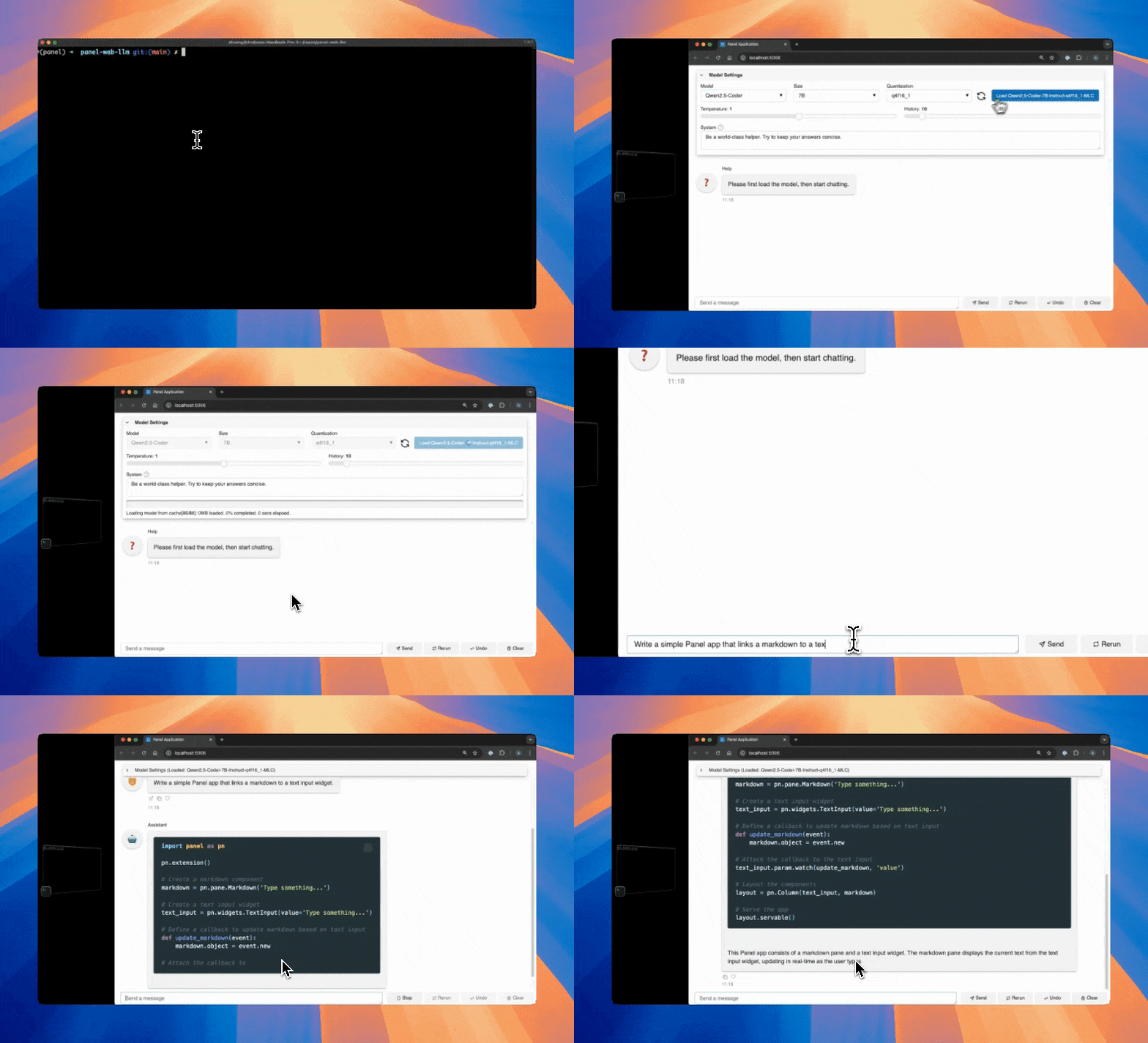
It leverages WebLLM under the hood to provide an in-browser LLM execution environment, enabling fully client-side interactions without relying on server-side APIs.
Features
- Run LLMs in the Browser: Execute large language models directly in the browser without requiring server-side APIs or cloud services.
- Offline Capability: Cache models locally in the browser, enabling offline use after initial download.
- Model Variety: Supports multiple models, including Llama 2 and Qwen 2.5. Check Available Models for the most up-to-date list.
- Privacy-Preserving: Keeps all computations client-side, ensuring data privacy and security.
- Panel Integration: Effortlessly incorporate LLM-powered features into interactive Panel applications.
Pin Version
This project is in its early stages, so if you find a version that suits your needs, it’s recommended to pin your version, as updates may introduce changes.
Installation
Install it via pip:
pip install panel-web-llm
Usage
Online
Try it out in Examples.
Command Line Interface
Once installed, you may launch the web LLM in the terminal with the following command:
panel-web-llm
Once the server launches, the Load <model_name> button has been clicked, the model is cached in your browser.
That means, even if you restart the server without internet, you can still run that same model offline, as long as your browser cache is not cleared.
The following is an alias for convenience:
pllm
The default model used is Qwen2.5-Coder-7B-Instruct-q4f16_1-MLC. To default to another model:
panel-web-llm run <model_name>
Replace <model_name> with the name of the model you want to use. For a list of models:
panel-web-llm list
Python
You can seamlessly integrate the Web LLM interface into your Panel applications:
import panel as pn
from panel_web_llm import WebLLMInterface
pn.extension()

template = pn.template.FastListTemplate(
    title="Web LLM Interface", main=[WebLLMInterface()]
)
template.show()
If you don't like the built-in layout of WebLLMInterface, you can instead wrap WebLLM manually:
import panel as pn
from panel_web_llm import WebLLM

pn.extension()

web_llm = WebLLM(load_layout="column")
chat_interface = pn.chat.ChatInterface(
    callback=web_llm.callback,
)

template = pn.template.FastListTemplate(
    title="Web LLM Interface",
    main=[chat_interface],
    sidebar=[web_llm.menu, web_llm],  # important to include `web_llm`
    sidebar_width=350,
)
template.show()
Development
git clone https://github.com/panel-extensions/panel-web-llm
cd panel-web-llm
For a simple setup use uv:
uv venv
source .venv/bin/activate # on linux. Similar commands for windows and osx
uv pip install -e .[dev]
pre-commit run install
pytest tests
For the full Github Actions setup use pixi:
pixi run pre-commit-install
pixi run postinstall
pixi run test
This repository is based on copier-template-panel-extension (you can create your own Panel extension with it)!
To update to the latest template version run:
pixi exec --spec copier --spec ruamel.yaml -- copier update --defaults --trust
Note: copier will show Conflict for files with manual changes during an update. This is normal. As long as there are no merge conflict markers, all patches applied cleanly.
❤️ Contributing
Contributions are welcome! Please follow these steps to contribute:
- Fork the repository.
- Create a new branch:
git checkout -b feature/YourFeature. - Make your changes and commit them:
git commit -m 'Add some feature'. - Push to the branch:
git push origin feature/YourFeature. - Open a pull request.
Please ensure your code adheres to the project's coding standards and passes all tests.
1 maintainer

Metadata
1 maintainer
Release files for panel-web-llm 0.0.2
For a detailed explanation of source distributions (sdists) and built distributions (wheels), please see the package formats documentation.
Source distribution (sdist)
| File | Size | Uploaded | Provenance | Actions |
|---|---|---|---|---|
| panel_web_llm-0.0.2.tar.gz | 130.6 kB | With provenance | Details for panel_web_llm-0.0.2.tar.gz |
Built distribution (wheel)
| File | Interpreter | ABI | Platform | Actions Reset |
|---|---|---|---|---|
| panel_web_llm-0.0.2-py3-none-any.whl | Python 3 | none | any | Details for panel_web_llm-0.0.2-py3-none-any.whl |
Total release size: 145.4 kB
Release files / panel_web_llm-0.0.2.tar.gz
| Download URL | panel_web_llm-0.0.2.tar.gz |
|---|---|
| Size | 130.6 kB |
| Tags | Source |
|
SHA-256 checksum How to use checksums |
b06513825a8ad21117b122bd67e0aadc950d5893444d0608eacb02ba88f5b178
|
|
BLAKE2b-256 checksum How to use checksums |
80266f7216c78a61b2d61383f3159167e506144d662e541dda11caf0018d29da
|
| Upload date | |
|
Uploaded using Trusted Publishing? What is trusted publishing? |
Yes |
| Uploaded via |
twine/6.0.1 CPython/3.12.8
|
Provenance
Provenance describes where a file came from. On PyPI, provenance is shared via attestations, which provide a verifiable record of the build or publishing details. View details, limitations and caveats.


PyPI Publish Attestation
PyPI verified that this artifact, at this checksum, originated from the publisher listed below.
Signed by GitHub Actions, verified by PyPI on Apr 8, 2025.
Transparency logRelease files / panel_web_llm-0.0.2-py3-none-any.whl
| Download URL | panel_web_llm-0.0.2-py3-none-any.whl |
|---|---|
| Size | 14.8 kB |
| Tags | Python 3 |
|
SHA-256 checksum How to use checksums |
90dea3ce16c91205db337ca2c255ee2de35892f85c5f05435196d74917fcc073
|
|
BLAKE2b-256 checksum How to use checksums |
cfe8fb558d459c825b3346890ae3b5d824faf2bb61f49491f1cbd0a2808cbb10
|
| Upload date | |
|
Uploaded using Trusted Publishing? What is trusted publishing? |
Yes |
| Uploaded via |
twine/6.0.1 CPython/3.12.8
|
Provenance
Provenance describes where a file came from. On PyPI, provenance is shared via attestations, which provide a verifiable record of the build or publishing details. View details, limitations and caveats.
PyPI Publish Attestation
PyPI verified that this artifact, at this checksum, originated from the publisher listed below.
Signed by GitHub Actions, verified by PyPI on Apr 8, 2025.
Transparency logSecurity for panel-web-llm 0.0.2
Provenance
Provenance describes where a file came from. On PyPI, provenance is shared via attestations, which provide a verifiable record of the build or publishing details. View details, limitations and caveats.
Full provenance
All 2 files in this release have been uploaded with provenance metadata.
Attestation for panel_web_llm-0.0.2.tar.gz
PyPI Publish Attestation
PyPI verified that this artifact, at this checksum, originated from the publisher listed below.
Signed by GitHub Actions, verified by PyPI on Apr 8, 2025.
Transparency logA note on package security
PyPI is a repository for distributing packages, not a service for auditing them. While third-party security researchers and our staff do their best to detect and remove malicious packages, PyPI cannot guarantee the quality, security or suitability of any given package.
To learn more about protecting yourself from malicious actors, visit our package security documentation.














