
Panelini is a user-friendly Python package designed to provide an out-of-the-box panel with a beautiful and responsive layout. It simplifies the creation of interactive dashboards by handling dynamic content seamlessly using Python Panel components. Whether you're building complex data visualizations or simple interactive interfaces, panelini offers an easy-to-use solution that enhances productivity and aesthetics.
Project description
📊 panelini 🐍






panelini is a user-friendly Python package designed to provide an out-of-the-box panel with a beautiful and responsive layout. It simplifies the creation of interactive dashboards by handling dynamic content seamlessly using Python Panel components. Whether you're building complex data visualizations or simple interactive interfaces, this package offers an easy-to-use solution that enhances productivity and aesthetics.
📦 Table of Contents
📄 Features
- Easy Setup: Quickly get started with minimal configuration.
- Beautiful Layouts: Pre-designed, aesthetically pleasing layouts that can be customized to fit your needs.
- Dynamic Content: Efficiently manage and display dynamic content using robust Python Panel components.
- Extensible: Easily extend and integrate with other Python libraries and tools.
- Published on PyPI: Install effortlessly using pip.
🚀 Install
Recommended
uv add panelini
or use pip
pip install panelini
💥 Usage
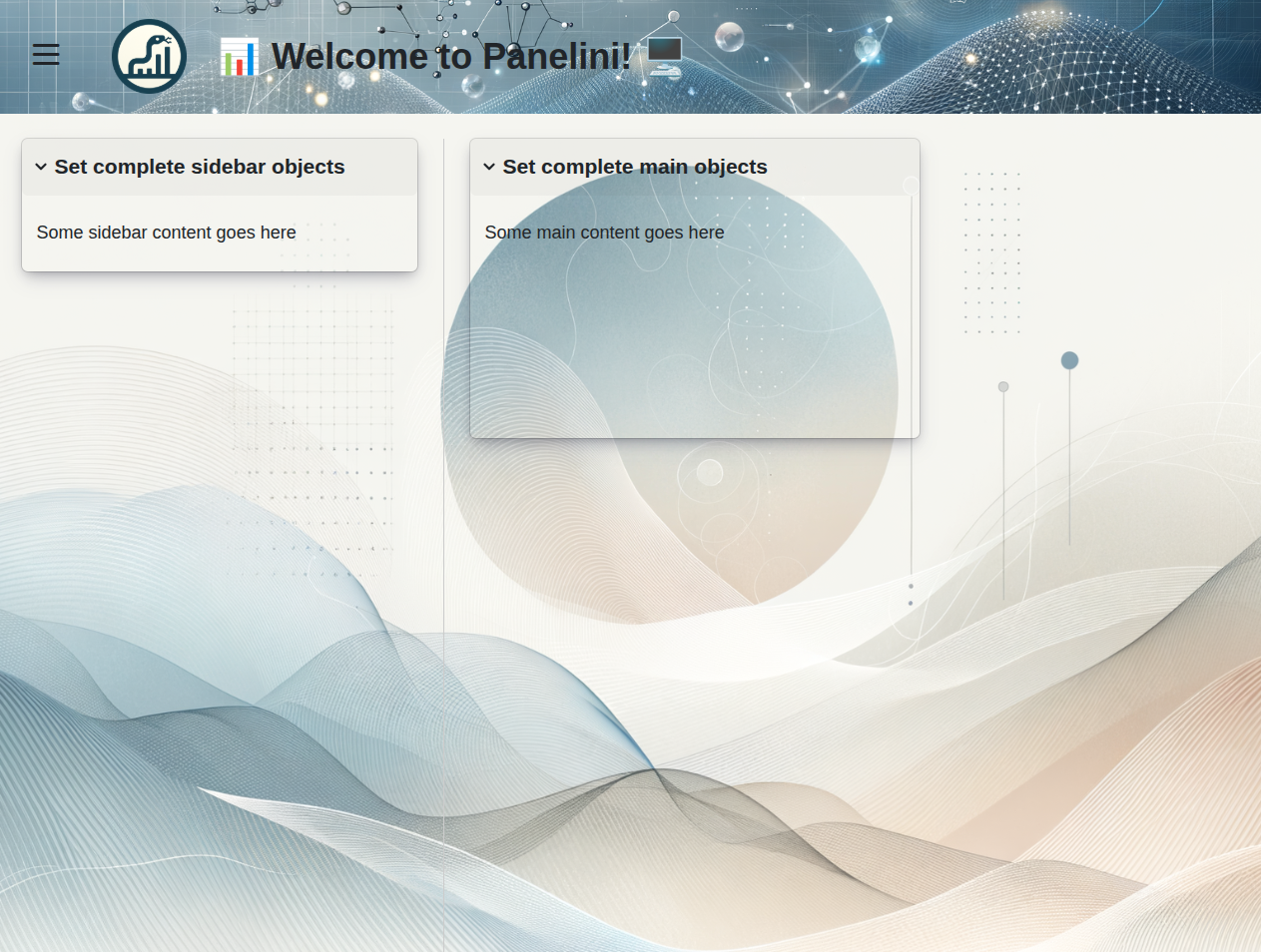
A minimal example to run Panelini can be found in the examples/panelini_min.py file.
Below is a simple code snippet to get you started:
import panel as pn
from panelini import Panelini

# Create an instance of Panelini
app = Panelini(
    title="📊 Welcome to Panelini! 🖥️",
    # main = main_objects # init objects here
)
# Or set objects outside
app.main_set(
    # Use panel components to build your layout
    objects=[
        pn.Card(
            title="Set complete main objects",
            objects=["Some content goes here"],
            width=300,
            max_height=200,
        )
    ]
)
# Servable for debugging using command
# panel serve <panelini_min.py --dev
app.servable()

if __name__ == "__main__":
    # Serve app as you would in panel
    pn.io.server.serve(app, port=2233)
See examples directory for more usage scenarios.
🛞 Commands
Panel command to serve with static content
panel serve examples/panelini_min.py --dev --port 5006 --static-dirs assets="src/panelini/assets" --ico-path src/panelini/assets/favicon.ico
When using
panel serve, make sure to specify the correct paths for your static assets and favicon.
🦥 Authors
📜 Content Attribution
The authors initially generated the logo and banner for this repository using DALL-E 3 and later modified it to better align with the project's vision.
Project details
Release history Release notifications | RSS feed


Download files
Download the file for your platform. If you're not sure which to choose, learn more about installing packages.
Source Distribution
Built Distribution
Filter files by name, interpreter, ABI, and platform.
If you're not sure about the file name format, learn more about wheel file names.
Copy a direct link to the current filters
File details
Details for the file panelini-0.9.4.tar.gz.
File metadata
- Download URL: panelini-0.9.4.tar.gz
- Upload date:
- Size: 6.4 MB
- Tags: Source
- Uploaded using Trusted Publishing? No
- Uploaded via: uv/0.6.14
File hashes
| Algorithm | Hash digest | |
|---|---|---|
| SHA256 |
b6421e7a46bffad884c49be4f2995cf82ba0be920a1668841819e43203029f12
|
|
| MD5 |
50bf9f554af64d52b484ddbdad1f412c
|
|
| BLAKE2b-256 |
b9d231bfd4487a54e83355f7a8b289e0c5539a225281fd2979fa1a31e2054d11
|
File details
Details for the file panelini-0.9.4-py3-none-any.whl.
File metadata
- Download URL: panelini-0.9.4-py3-none-any.whl
- Upload date:
- Size: 1.7 MB
- Tags: Python 3
- Uploaded using Trusted Publishing? No
- Uploaded via: uv/0.6.14
File hashes
| Algorithm | Hash digest | |
|---|---|---|
| SHA256 |
f15653b68257a803c32230bb602e6587c8d9569d2f35dd69f16ba44acb7ff7e3
|
|
| MD5 |
d3e69ab2bebeffe564e8481ba0ab4afc
|
|
| BLAKE2b-256 |
7dd6c668d17d5c2851add64475d5fbdea142201d46bfb04b800224be3e63cfa4
|






