
Pangea AuthN integration for FastMCP

Project description
pangea-authn-fastmcp
Easily add authentication to a FastMCP server with Pangea's AuthN service.
Installation
pip install -U pangea-authn-fastmcp
Pangea AuthN setup
- Create a Pangea account at https://pangea.cloud/signup. During the account creation process, an organization (top-level group) and project (individual app) will be created as well. On the "Get started with a common service" dialog, just click on the Skip button to get redirected to the developer console.
- In the developer console, there will be a list of services in the left hand panel. Click the AuthN service to enable it.
- In the modal, there will be a prompt to create a new Pangea API token or to extend an existing one. Choose Create a new token and click on Done.
- In the left hand panel, click on OAuth Server, then navigate to the Scopes tab. We'll create a new scope to represent one's permission to authenticate with the MCP server.
- To add a custom scope value, click the + Scope button on the right. In
the Create Scope dialog, provide the new scope value details in the
following fields:
- Name: Define the scope value. Note this down for later. A sample one could be "user".
- Display Name: Provide a recognizable name that will appear in the Display Name column in the scopes list.
- Description: Explain what this scope value represents. For example, describe the permissions granted with this scope value.
- Consent Required: Check this option to require explicit user approval for adding this scope value to the access token. This setting may remain unchecked for the purposes of this example.
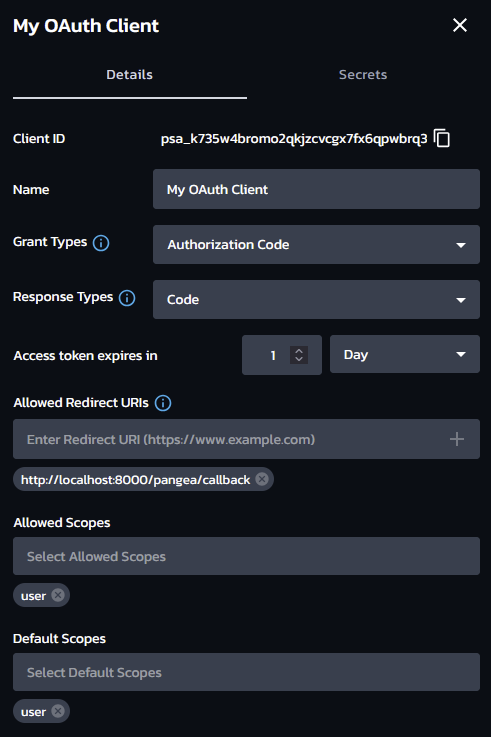
- Navigate back to the Clients tab, then click on the + OAuth Client
button on the right to begin creating a new OAuth client.
- Name: Assign a recognizable name to your client as it will appear in the list of clients in the OAuth Server settings. This name may be updated at any time.
- Grant Type: must be Authorization Code.
- Response Types: only Code is required.
- Allowed Redirect URIs: enter
http://localhost:8000/pangea/callback. Note that for a production MCP server, this should use the remote address of the server (e.g.https://mcp.example.org/pangea/callback) instead of alocalhostaddress. - Allowed Scopes & Default Scopes: add the scope that was created earlier (e.g. "user").
- Note down the Client ID and Client Secret for later. Also note down the Hosted Login URL that is displayed on the AuthN Overview page.
Usage
from fastmcp import FastMCP
from mcp.server.auth.settings import ClientRegistrationOptions

from pangea_authn_fastmcp import PangeaOAuthProvider

# Can load these either from environment variables or from Pangea Vault.
PANGEA_AUTHN_ISSUER_URL = "https://pdn-[...].login.aws.us.pangea.cloud"
PANGEA_AUTHN_CLIENT_ID = "psa_[...]"
PANGEA_AUTHN_CLIENT_SECRET = "pck_[...]"
PANGEA_VAULT_TOKEN = "pts_[...]"

MCP_SCOPES = ["user"]

# In production, this would be the remote URL of the MCP server.
MCP_ISSUER_URL = "http://localhost:8000"

# Create the OAuth provider that will defer to Pangea AuthN for authentication.
oauth_provider = PangeaOAuthProvider(
    mcp_issuer_url=MCP_ISSUER_URL,
    pangea_authn_issuer_url=PANGEA_AUTHN_ISSUER_URL,
    pangea_authn_client_id=PANGEA_AUTHN_CLIENT_ID,
    pangea_authn_client_secret=PANGEA_AUTHN_CLIENT_SECRET,
    mcp_scopes=MCP_SCOPES,
    pangea_authn_scopes=MCP_SCOPES,
    client_registration_options=ClientRegistrationOptions(
        enabled=True, valid_scopes=MCP_SCOPES, default_scopes=MCP_SCOPES
    ),
    required_scopes=MCP_SCOPES,
)

# Configure FastMCP to use the OAuth provider.
mcp = FastMCP(auth=oauth_provider)

# Register a callback route for the OAuth provider.
mcp.custom_route("/pangea/callback", methods=["GET"])(oauth_provider.callback_handler)
Storage backends
These are three types of items that the OAuth provider needs to store:
- Access tokens
- Authorization codes
- OAuth clients
By default, the OAuth provider will store these in memory, which is convenient for development purposes but not recommended for production use. This library comes with an alternative storage backend that uses Pangea Vault to store these items.
from mcp.server.auth.provider import AccessToken, AuthorizationCode
from mcp.shared.auth import OAuthClientInformationFull
from pangea_authn_fastmcp import PangeaAccessToken, PangeaOAuthProvider, PangeaVaultRepository

# Again this can come from an environment variable.
PANGEA_VAULT_TOKEN = "pts_[...]"

oauth_provider = PangeaOAuthProvider(
    # ...

    # Repositories
    access_tokens_repository=PangeaVaultRepository(AccessToken, PANGEA_VAULT_TOKEN),
    auth_codes_repository=PangeaVaultRepository(AuthorizationCode, PANGEA_VAULT_TOKEN),
    clients_repository=PangeaVaultRepository(OAuthClientInformationFull, PANGEA_VAULT_TOKEN),
    client_to_authn_repository=PangeaVaultRepository(PangeaAccessToken, PANGEA_VAULT_TOKEN),
)
To implement a custom storage backend, follow the Repository protocol like so:
from typing import TypeVar

from pangea_authn_fastmcp import Repository


KeyT = TypeVar("KeyT", bound=str)
ValueT = TypeVar("ValueT")

class CustomRepository(Repository[KeyT, ValueT]):
    """A custom storage backend."""

    @override
    async def get(self, key: KeyT) -> ValueT | None:
        # TODO: implement.

    @override
    async def set(self, key: KeyT, value: ValueT) -> None:
        # TODO: implement.

    @override
    async def delete(self, key: KeyT) -> None:
        # TODO: implement.


Download files
Download the file for your platform. If you're not sure which to choose, learn more about installing packages.
Source Distribution
Built Distribution
Filter files by name, interpreter, ABI, and platform.
If you're not sure about the file name format, learn more about wheel file names.
Copy a direct link to the current filters
File details
Details for the file pangea_authn_fastmcp-0.2.1.tar.gz.
File metadata
- Download URL: pangea_authn_fastmcp-0.2.1.tar.gz
- Upload date:
- Size: 94.3 kB
- Tags: Source
- Uploaded using Trusted Publishing? No
- Uploaded via: twine/6.1.0 CPython/3.12.9
File hashes
| Algorithm | Hash digest | |
|---|---|---|
| SHA256 |
2ff524d64d53ca1eb74fac32d259add79be98ba1e193744aed9c4d44b40f0a13
|
|
| MD5 |
b94071875ba5404ba926b3b5eb18e12a
|
|
| BLAKE2b-256 |
2243ad919f582710a8748a30baa29c8659c712c7bb3dc52817e708275b0f1455
|
File details
Details for the file pangea_authn_fastmcp-0.2.1-py3-none-any.whl.
File metadata
- Download URL: pangea_authn_fastmcp-0.2.1-py3-none-any.whl
- Upload date:
- Size: 10.5 kB
- Tags: Python 3
- Uploaded using Trusted Publishing? No
- Uploaded via: twine/6.1.0 CPython/3.12.9
File hashes
| Algorithm | Hash digest | |
|---|---|---|
| SHA256 |
46f0f7905f3841ce723860d2baef3c96bb152a3510ba222bcd17230a425cfe8c
|
|
| MD5 |
8ed315fc46a9880a1b840d5875391be8
|
|
| BLAKE2b-256 |
99584ad5028255fd954151fef66b53492ba9a5497852cf51dff0e0dc49920631
|






