
Explore and analyze large datasets of images

Project description
Panoptic 👀


This documentation also exist in French
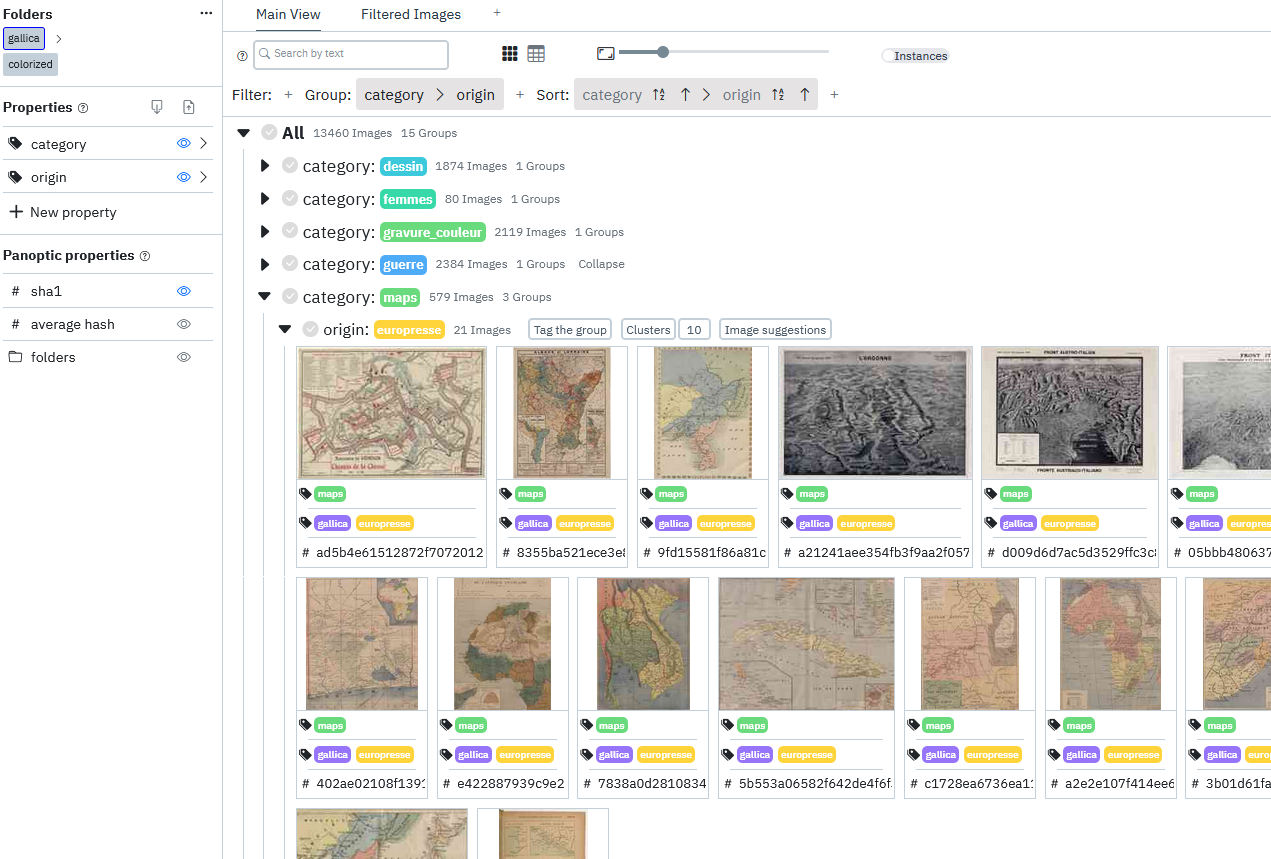
Panoptic is a tool for exploring and annotating large image corpora, using image analysis and machine learning tools to facilitate these tasks.
Since it requires deep learning libraries, it is recommended to use it with a computer with minimal computing capabilities.
Caution: Panoptic is still in active development and is currently a prototype, it is likely that you will encounter bugs, so we recommend to use this tool only for testing and not to rely on it for a substantial academic work.
Windows and Linux installation
Python 3.9 or higher is required, and a custom environnment (venv, pyenv, conda etc.) is recommended. Open a terminal and type:
pip install panopticpanoptic
Mac installation
Just like the windows installation but you will need to also install the xcode tools first.
For this, just use this command in a terminal: xcode-select –-install, it should trigger the installation of the command line tools.
Then run:
pip install panopticpanoptic
Docker installation
If you're having issues with the installation (sometimes the packages can be tricky) or if you just prefair to use Docker it's possible: Start by installing docker:
Option 1 : One folder to rule them all
Make a folder for the docker with a subfolder for the images /path/to/your/folder/images.
docker run -it -p 8000:8000 -v /path/to/your/folder:/data --name panoptic ceressorbonne/panoptic
Option 2 : Separate data and images folders
Make a folder for the panoptic datas (database, thumbnails, etc.) /path/to/your/data/.
And another one withe your images (could be an existing one) /path/to/your/images/.
docker run -it -p 8000:8000 \
-v /path/to/your/data:/data \
-v /path/to/your/images:/data/images \
--name panoptic \
ceressorbonne/panoptic
Access
You can now access panoptic through: https://localhost:8000 As if you were to launch it with the python version
Restart
If you happen to stop panoptic, you can re launch it with :
docker start -ia panoptic
Installation (development)
The following steps involve cloning the directory and are recommended for users who wish to have access to the development versions, or who wish to modify the code themselves in order to contribute.
Backend development only
To test and modify the backend operation, we provide an already built frontend in the backend html folder.
- go to the
panoptic-backfolder - to install the dependencies
python setup.py installto simply use panopticpip install -e .to developpip install -r requirements.txtand you have to addpanoptic-backto the PYTHON_PATH for developping purpose too
- run
python panoptic/main.py
Front and back development
- First of all, perform the installation steps of the backend
- go to the
panoptic-frontfolder - Run
npm install. - run
npm run dev. - before running the backend the
PANOPTIC_ENVenvironment variable should be set toDEVin order to use the development frontend.
Release history Release notifications | RSS feed


Download files
Download the file for your platform. If you're not sure which to choose, learn more about installing packages.
Source Distribution
Built Distribution
Filter files by name, interpreter, ABI, and platform.
If you're not sure about the file name format, learn more about wheel file names.
Copy a direct link to the current filters
File details
Details for the file panoptic-0.3.3.tar.gz.
File metadata
- Download URL: panoptic-0.3.3.tar.gz
- Upload date:
- Size: 1.0 MB
- Tags: Source
- Uploaded using Trusted Publishing? No
- Uploaded via: twine/5.0.0 CPython/3.12.3
File hashes
| Algorithm | Hash digest | |
|---|---|---|
| SHA256 |
9ad2b41fd311ff6cf78ab6c7af1fdabbdb4e86d8f55319fd94e8d91ba7df4b9f
|
|
| MD5 |
a1f48be277c237292568661a4f3b1204
|
|
| BLAKE2b-256 |
12e460f47ea17ea2256984b32aa5dab6c34efb4a153c61a55be3a02c4a25f4e8
|
File details
Details for the file panoptic-0.3.3-py3-none-any.whl.
File metadata
- Download URL: panoptic-0.3.3-py3-none-any.whl
- Upload date:
- Size: 1.0 MB
- Tags: Python 3
- Uploaded using Trusted Publishing? No
- Uploaded via: twine/5.0.0 CPython/3.12.3
File hashes
| Algorithm | Hash digest | |
|---|---|---|
| SHA256 |
b2fbcd2d477a96ca9836698840fbecdb27745148c2e198929f934747ddd0bfa6
|
|
| MD5 |
692f8fb85cc0a871bfdd7fa0d502cd44
|
|
| BLAKE2b-256 |
97c02b0730f46728b5a72adb047aaca0e85824bbb513ae8d2f5ddfd338851be6
|






