

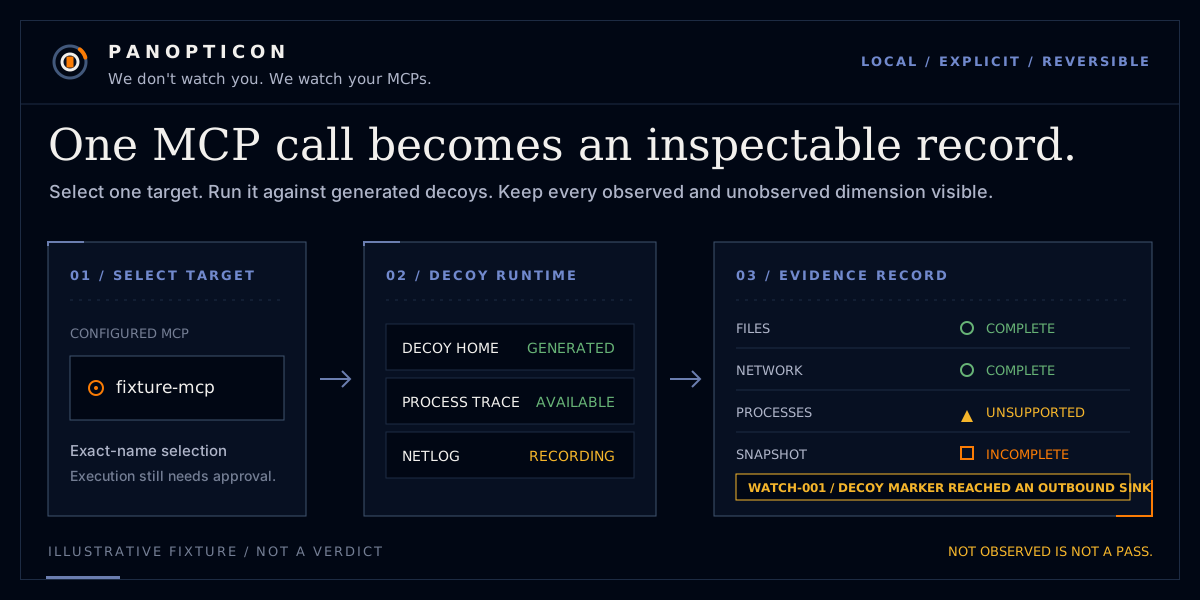



pano finds MCP servers configured in your AI clients, runs a selected server in a decoy-filled
sandbox, and records files, network hosts, processes, and declared-versus-observed differences.
It reports observation evidence; it does not make a verdict for you.

Start here
Install the current public PyPI release, inspect the configured server names, and observe one selected server:
uv tool install panopticon-mcp==1.0.1
pano doctor --offline
pano watch SERVER_NAME --offline
The checked-out repository is unpublished 1.0.2 development. uv sync --all-extras is contributor
setup, not a public installation path.
Replace SERVER_NAME with a name printed by doctor; it is literal text rather than shell angle
brackets. Package installation contacts the selected registry before pano runs. --offline
then disables Panopticon's registry, advisory, package-lookup, and semantic-analyzer outbound
paths. Traffic attempted by the selected MCP remains sandbox evidence rather than a Panopticon
product lookup. doctor does not require Docker or Podman; local watch does.
On a clean runtime, follow Stage images for offline watch
before the first offline observation.
For a one-time version check, uvx --from 'panopticon-mcp==1.0.1' pano version prints
pano 1.0.1 (schema 1.0). Other installation methods, upgrades, rollback, and air-gapped use are
in the installation and release guide.
The bilingual demo source starts at
site/template.html. scripts/build_site.py validates locale parity and
builds both routes deterministically; the SHA-pinned Pages workflow deploys those generated
artifacts from main. The page has no analytics, cookies, local storage, or runtime remote
resources. Requests handled by GitHub Pages remain subject to GitHub's hosting policy.
Pick the right workflow
| You want to… | Start with… | Requirement or boundary |
|---|---|---|
| Find configured MCPs | pano doctor --offline |
No container runtime required |
| Observe one local MCP | pano watch SERVER_NAME --offline |
Docker or Podman; use an exact name from doctor |
| Explain one finding | pano explain RULE_ID |
English by default; add --lang ko for Korean |
| Compare repeated observations | pano baseline create then pano diff SERVER_NAME |
Baselines retain canonical evidence for one installation |
| Analyze an MCP repository | pano scan . --mode quick --offline |
Standard/deep add advisory or semantic paths described in privacy docs |
| Apply repository policy | pano ci . --mode standard --fail-on high |
Writes SARIF and uses documented exit-code precedence |
| Change a client configuration | pano fix SERVER_NAME --dry-run --offline |
Review the diff before a separate --yes invocation |
| Wrap or restore an MCP command | pano install CLIENT --dry-run / pano uninstall CLIENT --dry-run |
Original command is retained for undo |
The complete first-use flow, installation matrix, status table, exit codes, artifact locations, cleanup, troubleshooting, and command examples are in Getting started.
Use Panopticon from an AI agent
Agents should consume JSON and preserve uncertainty instead of summarizing every nonzero exit as a failure or every completed stage as a verdict. The narrow default sequence is:
pano version
pano doctor --offline --json
pano watch SERVER_NAME --offline --json
An agent must not choose --all, pass real environment values, allow destructive calls, run deep
semantic analysis, apply --yes, or delete local evidence without separate explicit authorization.
The copyable operating prompt, response schema, exit-code policy, and confirmation boundaries are
in Operating Panopticon from an AI agent.
Read the result
COMPLETEmeans the stage completed with its stated coverage.UNKNOWNmeans the available evidence cannot support a conclusion.INCOMPLETEmeans the requested observation did not complete all needed work.UNSUPPORTEDmeans that dimension is unavailable for this platform, mode, or target.
These states are not interchangeable. For example, remote observation cannot see server-side file
or process activity and marks those dimensions UNSUPPORTED. A rule ID such as WATCH-003,
CFG-008, or HIST-002 identifies the exact check; read its bilingual explanation with:
pano explain WATCH-003
Review the evidence card and the terminal result together. It intentionally retains visible coverage and rule identifiers rather than converting missing observation into a reassuring result.
How it is designed
cliparses and renders;engineowns typed outcomes and exit policy.- Collectors return exhaustive status, stable
reason_code, coverage, evidence, and diagnostics. - The sandbox receives a generated decoy home, never the user's home.
--selfis the one explicit read-only project-source mount. storeis the only artifact writer and performs canonicalization, leak checking, and atomic replacement before persistence.- The demo is built from bilingual locale catalogs with a deterministic standard-library builder and local browser assets only.
Read the architecture, the demo design system, the frozen decisions, and the product build plan for the complete contracts.
Privacy and cleanup
Read the complete privacy and outbound-traffic table
before observation, especially before allowing real environment values or running
scan --mode deep. --offline disables Panopticon's outbound product paths, but package
installation uses the selected package registry before pano runs. Artifacts are leak-checked
before persistence. Standard/deep scan sends exact locked package coordinates—not source—to OSV
for advisory lookup. Storage, record retention, configuration undo, and package rollback are
covered in the release guide and
limitations.
Lineage
The static, semantic, and dependency analysis assets in scan come from
MCP-Sentinel at commit
e717e955
(MIT). The exact carried file list is in
THIRD_PARTY_NOTICES.md.
MIT.
1 maintainer

Metadata
1 maintainer
Release files for panopticon-mcp 1.0.2
For a detailed explanation of source distributions (sdists) and built distributions (wheels), please see the package formats documentation.
Source distribution (sdist)
| File | Size | Uploaded | Provenance | |
|---|---|---|---|---|
| panopticon_mcp-1.0.2.tar.gz | 4.0 MB | With provenance | Details |
Built distribution (wheel)
| File | Interpreter | ABI | Platform | Reset |
|---|---|---|---|---|
| panopticon_mcp-1.0.2-py3-none-any.whl | Python 3 | none | any | Details |
Total release size: 5.2 MB
Release files / panopticon_mcp-1.0.2.tar.gz
| Download URL | panopticon_mcp-1.0.2.tar.gz |
|---|---|
| Size | 4.0 MB |
| Tags | Source |
|
SHA-256 checksum How to use checksums |
cc694da60fc457ab610fc527f5a4f503ccf0244833fe21dfd792566f5584c215
|
|
BLAKE2b-256 checksum How to use checksums |
6890521fffbed29d2bc396e059241de3a70c2b1f34e6d176fdfbcf69c3e969a5
|
| Upload date | |
|
Uploaded using Trusted Publishing? What is trusted publishing? |
Yes |
| Uploaded via |
twine/7.0.0 CPython/3.13.14
|
Provenance
Provenance describes where a file came from. On PyPI, provenance is shared via attestations, which provide a verifiable record of the build or publishing details. View details, limitations and caveats.


PyPI Publish Attestation
PyPI verified that this artifact, at this checksum, originated from the publisher listed below.
Signed by GitHub Actions, verified by PyPI on Aug 31, 2026.
Transparency logRelease files / panopticon_mcp-1.0.2-py3-none-any.whl
| Download URL | panopticon_mcp-1.0.2-py3-none-any.whl |
|---|---|
| Size | 1.2 MB |
| Tags | Python 3 |
|
SHA-256 checksum How to use checksums |
0b8a2f995632efde58fb65b05b16e0364ddeac22f1dc4ca89f98b03bdfc62e57
|
|
BLAKE2b-256 checksum How to use checksums |
2de6ac9cb170b4edaad4b5f5ac72a92b5567ceb605d6c512bca995fbe06fc058
|
| Upload date | |
|
Uploaded using Trusted Publishing? What is trusted publishing? |
Yes |
| Uploaded via |
twine/7.0.0 CPython/3.13.14
|
Provenance
Provenance describes where a file came from. On PyPI, provenance is shared via attestations, which provide a verifiable record of the build or publishing details. View details, limitations and caveats.
PyPI Publish Attestation
PyPI verified that this artifact, at this checksum, originated from the publisher listed below.
Signed by GitHub Actions, verified by PyPI on Aug 31, 2026.
Transparency logSecurity for panopticon-mcp 1.0.2
Provenance
Provenance describes where a file came from. On PyPI, provenance is shared via attestations, which provide a verifiable record of the build or publishing details. View details, limitations and caveats.
Full provenance
All 2 files in this release have been uploaded with provenance metadata.
Attestation for panopticon_mcp-1.0.2.tar.gz
PyPI Publish Attestation
PyPI verified that this artifact, at this checksum, originated from the publisher listed below.
Signed by GitHub Actions, verified by PyPI on Aug 31, 2026.
Transparency logA note on package security
PyPI is a repository for distributing packages, not a service for auditing them. While third-party security researchers and our staff do their best to detect and remove malicious packages, PyPI cannot guarantee the quality, security or suitability of any given package.
To learn more about protecting yourself from malicious actors, visit our package security documentation.














