
LLM Chain for answering questions from docs

Project description
Paper QA




This is a minimal package for doing question and answering from PDFs or text files (which can be raw HTML). It strives to give very good answers, with no hallucinations, by grounding responses with in-text citations. It uses OpenAI Embeddings with a vector DB called FAISS to embed and search documents. langchain helps generate answers.
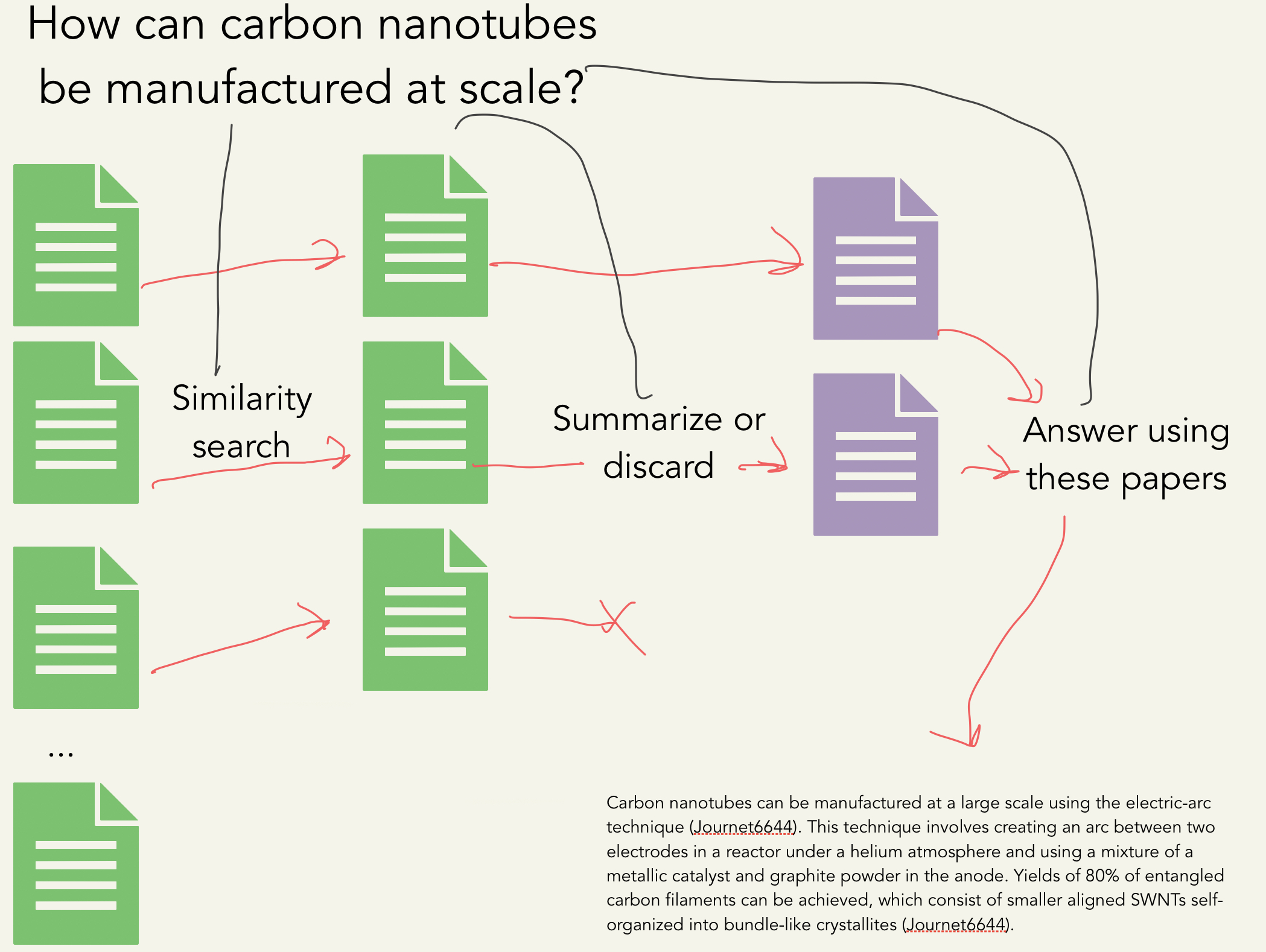
It uses the process shown below:
embed docs into vectors -> embed query into vector -> search for top k passages in docs

create summary of each passage relevant to query -> put summaries into prompt -> generate answer
Output Example
Question: How can carbon nanotubes be manufactured at a large scale?
Carbon nanotubes can be manufactured at a large scale using the electric-arc technique (Journet6644). This technique involves creating an arc between two electrodes in a reactor under a helium atmosphere and using a mixture of a metallic catalyst and graphite powder in the anode. Yields of 80% of entangled carbon filaments can be achieved, which consist of smaller aligned SWNTs self-organized into bundle-like crystallites (Journet6644). Additionally, carbon nanotubes can be synthesized and self-assembled using various methods such as DNA-mediated self-assembly, nanoparticle-assisted alignment, chemical self-assembly, and electro-addressed functionalization (Tulevski2007). These methods have been used to fabricate large-area nanostructured arrays, high-density integration, and freestanding networks (Tulevski2007). 98% semiconducting CNT network solution can also be used and is separated from metallic nanotubes using a density gradient ultracentrifugation approach (Chen2014). The substrate is incubated in the solution and then rinsed with deionized water and dried with N2 air gun, leaving a uniform carbon network (Chen2014).
References
Journet6644: Journet, Catherine, et al. "Large-scale production of single-walled carbon nanotubes by the electric-arc technique." nature 388.6644 (1997): 756-758.
Tulevski2007: Tulevski, George S., et al. "Chemically assisted directed assembly of carbon nanotubes for the fabrication of large-scale device arrays." Journal of the American Chemical Society 129.39 (2007): 11964-11968.
Chen2014: Chen, Haitian, et al. "Large-scale complementary macroelectronics using hybrid integration of carbon nanotubes and IGZO thin-film transistors." Nature communications 5.1 (2014): 4097.
Hugging Face Demo
Install
Install with pip:
pip install paper-qa
Usage
Make sure you have set your OPENAI_API_KEY environment variable to your openai api key
To use paper-qa, you need to have a list of paths (valid extensions include: .pdf, .txt) and a list of citations (strings) that correspond to the paths. You can then use the Docs class to add the documents and then query them.
from paperqa import Docs

# get a list of paths

docs = Docs()
for d in my_docs:
    docs.add(d)

answer = docs.query("What manufacturing challenges are unique to bispecific antibodies?")
print(answer.formatted_answer)
The answer object has the following attributes: formatted_answer, answer (answer alone), question, context (the summaries of passages found for answer), references (the docs from which the passages came), and passages which contain the raw text of the passages as a dictionary.
Choosing Model
By default, it uses a hybrid of gpt-3.5-turbo and gpt-4. If you don't have gpt-4 access or would like to save money, you can adjust:
docs = Docs(llm='gpt-3.5-turbo')
Locally Hosted
You can also use any other models (or embeddings) available in langchain. Here's an example of using llama.cpp to have locally hosted paper-qa:
from langchain.embeddings import LlamaCppEmbeddings
from langchain.llms import LlamaCpp
llm = LlamaCpp(model_path="./ggml-model-q4_0.bin")
embeddings = LlamaCppEmbeddings(model_path="/path/to/model/ggml-model-q4_0.bin")
docs = Docs(llm=llm, embeddings=embeddings)
Adjusting number of sources
You can adjust the numbers of sources (passages of text) to reduce token usage or add more context. k refers to the top k most relevant and diverse (may from different sources) passages. Each passage is sent to the LLM to summarize, or determine if it is irrelevant. After this step, a limit of max_sources is applied so that the final answer can fit into the LLM context window. Thus, k > max_sources and max_sources is the number of sources used in the final answer.
docs.query("What manufacturing challenges are unique to bispecific antibodies?", k = 5, max_sources = 2)
Using Code or HTML
You do not need to use papers -- you can use code or raw HTML. Note that this tool is focused on answering questions, so it won't do well at writing code. One note is that the tool cannot infer citations from code, so you will need to provide them yourself.
import glob

source_files = glob.glob('**/*.js')

docs = Docs()
for f in source_files:
    # this assumes the file names are unique in code
    docs.add(f, citation='File ' + os.path.name(f), key=os.path.name(f))
answer = docs.query("Where is the search bar in the header defined?")
print(answer)
Notebooks
If you want to use this in an jupyter notebook or colab, you need to run the following command:
import nest_asyncio
nest_asyncio.apply()
Also - if you know how to make this automated, please let me know!
Agents (experimental)
You can try to automate the collection of papers and assessment of correctness of papers using an agent. This is experimental and requires installation of paper-scraper.
docs = paperqa.Docs()
answer = paperqa.run_agent(docs, 'What compounds target AKT1')
print(answer)
Where do I get papers?
Well that's a really good question! It's probably best to just download PDFs of papers you think will help answer your question and start from there.
Zotero
If you use Zotero to organize your personal bibliography,
you can use the paperqa.contrib.ZoteroDB to query papers from your library,
which relies on pyzotero.
Install pyzotero to use this feature:
pip install pyzotero
First, note that `paperqa` parses the PDFs of papers to store in the database,
so all relevant papers should have PDFs stored inside your database.
You can get Zotero to automatically do this by highlighting the references
you wish to retrieve, right clicking, and selecting *"Find Available PDFs"*.
You can also manually drag-and-drop PDFs onto each reference.

To download papers, you need to get an API key for your account.

1. Get your library ID, and set it as the environment variable `ZOTERO_USER_ID`.
    - For personal libraries, this ID is given [here](https://www.zotero.org/settings/keys) at the part "*Your userID for use in API calls is XXXXXX*".
    - For group libraries, go to your group page `https://www.zotero.org/groups/groupname`, and hover over the settings link. The ID is the integer after /groups/. (*h/t pyzotero!*)
2. Create a new API key [here](https://www.zotero.org/settings/keys/new) and set it as the environment variable `ZOTERO_API_KEY`.
    - The key will need read access to the library.

With this, we can download papers from our library and add them to `paperqa`:

```py
from paperqa.contrib import ZoteroDB

docs = paperqa.Docs()
zotero = ZoteroDB(library_type="user")  # "group" if group library

for item in zotero.iterate(limit=20):
    if item.num_pages > 30:
        continue  # skip long papers
    docs.add(item.pdf, key=item.key)
which will download the first 20 papers in your Zotero database and add
them to the Docs object.
We can also do specific queries of our Zotero library and iterate over the results:
for item in zotero.iterate(
        q="large language models",
        qmode="everything",
        sort="date",
        direction="desc",
        limit=100,
):
    print("Adding", item.title)
    docs.add(item.pdf, key=item.key)
You can read more about the search syntax by typing zotero.iterate? in IPython.
Paper Scraper
If you want to search for papers outside of your own collection, I've found an unrelated project called paper-scraper that looks like it might help. But beware, this project looks like it uses some scraping tools that may violate publisher's rights or be in a gray area of legality.
keyword_search = 'bispecific antibody manufacture'
papers = paperscraper.search_papers(keyword_search)
docs = paperqa.Docs()
for path,data in papers.items():
    try:
        docs.add(path)
    except ValueError as e:
        # sometimes this happens if PDFs aren't downloaded or readable
        print('Could not read', path, e)
answer = docs.query("What manufacturing challenges are unique to bispecific antibodies?")
print(answer)
FAQ
How is this different from LlamaIndex?
It's not that different! This is similar to the tree response method in LlamaIndex. I just have included some prompts I find useful, readers that give page numbers/line numbers, and am focused on one task - answering technical questions with cited sources.
How is this different from LangChain?
It's not! We use langchain to abstract the LLMS, and the process is very similar to the map_reduce chain in LangChain.
Caching
This code will cache responses from LLMS by default in $HOME/.paperqa/llm_cache.db. Delete this file to clear the cache.
Can I use different LLMs?
Yes, you can use any LLMs from langchain by passing the llm argument to the Docs class. You can use different LLMs for summarization and for question answering too.
Where do the documents come from?
You can provide your own. I use some of my own code to pull papers from Google Scholar. This code is not included because it may enable people to violate Google's terms of service and publisher's terms of service.
Can I save or load?
The Docs class can be pickled and unpickled. This is useful if you want to save the embeddings of the documents and then load them later.
import pickle

# save
with open("my_docs.pkl", "wb") as f:
    pickle.dump(docs, f)

# load
with open("my_docs.pkl", "rb") as f:
    docs = pickle.load(f)
Release history Release notifications | RSS feed


Download files
Download the file for your platform. If you're not sure which to choose, learn more about installing packages.
Source Distribution
Built Distribution
Filter files by name, interpreter, ABI, and platform.
If you're not sure about the file name format, learn more about wheel file names.
Copy a direct link to the current filters
File details
Details for the file paper-qa-1.1.0.tar.gz.
File metadata
- Download URL: paper-qa-1.1.0.tar.gz
- Upload date:
- Size: 21.7 kB
- Tags: Source
- Uploaded using Trusted Publishing? No
- Uploaded via: twine/4.0.2 CPython/3.9.16
File hashes
| Algorithm | Hash digest | |
|---|---|---|
| SHA256 |
4ee113bd0705c8849c6141fe4172fe2e3dc366f6625cb3d29c130c9eaeacf2a9
|
|
| MD5 |
62c2039f40e61535bfa02b991e4b1c65
|
|
| BLAKE2b-256 |
5dcf10ee1e20af322e553ffe2bc39c36243d22cf6d1ded8a50cceb238bab5665
|
File details
Details for the file paper_qa-1.1.0-py3-none-any.whl.
File metadata
- Download URL: paper_qa-1.1.0-py3-none-any.whl
- Upload date:
- Size: 22.4 kB
- Tags: Python 3
- Uploaded using Trusted Publishing? No
- Uploaded via: twine/4.0.2 CPython/3.9.16
File hashes
| Algorithm | Hash digest | |
|---|---|---|
| SHA256 |
184e0d6156134a1f4a62b4275f1a3e8e8b23896cf455f964fb97ab9cb13f62b2
|
|
| MD5 |
02631461df9a093a8e74b26a91746775
|
|
| BLAKE2b-256 |
38a316f1b9eebe0002dff9f9d5fbc511d8ecc0e171288aa2cd71c6fcaa5d87b5
|






