
paper-streamfield
Implementation of the Wagtail's StreamField block picker for paper-admin.



Compatibility
python>= 3.9django>= 3.1paper-admin>= 6.0
Installation
Install the latest release with pip:
pip install paper-streamfield
Add streamfield to your INSTALLED_APPS in django's settings.py:
INSTALLED_APPS = (
    # other apps
    "streamfield",
)
Add streamfield.urls to your URLconf:
urlpatterns = patterns('',
    ...
    path("streamfields/", include("streamfield.urls")),
)
How to use
-
Create some models that you want to use as blocks:
# blocks/models.py

from django.core.validators import MaxValueValidator, MinValueValidator
from django.db import models
from django.utils.text import Truncator


class HeadingBlock(models.Model):
    text = models.TextField()
    rank = models.PositiveSmallIntegerField(
        default=1,
        validators=[
            MinValueValidator(1),
            MaxValueValidator(6)
        ]
    )

    class Meta:
        verbose_name = "Heading"

    def __str__(self):
        return Truncator(self.text).chars(128)


class TextBlock(models.Model):
    text = models.TextField()

    class Meta:
        verbose_name = "Text"

    def __str__(self):
        return Truncator(self.text).chars(128)
-
Register your models using
StreamBlockModelAdminclass.# blocks/admin.py from django.contrib import admin from streamfield.admin import StreamBlockModelAdmin from .models import HeadingBlock, TextBlock @admin.register(HeadingBlock) class HeadingBlockAdmin(StreamBlockModelAdmin): list_display = ["__str__", "rank"] @admin.register(TextBlock) class TextBlockAdmin(StreamBlockModelAdmin): pass
-
Create templates for each block model, named as lowercase model name or snake_cased model name.
<!-- blocks/templates/blocks/headingblock.html -->
<!-- or -->
<!-- blocks/templates/blocks/heading_block.html -->
<h{{ block.rank }}>{{ block.text }}</h{{ block.rank }}>
<!-- blocks/templates/blocks/textblock.html -->
<!-- or -->
<!-- blocks/templates/blocks/text_block.html -->
<div>{{ block.text|linebreaks }}</div>
-
Add a
StreamFieldto your model:# app/models.py from django.db import models from django.utils.translation import gettext_lazy as _ from streamfield.field.models import StreamField class Page(models.Model): stream = StreamField( _("stream"), models=[ "blocks.HeaderBlock", "blocks.TextBlock", ] ) class Meta: verbose_name = "Page"
Result:
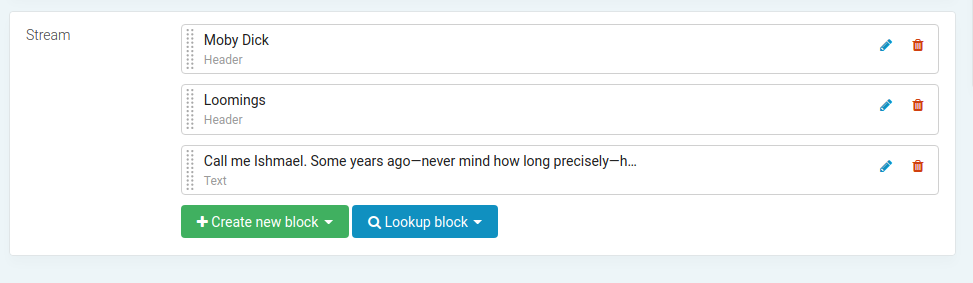
Now you can create some blocks:
-
Use
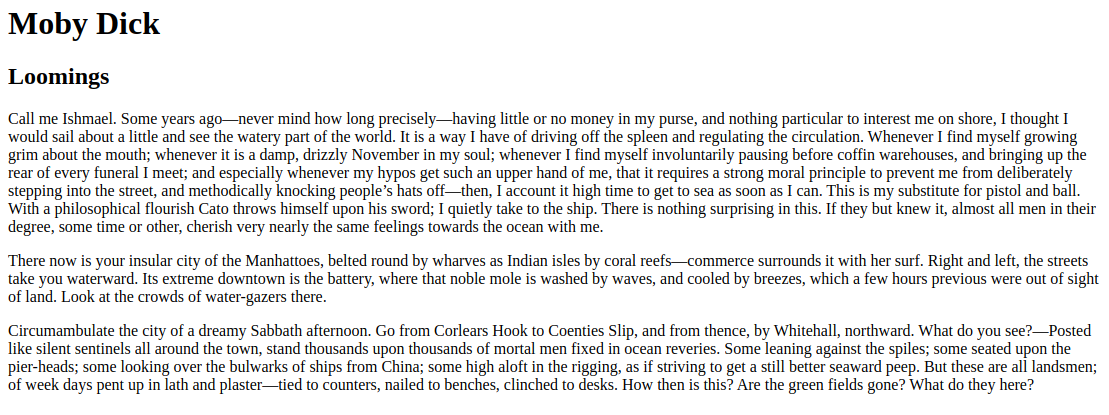
render_streamtemplate tag to render the stream field.<!-- app/templates/index.html --> {% load streamfield %} {% render_stream page.stream %}Result:

When working with block templates, it's important to note that you have access to all variables from the parent context.
Special cases
Use custom template name or template engine
You can specify a template name or engine to render a specific block
with StreamBlockMeta class in your block model:
class HeadingBlock(models.Model):
    # ...

    class StreamBlockMeta:
        template_engine = "jinja2"
        template_name = "blocks/heading.html"
Caching the rendered HTML of a block
You can enable caching for specific blocks to optimize rendering.
class HeadingBlock(models.Model):
    # ...

    class StreamBlockMeta:
        cache = True
        cache_ttl = 3600
Once caching is enabled for the block, the rendered HTML will be stored in cache, and subsequent requests will retrieve the cached content, reducing the need for re-rendering.
Note that the specified block will not be invalidated when something changes in it.
Adding context variables to all blocks
You can add context variables to all blocks in your StreamField by providing them
through the render_stream template tag. This allows you to pass common context data
to customize the rendering of all content blocks consistently:
<!-- app/templates/index.html -->
{% load streamfield %}

{% render_stream page.stream classes="text text--small" %}
<!-- blocks/templates/blocks/textblock.html -->
<div class="{{ classes }}">{{ block.text|linebreaks }}</div>
Adding context variables to a specific block
To add context variables to a specific content block, you must create a custom processor. A processor provides a mechanism for customizing the context data and the rendering process of an individual block.
- Create a custom processor class that inherits from
streamfield.processors.DefaultProcessor.from streamfield.processors import DefaultProcessor from reviews.models import Review class ReviewsBlockProcessor(DefaultProcessor): def get_context(self, block): context = super().get_context(block) context["reviews"] = Review.objects.all()[:5] return context
- In your block's model, specify the processor to use:
class ReviewsBlock(models.Model):
    # ...

    class StreamBlockMeta:
        processor = "your_app.processors.ReviewsBlockProcessor"
You can utilize the exceptions.SkipBlock feature to conditionally skip the rendering
of a block. This can be useful, for example, when dealing with a block like "Articles"
that should only render when there are articles available. Example:
from streamfield.processors import DefaultProcessor
from streamfield.exceptions import SkipBlock
from articles.models import Article


class ArticlesBlockProcessor(DefaultProcessor):
    def get_context(self, block):
        context = super().get_context(block)

        articles = Article.object.all()[:3]
        if len(articles) < 3:
            # Skip block if not enough article instances
            raise SkipBlock

        context["articles"] = articles
        return context
Using render_block template tag
In some cases, you may have a page that references a specific block through
a ForeignKey relationship, and you want to render that referenced block on the page.
You can achieve this using the render_block template tag. Here's an example:
# page/models.py

from django.db import models
from blocks.models import TextBlock

class Page(models.Model):
   text_block = models.ForeignKey(TextBlock, on_delete=models.SET_NULL, blank=True, null=True)

   class Meta:
      verbose_name = "Page"
<!-- app/templates/page.html -->
{% load streamfield %}

<div>
    <h1>Page Title</h1>
    <div>
        <h2>Text Block:</h2>
        {% render_block page.text_block %}
    </div>
</div>
Customize block in admin interface
You can customize how a block is rendered in the admin interface
by specifying stream_block_template field in the StreamBlockModelAdmin
class:
from django.contrib import admin
from streamfield.admin import StreamBlockModelAdmin
from .models import ImageBlock


@admin.register(ImageBlock)
class ImageBlockAdmin(StreamBlockModelAdmin):
    stream_block_template = "blocks/admin/image.html"
    list_display = ["__str__", "title", "alt"]
<!-- blocks/admin/image.html -->
{% extends "streamfield/admin/block.html" %}

{% block content %}
   <div class="d-flex">
      <div class="flex-grow-0 mr-2">
         <img class="preview"
              src="{{ instance.image }}"
              width="48"
              height="36"
              title="{{ instance.title }}"
              alt="{{ instance.alt }}"
              style="object-fit: cover">
      </div>

      {{ block.super }}
   </div>
{% endblock content %}
Settings
PAPER_STREAMFIELD_DEFAULT_PROCESSOR
Default processor for content blocks.
Default: "streamfield.processors.DefaultProcessor"
PAPER_STREAMFIELD_DEFAULT_TEMPLATE_ENGINE
Default template engine for render_stream template tag.
Default: None
1 maintainer

Metadata
1 maintainer
Release files for paper-streamfield 0.8.0
For a detailed explanation of source distributions (sdists) and built distributions (wheels), please see the package formats documentation.
Source distribution (sdist)
| File | Size | Uploaded | |
|---|---|---|---|
| paper-streamfield-0.8.0.tar.gz | 28.5 kB | Details |
Built distribution (wheel)
| File | Interpreter | ABI | Platform | Reset |
|---|---|---|---|---|
| paper_streamfield-0.8.0-py2.py3-none-any.whl | Python 2, Python 3 | none | any | Details |
Total release size: 61.7 kB
Release files / paper-streamfield-0.8.0.tar.gz
| Download URL | paper-streamfield-0.8.0.tar.gz |
|---|---|
| Size | 28.5 kB |
| Tags | Source |
|
SHA-256 checksum How to use checksums |
c4730f036abb363c68b8a3004c937d5f5c6a8470a23fc31ac70c087f316c965d
|
|
BLAKE2b-256 checksum How to use checksums |
0c07d899717e4c34228a588aea88d9395f8f6e7b30400aab843f41d2d446721c
|
| Upload date | |
|
Uploaded using Trusted Publishing? What is trusted publishing? |
No |
| Uploaded via |
twine/4.0.2 CPython/3.10.12
|
Release files / paper_streamfield-0.8.0-py2.py3-none-any.whl
| Download URL | paper_streamfield-0.8.0-py2.py3-none-any.whl |
|---|---|
| Size | 33.2 kB |
| Tags | Python 2 Python 3 |
|
SHA-256 checksum How to use checksums |
e9cd194dd2b35648deb7faf55c666a7ae3798fe4f4326a9f4e8e5acb017664ba
|
|
BLAKE2b-256 checksum How to use checksums |
e6b84c674da537dc7b930426d8f1688ae96b406a541224f3e8ae64f1f89c1b99
|
| Upload date | |
|
Uploaded using Trusted Publishing? What is trusted publishing? |
No |
| Uploaded via |
twine/4.0.2 CPython/3.10.12
|














