
paperpress
Turn a run of old newspapers or magazines into an archive you can read, search and cite, a text corpus for your research, and a website you can share. It runs on a laptop.
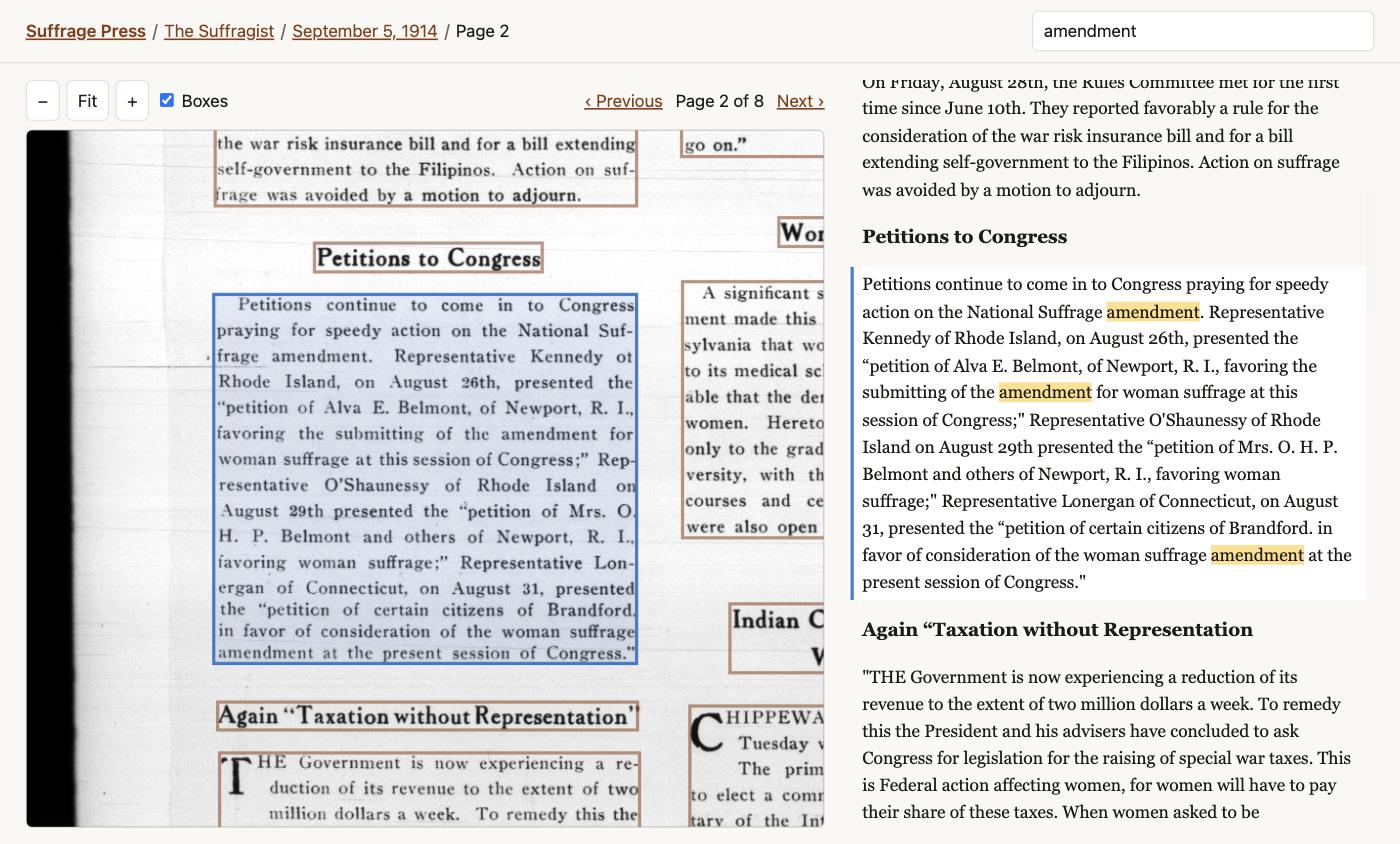
You have issues of a periodical, either scans on the Internet Archive or a folder of PDFs from a library. paperpress organizes them by title and date and OCRs every page in newspaper reading order, column by column. From that it builds:
- a private archive to browse and search on your own computer, with each scan shown beside its text;
- a research corpus: one row per page (or per article) in CSV and JSONL, each with a ready-to-use citation, for R, Python, Stata or a spreadsheet;
- a public website with full-text search, as plain files you can put on GitHub Pages or any web host.
An optional step uses an LLM to draft a table of contents for each issue, with headlines, bylines, sections, and stories that continue on a later page.
See it in action: a demo archive of three woman-suffrage papers, 15 issues from 1870 to 1917, built entirely by paperpress. Try searching for "silent sentinels".
paperpress grew out of The Negro World Archive. Its OCR comes from newspaper-ocr.
Status: early (0.2). Everything below works and is tested, but expect rough edges, and expect the commands to change before 1.0.
Install
You need Python 3.11 or newer, uv, and Tesseract:
brew install tesseract              # macOS;  Ubuntu: sudo apt install tesseract-ocr
uv tool install paperpress
paperpress --help
(pip install paperpress works too. To try the newest, unreleased version:
uv tool install git+https://github.com/nealcaren/paperpress.)
The first install downloads the OCR models' dependencies (PyTorch included), which takes a few minutes and about 1 GB of disk. The first OCR run also downloads the layout model (about 40 MB).
A first archive in 15 minutes
This builds a small archive of The Suffragist, the National Woman's Party weekly, from the Internet Archive. Times are from an M-series MacBook.
1. Start a project and name the periodical.
paperpress init suffrage-press
cd suffrage-press
paperpress title add suffragist "The Suffragist" \
    --ia https://archive.org/details/pub_the-suffragist
suffragist is a short name for folders and commands; "The Suffragist" is the name
citations use. --ia takes the periodical's Internet Archive collection, or the
link to any one of its issues, and paperpress finds the rest (here, 315 issues).
Titles are kept in paper.toml, a plain text file you can also edit by hand.
2. Bring in some issues.
paperpress add ia suffragist --from 1917-01-01 --limit 2 --dry-run   # see what matches
paperpress add ia suffragist --from 1917-01-01 --limit 2             # ~1 minute
3. OCR them.
paperpress ocr # 24 pages: ~4 minutes
Stop it at any point and run it again; it picks up where it left off.
4. Read, search, export, publish.
paperpress serve                    # opens the archive in your browser
paperpress export                   # export/pages.csv and friends
paperpress build                    # site/, ready to publish
paperpress status                   # what's in the project
What you get
An archive to read and search
paperpress serve runs a small website on your own computer. Nothing leaves it.
You can browse by title and year. The reader shows each scan with the OCR boxed beside
the text, in reading order: click a box to find its paragraph, or a paragraph to find
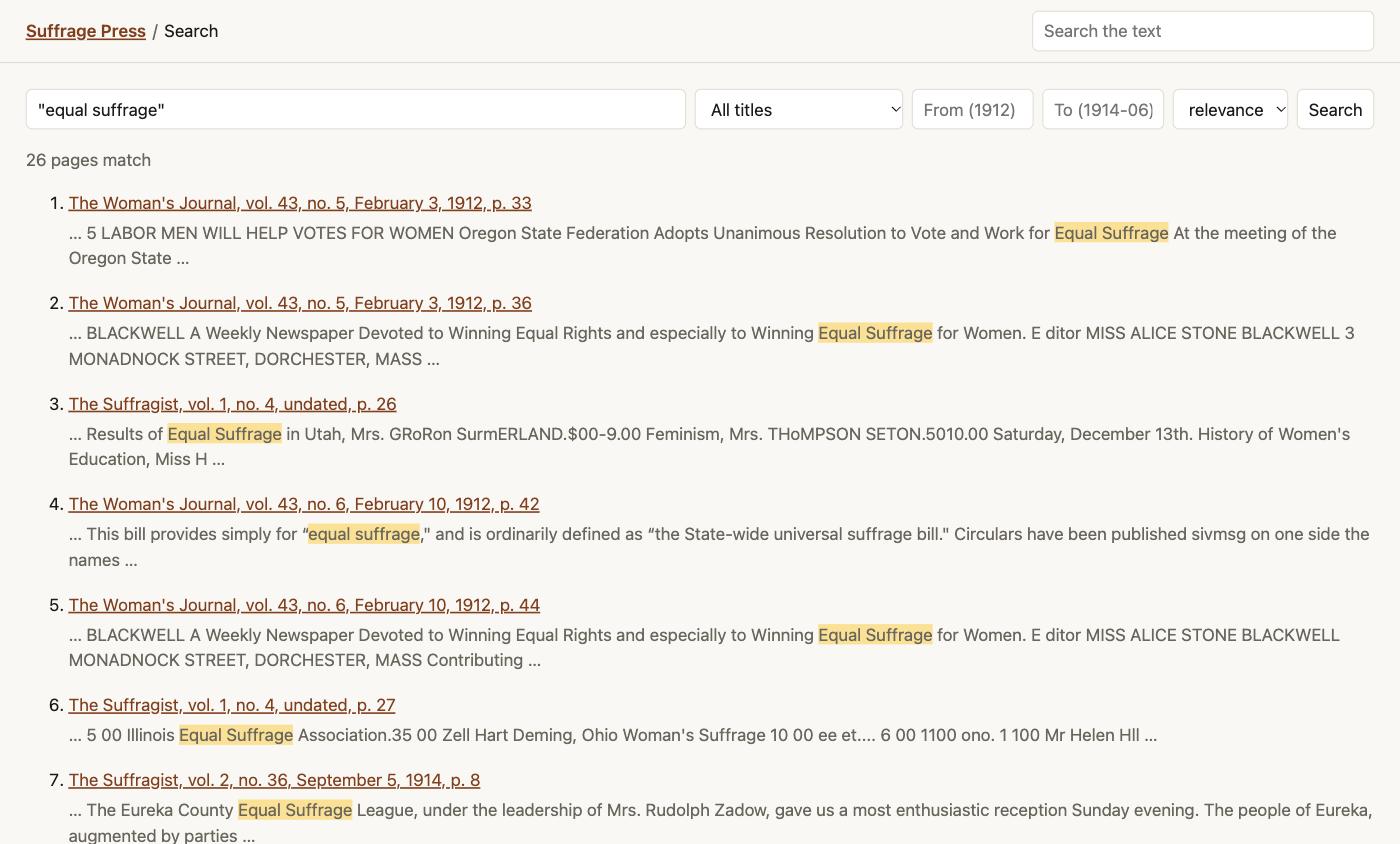
its box. Search covers every page and supports "exact phrases", suffrag* and
English word endings (voting also finds "vote"), with filters for title and date.
A corpus for research
paperpress export writes export/:
| File | One row per | Includes |
|---|---|---|
pages.csv, pages.jsonl |
page | title, date, volume and number, page, printed page, word count, citation, link to the source page, image, the text in reading order |
articles.csv, articles.jsonl |
article (needs enrich) |
headline, author, type, section, language, pages, citation, the article's text |
issues.csv |
issue | metadata only, as a manifest |
txt/ (with --txt) |
page | plain text, one file per page |
Every row carries a citation you can paste into a footnote:
"GAGGED AND BOUND," The Woman's Journal, vol. 43, no. 6, February 10, 1912, pp. 41, 46
The CSVs open cleanly in Excel. Check quotations against the page image before you cite them, because OCR makes mistakes.
On a busy front page, the reading order can slip where the layout is complicated, so a
page's text may run from one story into another. If you've run enrich,
articles.csv is the cleaner unit for analysis: each row is one story's text.
A website
paperpress build writes site/: the same pages as serve, with search that runs
in the visitor's browser (Pagefind). Put the folder on any
static host. Tell it the address the site will have, e.g. for a GitHub Pages project
site:
paperpress build --url https://you.github.io/suffrage-press/
With --url, the site also includes IIIF manifests (see
below). Without it, use --base /suffrage-press/ to
say only the path.
Page scans are copied into the site at 1,800 px wide, about 0.6 MB a page.
GitHub Pages allows about 1 GB, which is roughly 1,500 pages. For bigger runs from the
Internet Archive, --images ia shows each scan from IA's own image server instead;
the demo site drops from 115 MB to 13 MB.
Publishing makes the scans and text public. Make sure you have the right to share them.
A table of contents (optional)
export OPENROUTER_API_KEY=...       # https://openrouter.ai/keys
paperpress enrich
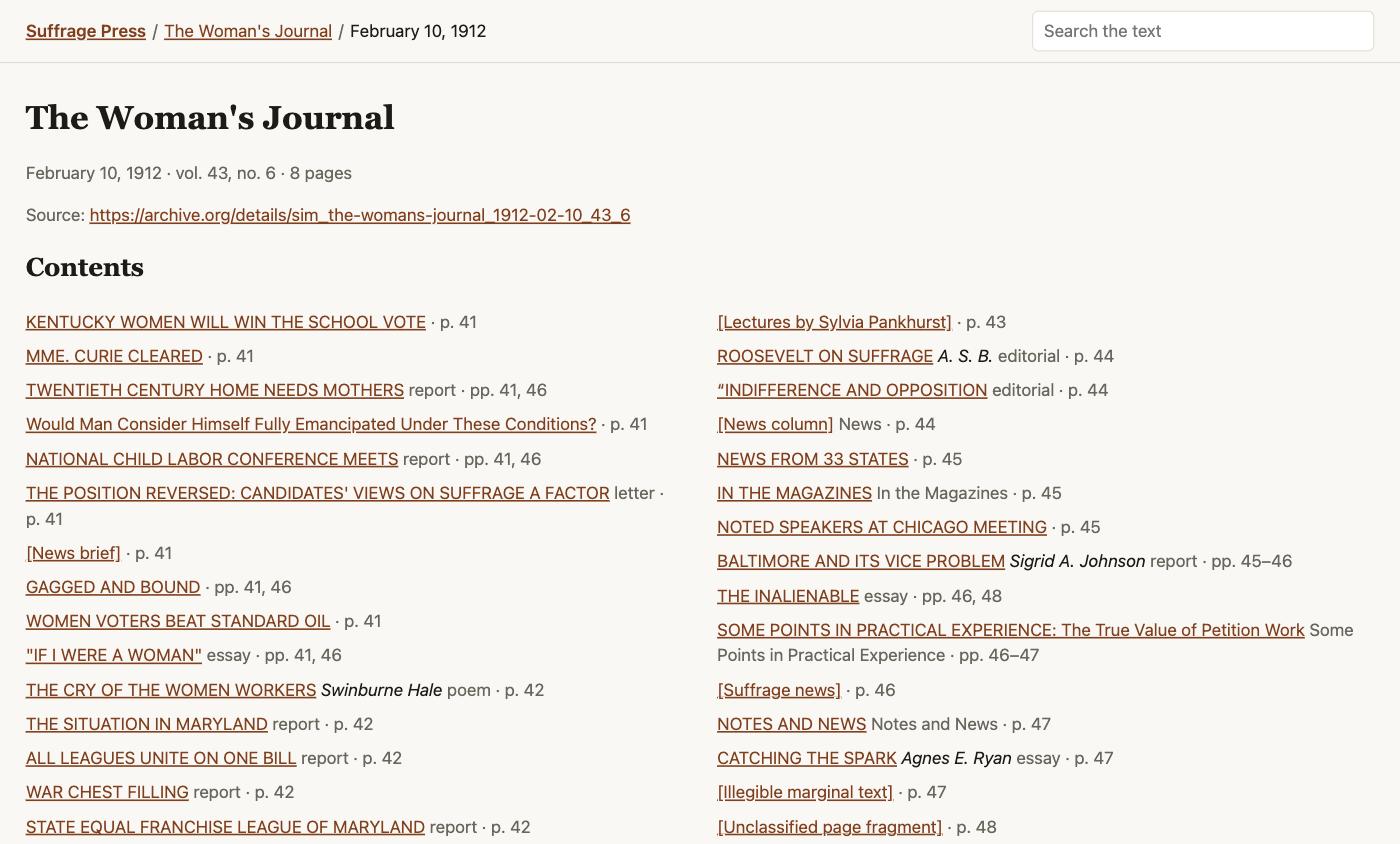
An LLM reads each OCR'd page and groups it into articles. Each article gets a
headline, an author (only from a byline or signature, never a guess), a type (news,
editorial, letter, poem, advertisement…), a section and a language. A second pass
links stories that continue on another page. The archive then shows a contents list
for each issue, and the export adds articles.csv. If an issue has no volume and
number yet (common for PDFs), enrich also reads them from the masthead, so citations
gain "vol. 68, no. 111". It keeps them only when the words it read are really on the
page, records where they came from, and never replaces a volume or number you or the
source supplied. With the default models it costs
about 1–4 cents per issue, and every run prints what it spent.
It does better when it knows the paper. paperpress profile suffragist reads six
issues spread across the run and drafts titles/suffragist/profile.json: the regular
sections and columns, the editors and contributors (with the ways OCR misspells their
names), the organizations, the kinds of advertisers and the languages. It costs 5–20
cents and takes a minute or two. Check the draft, fix what's wrong, add what you know, then run
paperpress enrich --force to redo issues already done.
Headlines and bylines come from OCR'd text and an LLM, so treat them as a finding aid, not a catalogue record.
For libraries and archives
paperpress also writes the standard formats that library systems take in:
-
IIIF manifests.
paperpress build --url ...adds a IIIF Presentation 3 manifest for every issue: one canvas per page, the OCR text as annotations on each page, the table of contents as ranges, dates for calendar browsing, and collections for each title and the whole archive. Mirador, the Universal Viewer, Omeka S and other IIIF tools can open them, e.g. this issue of The Suffragist in Mirador. Each issue page on the site links its manifest. Internet Archive pages point viewers at IA's full-resolution scans, so they can zoom further than the site does. -
Dublin Core.
paperpress exportwritesexport/dublin_core.csv: one record per issue in Dublin Core terms (dcterms:title,dcterms:date,dcterms:isPartOf,dcterms:source,dcterms:rights,dcterms:tableOfContents…) plusbibo:volumeandbibo:issue, ready for the CSV importers in Omeka, CONTENTdm and similar systems. -
BagIt.
paperpress bagpackages the whole project for deposit with a library or data repository (Dataverse, Zenodo, an institutional repository): the scans, the OCR, the metadata and a fresh export, with SHA-256 and SHA-512 checksums for every file.paperpress bag --check <bag>confirms that a bag is still intact.paperpress bag --organization "UNC Chapel Hill" --contact-email you@unc.edu
Your own PDFs
paperpress title add dth "The Daily Tar Heel"
paperpress add pdf dth ~/scans/daily-tar-heel --dry-run
paperpress add pdf dth ~/scans/daily-tar-heel
Each PDF is one issue, dated from its file name (dth_03041960.pdf,
1960-03-04.pdf, …). paperpress works out the order of the date's digits from all
the file names together. If it can't (every day in the batch is 12 or under, so March
4 and April 3 look the same), it asks you for --date-format MMDDYYYY. Scanned pages
are copied out of the PDF as they are, except that scans finer than 300 ppi are
reduced to 300 ppi, which is plenty for OCR (--ppi 0 keeps them as they are).
Adding the same file twice, even renamed, is skipped. Empty or broken files are
reported and skipped. (Files in a Dropbox, OneDrive or iCloud folder that are "online
only" look empty to paperpress: make the folder available offline first.)
Page numbers and citations
Many periodicals number pages through a whole volume, so the sixth page of an issue might be printed "46", and a citation needs the 46. paperpress reads the page numbers printed in each page's header or footer, adds the source's own guesses where it has confident ones, and uses the numbering most pages agree on. When the evidence is too thin to be sure, it cites the page's position in the issue instead of guessing. You can always set the numbering for an issue by hand; see below.
How a project is organized
suffrage-press/
  paper.toml                    the project: titles, and optional OCR and LLM settings
  titles/suffragist/
    1917-01-10/                 one folder per issue
      issue.json                date, volume, number, source, rights, page list
      images/page_01.jpg        the scans
      page_01.json              OCR: regions in reading order, with boxes and text
      full_text.json            the issue's text, page by page
      toc.json                  table of contents (only after `enrich`)
      source/                   the source's own OCR, kept for comparison
    _undated/<id>/              issues whose date couldn't be determined
  export/   site/               outputs; delete and rebuild any time
Everything is plain files, so a project can be zipped, backed up, or deposited in a data repository. Every step can be re-run safely: finished work is skipped, and an interrupted step leaves nothing half-written.
To fix an issue by hand, edit its issue.json. You can correct volume and
number (if enrich filled them, enrich_filled shows the masthead text it read), or add "printed_offset": 40 if its printed page numbers are 40 more than
their position. The archive's name, shown on the site and in exports, is name under
[project] in paper.toml; it starts as the project folder's name.
Commands
| Command | What it does |
|---|---|
paperpress init <folder> |
Start a project |
paperpress title add <slug> <name> [--ia URL] |
Add a periodical |
paperpress add ia <title> [ids…] [--query Q] [--from D] [--to D] [--limit N] |
Fetch issues from the Internet Archive |
paperpress add pdf <title> <files or folders…> [--date-format F] |
Add your own PDFs |
paperpress ocr [titles…] |
OCR every page not yet OCR'd |
paperpress profile <title> |
Optional: draft a profile of a paper for enrich |
paperpress enrich [titles…] |
Optional: LLM table of contents |
paperpress export [titles…] [--txt] |
Write the research corpus |
paperpress serve |
Browse and search on your own computer |
paperpress build [--url URL] [--images ia] |
Write the public website (and IIIF, with --url) |
paperpress bag [--out DIR] |
Package the project for a library or data repository |
paperpress refresh |
Re-read Internet Archive metadata without re-downloading |
paperpress status |
Summarize the project |
Add --help to any command for its options. add ia, ocr and enrich take
--from, --to and --limit to work on part of a run.
Settings
All optional, in paper.toml:
[ocr]                                       # newspaper-ocr engine
detector = "doclayout_yolo"
recognizer = "tesseract"
recognizer_model = "news_combo_fast"

[enrich]                                    # LLM table of contents
model = "openai/gpt-5.6-luna"               # reads each page
stitch_model = "google/gemini-3.8-flash"    # links continued stories
base_url = "https://openrouter.ai/api/v1"   # any OpenAI-compatible API
api_key_env = "OPENROUTER_API_KEY"
The default OCR engine runs anywhere Tesseract does. On a Linux machine with an NVIDIA GPU, newspaper-ocr's MinerU engine is more accurate; see its README.
Good to know
- OCR quality depends on the scans. On the sample papers our text has a higher share of real English words than the Internet Archive's own OCR, and it's in reading order. But 1870s type and damaged microfilm still produce errors (Tesseract reads "her" as "ber"). A stronger OCR engine is a settings change.
- Speed: OCR takes 10–20 seconds a page on a laptop, so a hundred issues of an 8-page weekly takes 2–4 hours. Leave it running overnight for a long run; it can be stopped and resumed. Downloads take a few seconds a page.
- Rights: paperpress records the rights statement from each source, but deciding what you may publish is up to you.
Development
git clone https://github.com/nealcaren/paperpress && cd paperpress
uv venv && uv pip install -e '.[dev]'
.venv/bin/pytest
The tests need no network or OCR models. examples/ has two sample projects: three
suffrage papers from the Internet Archive, and The Daily Tar Heel from a folder of
PDFs.
License
MIT
1 maintainer

Metadata
1 maintainer
Release files for paperpress 0.2.0
For a detailed explanation of source distributions (sdists) and built distributions (wheels), please see the package formats documentation.
Source distribution (sdist)
| File | Size | Uploaded | |
|---|---|---|---|
| paperpress-0.2.0.tar.gz | 96.4 kB | Details |
Built distribution (wheel)
| File | Interpreter | ABI | Platform | Reset |
|---|---|---|---|---|
| paperpress-0.2.0-py3-none-any.whl | Python 3 | none | any | Details |
Total release size: 178.3 kB
Release files / paperpress-0.2.0.tar.gz
| Download URL | paperpress-0.2.0.tar.gz |
|---|---|
| Size | 96.4 kB |
| Tags | Source |
|
SHA-256 checksum How to use checksums |
9ebbb5de395a2131ffa4577ac1b245d66f2233358b2b1f572ae11bf97cd21065
|
|
BLAKE2b-256 checksum How to use checksums |
bc9045eb5258a06f204a3b7178ef742718dc7ebf1d17430c9b3565a763766018
|
| Upload date | |
|
Uploaded using Trusted Publishing? What is trusted publishing? |
Yes |
| Uploaded via |
twine/7.0.0 CPython/3.13.14
|
Provenance
Provenance describes where a file came from. On PyPI, provenance is shared via attestations, which provide a verifiable record of the build or publishing details. View details, limitations and caveats.


PyPI Publish Attestation
PyPI verified that this artifact, at this checksum, originated from the publisher listed below.
Signed by GitHub Actions, verified by PyPI on Oct 2, 2026.
Transparency logRelease files / paperpress-0.2.0-py3-none-any.whl
| Download URL | paperpress-0.2.0-py3-none-any.whl |
|---|---|
| Size | 81.9 kB |
| Tags | Python 3 |
|
SHA-256 checksum How to use checksums |
7ede7b33e351f3ce278b0673165584c84f7e5464beb5f5718ee3b35e2b3d99a5
|
|
BLAKE2b-256 checksum How to use checksums |
4f6dba3c7375b92745b9f984cb99281f1676d37785d5c965fa4799f17f3ebcb8
|
| Upload date | |
|
Uploaded using Trusted Publishing? What is trusted publishing? |
Yes |
| Uploaded via |
twine/7.0.0 CPython/3.13.14
|
Provenance
Provenance describes where a file came from. On PyPI, provenance is shared via attestations, which provide a verifiable record of the build or publishing details. View details, limitations and caveats.
PyPI Publish Attestation
PyPI verified that this artifact, at this checksum, originated from the publisher listed below.
Signed by GitHub Actions, verified by PyPI on Oct 2, 2026.
Transparency log












