




papir
Papir is an acronym for “Python API Requests”.
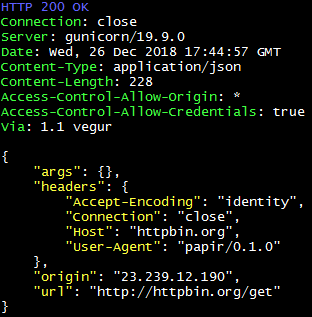
The main purpose is to make custom http requests to json APIs, prettify and colorize the full response (headers + json content).
Json is used to post, put, patch or delete and to customize the http headers.
Basic http authentication and gzip compression are supported.
Simple example:
$ papir httpbin.org/get
Notes
Works on Python 3
Uses only Python standard library for maximum compatibility
Small and simple source code
Install
Install using pip:
pip install papir
or
Download and set executable permission on the script file:
chmod +x papir.py
or
Download and run using the python interpreter:
python3 papir.py
Usage
Usage: papir url [options] [method]

make http requests to json apis

Options:
  --version        show program's version number and exit
  -d DATA_FILE     json file to post, put, patch or delete
  -h HEADERS_FILE  json file containing additional headers
  -j JSON_DATA     json string to post, put, patch or delete
  -e JSON_HEADERS  json string containing additional headers
  -t TIMEOUT       timeout in seconds to wait for response (default: 10)
  -a AUTH          basic http authentication in the format username:password
  -f, --follow     follow redirects (default: disabled)
  -i, --insecure   allow insecure SSL connections (default: disabled)
  -v, --verbose    show request headers (default: disabled)
Examples
Assuming the file “data.json” exists containing:
{
    "name": "Bob",
    "age": 30
}
Make a post request using that data:
$ papir example.org -d data.json
The json data can also be passed directly from cli:
$ papir example.org -j '{"name": "Bob", "age": 30}'
To use a different http method just inform it:
$ papir example.org -d data.json put
To customize the request headers, create a json file like:
{
    "Auth-User": "user",
    "Auth-Token": "1234",
    "User-Agent": "myagent"
}
And add it to the request:
$ papir example.org -h headers.json
Headers can also be customized directly from cli:
$ papir example.org -e '{"custom-header": "foobar", "user-agent": "myagent"}'
Obviously, you can mix it with all kinds of http methods:
$ papir example.org -h headers.json -d data.json patch
Simple basic auth:
$ papir example.org -a user:pass
To ignore invalid SSL certificates:
$ papir https://self-signed.badssl.com/ -i
1 maintainer

Metadata
1 maintainer
Release files for papir 0.3.0
For a detailed explanation of source distributions (sdists) and built distributions (wheels), please see the package formats documentation.
Source distribution (sdist)
| File | Size | Uploaded | Provenance | |
|---|---|---|---|---|
| papir-0.3.0.tar.gz | 6.1 kB | Without provenance | Details |
Release files / papir-0.3.0.tar.gz
| Download URL | papir-0.3.0.tar.gz |
|---|---|
| Size | 6.1 kB |
| Tags | Source |
|
SHA-256 checksum How to use checksums |
8125b68c65b5aa80681b317da60ad476fbe321e0444dd1ab13ede8014abe7216
|
|
BLAKE2b-256 checksum How to use checksums |
089d69a2980bc8930449c8407316d3fb8892bcb3387954e7dbcf9bdfb9716d8e
|
| Upload date | |
|
Uploaded using Trusted Publishing? What is trusted publishing? |
No |
| Uploaded via |
twine/3.1.1 pkginfo/1.5.0.1 requests/2.22.0 setuptools/39.2.0 requests-toolbelt/0.9.1 tqdm/4.36.1 CPython/3.6.8
|
Security for papir 0.3.0
Provenance
Provenance describes where a file came from. On PyPI, provenance is shared via attestations, which provide a verifiable record of the build or publishing details. View details, limitations and caveats.
No provenance found
None of the files in this release were uploaded with provenance metadata.
A note on package security
PyPI is a repository for distributing packages, not a service for auditing them. While third-party security researchers and our staff do their best to detect and remove malicious packages, PyPI cannot guarantee the quality, security or suitability of any given package.
To learn more about protecting yourself from malicious actors, visit our package security documentation.














