
Papyrium


Papyrium is a virtual vintage printer. It runs as a headless service, receives the bytes a computer sends to its printer, interprets them as a chosen period printer would, lays the result out on emulated paper, and writes the pages as PNG images and PDF documents, dot for dot.
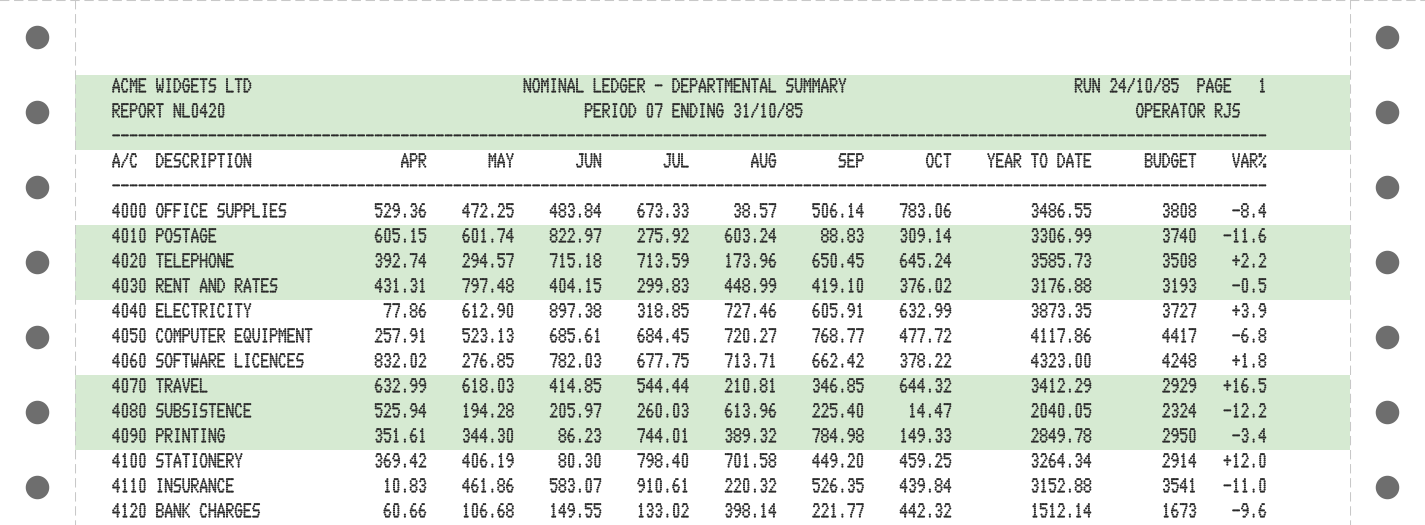
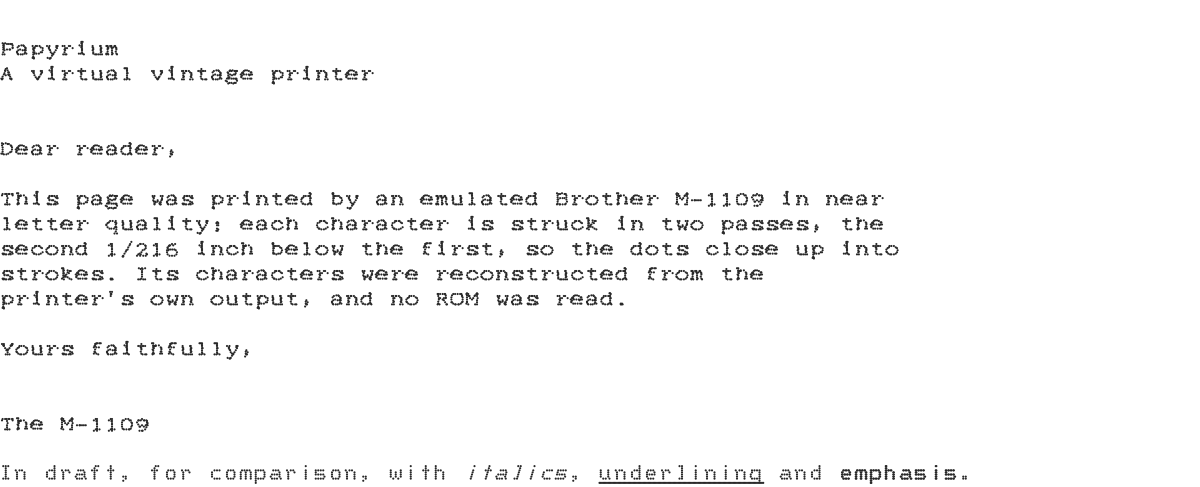
The printers are 9-pin dot-matrix printers of the 1980s, the Epson FX-80 and the Brother M-1109, speaking Epson's ESC/P. The first client is Beebium, the BBC Micro emulator, but Papyrium knows nothing about the computer on the other end: any emulator, or real hardware behind a network adapter, can drive it.
Quick start
With uv, run it straight from PyPI:
uvx papyrium serve
or install the papyrium command for good with uv tool install papyrium
(or pipx install papyrium, or pip install papyrium). The papyrium
distribution brings the command and every printer model; papyrium-cli
alone brings the command with no printer model, to which you add the
papyrium-model-... packages you want.
From a checkout:
git clone https://github.com/rob-smallshire/papyrium.git
cd papyrium
uv sync
uv run papyrium serve
This listens on localhost:9100 (raw TCP, the JetDirect convention) as an
Epson FX-80, and writes each job into papyrium-jobs/job-NNNN/:
| File | Contents |
|---|---|
capture.prn |
Every byte received, exactly as sent |
job.json |
When the job started and ended, why it ended, and the printer setup |
page-0001.png, ... |
Each page, written as the paper is ejected |
job.pdf |
The whole job, written when the job ends |
Print something to it:
printf 'HELLO FROM PAPYRIUM\r\n\x0c' | nc localhost 9100
A job ends after five seconds without bytes (--idle-timeout), or when
the service stops. A disconnect never ends a job: an emulator may hold one
connection open for its whole life.
Printers, paper and fonts
$ papyrium list-models
                                     Models
┏━━━━━━━━━━━━━━━┳━━━━━━━━━━━━━━━━━━━━━━━━━━━━━━━━━━━━━━━━━━━━━━━━━━━━━━━━━━━━━━┓
┃ Name          ┃ Description                                                  ┃
┡━━━━━━━━━━━━━━━╇━━━━━━━━━━━━━━━━━━━━━━━━━━━━━━━━━━━━━━━━━━━━━━━━━━━━━━━━━━━━━━┩
│ brother-m1109 │ Brother M-1109: an 80-column, 9-pin dot-matrix printer in    │
│               │ its Mode I.                                                  │
│ epson-fx80    │ Epson FX-80: an 80-column, 9-pin dot-matrix printer speaking │
│               │ ESC/P.                                                       │
└───────────────┴──────────────────────────────────────────────────────────────┘

$ papyrium list-fonts
                                     Fonts
┏━━━━━━━━━━━━━┳━━━━━━━━━━━━━━━━━━━━━━━━━━━━━━━━━━━━━━━━━━━━━━━━━━━━━━━━━━━━━━━━┓
┃ Name        ┃ Description                                                    ┃
┡━━━━━━━━━━━━━╇━━━━━━━━━━━━━━━━━━━━━━━━━━━━━━━━━━━━━━━━━━━━━━━━━━━━━━━━━━━━━━━━┩
│ draft-9     │ An original 9-pin draft font in the style of 1980s dot-matrix  │
│             │ printers.                                                      │
│ m1109-draft │ The Brother M-1109's draft font, reconstructed from printed    │
│             │ output.                                                        │
│ m1109-nlq   │ The Brother M-1109's NLQ font, reconstructed from printed      │
│             │ output.                                                        │
└─────────────┴────────────────────────────────────────────────────────────────┘
Choose a printer with --model and set its options with -M KEY=VALUE;
papyrium describe-model NAME describes a model and its options, which
set its DIP switches and its paper. For example, an M-1109 printing near
letter quality from power on, on blue-bar listing paper:
uv run papyrium serve --model brother-m1109 -M near-letter-quality=yes -M stationery=blue-bar
The paper can be a plain sheet, continuous fanfold with its tear-off
strips and feed holes, or listing paper: green-bar, blue-bar or
music-ruled. A font stands in for each printer's character ROM, which is
never copied: draft-9 is an original design, and the M-1109's fonts are
reconstructed from its printed output. Any font can be replaced by a dot
font file, with -M font=PATH.
Printing from a BBC Micro in Beebium
uv run papyrium serve
/path/to/beebium/build/src/server/beebium-model-b --tcp-printer host=localhost:port=9100
On the BBC:
*FX6,0
*FX5,1
VDU 2
PRINT "HELLO"
VDU 1,12
VDU 3
*FX5,1 selects the parallel printer. The BBC normally suppresses line
feeds to the printer and sends CR alone; *FX6,0 lets them through. If you
would rather leave the BBC at its defaults, switch on the printer's auto
line feed DIP switch instead:
uv run papyrium serve -M auto-line-feed=yes
Escape sequences go to the printer with VDU 1, so VDU 1,27,1,69 turns
on emphasized printing (ESC E).
Finding Papyrium on the network
--advertise announces the printer on the local network with multicast
DNS, as Bonjour and Avahi announce network printers, so that a sender,
such as a bridge from a real computer's printer port, can find it without
being given an address:
uv run papyrium serve --model brother-m1109 --advertise --name "Desk M-1109"
It appears as a raw TCP printer, a _pdl-datastream._tcp service. Its TXT
record names it a Papyrium printer (note=Papyrium virtual printer, and
ty=Brother M-1109 (Papyrium)), so a client can tell it from a real
printer, and carries the printer's uuid, which stays the same across
restarts and renames. The UUID is kept in printer.json in the output
directory; --name defaults to the model's name with "(Papyrium)".
Advertising makes the printer listen on every interface unless a host is
given with -T host=. Anyone on the network can then send it jobs, as with
any network printer. A printer only this machine can reach is not
advertised, and says so. A desktop that adds the printer from its printer
dialog must print to it in ESC/P, not PostScript or PCL.
Commands
| Command | Purpose |
|---|---|
papyrium serve |
Run a printer until interrupted |
papyrium render JOB_OR_CAPTURE |
Print a captured job again, from a job directory or a .prn file |
papyrium list-jobs |
List captured jobs |
papyrium list-models, describe-model NAME |
The printer models installed, and their options |
papyrium list-transports, list-languages, list-fonts, list-outputs, list-advertisers |
The other plug-ins installed |
Options are passed as KEY=VALUE: -T for the transport (-T port=9101),
-M for the printer model (-M character-set=uk), and
-O OUTPUT.KEY=VALUE for an output (-O png.dpi=300). Choose outputs with
-o png -o pdf. Reports such as list-jobs print as a table, or as TSV or
JSON with --as tsv or --as json.
Replaying a capture with the same printer setup always gives identical
pages; render on a job directory uses the setup recorded in its
job.json. serve --capture-only captures jobs without printing
them, and needs no printer model installed: each job records the model and
options asked for, so it can be printed later on a machine that has it.
How it is built
Papyrium is a framework of independent, pluggable axes. Each is an
entry-point extension point, so a separately distributed papyrium-*
package can add to it:
| Axis | Plug-in | Description | Package |
|---|---|---|---|
| Transports deliver bytes | raw-tcp |
Raw TCP printing, by default on port 9100 | papyrium-transport-raw-tcp |
| Languages interpret them | escp |
Epson ESC/P, as spoken by 9-pin dot-matrix printers such as the FX-80 | papyrium-language-escp |
| Printer models are what the user chooses | brother-m1109 |
Brother M-1109: an 80-column, 9-pin dot-matrix printer in its Mode I | papyrium-model-brother-m1109 |
epson-fx80 |
Epson FX-80: an 80-column, 9-pin dot-matrix printer speaking ESC/P | papyrium-model-epson-fx80 |
|
| Fonts stand in for character ROMs | draft-9 |
An original 9-pin draft font in the style of 1980s dot-matrix printers | papyrium-font-draft-9 |
m1109-draft |
The Brother M-1109's draft font, reconstructed from printed output | papyrium-font-m1109-draft |
|
m1109-nlq |
The Brother M-1109's NLQ font, reconstructed from printed output | papyrium-font-m1109-nlq |
|
| Outputs write pages | pdf |
One PDF per job, one page per printed page, every dot a vector dot | papyrium-output-pdf |
png |
PNG images, one per page, with each struck dot drawn as a dot | papyrium-output-png |
|
| Advertisers announce printers | mdns |
Announces printers with multicast DNS, as Bonjour and Avahi do | papyrium-advertiser-mdns |
The packages live under packages/, in a uv
workspace, and share the papyrium namespace:
| Package | Contents |
|---|---|
papyrium-exception |
Categorised exceptions and the CLI error-reporting boundary shared by Papyrium |
papyrium-extension |
Entry-point plug-in framework shared by every extensible axis of Papyrium |
papyrium-core |
Papyrium's extension axes, conformance suites, spooler and job captures |
papyrium-transport-raw-tcp |
Raw TCP (port 9100, JetDirect style) transport for Papyrium |
papyrium-language-escp |
The Epson ESC/P printer language for Papyrium's 9-pin dot-matrix models |
papyrium-model-epson-fx80 |
The Epson FX-80 9-pin dot-matrix printer, emulated for Papyrium |
papyrium-model-brother-m1109 |
The Brother M-1109 9-pin dot-matrix printer, emulated for Papyrium |
papyrium-font-draft-9 |
draft-9, a 9-pin dot-matrix font in the style of 1980s printers, designed for Papyrium |
papyrium-font-m1109-draft |
m1109-draft, the Brother M-1109's draft characters, reconstructed for Papyrium |
papyrium-font-m1109-nlq |
m1109-nlq, the Brother M-1109's near letter quality characters, reconstructed for Papyrium |
papyrium-output-png |
PNG output for Papyrium: one raster image per page, dots drawn as dots |
papyrium-output-pdf |
PDF output for Papyrium: one document per job, dots as vector dots |
papyrium-advertiser-mdns |
Announces Papyrium printers on the local network with multicast DNS (Bonjour, Avahi) |
papyrium-cli |
The papyrium command: run a virtual vintage printer, replay its jobs and inspect them |
docs/specification.md is the design as handed over from Beebium.
docs/epson-fx80.md and docs/brother-m1109.md record the behaviour
Papyrium follows, from the manufacturers' manuals, and CLAUDE.md records
the working practices.
Development
uv sync
uv run pytest
uv run pre-commit install
The golden tests replay the captures in each printer model's
tests/golden/ and compare every page with a pinned image. The end-to-end
tests that drive a real Beebium BBC Micro are in integration/beebium/;
their module docstring gives the command to run them. oracles/ compares
Papyrium with independent interpreters run as separate programs:
uv run pytest oracles/escapy.
This README and the printer models' READMEs are generated by
scripts/render_readme.py from the templates in
scripts/readme-templates/ and packages/*/readme/, running the examples
in scripts/readme-examples/ against the workspace's own code. The
pre-commit hook regenerates them, so edit the templates, not the READMEs.
Licence
Papyrium is released under the MIT licence; see LICENSE. Each
package carries its own copy.
Epson, Brother and the other printer and computer names in this project are trademarks of their owners, used only to identify the printers that Papyrium emulates. Papyrium is not affiliated with or endorsed by them.
1 maintainer

Metadata
1 maintainer
Release files for papyrium 0.1.0
For a detailed explanation of source distributions (sdists) and built distributions (wheels), please see the package formats documentation.
Built distribution (wheel)
| File | Interpreter | ABI | Platform | Reset |
|---|---|---|---|---|
| papyrium-0.1.0-py3-none-any.whl | Python 3 | none | any | Details |
Release files / papyrium-0.1.0-py3-none-any.whl
| Download URL | papyrium-0.1.0-py3-none-any.whl |
|---|---|
| Size | 7.1 kB |
| Tags | Python 3 |
|
SHA-256 checksum How to use checksums |
f8f6d2b2c662475875725f819558af36eda233954fb8f19d9946b2326fc64dab
|
|
BLAKE2b-256 checksum How to use checksums |
63dbebf5d702588fc16ae29f76d9dc8765e5915942dbca69db9753a00d651c95
|
| Upload date | |
|
Uploaded using Trusted Publishing? What is trusted publishing? |
No |
| Uploaded via |
uv/0.13.5 {"installer":{"name":"uv","version":"0.13.5","subcommand":["publish"]},"python":null,"implementation":{"name":null,"version":null},"distro":{"name":"Ubuntu","version":"24.04","id":"noble","libc":null},"system":{"name":null,"release":null},"cpu":null,"openssl_version":null,"setuptools_version":null,"rustc_version":null,"ci":true}
|
Security for papyrium 0.1.0
Provenance
Provenance describes where a file came from. On PyPI, provenance is shared via attestations, which provide a verifiable record of the build or publishing details. View details, limitations and caveats.
No provenance found
None of the files in this release were uploaded with provenance metadata.
A note on package security
PyPI is a repository for distributing packages, not a service for auditing them. While third-party security researchers and our staff do their best to detect and remove malicious packages, PyPI cannot guarantee the quality, security or suitability of any given package.
To learn more about protecting yourself from malicious actors, visit our package security documentation.













