
A versatile web scraping tool with options for Selenium or Playwright, featuring OpenAI-powered data extraction and formatting.
Verified details
These details have been verified by PyPIProject links
GitHub Statistics
Maintainers

Project description
PAR Scrape






PAR Scrape is a versatile web scraping tool with options for Selenium or Playwright, featuring AI-powered data extraction and formatting.

Screenshots
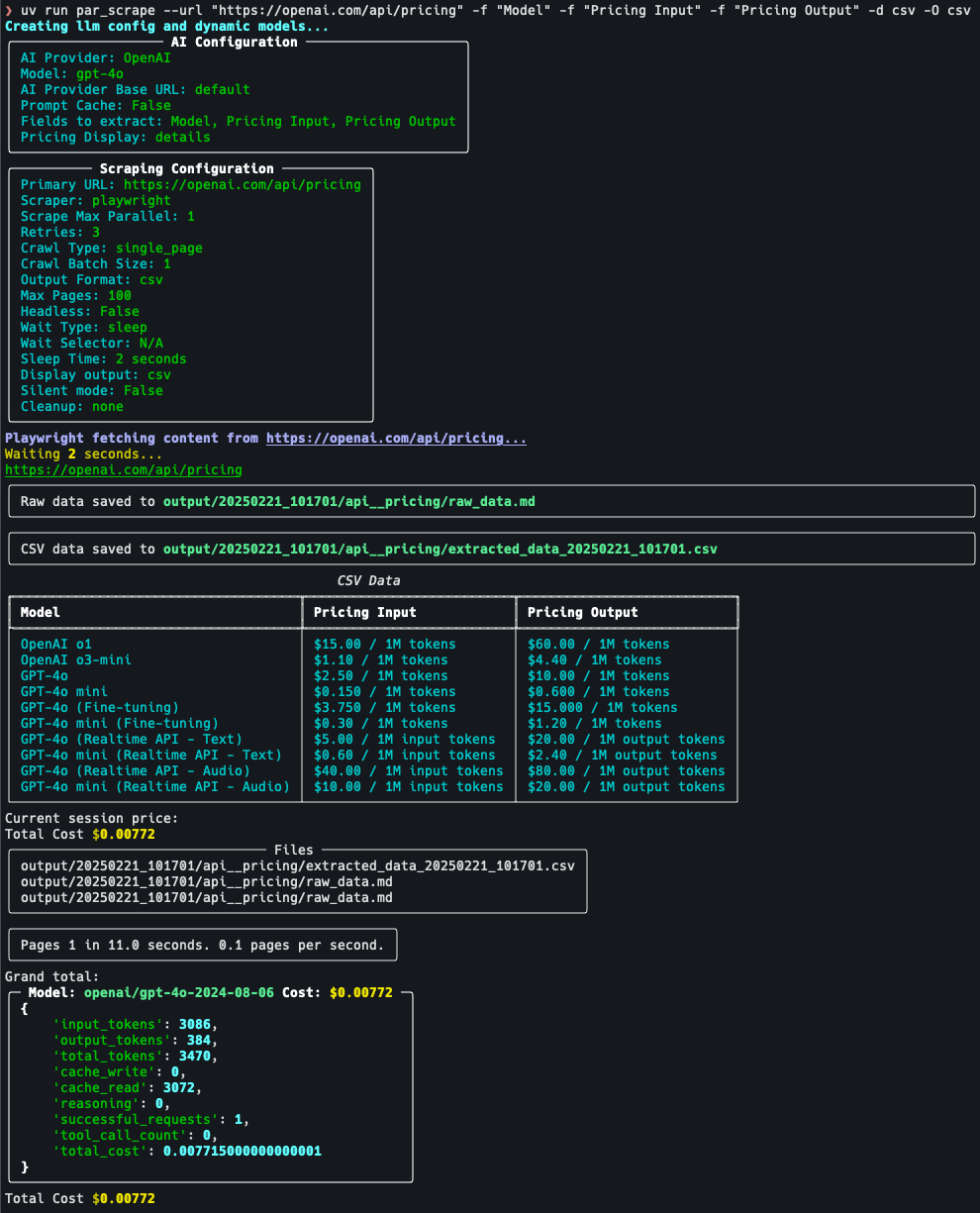
Features
- Web scraping using Playwright or Selenium
- AI-powered data extraction and formatting
- Can be used to crawl and extract clean markdown without AI
- Supports multiple output formats (JSON, Excel, CSV, Markdown)
- Customizable field extraction
- Token usage and cost estimation
- Prompt cache for Anthropic provider
- Uses my PAR AI Core
Known Issues
- Selenium silent mode on windows still shows message about websocket. There is no simple way to get rid of this.
- Providers other than OpenAI are hit-and-miss depending on provider / model / data being extracted.
Prompt Cache
- OpenAI will auto cache prompts that are over 1024 tokens.
- Anthropic will only cache prompts if you specify the --prompt-cache flag. Due to cache writes costing more only enable this if you intend to run multiple scrape jobs against the same url, also the cache will go stale within a couple of minutes so to reduce cost run your jobs as close together as possible.
How it works
- Data is fetch from the site using either Selenium or Playwright
- HTML is converted to clean markdown
- If you specify an output format other than markdown then the following kicks in:
- A pydantic model is constructed from the fields you specify
- The markdown is sent to the AI provider with the pydantic model as the the required output
- The structured output is saved in the specified formats
- If crawling mode is enabled this process is repeated for each page in the queue until the specified max number of pages is reached
Site Crawling
Crawling currently comes in 3 modes:
- Single page which is the default
- Single level which will crawl all links on the first page and add them to the queue. Links from any pages after the first are not added to the queue
- Domain which will crawl all links on all pages as long as they below to the same top level domain (TLD).
- Paginated will be added soon
Crawling progress is stored in a sqlite database and all pages are tagged with the run name which can be specified with the --run-name / -n flag.
You can resume a crawl by specifying the same run name again.
The options --scrape-max-parallel / -P can be used to increase the scraping speed by running multiple scrapes in parallel.
The options --crawl-batch-size / -b should be set at least as high as the scrape max parallel option to ensure that the queue is always full.
The options --crawl-max-pages / -M can be used to limit the total number of pages crawled in a single run.
Prerequisites
To install PAR Scrape, make sure you have Python 3.11 or higher. Python 3.14 is the default and recommended version (supports Python 3.11-3.14).
uv is recommended
Linux and Mac
curl -LsSf https://astral.sh/uv/install.sh | sh
Windows
powershell -ExecutionPolicy ByPass -c "irm https://astral.sh/uv/install.ps1 | iex"
Installation
Installation From Source
Then, follow these steps:
-
Clone the repository:
git clone https://github.com/paulrobello/par_scrape.git
cd par_scrape
-
Install the package dependencies using uv:
uv sync
Installation From PyPI
To install PAR Scrape from PyPI, run any of the following commands:
uv tool install par_scrape
pipx install par_scrape
Playwright Installation
To use playwright as a scraper, you must install it and its browsers using the following commands:
uv tool install playwright
playwright install chromium
Usage
To use PAR Scrape, you can run it from the command line with various options. Here's a basic example:
Ensure you have the AI provider api key in your environment.
You can also store your api keys in the file ~/.par_scrape.env as follows:
# AI API KEYS
OPENAI_API_KEY=
ANTHROPIC_API_KEY=
GROQ_API_KEY=
XAI_API_KEY=
GOOGLE_API_KEY=
MISTRAL_API_KEY=
GITHUB_TOKEN=
OPENROUTER_API_KEY=
DEEPSEEK_API_KEY=
# Used by Bedrock
AWS_PROFILE=
AWS_ACCESS_KEY_ID=
AWS_SECRET_ACCESS_KEY=


### Tracing (optional)
LANGCHAIN_TRACING_V2=false
LANGCHAIN_ENDPOINT=https://api.smith.langchain.com
LANGCHAIN_API_KEY=
LANGCHAIN_PROJECT=par_scrape
AI API KEYS
- ANTHROPIC_API_KEY is required for Anthropic. Get a key from https://console.anthropic.com/
- OPENAI_API_KEY is required for OpenAI. Get a key from https://platform.openai.com/account/api-keys
- GITHUB_TOKEN is required for GitHub Models. Get a free key from https://github.com/marketplace/models
- GOOGLE_API_KEY is required for Google Models. Get a free key from https://console.cloud.google.com
- XAI_API_KEY is required for XAI. Get a free key from https://x.ai/api
- GROQ_API_KEY is required for Groq. Get a free key from https://console.groq.com/
- MISTRAL_API_KEY is required for Mistral. Get a free key from https://console.mistral.ai/
- OPENROUTER_KEY is required for OpenRouter. Get a key from https://openrouter.ai/
- DEEPSEEK_API_KEY is required for Deepseek. Get a key from https://platform.deepseek.com/
- AWS_PROFILE or AWS_ACCESS_KEY_ID and AWS_SECRET_ACCESS_KEY are used for Bedrock authentication. The environment must already be authenticated with AWS.
- No key required to use with Ollama, LlamaCpp, LiteLLM.
Open AI Compatible Providers
If a specify provider is not listed but has an OpenAI compatible endpoint you can use the following combo of vars:
- PARAI_AI_PROVIDER=OpenAI
- PARAI_MODEL=Your selected model
- PARAI_AI_BASE_URL=The providers OpenAI endpoint URL
Running from source
uv run par_scrape --url "https://openai.com/api/pricing/" -f "Title" -f "Description" -f "Price" -f "Cache Price" --model gpt-4o-mini --display-output md
Running if installed from PyPI
par_scrape --url "https://openai.com/api/pricing/" -f "Title" -f "Description" -f "Price" -f "Cache Price" --model gpt-4o-mini --display-output md
Options
--url                  -u      TEXT                                                                                           URL to scrape [default: https://openai.com/api/pricing/]
--output-format        -O      [md|json|csv|excel]                                                                            Output format for the scraped data [default: md]
--fields               -f      TEXT                                                                                           Fields to extract from the webpage
                                                                                                                              [default: Model, Pricing Input, Pricing Output, Cache Price]
--scraper              -s      [selenium|playwright]                                                                          Scraper to use: 'selenium' or 'playwright' [default: playwright]
--retries              -r      INTEGER                                                                                        Retry attempts for failed scrapes [default: 3]
--scrape-max-parallel  -P      INTEGER                                                                                        Max parallel fetch requests [default: 1]
--wait-type            -w      [none|pause|sleep|idle|selector|text]                                                          Method to use for page content load waiting [default: sleep]
--wait-selector        -i      TEXT                                                                                           Selector or text to use for page content load waiting. [default: None]
--headless             -h                                                                                                     Run in headless mode (for Selenium)
--sleep-time           -t      INTEGER                                                                                        Time to sleep before scrolling (in seconds) [default: 2]
--ai-provider          -a      [Ollama|LlamaCpp|OpenRouter|OpenAI|Gemini|Github|XAI|Anthropic|
                                Groq|Mistral|Deepseek|LiteLLM|Bedrock]                                                        AI provider to use for processing [default: OpenAI]
--model                -m      TEXT                                                                                           AI model to use for processing. If not specified, a default model will be used. [default: None]
--ai-base-url          -b      TEXT                                                                                           Override the base URL for the AI provider. [default: None]
--prompt-cache                                                                                                                Enable prompt cache for Anthropic provider
--reasoning-effort             [low|medium|high]                                                                              Reasoning effort level to use for o1 and o3 models. [default: None]
--reasoning-budget             INTEGER                                                                                        Maximum context size for reasoning. [default: None]
--display-output       -d      [none|plain|md|csv|json]                                                                       Display output in terminal (md, csv, or json) [default: None]
--output-folder        -o      PATH                                                                                           Specify the location of the output folder [default: output]
--silent               -q                                                                                                     Run in silent mode, suppressing output
--run-name             -n      TEXT                                                                                           Specify a name for this run. Can be used to resume a crawl Defaults to YYYYmmdd_HHMMSS
--pricing              -p      [none|price|details]                                                                           Enable pricing summary display [default: details]
--cleanup              -c      [none|before|after|both]                                                                       How to handle cleanup of output folder [default: none]
--extraction-prompt    -e      PATH                                                                                           Path to the extraction prompt file [default: None]
--crawl-type           -C      [single_page|single_level|domain]                                                              Enable crawling mode [default: single_page]
--crawl-max-pages      -M      INTEGER                                                                                        Maximum number of pages to crawl this session [default: 100]
--crawl-batch-size     -B      INTEGER                                                                                        Maximum number of pages to load from the queue at once [default: 1]
--respect-rate-limits                                                                                                         Whether to use domain-specific rate limiting [default: True]
--respect-robots                                                                                                              Whether to respect robots.txt
--crawl-delay                  INTEGER                                                                                        Default delay in seconds between requests to the same domain [default: 1]
--version              -v
--help                                                                                                                        Show this message and exit.
Examples
- Basic usage with default options:
par_scrape --url "https://openai.com/api/pricing/" -f "Model" -f "Pricing Input" -f "Pricing Output" -O json -O csv --pricing details --display-output csv
- Using Playwright, displaying JSON output and waiting for text gpt-4o to be in page before continuing:
par_scrape --url "https://openai.com/api/pricing/" -f "Title" -f "Description" -f "Price" --scraper playwright -O json -O csv -d json --pricing details -w text -i gpt-4o
- Specifying a custom model and output folder:
par_scrape --url "https://openai.com/api/pricing/" -f "Title" -f "Description" -f "Price" --model gpt-4 --output-folder ./custom_output -O json -O csv --pricing details -w text -i gpt-4o
- Running in silent mode with a custom run name:
par_scrape --url "https://openai.com/api/pricing/" -f "Title" -f "Description" -f "Price" --silent --run-name my_custom_run --pricing details -O json -O csv -w text -i gpt-4o
- Using the cleanup option to remove the output folder after scraping:
par_scrape --url "https://openai.com/api/pricing/" -f "Title" -f "Description" -f "Price" --cleanup --pricing details -O json -O csv
- Using the pause option to wait for user input before scrolling:
par_scrape --url "https://openai.com/api/pricing/" -f "Title" -f "Description" -f "Price" --pause --pricing details -O json -O csv
- Using Anthropic provider with prompt cache enabled and detailed pricing breakdown:
par_scrape -a Anthropic --prompt-cache -d csv -p details -f "Title" -f "Description" -f "Price" -f "Cache Price" -O json -O csv
- Crawling single level and only outputting markdown (No LLM or cost):
par_scrape --url "https://openai.com/api/pricing/" -O md --crawl-batch-size 5 --scrape-max-parallel 5 --crawl-type single_level
Roadmap
- API Server
- More crawling options
- Paginated Listing crawling
Whats New
- Version 0.8.3
- Updated dependencies and ensured Python 3.14 compatibility
- Python 3.14 is now the default and recommended version
- Maintains backward compatibility with Python 3.11, 3.12, and 3.13
- Updated Pyright configuration to target Python 3.14
- Updated all CI/CD workflows to use Python 3.14
- Version 0.8.2
- Updated all dependencies to latest versions (anthropic, chromadb, fastapi, selenium, and more)
- Fixed critical race conditions in database operations:
get_next_urls(): Now uses atomic transactions to prevent duplicate URL processing in concurrent scenariosadd_to_queue(): Made INSERT and UPDATE operations atomicROBOTS_PARSERS: Added thread-safe locking for concurrent access
- Fixed logic error in crawl_delay initialization that affected all domains instead of just the target
- Improved error handling for file operations with proper UTF-8 encoding
- Enhanced concurrency safety for multi-threaded/multi-process crawling
- Version 0.8.1
- Updated dependencies (ruff 0.14.2, pyright 1.1.407)
- Ensured compatibility with Python 3.13 (now the default version)
- Maintains backward compatibility with Python 3.11 and 3.12
- Version 0.8.0
- Update deps and ci/cd workflows
- Version 0.7.1
- Updated par-ai-core and other deps
- Version 0.7.0
- Major overhaul and fixing of crawling features.
- added --respect-robots flag to check robots.txt before scraping
- added --respect-rate-limits to respect rate limits for domains
- added --reasoning-effort and --reasoning-budget for o1/o3 and Sonnet 3.7
- updated dependencies
- Version 0.6.1
- Updated ai-core
- Version 0.6.0
- Fixed bug where images were being striped from markdown output
- Now uses par_ai_core for url fetching and markdown conversion
- New Features:
- BREAKING CHANGES:
- New option to specify desired output formats
-Owhich defaults to markdown only, which does not require AI
- New option to specify desired output formats
- BEHAVIOR CHANGES:
- Now retries 3 times on failed scrapes
- Basic site crawling
- Retry failed fetches
- HTTP authentication
- Proxy settings
- BREAKING CHANGES:
- Updated system prompt for better results
- Version 0.5.1
- Update ai-core and dependencies
- Now supports Deepseek, XAI and LiteLLM
- Better pricing data
- Version 0.5.0
- Update ai-core and dependencies
- Now supports OpenRouter
- Version 0.4.9
- Updated to use new par-ai-core
- Now supports LlamaCPP and XAI Grok
- Better cost tracking
- Updated pricing data
- Better error handling
- Now supports Python 3.10
- Updated to use new par-ai-core
- Version 0.4.8:
- Added Anthropic prompt cache option.
- Version 0.4.7:
- BREAKING CHANGE: --pricing cli option now takes a string value of 'details', 'cost', or 'none'.
- Added pool of user agents that gets randomly pulled from.
- Updating pricing data.
- Pricing token capture and compute now much more accurate.
- Version 0.4.6:
- Minor bug fixes.
- Updating pricing data.
- Added support for Amazon Bedrock
- Removed some unnecessary dependencies.
- Code cleanup.
- Version 0.4.5:
- Added new option --wait-type that allows you to specify the type of wait to use such as pause, sleep, idle, text or selector.
- Removed --pause option as it is no longer needed with --wait-type option.
- Playwright scraping now honors the headless mode.
- Playwright is now the default scraper as it is much faster.
- Version 0.4.4:
- Better Playwright scraping.
- Version 0.4.3:
- Added option to override the base URL for the AI provider.
- Version 0.4.2:
- The url parameter can now point to a local rawData_*.md file for easier testing of different models without having to re-fetch the data.
- Added ability to specify file with extraction prompt.
- Tweaked extraction prompt to work with Groq and Anthropic. Google still does not work.
- Remove need for ~/.par-scrape-config.json
- Version 0.4.1:
- Minor bug fixes for pricing summary.
- Default model for google changed to "gemini-1.5-pro-exp-0827" which is free and usually works well.
- Version 0.4.0:
- Added support for Anthropic, Google, Groq, and Ollama. (Not well tested with any providers other than OpenAI)
- Add flag for displaying pricing summary. Defaults to False.
- Added pricing data for Anthropic.
- Better error handling for llm calls.
- Updated cleanup flag to handle both before and after cleanup. Removed --remove-output-folder flag.
- Version 0.3.1:
- Add pause and sleep-time options to control the browser and scraping delays.
- Default headless mode to False so you can interact with the browser.
- Version 0.3.0:
- Fixed location of config.json file.
Contributing
Contributions are welcome! Please feel free to submit a Pull Request.
License
This project is licensed under the MIT License - see the LICENSE file for details.
Author
Paul Robello - probello@gmail.com
Project details
Verified details
These details have been verified by PyPIProject links
GitHub Statistics
Maintainers
Release history Release notifications | RSS feed


Download files
Download the file for your platform. If you're not sure which to choose, learn more about installing packages.
Source Distribution
Built Distribution
Filter files by name, interpreter, ABI, and platform.
If you're not sure about the file name format, learn more about wheel file names.
Copy a direct link to the current filters
File details
Details for the file par_scrape-0.8.3.tar.gz.
File metadata
- Download URL: par_scrape-0.8.3.tar.gz
- Upload date:
- Size: 25.2 kB
- Tags: Source
- Uploaded using Trusted Publishing? Yes
- Uploaded via: twine/6.1.0 CPython/3.13.7
File hashes
| Algorithm | Hash digest | |
|---|---|---|
| SHA256 |
5df25bf7f7bea2e0276ad385fba967f4ce2dad80250740614ea5de741331e609
|
|
| MD5 |
38d1345bf62b6bffe9da5a91f72b9b63
|
|
| BLAKE2b-256 |
6ee8f005ec1404509c41409f5d73430d2d845cf530c527bfa2513cbf6511aac7
|
Provenance
The following attestation bundles were made for par_scrape-0.8.3.tar.gz:
Publisher:
publish.yml on paulrobello/par_scrape
-
Statement:
-
Statement type:
https://in-toto.io/Statement/v1 -
Predicate type:
https://docs.pypi.org/attestations/publish/v1 -
Subject name:
par_scrape-0.8.3.tar.gz -
Subject digest:
5df25bf7f7bea2e0276ad385fba967f4ce2dad80250740614ea5de741331e609 - Sigstore transparency entry: 702511574
- Sigstore integration time:
-
Permalink:
paulrobello/par_scrape@de43e3895413bffc199eef244b895a93728de273 -
Branch / Tag:
refs/heads/main - Owner: https://github.com/paulrobello
-
Access:
public
-
Token Issuer:
https://token.actions.githubusercontent.com -
Runner Environment:
github-hosted -
Publication workflow:
publish.yml@de43e3895413bffc199eef244b895a93728de273 -
Trigger Event:
workflow_dispatch
-
Statement type:
File details
Details for the file par_scrape-0.8.3-py3-none-any.whl.
File metadata
- Download URL: par_scrape-0.8.3-py3-none-any.whl
- Upload date:
- Size: 27.9 kB
- Tags: Python 3
- Uploaded using Trusted Publishing? Yes
- Uploaded via: twine/6.1.0 CPython/3.13.7
File hashes
| Algorithm | Hash digest | |
|---|---|---|
| SHA256 |
d1903014340807622c62cc25f89d1347d876430f6fa135a1a3656af484757fa5
|
|
| MD5 |
e4402237d32203a03d1465b37e46f2f9
|
|
| BLAKE2b-256 |
d7520289b71aac5f345834e46e0df0c4562d079696e2b827cd4d97e89bfa6552
|
Provenance
The following attestation bundles were made for par_scrape-0.8.3-py3-none-any.whl:
Publisher:
publish.yml on paulrobello/par_scrape
-
Statement:
-
Statement type:
https://in-toto.io/Statement/v1 -
Predicate type:
https://docs.pypi.org/attestations/publish/v1 -
Subject name:
par_scrape-0.8.3-py3-none-any.whl -
Subject digest:
d1903014340807622c62cc25f89d1347d876430f6fa135a1a3656af484757fa5 - Sigstore transparency entry: 702511604
- Sigstore integration time:
-
Permalink:
paulrobello/par_scrape@de43e3895413bffc199eef244b895a93728de273 -
Branch / Tag:
refs/heads/main - Owner: https://github.com/paulrobello
-
Access:
public
-
Token Issuer:
https://token.actions.githubusercontent.com -
Runner Environment:
github-hosted -
Publication workflow:
publish.yml@de43e3895413bffc199eef244b895a93728de273 -
Trigger Event:
workflow_dispatch
-
Statement type:






