
A comprehensive terminal emulator library in Rust with Python bindings - supports true color, alt screen, mouse reporting, bracketed paste, and full Unicode
Verified details
These details have been verified by PyPIProject links
GitHub Statistics
Maintainers

Project description
Par Term Emu Core Rust








A comprehensive terminal emulator library written in Rust with Python bindings for Python 3.12+. Provides VT100/VT220/VT320/VT420/VT520 compatibility with PTY support, matching iTerm2's feature set.

What's New
Note: For the complete release history, see CHANGELOG.md. The entries below cover recent highlights; older entries may be archived to CHANGELOG.md in future releases to keep this section concise (DOC-016).
Version 0.44.0 is a minor release adding new VT reporting sequences and Kitty desktop notifications, plus security hardening and concurrency/performance work — non-breaking for both Python and Rust consumers. Added: OSC 99 Kitty desktop notifications (with a new Python take_notifications_detailed() / Notification API), XTGETTCAP (DCS + q), DECRQSS (DCS $ q), and XTWINOPS report ops 11/13/19. Security: capped Kitty PNG / iTerm2 image-decode sizes against decompression-bomb DoS, and hid streaming-server CLI secrets from --help. Performance: observer/trigger dispatch and PTY device-query replies now run outside the terminal write lock, and screenshot glyph bitmaps are shared via Arc. See What's New in 0.44.0 below, and CHANGELOG.md for complete release notes.
What's New in 0.44.0
Version 0.44.0 is a minor release focused on terminal-reporting completeness, security hardening, and concurrency. Added: OSC 99 Kitty desktop notifications (OSC 99 ; <metadata> ; <payload> ST) with multi-chunk accumulation, urgency, and actions — exposed to Python via the new take_notifications_detailed() method and Notification class (the existing take_notifications()/drain_notifications() tuple API is unchanged); XTGETTCAP (DCS + q) replying terminal capabilities (TN/Co/RGB/Tc); DECRQSS (DCS $ q) replying current SGR / cursor-style / scroll-margin settings; and XTWINOPS report ops CSI 11 t / 13 t / 19 t (window state / position / size-in-characters). Fixed: a DCS routing bug where DCS +q (XTGETTCAP) and DCS $q (DECRQSS) were misrouted into the Sixel parser because routing keyed only on the final q byte. Security: Kitty PNG and iTerm2 image decoding now enforce a shared MAX_IMAGE_PIXELS product cap (closing a decompression-bomb DoS reachable from any terminal/SSH bytes), and the streaming-server CLI hides api_key / http_password / http_password_hash values from --help. Performance: observer/trigger callback dispatch and PTY device-query reply writes moved outside the Terminal write lock (the reader thread previously held the exclusive guard across blocking PTY writes and Python re-entry, stalling every concurrent reader), screenshot glyph bitmaps are shared via Arc<[u8]> instead of per-character deep copies, and the per-row String allocation in flag-emoji detection is gone. Refactored (internal, no API change): the 4,004-line python_bindings/types.rs god-file was split into 12 cohesive submodules behind an unchanged facade, and the duplicated WS/WSS handshake logic was consolidated into a single shared callback factory. Non-breaking for Python and Rust consumers. See CHANGELOG.md for complete release notes.
What's New in 0.43.0
Version 0.43.0 is a minor release that ships the full code-quality/audit remediation plus new public API. ⚠️ Breaking for direct Rust consumers (Python bindings unchanged): the PtySession terminal lock changed from Arc<Mutex<Terminal>> to Arc<RwLock<Terminal>> — so any Rust .terminal().lock() call must become .read() (read-only queries) or .write() (mutators) — and Cell/Grid struct fields are now private (use the cell.fg() / cell.bg() / cell.c() / cell.flags() and grid.get() / grid.row() accessor methods). Python users are unaffected. See the "⚠️ Breaking — Rust API only" section of CHANGELOG.md for the full migration. Added: ScreenshotConfig options object, runtime-configurable OSC data limit (max_osc_data_length / set_max_osc_data_length), streaming-server allowed_origins CSRF defense, and a TerminalAction enum for test-in-isolation / record→replay. Hardened the standalone streaming server (bounded zlib decompression, explicit WebSocket message-size caps, constant-time htpasswd auth, Origin validation, public-bind warning). Refactored (no API change): the Terminal and PyTerminal god objects are decomposed and the duplicated Python-binding methods + WebSocket handlers are consolidated. Performance: read/write-lock concurrency (this is the breaking Arc<RwLock<Terminal>> type change noted above), inline combining marks (SmallVec), single-allocation row_text, bounded glyph LRU. Fixed: a trigger bug where Notify / MarkLine / StopPropagation actions were queued but never applied to terminal state. Tooling: integration tests and doctests now run in the CI gate, and new make coverage / coverage-html / coverage-python targets. See CHANGELOG.md for complete release notes.
What's New in 0.42.4
Version 0.42.4 fixes has_updates_since() on Windows — the generation counter now increments immediately on PTY data arrival instead of at the end of terminal processing, preventing it from getting stuck after Ctrl+C on ConPTY. See CHANGELOG.md for complete release notes.
What's New in 0.42.3
Version 0.42.3 implements BCE (Background Color Erase) — all VT erase operations (EL, ED, ECH, DECSERA) now fill erased cells with the current SGR background color instead of always resetting to black, matching iTerm2/Alacritty/Windows Terminal behavior. Also bumps dependencies across Rust (bitflags 2.13, tokio 1.52.3), Python (pytest-asyncio 1.4, ruff 0.15.16), and web frontend (next 16.2.7, react 19.2.7). See CHANGELOG.md for complete release notes.
What's New in 0.42.1
Version 0.42.1 fixes Kitty TGP virtual placement truncation past the 64th column/row — the diacritic table now covers all 297 entries from the spec, and CSI 16t (report cell pixel size) now returns the actual renderer pitch instead of a hardcoded 10×20. Also bumps GitHub Actions to latest versions and increases the streaming binary build timeout. See CHANGELOG.md for complete release notes.
What's New in 0.42.0
Version 0.42.0 adds Kitty Terminal Graphics Protocol support — APC ingestion (Phase 1) intercepts Kitty TGP sequences before the VTE parser, supporting chunked payloads, virtual placements, and malformed-sequence recovery. Query response (Phase 3) replies OK to Kitty image queries so terminal-detection probes succeed. Also fixes a critical hang where Kitty placeholder cells caused frame-skipping in par-term due to unnecessary Unicode NFC normalization on non-text cells. Dependency bumps across Rust (tokio 1.52, axum 0.8.9, tower-http 0.6.10, rustls 0.23.40), Python (rich 15, ruff 0.15.12, pyright 1.1.409), and the web frontend (next 16.2.5, react 19.2.6, eslint 10, typescript 6.0.3). See CHANGELOG.md for complete release notes.
What's New in 0.41.0
Version 0.41.0 added TriggerAction::SplitPane — a new trigger action that instructs frontends to open a split pane with configurable direction (horizontal/vertical), focus behaviour, target pane, and an optional command (SendText or InitialCommand). Poll results via poll_action_results() which returns dicts with type="split_pane".
What's New in 0.40.0
Version 0.40.0 added full VT100 ACS (Alternate Character Set) line-drawing support. Applications like tmux that fall back from UTF-8 to ACS now render correct box-drawing glyphs (┌, ┐, └, ┘, ─, │, ┼, etc.) instead of raw ASCII letters.
What's New in 0.34.0
OSC 1337 RemoteHost Support
Parse OSC 1337 ; RemoteHost=user@hostname ST sequences for remote host detection. This is iTerm2's dedicated mechanism for reporting remote host information, commonly emitted by shell integration scripts on remote hosts. The ShellIntegration state now includes hostname and username attributes, and a cwd_changed event is emitted when the remote host changes.
# After SSH to a remote host with iTerm2 shell integration:
# The shell sends: printf '\e]1337;RemoteHost=%s@%s\a' "$USER" "$HOSTNAME"

state = terminal.shell_integration_state()
print(f"Host: {state.hostname}")    # "remote-server.example.com"
print(f"User: {state.username}")    # "alice"
🔤 Unicode Normalization (NFC/NFD/NFKC/NFKD)
Configurable Unicode normalization ensures consistent text storage for search, comparison, and cursor movement. Unicode characters can have multiple binary representations that look identical (e.g., é can be precomposed U+00E9 or decomposed U+0065 + U+0301). Normalization eliminates this ambiguity.
from par_term_emu_core_rust import Terminal, NormalizationForm

term = Terminal(80, 24)

# Default is NFC (Canonical Composition) - most common form
assert term.normalization_form() == NormalizationForm.NFC

# Switch to NFD (Canonical Decomposition) for macOS HFS+ compatibility
term.set_normalization_form(NormalizationForm.NFD)

# NFKC replaces compatibility characters (e.g., fi ligature → fi)
term.set_normalization_form(NormalizationForm.NFKC)

# Disable normalization entirely
term.set_normalization_form(NormalizationForm.Disabled)
Normalization Forms:
NormalizationForm.NFC- Canonical Composition (default): composese+ combining accent →éNormalizationForm.NFD- Canonical Decomposition: decomposesé→e+ combining accentNormalizationForm.NFKC- Compatibility Composition: NFC + replaces compatibility chars (fi→fi)NormalizationForm.NFKD- Compatibility Decomposition: NFD + replaces compatibility charsNormalizationForm.Disabled- No normalization, store text as received
OSC 1337 SetUserVar Support
Shell integration scripts can now send user variables via OSC 1337 SetUserVar=<name>=<base64_value> sequences. Variables are base64-decoded, stored on the terminal, and accessible via a dedicated API. A UserVarChanged event is emitted when values change, enabling features like remote host detection, automatic profile switching, and hostname display.
# After shell sends: printf '\e]1337;SetUserVar=%s=%s\a' "hostname" "$(printf 'server1' | base64)"
host = terminal.get_user_var("hostname")     # "server1"
all_vars = terminal.get_user_vars()           # {"hostname": "server1", ...}

# Event-driven: poll for changes
for event in terminal.poll_events():
    if event["type"] == "user_var_changed":
        print(f"{event['name']} = {event['value']}")
Image Metadata Serialization for Session Persistence
Graphics state can now be serialized and restored for session persistence. All active placements, scrollback graphics, and animation state are captured in a versioned JSON snapshot with base64-encoded pixel data. External file references are also supported for compact on-disk storage.
# Save graphics state
json_str = terminal.export_graphics_json()
with open("session_graphics.json", "w") as f:
    f.write(json_str)

# Restore graphics state in a new session
with open("session_graphics.json") as f:
    count = terminal.import_graphics_json(f.read())
    print(f"Restored {count} graphics")
Image Placement Metadata
All graphics protocols now expose unified ImagePlacement metadata on Graphic.placement, abstracting protocol-specific placement parameters so frontends can implement inline/cover/contain rendering. The Kitty protocol exposes columns/rows sizing, z-index for layering, and sub-cell offsets. The iTerm2 protocol exposes width/height with unit support (cells, pixels, percent, auto) and preserveAspectRatio. New ImagePlacement and ImageDimension classes are importable from the package.
Original Image Dimensions for Aspect Ratio Preservation
All graphics protocols (Sixel, iTerm2, Kitty) now expose original_width and original_height on Graphic objects. These fields preserve the original decoded pixel dimensions even when width/height change during animation, enabling frontends to calculate correct aspect ratios when scaling images to fit terminal cells.
Kitty Graphics Compression Support
The Kitty graphics protocol now supports zlib-compressed image payloads (o=z parameter). Compressed data is automatically decompressed before pixel decoding, reducing data sent over the PTY. A new was_compressed flag on the Graphic class allows frontends to track compression usage for diagnostics.
Dependencies
- Migrated to PyO3 0.28 from 0.23, updating all Python binding patterns to the latest API
flate2is now a non-optional dependency (required for Kittyo=zdecompression)- Added
unicode-normalizationv0.1.25 for Unicode text normalization support
What's New in 0.33.0
Multi-Session Streaming Server
The streaming server now supports multiple concurrent terminal sessions. Each WebSocket client can connect to a named session, and new sessions are created on demand:
ws://host:port/ws?session=my-session     # Connect to (or create) a named session
ws://host:port/ws?preset=python           # Create a session using a shell preset
ws://host:port/ws                         # Connect to the default session
Key features:
- Session isolation: Each session has its own terminal, PTY, and broadcast channels
- Shell presets: Define named shell commands (
--preset python=python3 --preset node=node) - Idle timeout: Sessions with no clients are automatically reaped (default: 15 minutes)
- Client identity: Each client receives a unique
client_idin the Connected handshake - Read-only awareness: The
readonlyfield in Connected tells clients their permission level
Default limits:
- Max concurrent sessions: 10
- Idle session timeout: 900 seconds (15 minutes)
- Max clients per server: 100 (unchanged)
New Streaming Events: Mode, Graphics, and Hyperlink
Three new event types allow streaming clients to react to terminal state changes:
- ModeChanged: Fires when terminal modes toggle (e.g., cursor visibility, mouse tracking, bracketed paste). Subscribe with
"mode". - GraphicsAdded: Fires when images are rendered via Sixel, iTerm2, or Kitty protocols. Includes row position and format. Subscribe with
"graphics". - HyperlinkAdded: Fires when OSC 8 hyperlinks are added. Includes URL, row, column, and optional link ID. Subscribe with
"hyperlink".
Breaking: StreamingConfig has new required fields (max_sessions, session_idle_timeout, presets). ServerMessage::Connected now includes client_id and readonly fields.
What's New in 0.32.0
Coprocess Restart Policies & Stderr Capture
Coprocesses now support automatic restart when they exit, and stderr is captured separately:
from par_term_emu_core_rust import PtyTerminal, CoprocessConfig

with PtyTerminal(80, 24) as term:
    term.spawn_shell()

    # Start a coprocess that auto-restarts on failure with a 1-second delay
    config = CoprocessConfig(
        "my-watcher",
        restart_policy="on_failure",
        restart_delay_ms=1000,
    )
    cid = term.start_coprocess(config)

    # Read stderr separately from stdout
    errors = term.read_coprocess_errors(cid)
    output = term.read_from_coprocess(cid)
Restart Policies: "never" (default), "always", "on_failure" (non-zero exit only)
Trigger Notify & MarkLine as Frontend Events
Notify and MarkLine trigger actions now emit ActionResult events (via poll_action_results()) instead of directly modifying internal state. This gives frontends full control over how notifications and line marks are displayed. MarkLine also supports an optional color parameter:
mark = TriggerAction("mark_line", {"label": "Error", "color": "255,0,0"})
Breaking: If you relied on Notify triggers adding to the notification queue or MarkLine triggers adding bookmarks directly, you must now handle these via poll_action_results().
What's New in 0.31.1
Trigger Column Mapping Fix
TriggerMatch.col and TriggerMatch.end_col now correctly report grid column positions for text containing wide characters (CJK, emoji) and multi-byte UTF-8 characters. Previously, regex byte offsets were used directly, producing incorrect column values for non-ASCII text. Trigger highlights now correctly overlay the matched text even when wide or combining characters appear in the same row.
What's New in 0.31.0
Triggers & Automation
Register regex patterns to automatically match terminal output and execute actions — highlight matches, send notifications, set bookmarks, update session variables, or emit events for frontend handling:
from par_term_emu_core_rust import Terminal, TriggerAction

term = Terminal(80, 24)

# Highlight errors in red
highlight = TriggerAction("highlight", {"bg_r": "255", "bg_g": "0", "bg_b": "0"})
term.add_trigger("errors", r"ERROR:\s+(\S+)", [highlight])

# Set a session variable from matched output
set_var = TriggerAction("set_variable", {"name": "last_status", "value": "$1"})
term.add_trigger("status", r"STATUS: (\w+)", [set_var])

# Process terminal output and scan for matches
term.process_str("ERROR: diskfull\nSTATUS: RUNNING\n")
term.process_trigger_scans()

# Poll results
matches = term.poll_trigger_matches()  # TriggerMatch objects with captures
highlights = term.get_trigger_highlights()  # Active highlight overlays
Trigger Actions: highlight, notify, mark_line, set_variable, run_command, play_sound, send_text, stop
Features:
RegexSet-based multi-pattern matching for efficient scanning- Capture group substitution (
$1,$2) in action parameters - Highlight overlays with optional time-based expiry
- Automatic scanning in PTY mode; manual
process_trigger_scans()for non-PTY
Coprocess Management
Run external processes alongside terminal sessions with automatic output piping:
from par_term_emu_core_rust import PtyTerminal, CoprocessConfig

with PtyTerminal(80, 24) as term:
    term.spawn_shell()

    # Start a coprocess that receives terminal output
    config = CoprocessConfig("grep", args=["ERROR"], copy_terminal_output=True)
    cid = term.start_coprocess(config)

    # Read coprocess output
    lines = term.read_from_coprocess(cid)

    # Check status and stop
    term.coprocess_status(cid)  # True if running
    term.stop_coprocess(cid)
New Python Classes: Trigger, TriggerAction, TriggerMatch, CoprocessConfig
What's New in 0.30.0
⌨️ modifyOtherKeys Protocol Support
XTerm extension for enhanced keyboard input reporting, enabling applications to receive modifier keys with regular characters:
from par_term_emu_core_rust import Terminal

term = Terminal(80, 24)

# Enable modifyOtherKeys mode via escape sequence
term.process(b"\x1b[>4;2m")  # Mode 2: report all keys with modifiers
print(f"Mode: {term.modify_other_keys_mode()}")  # Output: 2

# Or set directly
term.set_modify_other_keys_mode(1)  # Mode 1: special keys only

# Query mode (response in drain_responses())
term.process(b"\x1b[?4m")
response = term.drain_responses()  # Returns b"\x1b[>4;1m"
Modes:
0- Disabled (default)1- Report modifiers for special keys only2- Report modifiers for all keys
New Methods:
modify_other_keys_mode()- Get current modeset_modify_other_keys_mode(mode)- Set mode directly (values > 2 clamped to 2)
Sequences:
CSI > 4 ; mode m- Set modeCSI ? 4 m- Query mode (response:CSI > 4 ; mode m)
Note: Mode resets to 0 on terminal reset and when exiting alternate screen.
🎨 Faint Text Alpha Control
Configurable alpha multiplier for SGR 2 (dim/faint) text, allowing fine-grained control over how dim text is rendered:
from par_term_emu_core_rust import Terminal

term = Terminal(80, 24)

# Get current faint text alpha (default: 0.5 = 50% dimming)
print(f"Alpha: {term.faint_text_alpha()}")  # Output: 0.5

# Set faint text to be more transparent (more dimmed)
term.set_faint_text_alpha(0.3)  # 30% opacity

# Set faint text to be less transparent (less dimmed)
term.set_faint_text_alpha(0.7)  # 70% opacity

# Values are clamped to 0.0-1.0 range
term.set_faint_text_alpha(1.5)  # Clamped to 1.0
term.set_faint_text_alpha(-0.5)  # Clamped to 0.0
New Methods:
faint_text_alpha()- Get current alpha multiplier (0.0-1.0)set_faint_text_alpha(alpha)- Set alpha multiplier (clamped to valid range)
Usage: This setting is used by the screenshot renderer and can be queried by frontends for consistent rendering of dim text (SGR 2).
What's New in 0.28.0
🏷️ Badge Format Support (OSC 1337 SetBadgeFormat)
iTerm2-style badge support for terminal overlays with variable interpolation:
from par_term_emu_core_rust import Terminal

term = Terminal(80, 24)

# Set badge format with variables
term.set_badge_format(r"\(username)@\(hostname)")

# Set session variables
term.set_badge_session_variable("username", "alice")
term.set_badge_session_variable("hostname", "server1")

# Evaluate badge - returns "alice@server1"
badge = term.evaluate_badge()
print(f"Badge: {badge}")

# Get all session variables
vars = term.get_badge_session_variables()
print(f"Columns: {vars['columns']}, Rows: {vars['rows']}")
New Methods:
badge_format()- Get current badge format templateset_badge_format(format)- Set badge format with\(variable)placeholdersclear_badge_format()- Clear badge formatevaluate_badge()- Evaluate badge with session variablesget_badge_session_variable(name)- Get a session variable valueset_badge_session_variable(name, value)- Set a custom session variableget_badge_session_variables()- Get all session variables as a dictionary
Built-in Variables:
hostname, username, path, job, last_command, profile_name, tty, columns, rows, bell_count, selection, tmux_pane_title, session_name, title
Security: Badge formats are validated to reject shell injection patterns (backticks, $(), pipes, etc.)
🔧 Tmux Control Mode Fixes
- Fixed CRLF line ending handling (strips
\rfrom\r\nline endings) - Fixed
%outputnotifications to preserve trailing spaces - Fixed OSC 133 exit code parsing from
OSC 133 ; D ; <exit_code> ST
What's New in 0.27.0
🔄 Tmux Control Mode Auto-Detection
Automatic detection and switching to tmux control mode to handle race conditions:
from par_term_emu_core_rust import Terminal

term = Terminal(80, 24)

# Enable auto-detection before starting tmux
# Parser will automatically switch to control mode when %begin is seen
term.set_tmux_auto_detect(True)

# Or just call set_tmux_control_mode(True) which enables auto-detect automatically
term.set_tmux_control_mode(True)

# Process tmux output - auto-detects %begin and switches modes
term.process_str("$ tmux -CC\n%begin 1234567890 1\n%output %1 Hello\n")

# Check modes
print(f"Control mode: {term.is_tmux_control_mode()}")
print(f"Auto-detect: {term.is_tmux_auto_detect()}")
New Methods:
set_tmux_auto_detect(enabled)- Enable/disable auto-detection of tmux control modeis_tmux_auto_detect()- Check if auto-detection is enabled
Behavior:
- When
%beginnotification is detected, parser automatically switches to control mode - Data before
%beginis returned asTerminalOutputnotification for normal display - Calling
set_tmux_control_mode(True)now also enables auto-detect
What's New in 0.26.0
🎬 Session Recording Enhancements
Full Python API for session recording with event iteration and environment capture:
from par_term_emu_core_rust import Terminal, RecordingEvent, RecordingSession

term = Terminal(80, 24)

# Start recording
term.start_recording("demo session")
term.process_str("echo hello\n")
term.record_marker("checkpoint")
session = term.stop_recording()

# Access session metadata
print(f"Duration: {session.get_duration_seconds()}s")
print(f"Size: {session.get_size()}")
print(f"Environment: {session.env}")

# Iterate over recorded events
for event in session.events:
    print(f"{event.event_type} at {event.timestamp}ms: {event.get_data_str()}")
New Exports:
RecordingEventandRecordingSessionnow directly importable from the module
New RecordingSession Properties:
session.events- List of RecordingEvent objectssession.env- Dict of captured environment variables
New PtyTerminal Methods:
record_output(),record_input(),record_resize(),record_marker(),get_recording_session()
What's New in 0.25.0
🌐 Configurable Unicode Width
Full control over character width calculations for proper terminal alignment in CJK and mixed-script environments:
from par_term_emu_core_rust import (
    Terminal, WidthConfig, UnicodeVersion, AmbiguousWidth,
    char_width, str_width, is_east_asian_ambiguous
)

# Configure terminal for CJK environment (Greek/Cyrillic = 2 cells)
term = Terminal(80, 24)
term.set_width_config(WidthConfig.cjk())

# Or configure individually
term.set_ambiguous_width(AmbiguousWidth.Wide)
term.set_unicode_version(UnicodeVersion.Auto)

# Standalone width functions
print(char_width("日"))  # 2 - CJK character
print(char_width("α", WidthConfig.cjk()))  # 2 - Greek with CJK config
print(str_width("Hello日本"))  # 9 - mixed text
print(is_east_asian_ambiguous("α"))  # True - Greek is ambiguous
New Types:
UnicodeVersion: Unicode9-Unicode16, AutoAmbiguousWidth: Narrow (1 cell), Wide (2 cells)WidthConfig: Combines both with.cjk()and.western()presets
New Functions:
char_width(c, config?)/str_width(s, config?)- configurable widthchar_width_cjk(c)/str_width_cjk(s)- CJK convenience functionsis_east_asian_ambiguous(c)- check if character is ambiguous
What's New in 0.23.0
📨 Configurable ENQ Answerback
- Added an optional answerback string that the terminal returns when receiving ENQ (0x05)
- Disabled by default for security; set a custom value via Rust API or Python bindings
- Responses are buffered in the existing response buffer and drained with
drain_responses() - Python bindings now expose
answerback_string()andset_answerback_string()
What's New in 0.22.1
🐛 Search Unicode Bug Fix
Fixed search() and search_scrollback() returning byte offsets instead of character offsets for text containing multi-byte Unicode characters (CJK, emoji, etc.):
SearchMatch.colnow correctly returns the character column positionSearchMatch.lengthnow correctly returns the character count- Example: Searching for "World" in "こんにちは World" now returns
col=6(correct) instead ofcol=16(byte offset)
What's New in 0.22.0
🏳️ Regional Indicator Flag Emoji Support
Proper grapheme cluster handling for flag emoji like 🇺🇸, 🇬🇧, 🇯🇵:
- Flag emoji are now correctly combined into single wide (2-cell) graphemes
- Two regional indicator codepoints are combined with the first as the base character and the second in the combining vector
- Cursor correctly advances by 2 cells after writing a flag
- Added
unicode-segmentationcrate dependency for grapheme cluster support - Comprehensive test suite for flag emoji
What's New in 0.21.0
🚀 parking_lot Migration
The entire library has been migrated from std::sync::Mutex to parking_lot::Mutex.
- Improved Reliability: Eliminated "Mutex Poisoning". A panic in one thread no longer renders the terminal state permanently inaccessible to other threads.
- Better Performance: Faster lock/unlock operations and significantly smaller memory footprint for locks.
- Ergonomic API: Lock acquisition no longer requires
.unwrap(), making the code cleaner and more robust.
What's New in 0.20.1
🔧 Safe Environment Variable API
Added new methods to pass environment variables and working directory directly to spawned processes without modifying the global environment of the parent process.
- Rust:
spawn_shell_with_env(env, cwd),spawn_with_env(command, args, env, cwd) - Python:
spawn_shell(env=None, cwd=None)- now supports optional environment dictionary and working directory path. - Thread Safety: Eliminates the need for
unsafe { std::env::set_var() }in multi-threaded applications like those using Tokio.
What's New in 0.20.0
🎨 External UI Theme
The web frontend UI chrome can now be customized after static build without rebuilding:
/* Edit web_term/theme.css */
:root {
  --terminal-bg: #0a0a0a;      /* Main background */
  --terminal-surface: #1a1a1a; /* Status bar, cards */
  --terminal-border: #2a2a2a;  /* Borders */
  --terminal-accent: #3a3a3a;  /* Scrollbar, accents */
  --terminal-text: #e0e0e0;    /* Primary text */
}
- Edit colors and refresh the page - no rebuild required
- Terminal emulator colors (ANSI palette) still controlled by server
--themeoption - See docs/STREAMING.md for details
🐛 Bug Fixes
- Web Terminal On-Screen Keyboard: Fixed native device keyboard appearing when tapping on-screen keyboard buttons on mobile devices
- The on-screen keyboard now properly prevents xterm's internal textarea from gaining focus
- Tapping virtual keys no longer triggers the device's native keyboard
What's New in 0.19.5
🐛 Bug Fixes
- Streaming Server Shell Restart Input: Fixed WebSocket client connections not receiving input after shell restart
- PTY writer was captured once at connection time, becoming stale after shell restart
- Client keyboard input now properly reaches the shell after any restart
What's New in 0.19.4
🔧 Python SDK Sync
- Python SDK aligned with Rust SDK: All streaming features now available in Python bindings
StreamingConfig.enable_http/web_root- HTTP server configuration (getter/setter)StreamingServer.max_clients()- Query maximum allowed clientsStreamingServer.create_theme_info()- Create theme dictionaries for protocolencode_server_message("pong")- Pong message encoding supportencode_server_message("connected", theme=...)- Theme support in connected messages
from par_term_emu_core_rust import StreamingConfig, StreamingServer, encode_server_message

# Configure HTTP serving
config = StreamingConfig(enable_http=True, web_root="/var/www/terminal")

# Create theme for connected message
theme = StreamingServer.create_theme_info(
    name="my-theme",
    background=(0, 0, 0),
    foreground=(255, 255, 255),
    normal=[(0,0,0), (255,0,0), (0,255,0), (255,255,0), (0,0,255), (255,0,255), (0,255,255), (200,200,200)],
    bright=[(128,128,128), (255,128,128), (128,255,128), (255,255,128), (128,128,255), (255,128,255), (128,255,255), (255,255,255)]
)

# Encode messages
pong = encode_server_message("pong")
connected = encode_server_message("connected", cols=80, rows=24, session_id="abc", theme=theme)
What's New in 0.19.2
🐛 Bug Fixes
- Streaming Server Hang on Shell Exit: Fixed server hanging indefinitely when the shell exits
- Added shutdown signal mechanism to gracefully terminate the broadcaster loop
- Prevents blocking indefinitely when shell exits in some conditions
What's New in 0.19.1
🐛 Bug Fixes
- Streaming Server Ping/Pong: Fixed application-level ping/pong handling
- Server was sending WebSocket-level pong frames instead of protobuf
Pongmessages - Frontend heartbeat mechanism now properly receives pong responses
- Fixes stale connection detection that was failing due to missing pong responses
- Server was sending WebSocket-level pong frames instead of protobuf
What's New in 0.19.0
🎉 New Features
-
Automatic Shell Restart: Streaming server now automatically restarts the shell when it exits
- Default behavior: shell is restarted automatically when it exits
- New
--no-restart-shellCLI option to disable automatic restart - New
PAR_TERM_NO_RESTART_SHELLenvironment variable support - When restart is disabled, server exits gracefully when the shell exits
-
Header/Footer Toggle in On-Screen Keyboard: Layout toggle button in keyboard header
- Show/hide header and footer directly from the on-screen keyboard
- Blue indicator shows when header/footer is visible
- Convenient for maximizing terminal space on mobile
-
Font Size Controls in On-Screen Keyboard: Plus/minus buttons in keyboard header
- Adjust font size (8-32px) without opening the header panel
🔧 Changes
- StreamingServer API:
set_pty_writernow uses interior mutability for shell restart support - UI Improvements: Font size controls moved to keyboard header; floating buttons repositioned side by side
What's New in 0.18.2
🎉 New Features
-
Font Size Control: User-adjustable terminal font size in web frontend
- Plus/minus buttons in header (8px to 32px range)
- Persisted to localStorage across sessions
-
Heartbeat/Ping Mechanism: Stale WebSocket connection detection
- Sends ping every 25s, expects pong within 10s
- Automatically closes and reconnects stale connections
🔒 Security Hardening
- Web Terminal Security Fixes: Comprehensive security audit remediation
- Reverse-tabnabbing prevention: Terminal links now open with
noopener,noreferrer - Zip bomb protection: Added decompression size limits (256KB compressed, 2MB decompressed)
- Localhost probe fix: WebSocket preconnect hints gated to development mode only
- Snapshot size guard: 1MB limit on screen snapshots to prevent UI freezes
- Reverse-tabnabbing prevention: Terminal links now open with
🐛 Bug Fixes
- WebSocket URL Changes: Properly disconnects and reconnects when URL changes
- Invalid URL Handling: Displays friendly error instead of crashing
- Next.js Config: Merged duplicate config files into single file
- Toggle Button Overlap: Moved button left to avoid scrollbar overlap
What's New in 0.18.1
🐛 Bug Fixes
- Web Terminal On-Screen Keyboard: Fixed device virtual keyboard appearing when tapping on-screen keyboard buttons on mobile devices
- Added
tabIndex={-1}to all buttons to prevent focus acquisition that triggered device keyboard
- Added
What's New in 0.18.0
🎉 New Features
-
Environment Variable Support: All CLI options now support environment variables with
PAR_TERM_prefix- Examples:
PAR_TERM_HOST,PAR_TERM_PORT,PAR_TERM_THEME,PAR_TERM_HTTP_USER - Configuration via environment for containerized deployments
- Examples:
-
HTTP Basic Authentication: New password protection for the web frontend
--http-user- Username for HTTP Basic Auth--http-password- Clear text password--http-password-hash- htpasswd format hash (bcrypt, apr1, SHA1, MD5 crypt)--http-password-file- Read password from file (auto-detects hash vs clear text)
🧪 Test Coverage
- Comprehensive Streaming Test Suite: 94 new tests for streaming functionality
- Protocol message constructors, theme info, HTTP Basic Auth configuration
- Binary protocol encoding/decoding with compression
- Event types, streaming errors, JSON serialization
- Unicode content and ANSI escape sequence preservation
🔧 Improvements
- Python Bindings: Binary protocol functions now properly exported (
encode_server_message,decode_server_message,encode_client_message,decode_client_message)
Usage Examples
# Environment variables
export PAR_TERM_HOST=0.0.0.0
export PAR_TERM_HTTP_USER=admin
export PAR_TERM_HTTP_PASSWORD=secret
par-term-streamer --enable-http

# CLI with htpasswd hash
par-term-streamer --enable-http --http-user admin --http-password-hash '$apr1$...'
What's New in 0.17.0
🎉 New Features
-
Web Terminal Macro System: New macro tab in the on-screen keyboard for creating and playing terminal command macros
- Create named macros with multi-line scripts (one command per line)
- Quick select buttons to run macros with a single tap
- Playback with 200ms delay before each Enter key for reliable command execution
- Edit and delete existing macros via hover menu
- Stop button to abort macro playback mid-execution
- Macros persist to localStorage across sessions
- Visual feedback during playback (pulsing animation, stop button)
- Option to disable sending Enter after each line (for text insertion macros)
- Template commands for advanced scripting:
[[delay:N]],[[enter]],[[tab]],[[esc]],[[space]],[[ctrl+X]],[[shift+X]],[[ctrl+shift+X]],[[shift+tab]],[[shift+enter]]
-
On-Screen Keyboard Enhancements:
- Permanent symbols grid on the right side with all keyboard symbols (32 keys)
- Added Space, Enter, http://, and https:// buttons to modifier row
- Added tooltips to Ctrl shortcut buttons
- Expanded symbol keys with full punctuation set
🔧 Improvements
- On-Screen Keyboard Layout: Reorganized for better usability with more compact vertical layout and persistent symbols grid
📦 Dependency Updates
- Web Frontend: Updated @types/node (25.0.1 → 25.0.2)
What's New in 0.16.3
🐛 Bug Fixes
- Web Terminal tmux/TUI Fix: Fixed control characters (
^[[?1;2c^[[>0;276;0c) appearing when running tmux or other TUI applications in the web terminal. The issue was caused by xterm.js generating Device Attributes responses when the backend terminal emulator already handles these queries.
🚀 Performance Optimizations
- jemalloc Allocator: New optional
jemallocfeature for 5-15% server throughput improvement (non-Windows only) - TCP_NODELAY: Disabled Nagle's algorithm for lower keystroke latency (up to 40ms improvement)
- Output Batching: Time-based batching at 60fps reduces WebSocket overhead by 50-80% during burst output
- Compression Threshold: Lowered to 256 bytes to compress more typical terminal output
- WebSocket Preconnect: Reduces initial connection latency by 100-200ms
- Font Preloading: Eliminates layout shift and font flash
📦 Dependency Updates
- Web Frontend: Updated Next.js and type definitions
- Pre-commit Hooks: Updated ruff linter
What's New in 0.16.2
🔧 Compatibility Fix
- TERM Environment Variable: Changed default
TERMfromxterm-kittytoxterm-256colorfor better compatibility with systems lacking kitty terminfo
What's New in 0.16.0
🔒 TLS/SSL Support
- Secure WebSocket Connections for production deployments:
- New CLI options:
--tls-cert,--tls-key,--tls-pem - Supports separate cert/key files or combined PEM
- Enables HTTPS and WSS (secure WebSocket)
- New CLI options:
# Using separate cert and key files
par-term-streamer --enable-http --tls-cert cert.pem --tls-key key.pem

# Using combined PEM file
par-term-streamer --enable-http --tls-pem combined.pem
🚀 Performance: Binary Protocol
- BREAKING: Protocol Buffers for WebSocket Streaming:
- Replaced JSON with binary Protocol Buffers encoding
- ~80% smaller messages for typical terminal output
- Optional zlib compression for large payloads (screen snapshots)
- Wire format: 1-byte header + protobuf payload
🐍 Python Bindings
- TLS Configuration:
StreamingConfigmethods for TLS setup - Binary Protocol Functions:
encode_server_message(),decode_server_message(),encode_client_message(),decode_client_message()
See CHANGELOG.md for complete version history.
What's New in 0.15.0
🎉 New Features
- Streaming Server CLI Enhancements:
--download-frontendoption to download prebuilt web frontend from GitHub releases--frontend-versionoption to specify version to download (default: "latest")--use-tty-sizeoption to use current terminal size from TTY- No longer requires Node.js/npm to use web frontend - can download prebuilt version
Quick Start
# Build the streaming server
make streamer-build-release

# Download prebuilt web frontend (no Node.js required!)
./target/release/par-term-streamer --download-frontend

# Run server with frontend
./target/release/par-term-streamer --enable-http

# Open browser to http://127.0.0.1:8099
What's New in 0.14.0
🎉 New Features
-
Web Terminal Onscreen Keyboard: Mobile-friendly virtual keyboard for touch devices
- Special keys missing from iOS/Android keyboards: Esc, Tab, arrow keys, Page Up/Down, Home, End, Insert, Delete
- Function keys F1-F12 (toggleable), symbol keys (|, , `, ~, {, }, etc.)
- Modifier keys (Ctrl, Alt, Shift) that combine with other keys
- Quick Ctrl shortcuts: ^C, ^D, ^Z, ^L, ^A, ^E, ^K, ^U, ^W, ^R
- Glass morphism design, haptic feedback, auto-shows on mobile
-
OSC 9;4 Progress Bar Support (ConEmu/Windows Terminal style):
- Terminal applications can report progress that can be displayed in tab bars, taskbars, or window titles
What's New in 0.13.0
🎉 New Features
-
Streaming Server Enhancements:
--sizeCLI option for specifying terminal size inCOLSxROWSformat (e.g.,--size 120x40or-s 120x40)--command/-cCLI option to execute a command after shell startup (with 1 second delay for prompt settling)initial_colsandinitial_rowsconfiguration options inStreamingConfigfor both Rust and Python APIs
-
Python Bindings Enhancements:
- New
MouseEncodingenum for mouse event encoding control (Default, Utf8, Sgr, Urxvt) - Direct screen buffer control:
use_alt_screen(),use_primary_screen() - Mouse encoding control:
mouse_encoding(),set_mouse_encoding() - Mode setters:
set_focus_tracking(),set_bracketed_paste(),set_title() - Bold brightening control:
bold_brightening(),set_bold_brightening() - Faint text alpha control:
faint_text_alpha(),set_faint_text_alpha() - Color getters for all theme colors (link, bold, cursor guide, badge, match, selection)
- New
What's New in 0.12.0
🐛 Bug Fixes
- Terminal Reflow Improvements: Multiple fixes to scrollback and grid reflow behavior during resize
What's New in 0.11.0
🎉 New Features
- Full Terminal Reflow on Width Resize: Both scrollback AND visible screen content now reflow when terminal width changes
- Previously, width changes cleared scrollback and clipped visible content
- Now implements intelligent reflow similar to xterm and iTerm2:
- Scrollback: Preserves all history with proper line wrapping/unwrapping
- Visible Screen: Content wraps instead of being clipped when narrowing
- Width increase: Unwraps soft-wrapped lines into longer lines
- Width decrease: Re-wraps lines that no longer fit
- Preserves all cell attributes (colors, bold, italic, etc.)
- Handles wide characters (CJK, emoji) correctly at line boundaries
- Significant UX improvement for terminal resize operations
What's New in 0.10.0
🎉 New Features
-
Emoji Sequence Preservation: Complete support for complex emoji sequences and grapheme clusters
- ⚠️ vs ⚠ - Variation selectors (emoji vs text style)
- 👋🏽 - Skin tone modifiers (Fitzpatrick scale)
- 👨👩👧👦 - ZWJ sequences (family emoji)
- 🇺🇸 🇬🇧 - Regional indicator flags
- é - Combining diacritics and marks
- New
graphememodule for Unicode cluster detection - Enhanced Python bindings export full grapheme clusters
-
Web Terminal Frontend: Modern Next.js-based web interface
- Built with Next.js, TypeScript, and Tailwind CSS v4
- Theme support with configurable color palettes
- Nerd Font support for file/folder icons
- New Makefile targets for web frontend development
-
Terminal Sequence Support:
- CSI 3J - Clear scrollback buffer command
- Improved cursor positioning for snapshot exports
🐛 Bug Fixes
- Graphics now properly preserved when scrolling into scrollback buffer
- Sixel content saved to scrollback during large scrolling operations
- Kitty Graphics Protocol animation parsing fixes (base64 encoding, frame actions)
⚠️ Breaking Changes (Rust API only)
Cellstruct no longer implementsCopy(nowCloneonly)- Required for variable-length grapheme cluster storage
- All cell copy operations now require explicit
.clone()calls - Python bindings are unaffected - no changes needed in Python code
- Performance impact is minimal due to efficient cloning
What's New in 0.9.1
- Theme Rendering Fix: Fixed theme color palette application in Python bindings
What's New in 0.9.0
-
Graphics Protocol Support: Comprehensive multi-protocol graphics implementation
- iTerm2 Inline Images (OSC 1337): PNG, JPEG, GIF support with base64 encoding
- Kitty Graphics Protocol (APC G): Advanced image placement with reuse and animations
- Sixel Graphics: Enhanced with unique IDs and configurable cell dimensions
- Unified
GraphicsStorewith scrollback support and memory limits - Animation support with frame composition and timing control
- Graphics dropped event tracking for resource management
-
Pre-built Streaming Server Binaries: Download ready-to-run binaries from GitHub Releases
- Linux (x86_64, ARM64), macOS (Intel, Apple Silicon), Windows (x86_64)
- No compilation needed - just download and run
- Includes separate web frontend package (tar.gz/zip) for serving the terminal interface
- Published to crates.io for Rust developers:
cargo install par-term-emu-core-rust --features streaming
See CHANGELOG.md for complete version history.
Features
Core Terminal Emulation
- VT100/VT220/VT320/VT420/VT520 Support - Comprehensive terminal emulation matching iTerm2
- Rich Color Support - 16 ANSI colors, 256-color palette, 24-bit RGB (true color)
- Text Attributes - Bold, italic, underline (5 styles), strikethrough, blink, reverse, dim, hidden
- Advanced Cursor Control - Full VT cursor movement and positioning
- Line/Character Editing - VT220 insert/delete operations
- Rectangle Operations - VT420 fill/copy/erase/modify rectangular regions (DECFRA, DECCRA, etc.)
- Scrolling Regions - DECSTBM for restricted scrolling areas
- Tab Stops - Configurable tab stops (HTS, TBC, CHT, CBT)
- Unicode Support - Full Unicode including complex emoji sequences and grapheme clusters
- Variation selectors (emoji vs text presentation)
- Skin tone modifiers (Fitzpatrick scale U+1F3FB-U+1F3FF)
- Zero Width Joiner (ZWJ) sequences for multi-emoji glyphs
- Regional indicators for flag emoji
- Combining characters and diacritical marks
Modern Features
- Alternate Screen Buffer - Full support with automatic cleanup
- Mouse Support - Multiple tracking modes and encodings (X10, Normal, Button, Any, SGR, URXVT)
- Bracketed Paste Mode - Safe paste handling
- Focus Tracking - Focus in/out events
- OSC 8 Hyperlinks - Clickable URLs in terminal (full TUI support)
- OSC 52 Clipboard - Copy/paste over SSH without X11
- OSC 9/777/99 Notifications - Desktop-style alerts and notifications, including Kitty's OSC 99 protocol (chunked payloads, urgency levels, actions) via
take_notifications_detailed() - Terminal Capability Queries - XTGETTCAP (
DCS + q) capability lookup and DECRQSS (DCS $ q) SGR/cursor-style/scroll-margin introspection - Expanded XTWINOPS Reporting -
CSI 11/13/19 treport window state, position, and screen size in characters - Shell Integration - OSC 133 (iTerm2/VSCode compatible), OSC 1337 RemoteHost for remote host detection
- Semantic Buffer Zones - OSC 133 FinalTerm markers partition scrollback into prompt, command, and output zones
- Command Output Capture - Extract text from specific command execution blocks via
get_command_output()andget_command_outputs() - Semantic Snapshot API - Structured terminal state extraction via
get_semantic_snapshot()for AI/LLM consumption, with configurable scope (visible, recent, full) and JSON output - Kitty Keyboard Protocol - Progressive keyboard enhancement with auto-reset on alternate screen exit
- Synchronized Updates (DEC 2026) - Flicker-free rendering
- Tmux Control Protocol - Control mode integration support
- Observer API - Push-based event delivery with sync callbacks and async queues; convenience wrappers for common patterns (bell, title, CWD, command completion, zone changes)
- General-purpose File Transfer - OSC 1337
File=withinline=0for host-to-terminal downloads,RequestUploadfor terminal-to-host uploads, with progress tracking and lifecycle events - Instant Replay - Cell-level terminal snapshots with input-stream delta recording, size-based eviction, and timeline navigation via
SnapshotManagerandReplaySession - C-Compatible FFI -
#[repr(C)]types (SharedState,SharedCell) and C API (terminal_get_state,terminal_add_observer) for embedding in C/C++ applications
Graphics Support
- Sixel Graphics - DEC VT340 compatible bitmap graphics with half-block rendering
- iTerm2 Inline Images - OSC 1337 protocol for PNG, JPEG, GIF images
- Kitty Graphics Protocol - APC G protocol with image reuse, animations, zlib compression (
o=z), and advanced placement - Unicode Placeholders - Virtual placements insert U+10EEEE characters for inline image display
- Unified Graphics Store - Protocol-agnostic storage with scrollback support
- Animation Support - Frame-based animations with timing and composition control
- Resource Management - Configurable memory limits and graphics dropped tracking
PTY Support
- Interactive Shell Sessions - Spawn and control shell processes
- Bidirectional I/O - Send input and receive output
- Process Management - Start, stop, and monitor child processes
- Dynamic Resizing - Resize with SIGWINCH signal
- Environment Control - Custom environment variables and working directory
- Event Loop Integration - Non-blocking update detection
- Cross-Platform - Linux, macOS, and Windows via portable-pty
Terminal Streaming (WebSocket)
- Standalone Server - Pure Rust streaming server binary (no Python required)
- Real-time Streaming - Sub-100ms latency terminal streaming over WebSocket
- Multiple Clients - Support for concurrent viewers per session
- Authentication - Optional API key authentication (header or URL param)
- Configurable Themes - Multiple built-in color themes (iTerm2, Monokai, Dracula, Solarized)
- Auto-resize - Client-initiated terminal resizing with SIGWINCH support
- Browser Compatible - Works with any WebSocket client (xterm.js recommended)
- Modern Web Frontend - Next.js/React application with Tailwind CSS v4 and xterm.js
Screenshots and Export
- Multiple Formats - PNG, JPEG, BMP, SVG (vector), HTML
- Embedded Font - JetBrains Mono bundled - no installation required
- Programming Ligatures - =>, !=, >=, and other code ligatures
- True Font Rendering - High-quality antialiasing for raster formats
- Color Emoji Support - Full emoji rendering with automatic font fallback
- Session Recording - Record/replay sessions (asciicast v2, JSON)
- Export Functions - Plain text, ANSI styled, HTML export
Macro Recording and Playback
- YAML Format - Human-readable macro storage format
- Friendly Key Names - Intuitive key combinations (
ctrl+shift+s,enter,f1, etc.) - Keyboard Events - Record and replay keyboard input with precise timing
- Delays - Control timing between events
- Screenshot Triggers - Trigger screenshots during playback
- Playback Controls - Play, pause, resume, stop, and speed control
- Macro Library - Store and manage multiple macros
- Recording Conversion - Convert terminal recording sessions to macros
Utility Functions
- Text Extraction - Smart word/URL detection, selection boundaries, bracket matching
- Content Search - Find text with case-sensitive/insensitive matching
- Buffer Statistics - Memory usage, cell counts, graphics count and memory tracking
- Color Utilities - 18+ color manipulation functions (iTerm2-compatible)
- NTSC brightness, contrast adjustment, WCAG accessibility checks
- Color space conversions (RGB, HSL, Hex, ANSI 256)
- Saturation/hue adjustment, color mixing
Documentation
- API Reference - Complete Python API documentation
- VT Sequences - Comprehensive ANSI/VT sequence reference
- Advanced Features - Detailed feature guides
- Architecture - Internal architecture details
- Security - PTY security best practices
- Building - Build instructions and requirements
- Configuration Reference - Configuration options
- Cross-Platform Notes - Platform-specific information
- VT Technical Reference - Detailed VT compatibility and implementation
- Fonts - Font configuration and rendering
- Macros - Macro recording and playback system
- Streaming - WebSocket terminal streaming
- Rust Usage - Using the library in pure Rust projects
- Graphics Testing - Testing graphics protocol implementations
Installation
From PyPI
uv add par-term-emu-core-rust
# or
pip install par-term-emu-core-rust
From Source
Requires Rust 1.88+ and Python 3.12+:
# Install maturin (build tool)
uv tool install maturin

# Build and install
maturin develop --release
Building a Wheel
maturin build --release
uv add --find-links target/wheels par-term-emu-core-rust
# or
pip install target/wheels/par_term_emu_core_rust-*.whl
Using as a Rust Library
The library can be used in pure Rust projects without Python. Choose your feature combination:
| Use Case | Cargo.toml | What's Included |
|---|---|---|
| Rust Only | par-term-emu-core-rust = { version = "0.43", default-features = false } |
Terminal, PTY, Macros |
| Rust + Streaming | par-term-emu-core-rust = { version = "0.43", default-features = false, features = ["streaming"] } |
+ WebSocket/HTTP server |
| Python Only | par-term-emu-core-rust = "0.43" |
+ Python bindings |
| Everything | par-term-emu-core-rust = { version = "0.43", features = ["full"] } |
All features |
Download pre-built streaming server (recommended):
Pre-built binaries and web frontend packages are available from GitHub Releases:
# Download binary (Linux example)
wget https://github.com/paulrobello/par-term-emu-core-rust/releases/latest/download/par-term-streamer-linux-x86_64
chmod +x par-term-streamer-linux-x86_64

# Download web frontend
wget https://github.com/paulrobello/par-term-emu-core-rust/releases/latest/download/par-term-web-frontend-v0.44.0.tar.gz
tar -xzf par-term-web-frontend-v0.44.0.tar.gz -C ./web_term

# Run
./par-term-streamer-linux-x86_64 --web-root ./web_term
Available binaries: Linux (x86_64, ARM64), macOS (Intel, Apple Silicon), Windows (x86_64)
Or install from crates.io:
cargo install par-term-emu-core-rust --features streaming-bin
Or build from source:
cargo build --bin par-term-streamer --no-default-features --features streaming-bin --release
./target/release/par-term-streamer --help
See docs/RUST_USAGE.md for detailed Rust API documentation and examples.
Optional Components
Terminfo Installation
For optimal terminal compatibility, install the par-term terminfo definition:
# Install for current user
./terminfo/install.sh

# Or install system-wide
sudo ./terminfo/install.sh --system

# Then use
export TERM=par-term
export COLORTERM=truecolor
See terminfo/README.md for details.
Shell Integration
Enhances terminal with semantic prompt markers, command status tracking, and smart selection:
cd shell_integration
./install.sh  # Auto-detects bash/zsh/fish
See shell_integration/README.md for details.
Quick Start
Basic Terminal Emulation
from par_term_emu_core_rust import Terminal

# Create terminal
term = Terminal(80, 24)

# Process ANSI sequences
term.process_str("Hello, \x1b[31mWorld\x1b[0m!\n")
term.process_str("\x1b[1;32mBold green text\x1b[0m\n")

# Get content and cursor position
print(term.content())
col, row = term.cursor_position()
print(f"Cursor at: ({col}, {row})")
PTY (Interactive Shell)
from par_term_emu_core_rust import PtyTerminal
import time

# Create PTY terminal and spawn shell
with PtyTerminal(80, 24) as term:
    term.spawn_shell()

    # Send commands
    term.write_str("echo 'Hello from shell!'\n")
    time.sleep(0.2)

    # Get output
    print(term.content())

    # Resize terminal
    term.resize(100, 30)

    # Exit shell
    term.write_str("exit\n")
# Automatic cleanup
Environment Variables and Working Directory
Pass environment variables and working directory directly to spawn_shell() without modifying
the parent process environment. This is safe for multi-threaded applications (e.g., Tokio):
from par_term_emu_core_rust import PtyTerminal

# Spawn with custom environment variables
with PtyTerminal(80, 24) as term:
    term.spawn_shell(env={"MY_VAR": "hello", "DEBUG": "1"})
    term.write_str("echo $MY_VAR\n")  # Outputs: hello

# Spawn with custom working directory
with PtyTerminal(80, 24) as term:
    term.spawn_shell(cwd="/tmp")
    term.write_str("pwd\n")  # Outputs: /tmp

# Combine both
with PtyTerminal(80, 24) as term:
    term.spawn_shell(env={"PROJECT": "myapp"}, cwd="/home/user/projects")
The spawn() method also accepts env and cwd parameters:
term.spawn("/bin/bash", ["-c", "echo $MY_VAR"], env={"MY_VAR": "test"}, cwd="/tmp")
Screenshots
term = Terminal(80, 24)
term.process_str("\x1b[1;31mHello, World!\x1b[0m\n")

# Save screenshot
term.screenshot_to_file("output.png")
term.screenshot_to_file("output.svg", format="svg")  # Vector graphics!
term.screenshot_to_file("output.html", format="html")  # Styled HTML

# Custom configuration
term.screenshot_to_file(
    "output.png",
    font_size=16.0,
    padding=20,
    include_scrollback=True,
    minimum_contrast=0.5  # iTerm2-compatible contrast adjustment
)
Color Utilities
from par_term_emu_core_rust import (
    perceived_brightness_rgb, adjust_contrast_rgb,
    contrast_ratio, meets_wcag_aa,
    rgb_to_hex, hex_to_rgb, mix_colors
)

# iTerm2-compatible contrast adjustment
adjusted = adjust_contrast_rgb((64, 64, 64), (0, 0, 0), 0.5)

# WCAG accessibility checks
ratio = contrast_ratio((0, 0, 0), (255, 255, 255))
print(f"Contrast ratio: {ratio:.1f}:1")
print(f"Meets WCAG AA: {meets_wcag_aa((0, 0, 0), (255, 255, 255))}")

# Color conversions
hex_color = rgb_to_hex((255, 128, 64))  # "#FF8040"
rgb = hex_to_rgb("#FF8040")  # (255, 128, 64)
mixed = mix_colors((255, 0, 0), (0, 0, 255), 0.5)  # Purple
Macro Recording and Playback
from par_term_emu_core_rust import Macro, PtyTerminal
import time

# Create a macro manually
macro = Macro("git_status")
macro.set_description("Check git status and show branch")
macro.add_key("g")
macro.add_key("i")
macro.add_key("t")
macro.add_key("space")
macro.add_key("s")
macro.add_key("t")
macro.add_key("a")
macro.add_key("t")
macro.add_key("u")
macro.add_key("s")
macro.add_key("enter")
macro.add_delay(500)  # Wait 500ms
macro.add_screenshot("git_status.png")  # Trigger screenshot

# Save to YAML
macro.save_yaml("git_status.yaml")

# Load and play back
term = PtyTerminal(80, 24)
term.spawn_shell()

# Load macro from file
loaded_macro = Macro.load_yaml("git_status.yaml")
term.load_macro("git_check", loaded_macro)

# Play the macro
term.play_macro("git_check", speed=1.0)  # Normal speed

# Tick to execute macro events
while term.is_macro_playing():
    if term.tick_macro():  # Returns True if event was processed
        time.sleep(0.01)  # Small delay for visual effect

    # Check for screenshot triggers
    triggers = term.get_macro_screenshot_triggers()
    for label in triggers:
        term.screenshot_to_file(label)

# Convert a recording to a macro
term.start_recording("test session")
term.write_str("ls -la\n")
time.sleep(0.5)
session = term.stop_recording()

# Convert and save
macro = term.recording_to_macro(session, "ls_command")
macro.save_yaml("ls_command.yaml")
Examples
See the examples/ directory for comprehensive examples:
Basic Examples
basic_usage_improved.py- Enhanced basic usagecolors_demo.py- Color supportcursor_movement.py- Cursor controltext_attributes.py- Text stylingunicode_emoji.py- Unicode/emoji supportscrollback_demo.py- Scrollback buffer usage
Advanced Features
alt_screen.py- Alternate screen buffermouse_tracking.py- Mouse eventsbracketed_paste.py- Bracketed pastesynchronized_updates.py- Flicker-free renderingshell_integration.py- OSC 133 integrationtest_osc52_clipboard.py- SSH clipboardtest_kitty_keyboard.py- Kitty keyboard protocolhyperlink_demo.py- Clickable URLsnotifications.py- Desktop notificationsrectangle_operations.py- VT420 rectangle ops
Graphics and Export
display_image_sixel.py- Sixel graphicstest_sixel_simple.py- Simple sixel examplestest_sixel_display.py- Advanced sixel displayscreenshot_demo.py- Screenshot featuresfeature_showcase.py- Comprehensive TUI showcase
PTY Examples
pty_basic.py- Basic PTY usagepty_shell.py- Interactive shellspty_resize.py- Dynamic resizingpty_event_loop.py- Event loop integrationpty_mouse_events.py- Mouse in PTYpty_custom_env.py- Custom environment variablespty_multiple.py- Multiple PTY sessionspty_with_par_term.py- Integration with par-term
Terminal Streaming
streaming_demo.py- Python WebSocket streaming serverstreaming_client.html- Browser-based terminal client
Macros and Automation
demo.yaml- Example macro definition
Standalone Rust Server:
# Build and run (default: ws://127.0.0.1:8099)
make streamer-run

# Run with authentication
make streamer-run-auth

# Or use cargo directly
cargo build --bin par-term-streamer --no-default-features --features streaming-bin --release
./target/release/par-term-streamer --port 8099 --theme dracula

# With authentication
./target/release/par-term-streamer --api-key my-secret --theme monokai

# With system resource stats (CPU, memory, disk, network)
./target/release/par-term-streamer --enable-system-stats --system-stats-interval 5

# Install globally
make streamer-install
par-term-streamer --help
Available Themes: iterm2-dark, monokai, dracula, solarized-dark
Web Terminal Frontend
Using Pre-built Package (Recommended):
Download the pre-built static web frontend from GitHub Releases:
# Download and extract
wget https://github.com/paulrobello/par-term-emu-core-rust/releases/latest/download/par-term-web-frontend-v0.44.0.tar.gz
tar -xzf par-term-web-frontend-v0.44.0.tar.gz -C ./web_term

# Run streamer with web frontend
par-term-streamer --web-root ./web_term
# Open browser to http://localhost:8099
See web_term/README.md for detailed usage instructions.
Building from Source:
A modern Next.js-based web terminal frontend source is in web-terminal-frontend/:
cd web-terminal-frontend

# Install dependencies
npm install

# Development server (runs on port 8030)
npm run dev

# Build for production (outputs to out/)
npm run build

# Copy to web_term for serving
cp -r out/* ../web_term/
Features:
- Modern UI with Tailwind CSS v4
- xterm.js terminal emulator
- WebSocket connection to streaming server
- Theme selection and synchronization
- Responsive design
- Terminal resize support
- Customizable UI theme - Edit
theme.cssafter build (no rebuild required)
See web-terminal-frontend/README.md for detailed setup and configuration.
TUI Demo Application
A full-featured TUI (Text User Interface) application is available in the sister project par-term-emu-tui-rust.
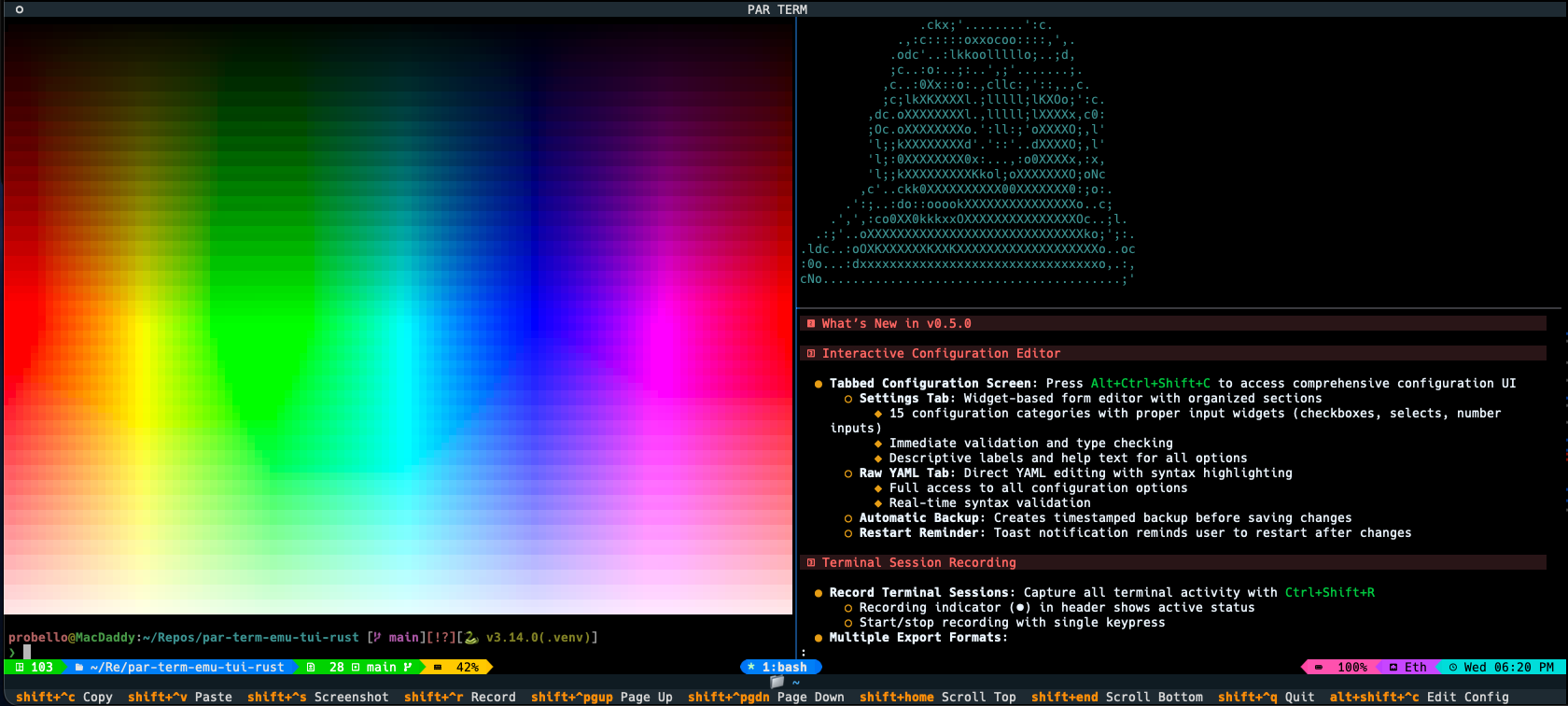
Installation: uv add par-term-emu-tui-rust or pip install par-term-emu-tui-rust
GitHub: https://github.com/paulrobello/par-term-emu-tui-rust
Technology
- Rust (1.88+) - Core library implementation
- Python (3.12+) - Python bindings
- PyO3 - Zero-cost Python/Rust bindings
- VTE - ANSI sequence parsing
- portable-pty - Cross-platform PTY support
Running Tests
# Run Rust tests
cargo test

# Run Python tests
uv sync  # Install dependencies including pytest
pytest tests/
Performance
- Zero-copy operations where possible
- Efficient grid representation
- Fast ANSI parsing with VTE crate
- Minimal Python/Rust boundary crossings
See docs/ARCHITECTURE.md for implementation details.
Security
When using PTY functionality, follow security best practices to prevent command injection and other vulnerabilities.
See docs/SECURITY.md for comprehensive security guidelines.
Contributing
Contributions are welcome! Please submit issues or pull requests on GitHub.
Development Setup
git clone https://github.com/paulrobello/par-term-emu-core-rust.git
cd par-term-emu-core-rust
make setup-venv  # Create virtual environment
make pre-commit-install  # Install pre-commit hooks (recommended)
make dev  # Build library
make checkall  # Run all quality checks
Code Quality
All contributions must pass:
- Rust formatting (
cargo fmt) - Rust linting (
cargo clippy) - Python formatting (
make fmt-python) - Python linting (
make lint-python) - Type checking (
pyright) - Tests (
make test-python)
TIP: Use make pre-commit-install to automate all checks on every commit!
See CLAUDE.md for detailed development instructions.
License
This project is licensed under the MIT License - see the LICENSE file for details.
Author
Paul Robello - probello@gmail.com
Links
- PyPI: https://pypi.org/project/par-term-emu-core-rust/
- Crates.io: https://crates.io/crates/par-term-emu-core-rust
- GitHub: https://github.com/paulrobello/par-term-emu-core-rust
- TUI Application: https://github.com/paulrobello/par-term-emu-tui-rust
- Documentation: See docs/ directory
- Examples: See examples/ directory
Project details
Verified details
These details have been verified by PyPIProject links
GitHub Statistics
Maintainers
Release history Release notifications | RSS feed


Download files
Download the file for your platform. If you're not sure which to choose, learn more about installing packages.
Source Distribution
Built Distributions
Filter files by name, interpreter, ABI, and platform.
If you're not sure about the file name format, learn more about wheel file names.
Copy a direct link to the current filters
File details
Details for the file par_term_emu_core_rust-0.44.0.tar.gz.
File metadata
- Download URL: par_term_emu_core_rust-0.44.0.tar.gz
- Upload date:
- Size: 1.8 MB
- Tags: Source
- Uploaded using Trusted Publishing? Yes
- Uploaded via: twine/6.1.0 CPython/3.13.12
File hashes
| Algorithm | Hash digest | |
|---|---|---|
| SHA256 |
13e25d6cca6d8843b4292944ab590cbf64336c5c223efd9b6ffb37ee46503f2e
|
|
| MD5 |
abc7a3caf31f273713a7b2707f13642d
|
|
| BLAKE2b-256 |
54810e1c4ffb4ba1c412b53caf91c7833ab2767199350015344806310e277291
|
Provenance
The following attestation bundles were made for par_term_emu_core_rust-0.44.0.tar.gz:
Publisher:
deployment.yml on paulrobello/par-term-emu-core-rust
-
Statement:
-
Statement type:
https://in-toto.io/Statement/v1 -
Predicate type:
https://docs.pypi.org/attestations/publish/v1 -
Subject name:
par_term_emu_core_rust-0.44.0.tar.gz -
Subject digest:
13e25d6cca6d8843b4292944ab590cbf64336c5c223efd9b6ffb37ee46503f2e - Sigstore transparency entry: 2064000079
- Sigstore integration time:
-
Permalink:
paulrobello/par-term-emu-core-rust@12295a60d40c30c416475b939794589ea4ca396a -
Branch / Tag:
refs/heads/main - Owner: https://github.com/paulrobello
-
Access:
public
-
Token Issuer:
https://token.actions.githubusercontent.com -
Runner Environment:
github-hosted -
Publication workflow:
deployment.yml@12295a60d40c30c416475b939794589ea4ca396a -
Trigger Event:
workflow_dispatch
-
Statement type:
File details
Details for the file par_term_emu_core_rust-0.44.0-cp314-cp314-win_amd64.whl.
File metadata
- Download URL: par_term_emu_core_rust-0.44.0-cp314-cp314-win_amd64.whl
- Upload date:
- Size: 4.1 MB
- Tags: CPython 3.14, Windows x86-64
- Uploaded using Trusted Publishing? Yes
- Uploaded via: twine/6.1.0 CPython/3.13.12
File hashes
| Algorithm | Hash digest | |
|---|---|---|
| SHA256 |
ff94bb21faf70fc7ab768381f90e6c44e7de78529ad673695fd2ad1e794d806a
|
|
| MD5 |
3a0c366e7d4a856b87c509e3d740bf29
|
|
| BLAKE2b-256 |
d0216650a949ffc903df4a06397650e73227f755a391a35122c5e3efc49d326d
|
Provenance
The following attestation bundles were made for par_term_emu_core_rust-0.44.0-cp314-cp314-win_amd64.whl:
Publisher:
deployment.yml on paulrobello/par-term-emu-core-rust
-
Statement:
-
Statement type:
https://in-toto.io/Statement/v1 -
Predicate type:
https://docs.pypi.org/attestations/publish/v1 -
Subject name:
par_term_emu_core_rust-0.44.0-cp314-cp314-win_amd64.whl -
Subject digest:
ff94bb21faf70fc7ab768381f90e6c44e7de78529ad673695fd2ad1e794d806a - Sigstore transparency entry: 2064000348
- Sigstore integration time:
-
Permalink:
paulrobello/par-term-emu-core-rust@12295a60d40c30c416475b939794589ea4ca396a -
Branch / Tag:
refs/heads/main - Owner: https://github.com/paulrobello
-
Access:
public
-
Token Issuer:
https://token.actions.githubusercontent.com -
Runner Environment:
github-hosted -
Publication workflow:
deployment.yml@12295a60d40c30c416475b939794589ea4ca396a -
Trigger Event:
workflow_dispatch
-
Statement type:
File details
Details for the file par_term_emu_core_rust-0.44.0-cp314-cp314-manylinux_2_17_x86_64.manylinux2014_x86_64.whl.
File metadata
- Download URL: par_term_emu_core_rust-0.44.0-cp314-cp314-manylinux_2_17_x86_64.manylinux2014_x86_64.whl
- Upload date:
- Size: 4.0 MB
- Tags: CPython 3.14, manylinux: glibc 2.17+ x86-64
- Uploaded using Trusted Publishing? Yes
- Uploaded via: twine/6.1.0 CPython/3.13.12
File hashes
| Algorithm | Hash digest | |
|---|---|---|
| SHA256 |
a2f6aa2c5c30e515a098d07d0359e5114d005e7954349c2f85b504cae532e809
|
|
| MD5 |
c14b3a86e624fc16309e73a1210e5818
|
|
| BLAKE2b-256 |
8f37556a99a8182ae25883e9963e651d0512a14bf2bced28805a1f90d91ec97b
|
Provenance
The following attestation bundles were made for par_term_emu_core_rust-0.44.0-cp314-cp314-manylinux_2_17_x86_64.manylinux2014_x86_64.whl:
Publisher:
deployment.yml on paulrobello/par-term-emu-core-rust
-
Statement:
-
Statement type:
https://in-toto.io/Statement/v1 -
Predicate type:
https://docs.pypi.org/attestations/publish/v1 -
Subject name:
par_term_emu_core_rust-0.44.0-cp314-cp314-manylinux_2_17_x86_64.manylinux2014_x86_64.whl -
Subject digest:
a2f6aa2c5c30e515a098d07d0359e5114d005e7954349c2f85b504cae532e809 - Sigstore transparency entry: 2064001687
- Sigstore integration time:
-
Permalink:
paulrobello/par-term-emu-core-rust@12295a60d40c30c416475b939794589ea4ca396a -
Branch / Tag:
refs/heads/main - Owner: https://github.com/paulrobello
-
Access:
public
-
Token Issuer:
https://token.actions.githubusercontent.com -
Runner Environment:
github-hosted -
Publication workflow:
deployment.yml@12295a60d40c30c416475b939794589ea4ca396a -
Trigger Event:
workflow_dispatch
-
Statement type:
File details
Details for the file par_term_emu_core_rust-0.44.0-cp314-cp314-manylinux_2_17_aarch64.manylinux2014_aarch64.whl.
File metadata
- Download URL: par_term_emu_core_rust-0.44.0-cp314-cp314-manylinux_2_17_aarch64.manylinux2014_aarch64.whl
- Upload date:
- Size: 3.9 MB
- Tags: CPython 3.14, manylinux: glibc 2.17+ ARM64
- Uploaded using Trusted Publishing? Yes
- Uploaded via: twine/6.1.0 CPython/3.13.12
File hashes
| Algorithm | Hash digest | |
|---|---|---|
| SHA256 |
02807ae918e6ccaba50a01b4579f38a9fb5cc31e030304dbd8bb803257028946
|
|
| MD5 |
7b64a1104546c8003c4ccb9098984846
|
|
| BLAKE2b-256 |
6d308ea7a5240b20c7574d54ba0729e9d4db1e7633663a9bcfad422e3cc5d955
|
Provenance
The following attestation bundles were made for par_term_emu_core_rust-0.44.0-cp314-cp314-manylinux_2_17_aarch64.manylinux2014_aarch64.whl:
Publisher:
deployment.yml on paulrobello/par-term-emu-core-rust
-
Statement:
-
Statement type:
https://in-toto.io/Statement/v1 -
Predicate type:
https://docs.pypi.org/attestations/publish/v1 -
Subject name:
par_term_emu_core_rust-0.44.0-cp314-cp314-manylinux_2_17_aarch64.manylinux2014_aarch64.whl -
Subject digest:
02807ae918e6ccaba50a01b4579f38a9fb5cc31e030304dbd8bb803257028946 - Sigstore transparency entry: 2064002758
- Sigstore integration time:
-
Permalink:
paulrobello/par-term-emu-core-rust@12295a60d40c30c416475b939794589ea4ca396a -
Branch / Tag:
refs/heads/main - Owner: https://github.com/paulrobello
-
Access:
public
-
Token Issuer:
https://token.actions.githubusercontent.com -
Runner Environment:
github-hosted -
Publication workflow:
deployment.yml@12295a60d40c30c416475b939794589ea4ca396a -
Trigger Event:
workflow_dispatch
-
Statement type:
File details
Details for the file par_term_emu_core_rust-0.44.0-cp314-cp314-macosx_10_12_x86_64.whl.
File metadata
- Download URL: par_term_emu_core_rust-0.44.0-cp314-cp314-macosx_10_12_x86_64.whl
- Upload date:
- Size: 3.9 MB
- Tags: CPython 3.14, macOS 10.12+ x86-64
- Uploaded using Trusted Publishing? Yes
- Uploaded via: twine/6.1.0 CPython/3.13.12
File hashes
| Algorithm | Hash digest | |
|---|---|---|
| SHA256 |
e3593e7876e6018a83350a52792a38581dd366cd71e45c4af49b0d2ed6cd1dee
|
|
| MD5 |
bb9c82d6ea2a38a912c49ccfbe5284b3
|
|
| BLAKE2b-256 |
b1b700d1c5c5138a9c1827164d159a1a06e6ea1f966c7ea1c13eaf036e909120
|
Provenance
The following attestation bundles were made for par_term_emu_core_rust-0.44.0-cp314-cp314-macosx_10_12_x86_64.whl:
Publisher:
deployment.yml on paulrobello/par-term-emu-core-rust
-
Statement:
-
Statement type:
https://in-toto.io/Statement/v1 -
Predicate type:
https://docs.pypi.org/attestations/publish/v1 -
Subject name:
par_term_emu_core_rust-0.44.0-cp314-cp314-macosx_10_12_x86_64.whl -
Subject digest:
e3593e7876e6018a83350a52792a38581dd366cd71e45c4af49b0d2ed6cd1dee - Sigstore transparency entry: 2064002237
- Sigstore integration time:
-
Permalink:
paulrobello/par-term-emu-core-rust@12295a60d40c30c416475b939794589ea4ca396a -
Branch / Tag:
refs/heads/main - Owner: https://github.com/paulrobello
-
Access:
public
-
Token Issuer:
https://token.actions.githubusercontent.com -
Runner Environment:
github-hosted -
Publication workflow:
deployment.yml@12295a60d40c30c416475b939794589ea4ca396a -
Trigger Event:
workflow_dispatch
-
Statement type:
File details
Details for the file par_term_emu_core_rust-0.44.0-cp314-cp314-macosx_10_12_x86_64.macosx_11_0_arm64.macosx_10_12_universal2.whl.
File metadata
- Download URL: par_term_emu_core_rust-0.44.0-cp314-cp314-macosx_10_12_x86_64.macosx_11_0_arm64.macosx_10_12_universal2.whl
- Upload date:
- Size: 7.6 MB
- Tags: CPython 3.14, macOS 10.12+ universal2 (ARM64, x86-64), macOS 10.12+ x86-64, macOS 11.0+ ARM64
- Uploaded using Trusted Publishing? Yes
- Uploaded via: twine/6.1.0 CPython/3.13.12
File hashes
| Algorithm | Hash digest | |
|---|---|---|
| SHA256 |
2e744cd5bf01cf3fc870198a78b0f4f07d9192e4d3c8d4cef22ef6ef8e9cae2a
|
|
| MD5 |
07a208ef154a5e2903857d6237a93276
|
|
| BLAKE2b-256 |
8470aeaf60035cef84bb3999c79bc96f577d8580366e1b5a2d7349bb7ba7ea96
|
Provenance
The following attestation bundles were made for par_term_emu_core_rust-0.44.0-cp314-cp314-macosx_10_12_x86_64.macosx_11_0_arm64.macosx_10_12_universal2.whl:
Publisher:
deployment.yml on paulrobello/par-term-emu-core-rust
-
Statement:
-
Statement type:
https://in-toto.io/Statement/v1 -
Predicate type:
https://docs.pypi.org/attestations/publish/v1 -
Subject name:
par_term_emu_core_rust-0.44.0-cp314-cp314-macosx_10_12_x86_64.macosx_11_0_arm64.macosx_10_12_universal2.whl -
Subject digest:
2e744cd5bf01cf3fc870198a78b0f4f07d9192e4d3c8d4cef22ef6ef8e9cae2a - Sigstore transparency entry: 2064001138
- Sigstore integration time:
-
Permalink:
paulrobello/par-term-emu-core-rust@12295a60d40c30c416475b939794589ea4ca396a -
Branch / Tag:
refs/heads/main - Owner: https://github.com/paulrobello
-
Access:
public
-
Token Issuer:
https://token.actions.githubusercontent.com -
Runner Environment:
github-hosted -
Publication workflow:
deployment.yml@12295a60d40c30c416475b939794589ea4ca396a -
Trigger Event:
workflow_dispatch
-
Statement type:
File details
Details for the file par_term_emu_core_rust-0.44.0-cp313-cp313-win_amd64.whl.
File metadata
- Download URL: par_term_emu_core_rust-0.44.0-cp313-cp313-win_amd64.whl
- Upload date:
- Size: 4.1 MB
- Tags: CPython 3.13, Windows x86-64
- Uploaded using Trusted Publishing? Yes
- Uploaded via: twine/6.1.0 CPython/3.13.12
File hashes
| Algorithm | Hash digest | |
|---|---|---|
| SHA256 |
3171351f06d0a26471f29d4d6ba2349875da9e51b40a951873db145c8c76658a
|
|
| MD5 |
b5b47ad03a9fb1dab1d8a133e88ede02
|
|
| BLAKE2b-256 |
4d81968f0fa1a3c43ae26d823cd477d43083b0f541450e2539ca631f533c9709
|
Provenance
The following attestation bundles were made for par_term_emu_core_rust-0.44.0-cp313-cp313-win_amd64.whl:
Publisher:
deployment.yml on paulrobello/par-term-emu-core-rust
-
Statement:
-
Statement type:
https://in-toto.io/Statement/v1 -
Predicate type:
https://docs.pypi.org/attestations/publish/v1 -
Subject name:
par_term_emu_core_rust-0.44.0-cp313-cp313-win_amd64.whl -
Subject digest:
3171351f06d0a26471f29d4d6ba2349875da9e51b40a951873db145c8c76658a - Sigstore transparency entry: 2064001205
- Sigstore integration time:
-
Permalink:
paulrobello/par-term-emu-core-rust@12295a60d40c30c416475b939794589ea4ca396a -
Branch / Tag:
refs/heads/main - Owner: https://github.com/paulrobello
-
Access:
public
-
Token Issuer:
https://token.actions.githubusercontent.com -
Runner Environment:
github-hosted -
Publication workflow:
deployment.yml@12295a60d40c30c416475b939794589ea4ca396a -
Trigger Event:
workflow_dispatch
-
Statement type:
File details
Details for the file par_term_emu_core_rust-0.44.0-cp313-cp313-manylinux_2_17_x86_64.manylinux2014_x86_64.whl.
File metadata
- Download URL: par_term_emu_core_rust-0.44.0-cp313-cp313-manylinux_2_17_x86_64.manylinux2014_x86_64.whl
- Upload date:
- Size: 4.0 MB
- Tags: CPython 3.13, manylinux: glibc 2.17+ x86-64
- Uploaded using Trusted Publishing? Yes
- Uploaded via: twine/6.1.0 CPython/3.13.12
File hashes
| Algorithm | Hash digest | |
|---|---|---|
| SHA256 |
9b6c03b990c759a9a14cbb520828fbb28d226d0c5751f364a593999032bf89f5
|
|
| MD5 |
3db9da5d7a8ae2b686ce6af506a7597d
|
|
| BLAKE2b-256 |
1d190ad1041866beca80e92e369d6c2884afcb737d2ac9450751011926e147fa
|
Provenance
The following attestation bundles were made for par_term_emu_core_rust-0.44.0-cp313-cp313-manylinux_2_17_x86_64.manylinux2014_x86_64.whl:
Publisher:
deployment.yml on paulrobello/par-term-emu-core-rust
-
Statement:
-
Statement type:
https://in-toto.io/Statement/v1 -
Predicate type:
https://docs.pypi.org/attestations/publish/v1 -
Subject name:
par_term_emu_core_rust-0.44.0-cp313-cp313-manylinux_2_17_x86_64.manylinux2014_x86_64.whl -
Subject digest:
9b6c03b990c759a9a14cbb520828fbb28d226d0c5751f364a593999032bf89f5 - Sigstore transparency entry: 2064002982
- Sigstore integration time:
-
Permalink:
paulrobello/par-term-emu-core-rust@12295a60d40c30c416475b939794589ea4ca396a -
Branch / Tag:
refs/heads/main - Owner: https://github.com/paulrobello
-
Access:
public
-
Token Issuer:
https://token.actions.githubusercontent.com -
Runner Environment:
github-hosted -
Publication workflow:
deployment.yml@12295a60d40c30c416475b939794589ea4ca396a -
Trigger Event:
workflow_dispatch
-
Statement type:
File details
Details for the file par_term_emu_core_rust-0.44.0-cp313-cp313-manylinux_2_17_aarch64.manylinux2014_aarch64.whl.
File metadata
- Download URL: par_term_emu_core_rust-0.44.0-cp313-cp313-manylinux_2_17_aarch64.manylinux2014_aarch64.whl
- Upload date:
- Size: 3.9 MB
- Tags: CPython 3.13, manylinux: glibc 2.17+ ARM64
- Uploaded using Trusted Publishing? Yes
- Uploaded via: twine/6.1.0 CPython/3.13.12
File hashes
| Algorithm | Hash digest | |
|---|---|---|
| SHA256 |
52a7d5c2f3efd8231dcc0acbee400f7275728fab8ce88d22a28699442eede351
|
|
| MD5 |
ec71dee5cf1c8ea194ec915a9e09408a
|
|
| BLAKE2b-256 |
bc5c0bbea77c76f2c55e107a85d8287444ecfabfb889b17b08e7e7f0cb745ef2
|
Provenance
The following attestation bundles were made for par_term_emu_core_rust-0.44.0-cp313-cp313-manylinux_2_17_aarch64.manylinux2014_aarch64.whl:
Publisher:
deployment.yml on paulrobello/par-term-emu-core-rust
-
Statement:
-
Statement type:
https://in-toto.io/Statement/v1 -
Predicate type:
https://docs.pypi.org/attestations/publish/v1 -
Subject name:
par_term_emu_core_rust-0.44.0-cp313-cp313-manylinux_2_17_aarch64.manylinux2014_aarch64.whl -
Subject digest:
52a7d5c2f3efd8231dcc0acbee400f7275728fab8ce88d22a28699442eede351 - Sigstore transparency entry: 2064000660
- Sigstore integration time:
-
Permalink:
paulrobello/par-term-emu-core-rust@12295a60d40c30c416475b939794589ea4ca396a -
Branch / Tag:
refs/heads/main - Owner: https://github.com/paulrobello
-
Access:
public
-
Token Issuer:
https://token.actions.githubusercontent.com -
Runner Environment:
github-hosted -
Publication workflow:
deployment.yml@12295a60d40c30c416475b939794589ea4ca396a -
Trigger Event:
workflow_dispatch
-
Statement type:
File details
Details for the file par_term_emu_core_rust-0.44.0-cp313-cp313-macosx_10_12_x86_64.whl.
File metadata
- Download URL: par_term_emu_core_rust-0.44.0-cp313-cp313-macosx_10_12_x86_64.whl
- Upload date:
- Size: 3.9 MB
- Tags: CPython 3.13, macOS 10.12+ x86-64
- Uploaded using Trusted Publishing? Yes
- Uploaded via: twine/6.1.0 CPython/3.13.12
File hashes
| Algorithm | Hash digest | |
|---|---|---|
| SHA256 |
ffe5daa8f6ed9ada74aba3d8d7ea57daf864dc7db23c5d7cc699900bfe56dcab
|
|
| MD5 |
1c755adcc2408f339ceec937282de5de
|
|
| BLAKE2b-256 |
84d261f223a3d267d367a91c4e0138d082fddc2f05780bcbd2d22d04ada62476
|
Provenance
The following attestation bundles were made for par_term_emu_core_rust-0.44.0-cp313-cp313-macosx_10_12_x86_64.whl:
Publisher:
deployment.yml on paulrobello/par-term-emu-core-rust
-
Statement:
-
Statement type:
https://in-toto.io/Statement/v1 -
Predicate type:
https://docs.pypi.org/attestations/publish/v1 -
Subject name:
par_term_emu_core_rust-0.44.0-cp313-cp313-macosx_10_12_x86_64.whl -
Subject digest:
ffe5daa8f6ed9ada74aba3d8d7ea57daf864dc7db23c5d7cc699900bfe56dcab - Sigstore transparency entry: 2064001557
- Sigstore integration time:
-
Permalink:
paulrobello/par-term-emu-core-rust@12295a60d40c30c416475b939794589ea4ca396a -
Branch / Tag:
refs/heads/main - Owner: https://github.com/paulrobello
-
Access:
public
-
Token Issuer:
https://token.actions.githubusercontent.com -
Runner Environment:
github-hosted -
Publication workflow:
deployment.yml@12295a60d40c30c416475b939794589ea4ca396a -
Trigger Event:
workflow_dispatch
-
Statement type:
File details
Details for the file par_term_emu_core_rust-0.44.0-cp313-cp313-macosx_10_12_x86_64.macosx_11_0_arm64.macosx_10_12_universal2.whl.
File metadata
- Download URL: par_term_emu_core_rust-0.44.0-cp313-cp313-macosx_10_12_x86_64.macosx_11_0_arm64.macosx_10_12_universal2.whl
- Upload date:
- Size: 7.6 MB
- Tags: CPython 3.13, macOS 10.12+ universal2 (ARM64, x86-64), macOS 10.12+ x86-64, macOS 11.0+ ARM64
- Uploaded using Trusted Publishing? Yes
- Uploaded via: twine/6.1.0 CPython/3.13.12
File hashes
| Algorithm | Hash digest | |
|---|---|---|
| SHA256 |
e36f9a41725c4349fe9b704dd8a845005ad4a42b05e00efff3973071effbbb4f
|
|
| MD5 |
f235d776bcc77b0084a896f3e2f85d02
|
|
| BLAKE2b-256 |
8e6e116743dbd902b91432b8dd5f042d0edb7161628b8ff82dd189261efac7fd
|
Provenance
The following attestation bundles were made for par_term_emu_core_rust-0.44.0-cp313-cp313-macosx_10_12_x86_64.macosx_11_0_arm64.macosx_10_12_universal2.whl:
Publisher:
deployment.yml on paulrobello/par-term-emu-core-rust
-
Statement:
-
Statement type:
https://in-toto.io/Statement/v1 -
Predicate type:
https://docs.pypi.org/attestations/publish/v1 -
Subject name:
par_term_emu_core_rust-0.44.0-cp313-cp313-macosx_10_12_x86_64.macosx_11_0_arm64.macosx_10_12_universal2.whl -
Subject digest:
e36f9a41725c4349fe9b704dd8a845005ad4a42b05e00efff3973071effbbb4f - Sigstore transparency entry: 2064003260
- Sigstore integration time:
-
Permalink:
paulrobello/par-term-emu-core-rust@12295a60d40c30c416475b939794589ea4ca396a -
Branch / Tag:
refs/heads/main - Owner: https://github.com/paulrobello
-
Access:
public
-
Token Issuer:
https://token.actions.githubusercontent.com -
Runner Environment:
github-hosted -
Publication workflow:
deployment.yml@12295a60d40c30c416475b939794589ea4ca396a -
Trigger Event:
workflow_dispatch
-
Statement type:
File details
Details for the file par_term_emu_core_rust-0.44.0-cp312-cp312-win_amd64.whl.
File metadata
- Download URL: par_term_emu_core_rust-0.44.0-cp312-cp312-win_amd64.whl
- Upload date:
- Size: 4.1 MB
- Tags: CPython 3.12, Windows x86-64
- Uploaded using Trusted Publishing? Yes
- Uploaded via: twine/6.1.0 CPython/3.13.12
File hashes
| Algorithm | Hash digest | |
|---|---|---|
| SHA256 |
964f7e7f8618e5be50fcd059c428868185780aeb2c9a46f0eaf429d707814761
|
|
| MD5 |
80119065e936754591fae98b4cd5a9d3
|
|
| BLAKE2b-256 |
e13492133fca0780bdd272df31ea8bd76024054848be96a252875c1cf74147a5
|
Provenance
The following attestation bundles were made for par_term_emu_core_rust-0.44.0-cp312-cp312-win_amd64.whl:
Publisher:
deployment.yml on paulrobello/par-term-emu-core-rust
-
Statement:
-
Statement type:
https://in-toto.io/Statement/v1 -
Predicate type:
https://docs.pypi.org/attestations/publish/v1 -
Subject name:
par_term_emu_core_rust-0.44.0-cp312-cp312-win_amd64.whl -
Subject digest:
964f7e7f8618e5be50fcd059c428868185780aeb2c9a46f0eaf429d707814761 - Sigstore transparency entry: 2064002558
- Sigstore integration time:
-
Permalink:
paulrobello/par-term-emu-core-rust@12295a60d40c30c416475b939794589ea4ca396a -
Branch / Tag:
refs/heads/main - Owner: https://github.com/paulrobello
-
Access:
public
-
Token Issuer:
https://token.actions.githubusercontent.com -
Runner Environment:
github-hosted -
Publication workflow:
deployment.yml@12295a60d40c30c416475b939794589ea4ca396a -
Trigger Event:
workflow_dispatch
-
Statement type:
File details
Details for the file par_term_emu_core_rust-0.44.0-cp312-cp312-manylinux_2_17_x86_64.manylinux2014_x86_64.whl.
File metadata
- Download URL: par_term_emu_core_rust-0.44.0-cp312-cp312-manylinux_2_17_x86_64.manylinux2014_x86_64.whl
- Upload date:
- Size: 4.0 MB
- Tags: CPython 3.12, manylinux: glibc 2.17+ x86-64
- Uploaded using Trusted Publishing? Yes
- Uploaded via: twine/6.1.0 CPython/3.13.12
File hashes
| Algorithm | Hash digest | |
|---|---|---|
| SHA256 |
2ad005571771bd7d0cd5284039b6675e4f45ed3029e3218b719e0084496ca1eb
|
|
| MD5 |
f4387c52baa2accdb3326f02b9f8cc42
|
|
| BLAKE2b-256 |
9d37c807edbcdce404029613f55fde3089ce4397223645303ae941ad301dc59d
|
Provenance
The following attestation bundles were made for par_term_emu_core_rust-0.44.0-cp312-cp312-manylinux_2_17_x86_64.manylinux2014_x86_64.whl:
Publisher:
deployment.yml on paulrobello/par-term-emu-core-rust
-
Statement:
-
Statement type:
https://in-toto.io/Statement/v1 -
Predicate type:
https://docs.pypi.org/attestations/publish/v1 -
Subject name:
par_term_emu_core_rust-0.44.0-cp312-cp312-manylinux_2_17_x86_64.manylinux2014_x86_64.whl -
Subject digest:
2ad005571771bd7d0cd5284039b6675e4f45ed3029e3218b719e0084496ca1eb - Sigstore transparency entry: 2064001317
- Sigstore integration time:
-
Permalink:
paulrobello/par-term-emu-core-rust@12295a60d40c30c416475b939794589ea4ca396a -
Branch / Tag:
refs/heads/main - Owner: https://github.com/paulrobello
-
Access:
public
-
Token Issuer:
https://token.actions.githubusercontent.com -
Runner Environment:
github-hosted -
Publication workflow:
deployment.yml@12295a60d40c30c416475b939794589ea4ca396a -
Trigger Event:
workflow_dispatch
-
Statement type:
File details
Details for the file par_term_emu_core_rust-0.44.0-cp312-cp312-manylinux_2_17_aarch64.manylinux2014_aarch64.whl.
File metadata
- Download URL: par_term_emu_core_rust-0.44.0-cp312-cp312-manylinux_2_17_aarch64.manylinux2014_aarch64.whl
- Upload date:
- Size: 3.9 MB
- Tags: CPython 3.12, manylinux: glibc 2.17+ ARM64
- Uploaded using Trusted Publishing? Yes
- Uploaded via: twine/6.1.0 CPython/3.13.12
File hashes
| Algorithm | Hash digest | |
|---|---|---|
| SHA256 |
91f6f1151c6e4efb74ca344f9a6ebc3b3d42540b66c431c347bcab8e7365c5e2
|
|
| MD5 |
8044811ba3ca47fb387d81caa5a46a62
|
|
| BLAKE2b-256 |
cc7867ab31e3a6a814e427192bf4ec49a454c72debc23cea1c89330d13aae02d
|
Provenance
The following attestation bundles were made for par_term_emu_core_rust-0.44.0-cp312-cp312-manylinux_2_17_aarch64.manylinux2014_aarch64.whl:
Publisher:
deployment.yml on paulrobello/par-term-emu-core-rust
-
Statement:
-
Statement type:
https://in-toto.io/Statement/v1 -
Predicate type:
https://docs.pypi.org/attestations/publish/v1 -
Subject name:
par_term_emu_core_rust-0.44.0-cp312-cp312-manylinux_2_17_aarch64.manylinux2014_aarch64.whl -
Subject digest:
91f6f1151c6e4efb74ca344f9a6ebc3b3d42540b66c431c347bcab8e7365c5e2 - Sigstore transparency entry: 2064001962
- Sigstore integration time:
-
Permalink:
paulrobello/par-term-emu-core-rust@12295a60d40c30c416475b939794589ea4ca396a -
Branch / Tag:
refs/heads/main - Owner: https://github.com/paulrobello
-
Access:
public
-
Token Issuer:
https://token.actions.githubusercontent.com -
Runner Environment:
github-hosted -
Publication workflow:
deployment.yml@12295a60d40c30c416475b939794589ea4ca396a -
Trigger Event:
workflow_dispatch
-
Statement type:
File details
Details for the file par_term_emu_core_rust-0.44.0-cp312-cp312-macosx_10_12_x86_64.whl.
File metadata
- Download URL: par_term_emu_core_rust-0.44.0-cp312-cp312-macosx_10_12_x86_64.whl
- Upload date:
- Size: 3.9 MB
- Tags: CPython 3.12, macOS 10.12+ x86-64
- Uploaded using Trusted Publishing? Yes
- Uploaded via: twine/6.1.0 CPython/3.13.12
File hashes
| Algorithm | Hash digest | |
|---|---|---|
| SHA256 |
eb14b829bf34b5263c93c680b713814e5dd7d27ed32f8db6404c591b3979ad23
|
|
| MD5 |
631cf473326b0c9bbe85a035ea197f1a
|
|
| BLAKE2b-256 |
4a45409f8aa10e79a622dfb07b2d3070b71fa1c19b8d4f9a79c85104809aec62
|
Provenance
The following attestation bundles were made for par_term_emu_core_rust-0.44.0-cp312-cp312-macosx_10_12_x86_64.whl:
Publisher:
deployment.yml on paulrobello/par-term-emu-core-rust
-
Statement:
-
Statement type:
https://in-toto.io/Statement/v1 -
Predicate type:
https://docs.pypi.org/attestations/publish/v1 -
Subject name:
par_term_emu_core_rust-0.44.0-cp312-cp312-macosx_10_12_x86_64.whl -
Subject digest:
eb14b829bf34b5263c93c680b713814e5dd7d27ed32f8db6404c591b3979ad23 - Sigstore transparency entry: 2064002858
- Sigstore integration time:
-
Permalink:
paulrobello/par-term-emu-core-rust@12295a60d40c30c416475b939794589ea4ca396a -
Branch / Tag:
refs/heads/main - Owner: https://github.com/paulrobello
-
Access:
public
-
Token Issuer:
https://token.actions.githubusercontent.com -
Runner Environment:
github-hosted -
Publication workflow:
deployment.yml@12295a60d40c30c416475b939794589ea4ca396a -
Trigger Event:
workflow_dispatch
-
Statement type:
File details
Details for the file par_term_emu_core_rust-0.44.0-cp312-cp312-macosx_10_12_x86_64.macosx_11_0_arm64.macosx_10_12_universal2.whl.
File metadata
- Download URL: par_term_emu_core_rust-0.44.0-cp312-cp312-macosx_10_12_x86_64.macosx_11_0_arm64.macosx_10_12_universal2.whl
- Upload date:
- Size: 7.6 MB
- Tags: CPython 3.12, macOS 10.12+ universal2 (ARM64, x86-64), macOS 10.12+ x86-64, macOS 11.0+ ARM64
- Uploaded using Trusted Publishing? Yes
- Uploaded via: twine/6.1.0 CPython/3.13.12
File hashes
| Algorithm | Hash digest | |
|---|---|---|
| SHA256 |
e2021139641de6601485923ecc0550d11e8caae68363088712c36a822913db00
|
|
| MD5 |
e039f3dee7346a554c446e8fc096a404
|
|
| BLAKE2b-256 |
c81ed6b68422db71eea57973c01c978deca969a6ba4c2624aece5f8d5703bfbe
|
Provenance
The following attestation bundles were made for par_term_emu_core_rust-0.44.0-cp312-cp312-macosx_10_12_x86_64.macosx_11_0_arm64.macosx_10_12_universal2.whl:
Publisher:
deployment.yml on paulrobello/par-term-emu-core-rust
-
Statement:
-
Statement type:
https://in-toto.io/Statement/v1 -
Predicate type:
https://docs.pypi.org/attestations/publish/v1 -
Subject name:
par_term_emu_core_rust-0.44.0-cp312-cp312-macosx_10_12_x86_64.macosx_11_0_arm64.macosx_10_12_universal2.whl -
Subject digest:
e2021139641de6601485923ecc0550d11e8caae68363088712c36a822913db00 - Sigstore transparency entry: 2064000891
- Sigstore integration time:
-
Permalink:
paulrobello/par-term-emu-core-rust@12295a60d40c30c416475b939794589ea4ca396a -
Branch / Tag:
refs/heads/main - Owner: https://github.com/paulrobello
-
Access:
public
-
Token Issuer:
https://token.actions.githubusercontent.com -
Runner Environment:
github-hosted -
Publication workflow:
deployment.yml@12295a60d40c30c416475b939794589ea4ca396a -
Trigger Event:
workflow_dispatch
-
Statement type:






