
PAR AI OCR





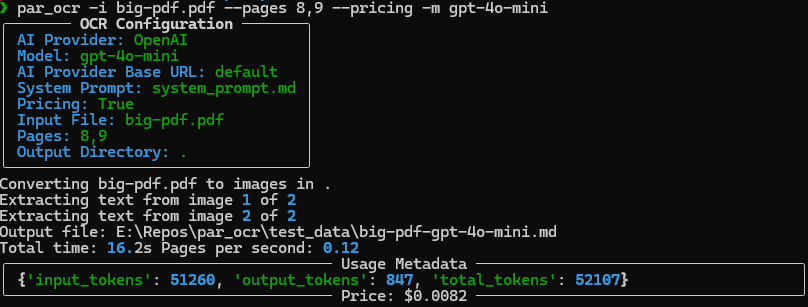
PAR AI OCR is a command-line tool that uses artificial intelligence to perform Optical Character Recognition (OCR) on PDF files and images. It extracts text from the input files and generates markdown output.

Screenshots
Features
- Extracts text for PDFs and images to Markdown while preserving as much formatting as possible.
- Works with most providers and vision models (quality will vary depending on provider and model used)
- Uses my PAR AI Core
Known Issues
- Providers other than OpenAI and Anthropic are hit-and-miss depending on provider / model / data being extracted.
Prerequisites
Install poppler (Used for PDF processing)
Linux
apt install poppler-utils
Mac
brew install poppler
Windows
scoop install poppler
uv is recommended
Linux and Mac
curl -LsSf https://astral.sh/uv/install.sh | sh
Windows
powershell -ExecutionPolicy ByPass -c "irm https://astral.sh/uv/install.ps1 | iex"
Installation
Installation From Source
Clone the repository and install the package:
git clone https://github.com/paulrobello/par_ocr.git
cd par_ocr
uv sync
From PiPy
uv tool install par_ocr
Usage
Basic usage from source:
uv run par_ocr
Basic usage if installed:
par_ocr
Command Line Parameters
--ai-provider,-a: AI provider to use for processing [Ollama|LlamaCpp|OpenAI|Groq|XAI|Anthropic|Google|Bedrock|Github|Mistral] (default: OpenAI)--model,-m: AI model to use for processing (default: provider-specific)--ai-base-url,-b: Override the base URL for the AI provider--system-prompt-file,-p: File containing custom system prompt, if you want to use one other than the default--input-file,-i: File to process, supported extensions: .pdf, .png, .jpg--pricing,-p: Configure pricing summary display [none|price|details] (default: price)--pages: Comma-separated page numbers or hyphen-separated range (e.g., '1,3,5-7')--output,-o: Output directory for markdown files (default same folder as input file)--debug,-D: Output extra debug info (Default: false)--version,-v: Show version information and exit
Examples
Note: If running from source prepend "uv run" to the beginning of the example commands.
-
Process a PDF file using the default settings:
par_ocr --input-file path/to/your/file.pdf
-
Use a specific AI provider and model:
par_ocr --ai-provider ANTHROPIC --model claude-3-5-sonnet-20241022 --input-file path/to/your/file.pdf
-
Process specific pages of a PDF:
par_ocr --input-file path/to/your/file.pdf --pages 1,3,5-7
-
Specify an output directory:
par_ocr --input-file path/to/your/file.pdf --output path/to/output/directory
-
Enable pricing details:
par_ocr --pricing details --input-file path/to/your/file.pdf
Note
Make sure to set the appropriate environment variables for the AI provider you're using (e.g., OPENAI_API_KEY for OpenAI).
you may also create a file ~/.par_ocr_config with your API Keys such as:
# AI API KEYS
OPENAI_API_KEY=
ANTHROPIC_API_KEY=
GROQ_API_KEY=
XAI_API_KEY=
GOOGLE_API_KEY=
MISTRAL_API_KEY=
GITHUB_TOKEN=
OPENROUTER_API_KEY=
# Used by Bedrock
AWS_PROFILE=
AWS_ACCESS_KEY_ID=
AWS_SECRET_ACCESS_KEY=


### Tracing (optional)
LANGCHAIN_TRACING_V2=false
LANGCHAIN_ENDPOINT=https://api.smith.langchain.com
LANGCHAIN_API_KEY=
LANGCHAIN_PROJECT=par_ocr
AI API KEYS
- ANTHROPIC_API_KEY is required for Anthropic. Get a key from https://console.anthropic.com/
- OPENAI_API_KEY is required for OpenAI. Get a key from https://platform.openai.com/account/api-keys
- GITHUB_TOKEN is required for GitHub Models. Get a free key from https://github.com/marketplace/models
- GOOGLE_API_KEY is required for Google Models. Get a free key from https://console.cloud.google.com
- XAI_API_KEY is required for XAI. Get a free key from https://x.ai/api
- GROQ_API_KEY is required for Groq. Get a free key from https://console.groq.com/
- MISTRAL_API_KEY is required for Mistral. Get a free key from https://console.mistral.ai/
- OPENROUTER_KEY is required for OpenRouter. Get a key from https://openrouter.ai/
- AWS_PROFILE or AWS_ACCESS_KEY_ID and AWS_SECRET_ACCESS_KEY are used for Bedrock authentication. The environment must already be authenticated with AWS.
- No key required to use with Ollama or LlamaCpp.
Open AI Compatible Providers
If a specify provider is not listed but has an OpenAI compatible endpoint you can use the following combo of vars:
- PARAI_AI_PROVIDER=OpenAI
- PARAI_MODEL=Your selected model
- PARAI_AI_BASE_URL=The providers OpenAI endpoint URL
Whats New
- Version 0.2.0:
- Updated ai lib and other dependencies
- Added debug flag
- Version 0.1.1:
- Updated ai lib
- Fixed markdown fences
- Version 0.1.0:
- Initial release
Contributing
Contributions are welcome! Please feel free to submit a Pull Request.
License
This project is licensed under the MIT License - see the LICENSE file for details.
Author
Paul Robello - probello@gmail.com
1 maintainer

Metadata
1 maintainer
Release files for par-ocr 0.2.0
For a detailed explanation of source distributions (sdists) and built distributions (wheels), please see the package formats documentation.
Source distribution (sdist)
| File | Size | Uploaded | |
|---|---|---|---|
| par_ocr-0.2.0.tar.gz | 8.4 kB | Details |
Built distribution (wheel)
| File | Interpreter | ABI | Platform | Reset |
|---|---|---|---|---|
| par_ocr-0.2.0-py3-none-any.whl | Python 3 | none | any | Details |
Total release size: 18.3 kB
Release files / par_ocr-0.2.0.tar.gz
| Download URL | par_ocr-0.2.0.tar.gz |
|---|---|
| Size | 8.4 kB |
| Tags | Source |
|
SHA-256 checksum How to use checksums |
fe2bb2622e1cba55796ae9fd5a3c7b48e2a4137ba158352bc09498c3dfb847c9
|
|
BLAKE2b-256 checksum How to use checksums |
ad052907457c01b4b4387ceaab1f24489a5f6d28fccdc8ff2cc3ef359a7d018b
|
| Upload date | |
|
Uploaded using Trusted Publishing? What is trusted publishing? |
Yes |
| Uploaded via |
twine/6.1.0 CPython/3.12.8
|
Provenance
Provenance describes where a file came from. On PyPI, provenance is shared via attestations, which provide a verifiable record of the build or publishing details. View details, limitations and caveats.


PyPI Publish Attestation
PyPI verified that this artifact, at this checksum, originated from the publisher listed below.
Signed by GitHub Actions, verified by PyPI on Jan 26, 2025.
Transparency logRelease files / par_ocr-0.2.0-py3-none-any.whl
| Download URL | par_ocr-0.2.0-py3-none-any.whl |
|---|---|
| Size | 9.9 kB |
| Tags | Python 3 |
|
SHA-256 checksum How to use checksums |
5234250417f8712296eb9f5d9bf3adcc3e578779861bcb5844bb17b19b9bf61e
|
|
BLAKE2b-256 checksum How to use checksums |
65801513ca6c7d4bf96d639b74b15d20cc720bb97a8c3cc21bcb15307e4a9210
|
| Upload date | |
|
Uploaded using Trusted Publishing? What is trusted publishing? |
Yes |
| Uploaded via |
twine/6.1.0 CPython/3.12.8
|
Provenance
Provenance describes where a file came from. On PyPI, provenance is shared via attestations, which provide a verifiable record of the build or publishing details. View details, limitations and caveats.
PyPI Publish Attestation
PyPI verified that this artifact, at this checksum, originated from the publisher listed below.
Signed by GitHub Actions, verified by PyPI on Jan 26, 2025.
Transparency log












