
Paradise
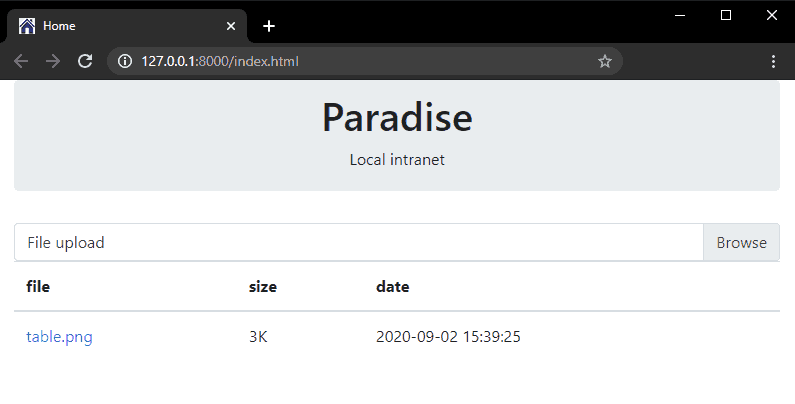
A file sharing and media streaming solution for local networks. Using this utility you can start a local server on your machine that is visible to other devices like mobile, laptop etc. Which can be used to download/upload files from other machines.
Why it's needed?
Can't I just transfer files from/to External drive or internet.
This utility is useful for people that are using office/work laptop/device that usually disables USB ports and/or external disks. And you want to transfer locally, so that it will be faster as well as don't your internet data.
Getting Started
These instructions will get you a server up and running on your local machine.
Prerequisites
Requires: python 3.6+
Installing
Paradise is available on PyPi and can be easily installed using pip.
pip install paradise
If you already have paradise and want to update to a newer version
pip install -U paradise
You can get the cutting edge version directly from dev branch (this can be unstable)
pip install git+https://github.com/rahulsrma26/paradise
Running
paradise
This will show the output and ip of your machine on local network
INFO:     Uvicorn running on http://127.0.0.1:8000 (Press CTRL+C to quit)
INFO:     Started reloader process [14192] using statreload
INFO:     Started server process [1580]
INFO:     Waiting for application startup.
[Visit url] http://192.168.0.123:8000
INFO:     Application startup complete.
Web server can be reached using http://127.0.0.1:8000 on your browser on the same machine. But if you want to access the web server from other devices then you need to open Visit url in the browser. In this example it is http://192.168.0.123:8000.
Built With
Authors
- Rahul Sharma - Initial work - Rahul Sharma
License
This project is licensed under the MIT License - see the LICENSE file for details
Acknowledgments
- Hat tip to anyone whose code was used
- Inspiration - Testing & Packaging by Hynek Schlawack
1 maintainer

Metadata
1 maintainer
Release files for paradise 0.3.0
For a detailed explanation of source distributions (sdists) and built distributions (wheels), please see the package formats documentation.
Source distribution (sdist)
| File | Size | Uploaded | |
|---|---|---|---|
| paradise-0.3.0.tar.gz | 8.5 kB | Details |
Built distribution (wheel)
| File | Interpreter | ABI | Platform | Reset |
|---|---|---|---|---|
| paradise-0.3.0-py3-none-any.whl | Python 3 | none | any | Details |
Total release size: 16.7 kB
Release files / paradise-0.3.0.tar.gz
| Download URL | paradise-0.3.0.tar.gz |
|---|---|
| Size | 8.5 kB |
| Tags | Source |
|
SHA-256 checksum How to use checksums |
a120943195e5d1232a6089d541917efa15704880ec2b5827d4d66d93aee6c26a
|
|
BLAKE2b-256 checksum How to use checksums |
a347e58a497455a5ab65b2b4b9a956488492d4ce765b453e12fb95d3b2fbdad1
|
| Upload date | |
|
Uploaded using Trusted Publishing? What is trusted publishing? |
No |
| Uploaded via |
twine/3.2.0 pkginfo/1.6.1 requests/2.25.0 setuptools/50.3.2 requests-toolbelt/0.9.1 tqdm/4.53.0 CPython/3.8.6
|
Release files / paradise-0.3.0-py3-none-any.whl
| Download URL | paradise-0.3.0-py3-none-any.whl |
|---|---|
| Size | 8.2 kB |
| Tags | Python 3 |
|
SHA-256 checksum How to use checksums |
b6e5f75ffa9bdc089a01f769675ce88f48ededa5b1a8024804942ca646e9f143
|
|
BLAKE2b-256 checksum How to use checksums |
509559bf010202eabda920834dcfef77c854dafeefe2c7363dcaf1a144c135ba
|
| Upload date | |
|
Uploaded using Trusted Publishing? What is trusted publishing? |
No |
| Uploaded via |
twine/3.2.0 pkginfo/1.6.1 requests/2.25.0 setuptools/50.3.2 requests-toolbelt/0.9.1 tqdm/4.53.0 CPython/3.8.6
|














