








PAI - Paradox Alarm Interface
Middleware that aims to connect to a Paradox Alarm panel, exposing the interface for monitoring and control via several technologies. With this interface it is possible to integrate Paradox panels with HomeAssistant, OpenHAB, Homebridge or other domotics system that supports MQTT, as well as several IM methods.
It supports MG/SP/EVO panels (firmwares below 7.50.000) connected through a serial port, which is present in all panels (TTL 5V), or through a USB 307 module. It also supports connections using the IP150 module, both directly (ip module firmware version < 4.0 or >= 4.40.004), and through the SITE ID (firmware versions >4.0).
Support for Magellan, Spectra and EVO panels is very stable. If you find a bug, please report it.
For further information and detailed usage refer to the Wiki.
If you are having issues, or wish to discuss new features, join us at our Discord community
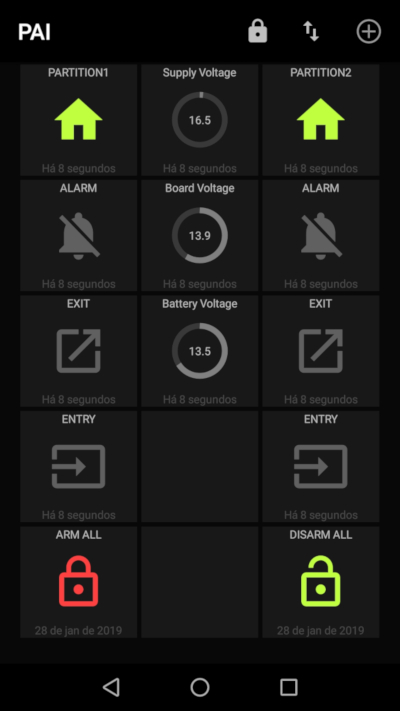
On Android, if you install MQTT Dash, and follow the instructions you will automatically get a panel like this:
Things you need to have to be able to connect
We support two connection options: via Serial and via IP150 Module.
For all connection methods
- PC Password: 4 digit
[0-9a-f]password. Can be looked up in Babyware (Right click on a panel ⇾ Properties ⇾ PC Communication (BabyWare) ⇾ PC Communication (BabyWare) ⇾ PC Password)
In case of IP150 you need additionally:
- IP Module password: Default is
paradox
For IP150 firmware > 4.0 if you connect via Paradox Cloud (SWAN)
- SITE ID
- Email registered in the site
We do not recommend using SWAN because of https://github.com/CriticalSecurity/paradox
Firmware Upgrade WARNING:
Do not upgrade EVO firmware versions to 7.50.000+ if you use Serial connection. Process is irreversible! Paradox introduces serial communication encryption which most probably will break our PAI ability to talk to the panel. Note: Paradox sells unlock code to re-enable the unencrypted serial port.
How to use
See wiki
Building the Docker image
Run docker build -t pai .. The Python 3.15 Debian slim multi-stage build requires
a prebuilt cryptography wheel, avoiding Rust compilation. A C compiler and
libffi headers are available in the builder stage for dependencies such as CFFI.
The runtime image contains the installed Python environment and shared libraries,
without the compiler toolchain.
Dependencies are installed in a separate layer from the application so code changes do not recompile them. The publishing workflow saves all build stages in the GitHub Actions cache, including the dependency layer.
Published images support linux/amd64, linux/arm/v7, and linux/arm64/v8.
32-bit x86 and ARMv6 images are no longer published. Raspberry Pi 1 and the
original Pi Zero/Zero W cannot run the ARMv7 image; Pi 2 and newer, including
Zero 2 W, can use it with a suitable 32-bit OS.
Tested Environment
Tested in the following environment:
- Python 3.9, 3.10, 3.11, 3.12, 3.13, 3.14 and 3.15
- Mosquitto MQTT Broker > 1.4.8
- OrangePi 2G-IOT, NanoPi NEO, and Raspberry Pi 3 through their built in Serial Port (with a level shifter!), or a USB RS232 TTL adapter (CP2102, PL2303, CH340, etc..)
- Ubuntu Server 16.04.3 LTS
- Paradox MG5050, SP7000 and EVO panels
- Signal Cli through a DBUS interface
- Pushbullet.py
- SIM900 module through a serial port
- Serial over TCP (ESP32 or Arduino connected to the panel's serial port acts as a proxy)
Authors
- João Paulo Barraca - @jpbarraca - Main code and MG/SP devices
- Jevgeni Kiski - @yozik04 - Main code and EVO devices
- Ion Darie - @iondarie - PAI Logo, Homebridge integration, testing
Acknowledgments
This work is inspired or uses parts from the following projects:
- Tertiush at https://github.com/Tertiush/ParadoxIP150v2
- Spinza at https://github.com/spinza/paradox_mqtt
Thanks
- Ivan Markov - @ivmarkov - Multi-platform Docker builds
- Claudiu Bucur - @clau-bucur - For fixing HomeAssistant plugin after Supervisor(2021.02.5) upgrade #199
- David Tekan - @tekand - For supporting different label encodings.
Disclaimer
Paradox, MG5050 and IP150 are registered marks of PARADOX. Other brands are owned by their respective owners.
The code was developed as a way of integrating personally owned Paradox systems, and it cannot be used for other purposes. It is not affiliated with any company and it doesn't have have commercial intent.
The code is provided AS IS and the developers will not be held responsible for failures in the alarm systems, or any other malfunction.
Donations
We have fully stopped accepting donations due to lack of free time to spend on this project.
1 maintainer

Metadata
1 maintainer
Release files for paradox-alarm-interface 3.8.1
For a detailed explanation of source distributions (sdists) and built distributions (wheels), please see the package formats documentation.
Source distribution (sdist)
| File | Size | Uploaded | Provenance | |
|---|---|---|---|---|
| paradox_alarm_interface-3.8.1.tar.gz | 175.6 kB | With provenance | Details |
Built distribution (wheel)
| File | Interpreter | ABI | Platform | Reset |
|---|---|---|---|---|
| paradox_alarm_interface-3.8.1-py3-none-any.whl | Python 3 | none | any | Details |
Total release size: 390.4 kB
Release files / paradox_alarm_interface-3.8.1.tar.gz
| Download URL | paradox_alarm_interface-3.8.1.tar.gz |
|---|---|
| Size | 175.6 kB |
| Tags | Source |
|
SHA-256 checksum How to use checksums |
ec26c68821b8314d85f6b72d7038cf3d0d9494938eba2a0dbcaa7549ace197c9
|
|
BLAKE2b-256 checksum How to use checksums |
39c603a57a21d5815df65252ea6f12f6a286b09b4a93e4dc3b78c65dbf3145e8
|
| Upload date | |
|
Uploaded using Trusted Publishing? What is trusted publishing? |
Yes |
| Uploaded via |
twine/7.0.0 CPython/3.13.16
|
Provenance
Provenance describes where a file came from. On PyPI, provenance is shared via attestations, which provide a verifiable record of the build or publishing details. View details, limitations and caveats.


PyPI Publish Attestation
PyPI verified that this artifact, at this checksum, originated from the publisher listed below.
Signed by GitHub Actions, verified by PyPI on Oct 21, 2026.
Transparency logRelease files / paradox_alarm_interface-3.8.1-py3-none-any.whl
| Download URL | paradox_alarm_interface-3.8.1-py3-none-any.whl |
|---|---|
| Size | 214.8 kB |
| Tags | Python 3 |
|
SHA-256 checksum How to use checksums |
f580bcdc39a4f63409cbf5a00abd314d0cd4066ace86e3efc32d863c7e0e467e
|
|
BLAKE2b-256 checksum How to use checksums |
dc238ad5e4e248b5d2408b7d5518e1d91ab0dcd17fe4230c71cdf0240dd422c8
|
| Upload date | |
|
Uploaded using Trusted Publishing? What is trusted publishing? |
Yes |
| Uploaded via |
twine/7.0.0 CPython/3.13.16
|
Provenance
Provenance describes where a file came from. On PyPI, provenance is shared via attestations, which provide a verifiable record of the build or publishing details. View details, limitations and caveats.
PyPI Publish Attestation
PyPI verified that this artifact, at this checksum, originated from the publisher listed below.
Signed by GitHub Actions, verified by PyPI on Oct 21, 2026.
Transparency logSecurity for paradox-alarm-interface 3.8.1
Provenance
Provenance describes where a file came from. On PyPI, provenance is shared via attestations, which provide a verifiable record of the build or publishing details. View details, limitations and caveats.
Full provenance
All 2 files in this release have been uploaded with provenance metadata.
Attestation for paradox_alarm_interface-3.8.1.tar.gz
PyPI Publish Attestation
PyPI verified that this artifact, at this checksum, originated from the publisher listed below.
Signed by GitHub Actions, verified by PyPI on Oct 21, 2026.
Transparency logA note on package security
PyPI is a repository for distributing packages, not a service for auditing them. While third-party security researchers and our staff do their best to detect and remove malicious packages, PyPI cannot guarantee the quality, security or suitability of any given package.
To learn more about protecting yourself from malicious actors, visit our package security documentation.














