
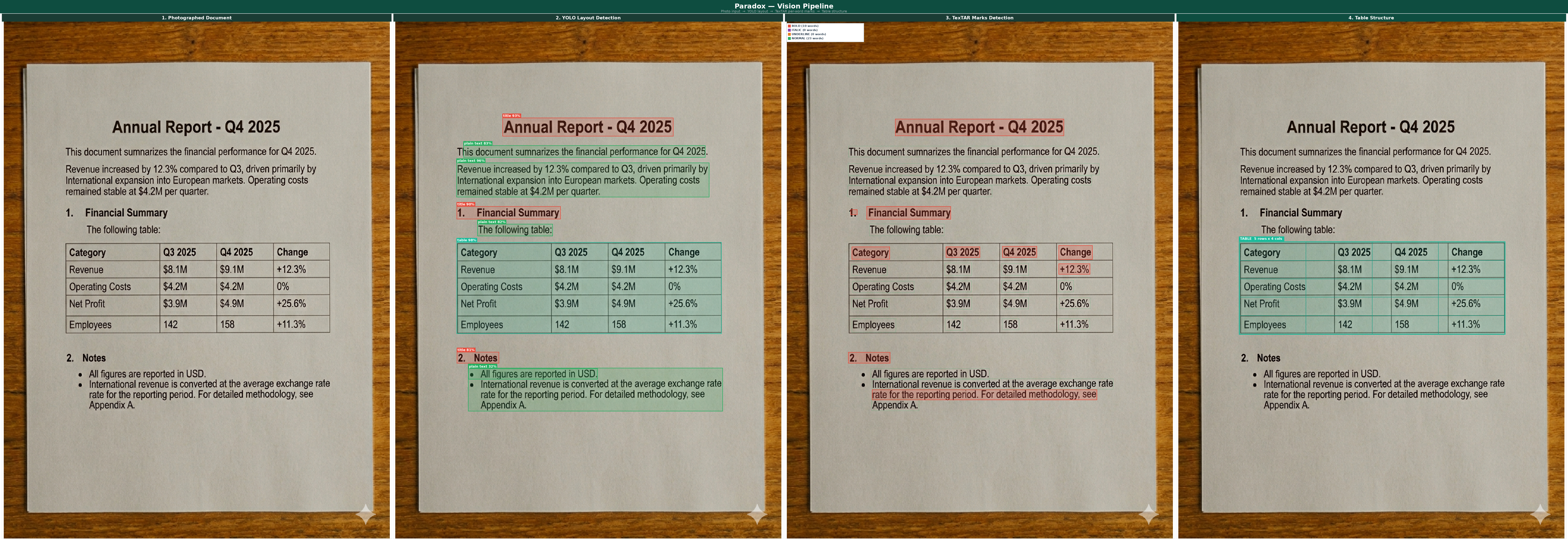
paradox-pdf
Any document → structured data, in one line.
PDFs · scans · phone photos · Word · Excel · email → clean JSON.










pip install paradox-pdf
import paradox_pdf as pdx

data = pdx.extract("invoice.pdf", feature="fields", show=True)
feature= picks what you get · add-ons (styles=, signatures=, fields=, …) and mode= stack like pandas · show=True lets you see it.
Why paradox-pdf
100% word coverage, 0 orphans — every word lands in exactly one typed region;
coverage_pct == 100.0is an enforced contract, not a hope.
| paradox-pdf | notes | |
|---|---|---|
| 🎯 Key→value accuracy vs Azure DI | P 0.84–0.89 · genuine-KIE recall 0.657 / prec 0.892 | matches Azure field counts, cleaner on mixed docs |
| ⚡ Speed | ~0.15 s/doc (digital KIE) | 20–40× faster than the OCR path |
| 📝 Text coverage vs Azure | ≈0.98 digital · ≈1.0 scanned | PP-OCR on scans ties Azure |
| 🧾 Tables (GPU) vs Azure DI | 68% exact / 98.7% cell-F1 | beats Azure (58% / 90%) |
| 💸 Cost | free · CPU-first | GPU/LLM optional |
Runs on CPU out of the box; GPU (PaddleOCR-VL) and LLM (Claude fallback) are optional.
vs. alternatives →
| paradox-pdf | Azure DI | unstructured | docling | marker | |
|---|---|---|---|---|---|
| Runs local / offline | ✅ | ☁️ cloud | ✅ | ✅ | ✅ |
| Free | ✅ | 💲 per-page | ✅ | ✅ | ✅ |
| Structure + 125 typed regions | ✅ | ✅ | ✅ | ✅ | partial |
| Tables (any shape) | ✅ | ✅ | ✅ | ✅ | ✅ |
| Key→value / KIE + confidence | ✅ | ✅ | ➖ | ➖ | ➖ |
Natural-language queries= |
✅ | ✅ | ➖ | ➖ | ➖ |
| Signatures / formulas / handwriting | ✅ | partial | ➖ | formulas | formulas |
| Font styles (bold/italic/…) | ✅ | fonts add-on | ➖ | ➖ | ➖ |
| 100% word-coverage guarantee | ✅ | ➖ | ➖ | ➖ | ➖ |
Draw bboxes (show=) |
✅ | ➖ | ➖ | ➖ | ➖ |
| One command, composable | ✅ | model-per-call | flat kwargs | options object | CLI |
Accuracy/speed numbers above are measured vs Azure Document Intelligence on a held-out insurance corpus.
✨ What it can do
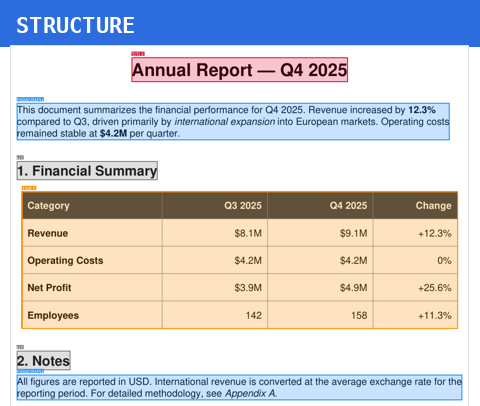 pdx.extract("doc.pdf") |
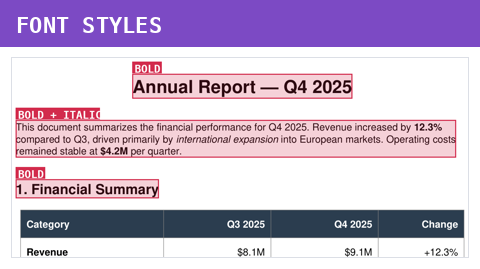 pdx.extract("doc.pdf", feature="styles") |
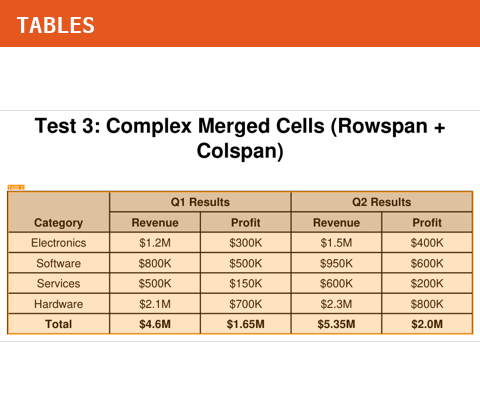 pdx.extract("doc.pdf", feature="tables") |
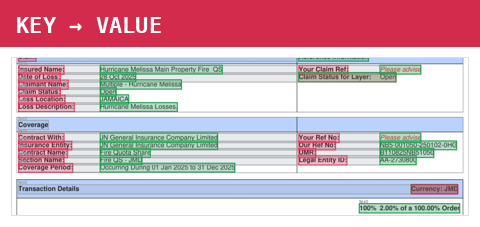 pdx.extract("doc.pdf", feature="fields") |
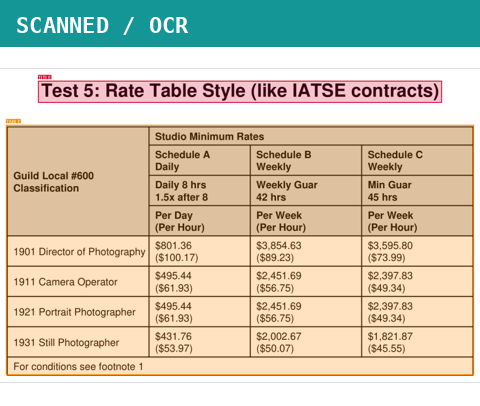 pdx.extract("scan.pdf", ocr=True) |
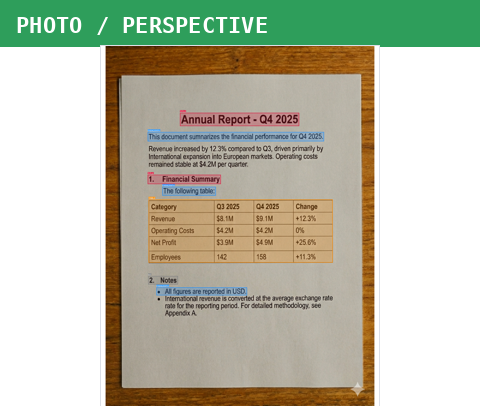 pdx.extract("photo.jpg", show=True) |
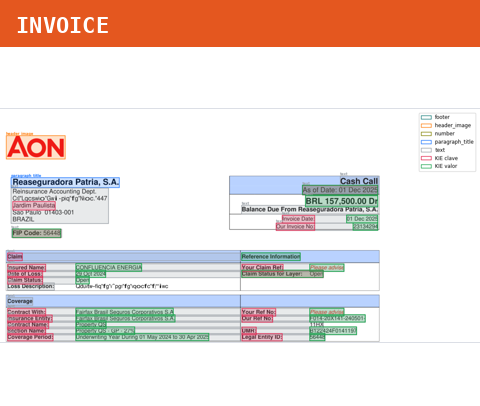 pdx.extract("doc.pdf", document_type="invoice") |
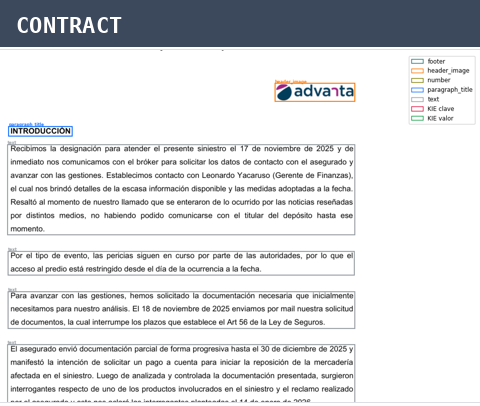 pdx.extract("doc.pdf", document_type="contract") |
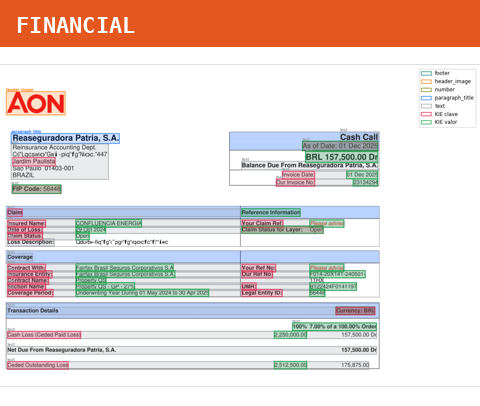 pdx.extract("doc.pdf", output_format="json") |
Same
pdx.extract(...)— one extra parameter unlocks a different capability.
# one parameter → one capability
pdx.extract("doc.pdf")                            # structure (125 typed regions)
pdx.extract("doc.pdf", feature="styles")          # bold / italic / underline / …
pdx.extract("doc.pdf", feature="tables")          # tables (any shape)
pdx.extract("doc.pdf", feature="fields")          # key → value (KIE)
pdx.extract("scan.pdf", ocr=True)                 # OCR scanned pages
pdx.extract("photo.jpg", show=True)               # photo + draw the page
pdx.extract("doc.pdf", document_type="invoice")   # invoice → key→value ON
pdx.extract("doc.pdf", document_type="contract")  # contract → + signatures
pdx.extract("doc.pdf", output_format="json")      # serialize to JSON

# …or CONCATENATE every capability in ONE call:
pdx.extract(
    file="contract.pdf",
    feature=["titles", "tables", "fields", "signatures",   # pull many outputs at once
             "formulas", "images", "styles", "language"],
    document_type="invoice",   # 🧾 mode → key→value ON by default
    styles=True,               # 🔤 bold / italic / underline / …
    signatures=True,           # ✍️ signature detection
    formulas=True,             # ∑  formulas → LaTeX
    handwriting=True,          # 🖊️ read handwriting (TrOCR)
    classify=True,             # 🧭 document topic
    fields=True,               # 🔑 force key→value
    ocr=True,                  # 👁️ OCR every page
    ocr_images=True,           # 🖼️ OCR text baked inside images
    pages=[1, 2, 3],           # 📄 page subset
    backend="gpu",             # ⚙️ PaddleOCR-VL
    output_format="json",      # 📦 serialize to JSON
    output_dir="./bundle",     # 🗂️ JSON + attachment PNGs + relative paths
    show=True,                 # 👁️ draw the annotated page
)
Everything is orthogonal. 17
feature=buckets × 8 detection toggles × 3 document types × 4 output formats × backends — mix any of them in a single line. Language is auto-detected intometadata.language_name.
🧾 The full recipe — every parameter, every option
pdx.extract(
    file,                    # "doc.pdf" · image · DOCX · XLSX · PPTX · EML/MSG · HTML · EPUB · XML · TeX · ZIP … (25+)

    # ── WHAT you get back ───────────────────────────────────────────────
    feature="all",           # "all" | "text" | "tables" | "fields" | "titles" | "signatures"
                             #   | "styles" | "images" | "formulas" | "markdown" | "metadata"
                             #   | "bookmarks" | "links" | "annotations" | "attachments"
                             #   | "language" | "class" | "handwriting"
                             #   | ["tables","fields", …]  (a list → dict)  |  "any phrase"  (locate)

    # ── DOCUMENT TYPE (auto-enables its detections) ─────────────────────
    document_type="auto",    # "auto" | "invoice" (→ key→value ON) | "contract" (→ signatures)

    # ── DETECTION TOGGLES — each: True | False | "auto" ─────────────────
    styles="auto",           # bold / italic / underline / strike / superscript / monospace / …
    signatures="auto",       # signature detection (bbox + score)
    formulas="auto",         # formulas → LaTeX
    handwriting="auto",      # handwriting (TrOCR)
    classify="auto",         # document topic (finance / legal / …)
    fields="auto",           # key→value (KIE)
    ocr="auto",              # True = OCR every page · False = never · "auto" = per page
    ocr_images="auto",       # OCR text baked inside embedded images

    # ── ASK / LANGUAGE ──────────────────────────────────────────────────
    queries=None,            # ["total amount due", "invoice date"] → {query: value}
    language=None,           # "en" | "es" | "french" | … | "auto" (English)  — OCR language

    # ── OUTPUT ──────────────────────────────────────────────────────────
    output_format="dict",    # "dict" | "json" | "markdown" | "text"
    output_dir=None,         # "./folder/"  → JSON + attachments/*.png + relative paths
    show=False,              # True | "inline" | "window" | "out.png"

    # ── PIPELINE ────────────────────────────────────────────────────────
    pages=None,              # [1, 2, 5]  |  "1-5,8"  |  None (all pages)
    backend="auto",          # "auto" | "cpu" | "gpu" (PaddleOCR-VL) | "llm" (Claude fallback)
    reading_order="auto",    # "auto" | "native" | "geometric" | "xy_cut"
    include_bbox=False,      # True | False  — add [x0,y0,x1,y1] to every element
    config=None,             # PipelineConfig(...) — override 30+ thresholds
)
🎛️ Everything it can do — by category
🧩 Structure & layout
| Capability | What it does | Call | Returns | |
|---|---|---|---|---|
| 🧩 | Component segmentation | 125 typed region kinds | feature="all" |
dict |
| 🏛️ | Heading hierarchy | TITLE → H1 → H4 nesting | auto | dict |
| 🔢 | Reading order | multi-column / XY-cut / pointer-net | reading_order= |
order |
| 🌲 | Section tree | nest headings → children | auto | dict |
🔤 Text & fonts
| Capability | What it does | Call | Returns | |
|---|---|---|---|---|
| 🔤 | Text styling & fonts | bold, italic, underline, strike, superscript, monospace, UPPERCASE, size, centered, indent, color, highlight | feature="styles" |
marks[] |
📊 Tables
| Capability | What it does | Call | Returns | |
|---|---|---|---|---|
| 📊 | Bordered tables | line/border grid extraction | feature="tables" |
list |
| 🕸️ | Borderless tables | alignment-cluster / HDBSCAN | feature="tables" |
list |
| 🔗 | Merged cells | colspan / rowspan | feature="tables" |
list |
| 🧮 | Multi-level headers | spanning header rows | feature="tables" |
list |
🔑 Forms & key-value
| Capability | What it does | Call | Returns | |
|---|---|---|---|---|
| 🔑 | Key→value (KIE) | entity linking + confidence | feature="fields" |
list |
| 🧾 | AcroForm widgets | PDF form fields | auto | list |
| 🤖 | Form/doc mode | invoice-vs-prose autodetect | mode= |
mode |
🔍 OCR & scanned
| Capability | What it does | Call | Returns | |
|---|---|---|---|---|
| 🔍 | Scan detection | route scanned pages to OCR | auto | — |
| 👁️ | OCR | RapidOCR (CPU) / PaddleOCR-VL (GPU) | backend= |
str |
| 🖊️ | Handwriting | TrOCR | feature="handwriting" |
list |
| 🧹 | Corrupt-font recovery | rebuild from broken font maps | auto | str |
📸 Image preprocessing
| Capability | What it does | Call | Returns | |
|---|---|---|---|---|
| 📐 | Deskew | straighten rotated scans | auto | — |
| 📸 | Perspective correction | flatten a photographed page | auto | — |
| 〰️ | Dewarp | rectify curved pages | auto | — |
🧠 Detection & intelligence
| Capability | What it does | Call | Returns | |
|---|---|---|---|---|
| ✍️ | Signature detection | bbox + score | feature="signatures" |
list |
| ∑ | Formula → LaTeX | convert formulas | feature="formulas" |
list |
| 🧭 | Classification | topic (finance/legal/…) | feature="class" |
dict |
| 🌐 | Language detection | per-element + document | feature="language" |
str |
| 🪢 | Semantic linking | caption↔figure, ref↔footnote | auto | list |
| ± | Amendment tracking | underline=added, strike=deleted | auto | type |
| 🎯 | Visual grounding | locate any phrase → bbox | feature="phrase" |
list |
📤 Output & export
| Capability | What it does | Call | Returns | |
|---|---|---|---|---|
| 📄 | Markdown / text | export | feature="markdown" |
str |
| 🏷️ | Metadata | title, author, dates | feature="metadata" |
dict |
| 🔖 | Bookmarks / TOC | document outline | feature="bookmarks" |
list |
| 🌍 | Hyperlinks | URL / internal / file | feature="links" |
list |
| 💬 | Annotations | comments, highlights, stamps | feature="annotations" |
list |
| 📎 | Attachments | embedded files | feature="attachments" |
list |
| 🖼️ | Images / figures | figures & pictures | feature="images" |
list |
| 🧵 | Traceable refs | (pX,lY) source span per element |
auto | str |
📦 Formats
| Capability | What it does | Call | Returns | |
|---|---|---|---|---|
| 📦 | 25+ input formats | PDF, image, DOCX, XLSX, EML, EPUB, ZIP… | pdx.extract(file) |
dict |
🧩 Compose freely — like pandas
Every knob is orthogonal — mix any combination. feature= picks what you get, the add-ons enrich it, mode= sets the document type, and output_format=/output_dir= control how it comes out.
# everything — auto-detected
pdx.extract("file.pdf")

# read as an invoice (key→value ON by default) and also detect styles + signatures
pdx.extract("file.pdf", document_type="invoice", styles=True, signatures=True)

# only the titles and the signatures → written as a bundle folder
pdx.extract("file.pdf", feature=["titles", "signatures"], output_dir="./out")
#   ./out/file.json           (structured JSON)
#   ./out/attachments/*.png   (extracted images/signatures)
#   → each element carries "attachment": "attachments/…png"  (relative path)

# just the tables, as a JSON string, and see the page
pdx.extract("scan.png", feature="tables", output_format="json", show=True)

# force OCR everywhere + read text baked inside embedded images
pdx.extract("scan.pdf", ocr=True, ocr_images=True, feature="text")

# see a specific page, or every page, as annotated PNGs
pdx.extract("doc.pdf", pages=[1], show="page1.png")   # just the first page
pdx.extract("doc.pdf", show="pages.png")               # all pages → pages_p1.png, pages_p2.png, …
| Knob | Values | What it controls |
|---|---|---|
file= |
path | the document (PDF · image · DOCX · XLSX · EML · EPUB · ZIP … 25+) |
feature= |
all·text·tables·fields·titles·signatures·styles·images·formulas·markdown·metadata·language·… or a list or a phrase |
what you get back |
mode= / document_type= |
auto · invoice (→ key→value) · contract (→ signatures) |
the type decides what runs |
| add-ons | styles= signatures= formulas= handwriting= classify= fields= ocr= ocr_images= |
each True/False/"auto" — stack any |
output_format= |
dict · json · markdown · text |
serialization |
output_dir= |
folder | writes JSON + attachments/ PNGs + relative paths |
show= |
True · "inline" · "window" · "out.png" |
draw annotated page(s); with pages= picks which — one PNG per page (out_p1.png, out_p2.png, …) |
queries= |
["total due", "invoice date"] |
ask questions → {query: value} |
language= |
"en" · "es" · "french" · … · "auto" |
OCR input language |
| detected language | auto | reported in metadata.language + language_name (English/Spanish/…) |
🔗 Shortcuts — pdx.tables(f) · pdx.fields(f) · pdx.text(f) · pdx.markdown(f) · pdx.find(f, "total").
Which mode / backend?
| Your document | mode= |
backend= |
|---|---|---|
| Invoice / form (key→value) | "invoice" |
auto |
| Contract / report / book | "contract" |
auto |
| Not sure | "auto" (default) |
auto |
| Clean digital PDF | any | cpu |
| Photo / curved / hard tables | any | gpu |
| No GPU, occasional hard scans | any | llm |
Same doc, any output_format
pdx.extract("report.pdf")                          # → dict (Python)
pdx.extract("report.pdf", output_format="json")    # → '{"source": "report.pdf", …}'  (str)
pdx.extract("report.pdf", output_format="markdown")# → '# **Annual Report — Q4 2025** …'
pdx.extract("report.pdf", output_format="text")    # → 'Annual Report — Q4 2025\n…'
🍳 Recipes — grab one for your use case
| Your document / goal | One line |
|---|---|
| 🧾 Invoice → key→value fields | pdx.fields("invoice.pdf") |
| 📜 Contract → structure + signatures | pdx.extract("contract.pdf", document_type="contract") |
| 📊 Financial statement → tables as JSON | pdx.extract("10k.pdf", feature="tables", output_format="json") |
| 🔬 Scientific paper → formulas as LaTeX | pdx.extract("paper.pdf", formulas=True) |
| 📸 Photo of a receipt → OCR + fields | pdx.extract("receipt.jpg", ocr=True, feature="fields") |
| 🗄️ Scanned archive (.zip) → all text | pdx.extract("archive.zip", ocr=True, feature="text") |
| 📧 Email + attachments → bundle folder | pdx.extract("mail.eml", output_dir="./out") |
| 📈 Excel / CSV → tables | pdx.tables("data.xlsx") |
| 🌐 Unknown language → detect it | pdx.extract("doc.pdf", feature="language") |
| ✍️ Signed form → locate signatures + see them | pdx.extract("form.pdf", signatures=True, show=True) |
| 📚 Book / report → Markdown | pdx.markdown("book.epub") |
| 🏷️ Triage → classify the topic | pdx.extract("doc.pdf", feature="class") |
| ❓ Ask questions → answers | pdx.extract("invoice.pdf", queries=["total due", "invoice date"]) |
| 🌍 Non-English scan → OCR in language | pdx.extract("factura.pdf", ocr=True, language="es") |
| 🔎 Find a value on the page | pdx.find("invoice.pdf", "total amount due") |
| 🖼️ Titles + signatures → JSON + PNG bundle | pdx.extract("doc.pdf", feature=["titles","signatures"], output_dir="./out") |
| 🧩 Everything at once | pdx.extract("doc.pdf", feature="all", styles=True, signatures=True, formulas=True, mode="invoice", output_dir="./out") |
📦 Install profiles
pip install paradox-pdf # CPU — works everywhere (default)
| Extra | Install | Unlocks |
|---|---|---|
| base | paradox-pdf |
PDF · images · structure · tables · KIE · marks · OCR (CPU) |
| all-formats | paradox-pdf[all-formats] |
DOCX · XLSX · PPTX · ODT · EML/MSG · EPUB · HTML · … (the 25+) |
| gpu | paradox-pdf[gpu] |
PaddleOCR-VL 0.9B — photos, curved pages, hard tables |
| llm | paradox-pdf[llm] |
Claude fallback on broken pages (no GPU) |
| locate | paradox-pdf[locate] |
feature="the total due" / find() visual grounding |
| handwriting | paradox-pdf[handwriting] |
handwriting=True (TrOCR) |
| formula | paradox-pdf[formula] |
formulas=True → LaTeX |
| surya | paradox-pdf[surya] |
90+ language OCR |
25+ input formats
PDF · PNG JPG TIFF BMP GIF WebP · DOCX DOC ODT RTF · XLSX XLS ODS CSV · PPTX · EML MSG · HTML MD TXT · XML EPUB TeX JATS XBRL · ZIP TAR 7z RAR — one call, auto-detected, each tagged with source_format.
🛟 Robust by default
from paradox_pdf import extract, PDFCorruptError, PageRangeError, doctor

try:
    doc = extract("scan.pdf", pages="1-5")
except PDFCorruptError:      ...   # typed, actionable errors
except PageRangeError:       ...

doctor()   # 🩺 check install health, CUDA, model cache, deps
Typed exceptions: ParadoxError · PDFNotFoundError · PDFCorruptError · PDFEmptyError · PageRangeError · BackendNotAvailableError · GPUOutOfMemoryError · ModelDownloadError · LLMAuthError · LLMRateLimitError · MissingDependencyError.
📖 Full reference — API · options · output schema · CLI · internals
🐍 Public API
extract(
    file,                     # path — PDF, image, or any supported format
    *,
    feature="all",            # what to return (str | list | phrase)
    show=False,               # draw the page: True | "inline" | "window" | "out.png"
    # composable add-ons — each True / False / "auto":
    styles="auto", signatures="auto", formulas="auto",
    handwriting="auto", classify="auto", fields="auto",
    ocr="auto", ocr_images="auto",
    document_type=None,       # "auto" | "invoice" | "contract"  (alias: mode=)
    queries=None,             # ["total due", …] → {query: value}
    language=None,            # OCR language: "en" | "es" | … | "auto"
    output_format="dict",     # "dict" | "json" | "markdown" | "text"
    output_dir=None,          # bundle: JSON + attachments/ PNGs + relative paths
    pages=None,               # [1,2,5] | "1-5,8" | None
    backend="auto",           # "auto" | "cpu" | "gpu" | "llm"
    reading_order="auto", include_bbox=False, config=None,
)
| Symbol | Purpose |
|---|---|
extract(file, feature="all", …) |
The one command. Any format → whatever feature asks for. |
tables(f) · fields(f) · text(f) · markdown(f) |
Shortcuts for the matching feature=. |
find(f, "total due") |
Natural-language visual locate. |
features() |
List every feature= bucket. |
read(f) |
Universal reader (explicit format dispatch). |
PipelineConfig |
Dataclass to override 30+ thresholds. |
Key options:
| Argument | Values | Description |
|---|---|---|
feature= |
all·text·tables·fields·titles·signatures·styles·images·formulas·markdown·metadata·bookmarks·links·annotations·attachments·language·class·handwriting · a list · a phrase |
what you get back |
document_type= / mode= |
auto · invoice (→ KIE) · contract (→ signatures) |
document type & its default detections |
styles/signatures/formulas/handwriting/classify/fields/ocr/ocr_images |
True · False · "auto" |
enable/disable each detection |
output_format= |
dict · json · markdown · text |
serialization of the result |
output_dir= |
folder path | bundle: <name>.json + attachments/*.png + relative paths |
show= |
True · "inline" · "window" · "path.png" |
draw the annotated page |
pages= |
list[int] |
1-based subset (default: all) |
backend= |
auto·cpu·gpu·llm |
vision backend (gpu=PaddleOCR-VL, llm=Claude fallback) |
config= |
PipelineConfig |
override 30+ thresholds |
🍳 Examples
10 copy-paste recipes (click to expand) →
1. Get the document tree
import paradox_pdf as pdx

doc = pdx.extract("annual_report.pdf")

# Top-level structure
print(doc.keys())
# dict_keys(['source', 'total_pages', 'total_elements', 'total_images',
#            'type_summary', 'elements'])

# Walk the heading tree
def walk(nodes, depth=0):
    for n in nodes:
        text = (n.get("text") or "").strip()[:80]
        print(f"{'  '*depth}{n['type']:14s} {text}")
        walk(n.get("children", []), depth + 1)

walk(doc["elements"])
2. Process only certain pages
doc = pdx.extract("contract.pdf", pages=[1, 2, 5])
# or
doc = pdx.extract_pages("contract.pdf", pages=range(10, 20))
3. Plain text in one call
text = pdx.extract_text("contract.pdf")
4. Extract every table
tables = pdx.extract_tables("contract.pdf")

for t in tables:
    rows, cols = t["shape"]
    cells = t["cells"]
    print(f"Table {rows}×{cols}, {len(cells)} cells")

    for c in cells:
        p = c["p"]
        if len(p) == 2:                          # simple cell
            r, col = p
            print(f"  ({r},{col}): {c['t']!r}")
        else:                                    # merged cell
            r, col, rowspan, colspan = p
            print(f"  ({r},{col}) span {rowspan}×{colspan}: {c['t']!r}")
Cell schema:
{"p": [row, col], "t": "Some cell text"}                       # simple
{"p": [row, col, rowspan, colspan], "t": "Header cell"}        # merged
5. Persist to disk
doc = pdx.extract_to_file(
    "contract.pdf",
    output="out/contract.json",
    images_dir="out/images/",
)
The function still returns the dict.
6. Convert a folder
from pathlib import Path
import paradox_pdf as pdx

for pdf in Path("inbox/").glob("*.pdf"):
    doc = pdx.extract_to_file(pdf, output=f"out/{pdf.stem}.json", no_images=True)
    print(f"{pdf.name:40s}  {doc['total_pages']}p  {doc['total_elements']} elements")
7. Custom configuration
from paradox_pdf import extract, PipelineConfig

cfg = PipelineConfig(
    render_dpi=300,                    # higher DPI for vision pipeline
    scan_text_threshold=80,            # treat pages with <80 chars as scanned
    cv_border_missing_threshold=0.40,  # be stricter about declaring borders absent
    yolo_confidence=0.30,              # stricter YOLO detections
)

doc = extract("noisy_scan.pdf", config=cfg)
Full reference of the 30+ tunables is in docs/configuration.md.
You can also override any parameter with environment variables prefixed PDF_:
PDF_RENDER_DPI=300 PDF_YOLO_CONFIDENCE=0.3 python my_script.py
8. Force a specific pipeline
# Force the digital pipeline even if a page looks scanned (faster, no OCR)
doc = pdx.extract("digital_only.pdf", force_mode="heuristic")

# Force the vision pipeline (OCR every page, even digital ones)
doc = pdx.extract("scanned.pdf", force_mode="vision")
9. Just count things
doc = pdx.extract("contract.pdf", no_images=True)
print(doc["type_summary"])
# {'TITLE': 1, 'H1': 4, 'H2': 11, 'PARAGRAPH': 67, 'TABLE': 3, 'SIGNATURE': 2}
10. Build markdown from the tree
import paradox_pdf as pdx

LEVEL = {"TITLE": 1, "SUBTITLE": 2, "H1": 3, "H2": 4, "H3": 5, "H4": 6}

def to_markdown(nodes, out=None):
    out = out if out is not None else []
    for n in nodes:
        t = n.get("type")
        text = (n.get("text") or "").strip()
        if t in LEVEL and text:
            out.append("#" * LEVEL[t] + " " + text)
        elif t == "PARAGRAPH":
            out.append(text)
        elif t == "TABLE":
            out.append(f"_<table {n['shape'][0]}x{n['shape'][1]}>_")
        out.append("")
        to_markdown(n.get("children", []), out)
    return "\n".join(out)

doc = pdx.extract("contract.pdf", no_images=True)
print(to_markdown(doc["elements"]))
🗂️ Output schema
{
  "source": "contract.pdf",
  "total_pages": 12,
  "total_elements": 145,
  "total_images": 4,
  "type_summary": {"TITLE": 1, "PARAGRAPH": 67, "TABLE": 3, "...": "..."},
  "elements": [
    {
      "type": "TITLE",
      "marks": ["BOLD"],
      "text": "**Annual Report — Q4 2025**",
      "ref": "(p1,l1):(p12,l8)",
      "children": [
        {"type": "PARAGRAPH", "text": "...", "ref": "(p1,l2):(p1,l2)"},
        {"type": "H1",
         "text": "**1. Financial Summary**",
         "ref": "(p1,l3):(p2,l4)",
         "children": [
           {"type": "TABLE",
            "shape": [5, 4],
            "cells": [
              {"p": [0, 0], "t": "Category"},
              {"p": [0, 1, 1, 3], "t": "Studio Minimum Rates"}
            ],
            "ref": "(p1,l4):(p1,l4)"}
         ]}
      ]
    }
  ]
}
ref field
Every element gets a ref of the form "(pX,lY):(pX,lY)" where:
pX= page number (1-based),lY= element index within that page (1-based).- The first tuple is the start; the second is the end of the element's last descendant.
Element types (excerpt)
TITLE, SUBTITLE, H1–H4, PARAGRAPH, TABLE, LIST (with items[]), TOC (with entries[]), IMAGE, SIGNATURE, AMENDMENT_DEL, EXHIBIT, APPENDIX, FOOTER, HEADER, PAGE_NUMBER, plus 50+ more. Full list: pdf_tagger/catalog.py.
Inline marks
Marks are preserved both in marks: [...] (per-element) and inline in the text:
| Mark | Inline syntax |
|---|---|
| BOLD | **bold text** |
| ITALIC | *italic* |
| UNDERLINE | ++underlined++ |
| STRIKETHROUGH | ~~deleted~~ |
| SUPERSCRIPT | ^superscript^ |
| MONOSPACE | `code` |
Top-level keys
Always present: source · source_format · total_pages · total_elements · total_images · type_summary · elements · document_metadata (title/author/dates + language/language_name) · bookmarks · embedded_files · page_links · page_annotations.
Added by the matching feature/add-on:
| Key | Added when | Shape |
|---|---|---|
key_information |
feature="fields" / mode="invoice" |
{section: {label: value}} |
key_information_fields |
idem | [{key, label, value, section, page, confidence, label_bbox, value_bbox, value_bboxes}] |
key_information_stats |
idem | {sections, fields, mean_confidence, low_confidence_fields} |
signatures / total_signatures |
signatures=True |
[{page, bbox, score}] |
doc_class / doc_class_score |
classify=True |
str / float |
coverage |
vision/containment path | {total_words, categorized, coverage_pct: 100.0, uncategorized_words: 0, by_type, source_per_page} |
output_dir / json_path |
output_dir= |
bundle paths |
Per-element extras
bbox (with include_bbox=True, PDF points) · latex (formulas) · handwritten_text (handwriting) · ocr_text (ocr_images=True) · language (per element) · color / highlight · attachment (bundle, relative path) · src/width/height (images) · TABLE shape+cells · FORM_FIELD name/field_type/value/label.
⌨️ CLI
The same package installs a paradox-pdf command.
Plug-and-play (single file, any format) — mirrors the feature= API:
paradox-pdf invoice.pdf --want fields          # key→value JSON to stdout
paradox-pdf scan.png     --want tables --show  # tables + save annotated PNG
paradox-pdf report.pdf   --want markdown -o out.md
paradox-pdf invoice.pdf  --want "the total amount due"
paradox-pdf doc.pdf      --want text,tables    # comma list → JSON dict
Batch / full-JSON mode (folders, parallel):
paradox-pdf contract.pdf                       # → output/contract.json
paradox-pdf contract.pdf -o result.json
paradox-pdf docs/ -o extracted/ -w 8           # parallel folder
paradox-pdf --pages 1-5 contract.pdf
paradox-pdf --no-images contract.pdf
Run paradox-pdf --help for the full set of flags.
⚙️ How it works
                 ┌─────────────────┐
PDF ─────────────► scan_detector   │  per page (<50 chars → vision)
                 └────────┬────────┘
            ┌─────────────┴─────────────┐
            ▼                           ▼
   ┌──────────────────┐        ┌──────────────────────┐
   │ Heuristic        │        │ Vision               │
   │ (PyMuPDF fonts)  │        │ YOLO + RapidOCR      │
   │                  │        │ + Table Transformer  │
   │                  │        │ + HDBSCAN borderless │
   │                  │        │ + TexTAR (marks)     │
   └────────┬─────────┘        └──────────┬───────────┘
            └─────────────┬───────────────┘
                          ▼
              ┌────────────────────────┐
              │ Section tree builder   │
              │ Post-processing passes │
              └───────────┬────────────┘
                          ▼
                       JSON dict
For tables, three detectors run in parallel — vector lines (PyMuPDF), Table Transformer, OpenCV border morphology — and the highest-quality result wins by IoU 0.5 NMS scored on fill_rate + source_bonus − merge_penalty. Merged cells are detected by missing inner borders (≥35% pixel coverage threshold) for bordered tables, and by cell-width ratio (>1.6× column pitch) for borderless ones.
Reading order (new in 0.5.0)
PP-DocLayoutV2 is a two-stage model: an RT-DETR detector emits boxes + class labels, and a pointer network trained end-to-end re-ranks them into reading order using class-label embeddings + 2D positional encodings + geometric bias. Paradox preserves that prediction by default — earlier releases discarded it by re-sorting on y0, which produced the wrong order on multi-column papers.
Override with the reading_order kwarg:
pdx.extract("paper.pdf")                          # auto → pointer-net when available
pdx.extract("paper.pdf", reading_order="native")  # require pointer-net (errors otherwise)
pdx.extract("paper.pdf", reading_order="geometric")  # recursive XY-Cut on bboxes only
pdx.extract("paper.pdf", reading_order="y")       # legacy 0.4.x behaviour (snapshot tests)
On the multi-column real-PDF bench (Las Condes journal, Nature Sci Reports, etc.) the pointer-net order matches the human-validated ground truth on 11/20–14/14 pages where naive y sort matched only 4/15–9/14. Pages without the detector (digital text path, YOLOv10 legacy fallback) automatically fall back to geometric XY-Cut.
Digital hierarchy via PP-DocLayoutV2 (new in 0.5.1, improved in 0.5.2)
On the digital (non-scanned) path, paradox normally classifies block types with font_classifier — font flags + size hierarchy + indentation. That works well when titles use a visibly larger font, but misses cases where a title is bold-and-same-size, or where an article subtitle, footnote, or caption is not encoded with a font-rank signal.
Three modes, ordered by trust:
# Default — heuristic only (unchanged from 0.4.x).
pdx.extract("doc.pdf")

# Recommended — tier-aware hybrid. PP for hierarchy signals (TITLE /
# FOOTNOTE / CAPTION / HEADER), heuristic for body text, sanity-checked
# TABLE/FIGURE so PP cannot promote a sectioned CV layout into a fake table.
pdx.extract("doc.pdf", digital_layout_detector="hybrid")

# Trust PP-DocLayoutV2 unconditionally. Good for clean papers; can
# over-classify TABLE on CVs/forms because the visual layout fools it.
pdx.extract("doc.pdf", digital_layout_detector="paddlex")
Validated on three real PDFs — hybrid is strictly better than the other two:
| heuristic | hybrid | paddlex | |
|---|---|---|---|
| Las Condes journal p1 | 8 elems — no TITLE | 12 elems — TITLE:3, FOOTNOTE:1, H1:3, PARAGRAPH:5 (best) |
10 elems — no H1 |
| Nature Sci Rep p1 | 5 elems — no header/footnote | 5 elems — PAGE_HEADER, TITLE, FOOTNOTE, H1, PARAGRAPH (best) |
5 elems — no H1 |
| CV (digital, sectioned) | 12 — H1x5, H2, PARAGRAPH | 12 — adds TITLE, otherwise unchanged (best) | 8 fake TABLEs (worst) |
PyMuPDF still extracts text + marks (digital signals stay perfect). PP-DocLayoutV2's pointer-network rank is preserved through the dispatcher in all three modes, so the reading order of multi-column pages is correct regardless of how types are decided.
Costs ~1 s/page on CPU.
Performance notes
- Digital page: ~0.05 s on CPU.
- Scanned page: ~10 s on CPU, much faster on GPU (PyTorch detects and uses CUDA automatically).
- First run: HuggingFace models are downloaded once (~500 MB total).
If you see multi-minute startup per document with the vision pipeline, set HF_HUB_OFFLINE=1 after the first download — HuggingFace's online metadata revalidation on slow networks is the bottleneck, not the actual inference:
HF_HUB_OFFLINE=1 python my_script.py
Or in code:
import os
os.environ["HF_HUB_OFFLINE"] = "1"
import paradox_pdf as pdx
Repository layout
paradox_pdf/         Public Python API (extract, extract_text, …)
pdf_tagger/          Core extraction (font classifier, vision layout, marks)
pdf_grid/            Vector-line table detection
scripts/             CLI implementation
docs/                Configuration reference, API reference, research notes
examples/            Sample PDFs + expected outputs
_dev/                Test suites, fixtures, benchmarks (not shipped in wheel)
License
Proprietary — © CreAI. Contact feliperodriguez@creai.mx for commercial use.
Links
1 maintainer

Release files for paradox-pdf 0.9.1
For a detailed explanation of source distributions (sdists) and built distributions (wheels), please see the package formats documentation.
Source distribution (sdist)
| File | Size | Uploaded | |
|---|---|---|---|
| paradox_pdf-0.9.1.tar.gz | 61.6 MB | Details |
Built distribution (wheel)
| File | Interpreter | ABI | Platform | Reset |
|---|---|---|---|---|
| paradox_pdf-0.9.1-py3-none-any.whl | Python 3 | none | any | Details |
Total release size: 123.2 MB
Release files / paradox_pdf-0.9.1.tar.gz
| Download URL | paradox_pdf-0.9.1.tar.gz |
|---|---|
| Size | 61.6 MB |
| Tags | Source |
|
SHA-256 checksum How to use checksums |
5fe38a791f391db5dd8deba37e459c97773b62db05f44bc70da148945a731b37
|
|
BLAKE2b-256 checksum How to use checksums |
0e986c6742c86e05c705af75ffc68a8358058f8a79c8ef2d318172a902b4e227
|
| Upload date | |
|
Uploaded using Trusted Publishing? What is trusted publishing? |
No |
| Uploaded via |
twine/6.2.0 CPython/3.11.15
|
Release files / paradox_pdf-0.9.1-py3-none-any.whl
| Download URL | paradox_pdf-0.9.1-py3-none-any.whl |
|---|---|
| Size | 61.6 MB |
| Tags | Python 3 |
|
SHA-256 checksum How to use checksums |
e11001171500b6df6758e1b957c97127bc40c90afb062431edb89094dd12d6fc
|
|
BLAKE2b-256 checksum How to use checksums |
32740daa4e0d18b037f1b2ec4c310374234e8f911d6d66d64141e414979c0de2
|
| Upload date | |
|
Uploaded using Trusted Publishing? What is trusted publishing? |
No |
| Uploaded via |
twine/6.2.0 CPython/3.11.15
|














