
Parallel-pandas



Makes it easy to parallelize your calculations in pandas on all your CPUs.
Installation
pip install --upgrade parallel-pandas
Quickstart
import pandas as pd
import numpy as np
from parallel_pandas import ParallelPandas

#initialize parallel-pandas
ParallelPandas.initialize(n_cpu=16, split_factor=4, disable_pr_bar=True)

# create big DataFrame
df = pd.DataFrame(np.random.random((1_000_000, 100)))

# calculate multiple quantiles. Pandas only uses one core of CPU
%%timeit
res = df.quantile(q=[.25, .5, .95], axis=1)
3.66 s ± 31.6 ms per loop (mean ± std. dev. of 7 runs, 1 loop each)
#p_quantile is parallel analogue of quantile methods. Can use all cores of your CPU.
%%timeit
res = df.p_quantile(q=[.25, .5, .95], axis=1)
679 ms ± 10.4 ms per loop (mean ± std. dev. of 7 runs, 1 loop each)
As you can see the p_quantile method is 5 times faster!
The .parallel accessor
Every p_* method is also reachable through the .parallel accessor, so you can
drop the prefix and write the call the way you would spell the pandas method:
df.parallel.quantile(q=[.25, .5, .95], axis=1)   # same as df.p_quantile(...)
df.parallel.mean()                                # same as df.p_mean()
df.parallel.apply(my_func, axis=1)                # same as df.p_apply(my_func, axis=1)
The accessor simply forwards df.parallel.<name>() to df.p_<name>(), so it
automatically exposes whatever ParallelPandas.initialize registered.
Parallel .str and .dt
On a Series the .parallel namespace also exposes the string and datetime
accessors, so element-wise text/date preprocessing runs across a worker pool.
The API mirrors pandas exactly — methods return a callable, accessor
properties (dt.year, dt.month, ...) are evaluated eagerly:
s.parallel.str.lower()
s.parallel.str.extract(r'(\d+)-(\w+)')      # returns a DataFrame, like pandas
s.parallel.str.replace('foo', 'bar', regex=False)

s.parallel.dt.year                          # property -> Series
s.parallel.dt.floor('D')
s.parallel.dt.strftime('%Y-%m-%d')
Each op is element-wise, so the Series is split into row-chunks, the real pandas accessor runs on every chunk and the results are concatenated — the output is identical to the serial version.
When it pays off: reach for it on CPU-heavy per-element ops (regex
extract/replace, strftime, custom-format parsing). The built-in light ops
(str.upper, str.contains, dt.year, ...) already run in vectorized C, and
shipping millions of Python strings to worker processes costs more than the op
itself, so the serial version is faster there. On a 5M-row string Series
str.extract with a regex is ~3.5x faster; str.upper is slower. Series
shorter than the worker count fall back to the serial call automatically.
Usage
Under the hood, parallel-pandas works very simply. The Dataframe or Series is split into chunks along the first or second axis. Then these chunks are passed to a pool of processes or threads where the desired method is executed on each part. At the end, the parts are concatenated to get the final result.
When initializing parallel-pandas you can specify the following options:
n_cpu- the number of cores of your CPU that you want to use (defaultNone- use all cores of CPU)split_factor- Affects the number of chunks into which the DataFrame/Series is split according to the formulachunks_number = split_factor*n_cpu. Default isNone, which enables automatic chunking: for the process-transport methods (p_apply,p_map,p_applymap,chunk_apply) the chunk count is picked from the input's byte size (aiming for ~8 MB per chunk, bounded betweenn_cpuand64*n_cpuchunks). This lets the data transfer to workers overlap with computation and noticeably speeds up large frames (e.g. ~1.9 GB frame: ~1.9x in local benchmarks). Pass an explicit integer (e.g.split_factor=4) to force the classicsplit_factor*n_cpunumber of chunks instead.show_vmem- Shows a progress bar with available RAM (defaultFalse)disable_pr_bar- Disable the progress bar for parallel tasks (defaultFalse)logger- Alogging.Loggerthe progress bar is redirected to instead of the terminal (defaultNone). Optionally set the level withlogger_level(defaultlogging.INFO). To write the bar to an arbitrary file-like object instead, passpbar_file.reuse_pool- Keep the worker pool warm and reuse it across calls instead of spawning a new one every time (defaultTrue). This removes the per-call process-spawn overhead, which makes a big difference when you call process-based methods (p_apply,p_map,chunk_apply,p_pivot_table, groupbyp_apply, ...) repeatedly. Set it toFalseto restore per-call pool creation.
For example
import pandas as pd
import numpy as np
from parallel_pandas import ParallelPandas

#initialize parallel-pandas
ParallelPandas.initialize(n_cpu=16, split_factor=4, disable_pr_bar=False)

# create big DataFrame
df = pd.DataFrame(np.random.random((1_000_000, 100)))

During initialization, we specified split_factor=4 and n_cpu = 16, so the DataFrame will be split into 64 chunks (in the case of the describe method, axis = 1) and the progress bar shows the progress for each chunk
Redirecting the progress bar to a logger
By default the progress bar is written to the terminal. In non-interactive environments (log files, JSON logs, schedulers) you can redirect it to a logging.Logger — each bar refresh is emitted as a log record:
import logging
from parallel_pandas import ParallelPandas

logging.basicConfig(filename="progress.log", level=logging.INFO)
ParallelPandas.initialize(logger=logging.getLogger("pp"))
# df.p_apply(...) now writes the bar into progress.log instead of the terminal
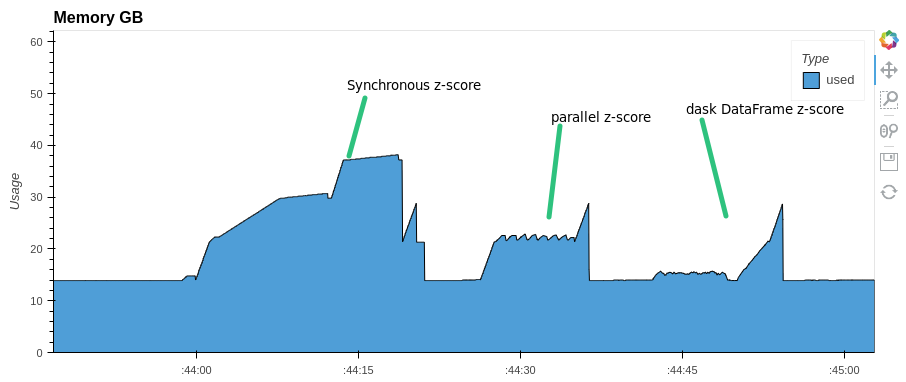
You can parallelize any expression with pandas Dataframe. For example, let's do a z-score normalization of columns in a dataframe. Let's look at the execution time and memory consumption. Compare with synchronous execution and with Dask.DataFrame
import pandas as pd
import numpy as np
from parallel_pandas import ParallelPandas
import dask.dataframe as dd
from time import monotonic

#initialize parallel-pandas
ParallelPandas.initialize(n_cpu=16, split_factor=8, disable_pr_bar=True)

# create big DataFrame
df = pd.DataFrame(np.random.random((1_000_000, 1000)))

# create dask DataFrame
ddf = dd.from_pandas(df, npartitions=128)

start = monotonic()
res=(df-df.mean())/df.std()
print(f'synchronous z-score normalization time took: {monotonic()-start:.1f} s.')
synchronous z-score normalization time took: 21.7 s.
#parallel-pandas
start = monotonic()
res=(df-df.p_mean())/df.p_std()
print(f'parallel z-score normalization time took: {monotonic()-start:.1f} s.')
parallel z-score normalization time took: 11.7 s.
#dask dataframe
start = monotonic()
res=((ddf-ddf.mean())/ddf.std()).compute()
print(f'dask parallel z-score normalization time took: {monotonic()-start:.1f} s.')
dask parallel z-score normalization time took: 12.5 s.
Pay attention to memory consumption. parallel-pandas and dask use almost half as much RAM as pandas
For some methods parallel-pandas is faster than dask.DataFrame:
#dask
%%time
res = ddf.nunique().compute()
Wall time: 42.9 s

%%time
res = ddf.rolling(10).mean().compute()
Wall time: 19.1 s

#parallel-pandas
%%time
res = df.p_nunique()
Wall time: 12.9 s

%%time
res = df.rolling(10).p_mean()
Wall time: 12.5 s
Parallel groupby.transform
Group-wise feature engineering with a Python UDF is a classic CPU-bound
workload. p_transform splits the groups across a worker pool and runs the
real pandas transform on every chunk, so the result is identical to
groupby.transform (column fast-path, broadcasting and string aggregations are
all handled by pandas):
def robust_zscore(s):
    med = s.median()
    mad = (s - med).abs().median()
    return (s - med) / (mad + 1e-9)

# drop-in parallel replacement for df.groupby('user_id')[cols].transform(robust_zscore)
feats = df.groupby('user_id')[['x', 'y']].p_transform(robust_zscore)
On a 2M-row frame with 20k groups and a heavy UDF this runs ~5x faster than the
serial transform on an 8-core machine. As with the other process methods,
reach for it when the UDF is an expensive Python function; for the built-in
aggregations ('mean', 'sum', ...) the native transform already runs in C.
p_agg is the reducing counterpart and mirrors groupby.agg, so callable,
string, list, dict and named aggregations all work (the aggregation spec and
resulting column layout are handled by pandas):
gb = df.groupby('user_id')
gb.p_agg(lambda s: s.max() - s.min())          # callable
gb.p_agg({'x': 'mean', 'y': my_udf})           # dict spec
gb.p_agg(rng=('x', my_udf), total=('y', 'sum'))  # named aggregation
API
Parallel counterparts for pandas Series methods
| methods | parallel analogue | executor |
|---|---|---|
| pd.Series.apply() | pd.Series.p_apply() | threads / processes |
| pd.Series.map() | pd.Series.p_map() | threads / processes |
Parallel counterparts for pandas SeriesGroupBy methods
| methods | parallel analogue | executor |
|---|---|---|
| pd.SeriesGroupBy.apply() | pd.SeriesGroupBy.p_apply() | threads / processes |
| pd.SeriesGroupBy.transform() | pd.SeriesGroupBy.p_transform() | threads / processes |
| pd.SeriesGroupBy.agg() | pd.SeriesGroupBy.p_agg() | threads / processes |
Parallel counterparts for pandas Dataframe methods
| methods | parallel analogue | executor |
|---|---|---|
| df.mean() | df.p_mean() | threads |
| df.min() | df.p_min() | threads |
| df.max() | df.p_max() | threads |
| df.median() | df.p_max() | threads |
| df.kurt() | df.p_kurt() | threads |
| df.skew() | df.p_skew() | threads |
| df.sum() | df.p_sum() | threads |
| df.prod() | df.p_prod() | threads |
| df.var() | df.p_var() | threads |
| df.sem() | df.p_sem() | threads |
| df.std() | df.p_std() | threads |
| df.cummin() | df.p_cummin() | threads |
| df.cumsum() | df.p_cumsum() | threads |
| df.cummax() | df.p_cummax() | threads |
| df.cumprod() | df.p_cumprod() | threads |
| df.apply() | df.p_apply() | threads / processes |
| df.applymap() | df.p_applymap() | processes |
| df.replace() | df.p_replace() | threads |
| df.describe() | df.p_describe() | threads |
| df.nunique() | df.p_nunique() | threads / processes |
| df.mad() | df.p_mad() | threads |
| df.idxmin() | df.p_idxmin() | threads |
| df.idxmax() | df.p_idxmax() | threads |
| df.rank() | df.p_rank() | threads |
| df.mode() | df.p_mode() | threads/processes |
| df.agg() | df.p_agg() | threads/processes |
| df.aggregate() | df.p_aggregate() | threads/processes |
| df.quantile() | df.p_quantile() | threads/processes |
| df.corr() | df.p_corr() | threads/processes |
Parallel counterparts for pandas DataframeGroupBy methods
| methods | parallel analogue | executor |
|---|---|---|
| DataFrameGroupBy.apply() | DataFrameGroupBy.p_apply() | threads / processes |
| DataFrameGroupBy.transform() | DataFrameGroupBy.p_transform() | threads / processes |
| DataFrameGroupBy.agg() | DataFrameGroupBy.p_agg() | threads / processes |
Parallel counterparts for pandas window methods
Rolling
| methods | parallel analogue | executor |
|---|---|---|
| pd.core.window.Rolling.apply() | pd.core.window.Rolling.p_apply() | threads / processes |
| pd.core.window.Rolling.min() | pd.core.window.Rolling.p_min() | threads / processes |
| pd.core.window.Rolling.max() | pd.core.window.Rolling.p_max() | threads / processes |
| pd.core.window.Rolling.mean() | pd.core.window.Rolling.p_mean() | threads / processes |
| pd.core.window.Rolling.sum() | pd.core.window.Rolling.p_sum() | threads / processes |
| pd.core.window.Rolling.var() | pd.core.window.Rolling.p_var() | threads / processes |
| pd.core.window.Rolling.sem() | pd.core.window.Rolling.p_sem() | threads / processes |
| pd.core.window.Rolling.skew() | pd.core.window.Rolling.p_skew() | threads / processes |
| pd.core.window.Rolling.kurt() | pd.core.window.Rolling.p_kurt() | threads / processes |
| pd.core.window.Rolling.median() | pd.core.window.Rolling.p_median() | threads / processes |
| pd.core.window.Rolling.quantile() | pd.core.window.Rolling.p_quantile() | threads / processes |
| pd.core.window.Rolling.rank() | pd.core.window.Rolling.p_rank() | threads / processes |
| pd.core.window.Rolling.agg() | pd.core.window.Rolling.p_agg() | threads / processes |
| pd.core.window.Rolling.aggregate() | pd.core.window.Rolling.p_aggregate() | threads / processes |
Window
| methods | parallel analogue | executor |
|---|---|---|
| pd.core.window.Window.mean() | pd.core.window.Window.p_mean() | threads / processes |
| pd.core.window.Window.sum() | pd.core.window.Window.p_sum() | threads / processes |
| pd.core.window.Window.var() | pd.core.window.Window.p_var() | threads / processes |
| pd.core.window.Window.std() | pd.core.window.Window.p_std() | threads / processes |
RollingGroupby
| methods | parallel analogue | executor |
|---|---|---|
| pd.core.window.RollingGroupby.apply() | pd.core.window.RollingGroupby.p_apply() | threads / processes |
| pd.core.window.RollingGroupby.min() | pd.core.window.RollingGroupby.p_min() | threads / processes |
| pd.core.window.RollingGroupby.max() | pd.core.window.RollingGroupby.p_max() | threads / processes |
| pd.core.window.RollingGroupby.mean() | pd.core.window.RollingGroupby.p_mean() | threads / processes |
| pd.core.window.RollingGroupby.sum() | pd.core.window.RollingGroupby.p_sum() | threads / processes |
| pd.core.window.RollingGroupby.var() | pd.core.window.RollingGroupby.p_var() | threads / processes |
| pd.core.window.RollingGroupby.sem() | pd.core.window.RollingGroupby.p_sem() | threads / processes |
| pd.core.window.RollingGroupby.skew() | pd.core.window.RollingGroupby.p_skew() | threads / processes |
| pd.core.window.RollingGroupby.kurt() | pd.core.window.RollingGroupby.p_kurt() | threads / processes |
| pd.core.window.RollingGroupby.median() | pd.core.window.RollingGroupby.p_median() | threads / processes |
| pd.core.window.RollingGroupby.quantile() | pd.core.window.RollingGroupby.p_quantile() | threads / processes |
| pd.core.window.RollingGroupby.rank() | pd.core.window.RollingGroupby.p_rank() | threads / processes |
| pd.core.window.RollingGroupby.agg() | pd.core.window.RollingGroupby.p_agg() | threads / processes |
| pd.core.window.RollingGroupby.aggregate() | pd.core.window.RollingGroupby.p_aggregate() | threads / processes |
Expanding
| methods | parallel analogue | executor |
|---|---|---|
| pd.core.window.Expanding.apply() | pd.core.window.Expanding.p_apply() | threads / processes |
| pd.core.window.Expanding.min() | pd.core.window.Expanding.p_min() | threads / processes |
| pd.core.window.Expanding.max() | pd.core.window.Expanding.p_max() | threads / processes |
| pd.core.window.Expanding.mean() | pd.core.window.Expanding.p_mean() | threads / processes |
| pd.core.window.Expanding.sum() | pd.core.window.Expanding.p_sum() | threads / processes |
| pd.core.window.Expanding.var() | pd.core.window.Expanding.p_var() | threads / processes |
| pd.core.window.Expanding.sem() | pd.core.window.Expanding.p_sem() | threads / processes |
| pd.core.window.Expanding.skew() | pd.core.window.Expanding.p_skew() | threads / processes |
| pd.core.window.Expanding.kurt() | pd.core.window.Expanding.p_kurt() | threads / processes |
| pd.core.window.Expanding.median() | pd.core.window.Expanding.p_median() | threads / processes |
| pd.core.window.Expanding.quantile() | pd.core.window.Expanding.p_quantile() | threads / processes |
| pd.core.window.Expanding.rank() | pd.core.window.Expanding.p_rank() | threads / processes |
| pd.core.window.Expanding.agg() | pd.core.window.Expanding.p_agg() | threads / processes |
| pd.core.window.Expanding.aggregate() | pd.core.window.Expanding.p_aggregate() | threads / processes |
ExpandingGroupby
| methods | parallel analogue | executor |
|---|---|---|
| pd.core.window.ExpandingGroupby.apply() | pd.core.window.ExpandingGroupby.p_apply() | threads / processes |
| pd.core.window.ExpandingGroupby.min() | pd.core.window.ExpandingGroupby.p_min() | threads / processes |
| pd.core.window.ExpandingGroupby.max() | pd.core.window.ExpandingGroupby.p_max() | threads / processes |
| pd.core.window.ExpandingGroupby.mean() | pd.core.window.ExpandingGroupby.p_mean() | threads / processes |
| pd.core.window.ExpandingGroupby.sum() | pd.core.window.ExpandingGroupby.p_sum() | threads / processes |
| pd.core.window.ExpandingGroupby.var() | pd.core.window.ExpandingGroupby.p_var() | threads / processes |
| pd.core.window.ExpandingGroupby.sem() | pd.core.window.ExpandingGroupby.p_sem() | threads / processes |
| pd.core.window.ExpandingGroupby.skew() | pd.core.window.ExpandingGroupby.p_skew() | threads / processes |
| pd.core.window.ExpandingGroupby.kurt() | pd.core.window.ExpandingGroupby.p_kurt() | threads / processes |
| pd.core.window.ExpandingGroupby.median() | pd.core.window.ExpandingGroupby.p_median() | threads / processes |
| pd.core.window.ExpandingGroupby.quantile() | pd.core.window.ExpandingGroupby.p_quantile() | threads / processes |
| pd.core.window.ExpandingGroupby.rank() | pd.core.window.ExpandingGroupby.p_rank() | threads / processes |
| pd.core.window.ExpandingGroupby.agg() | pd.core.window.ExpandingGroupby.p_agg() | threads / processes |
| pd.core.window.ExpandingGroupby.aggregate() | pd.core.window.ExpandingGroupby.p_aggregate() | threads / processes |
ExponentialMovingWindow
| methods | parallel analogue | executor |
|---|---|---|
| pd.core.window.ExponentialMovingWindow.mean() | pd.core.window.ExponentialMovingWindow.p_mean() | threads / processes |
| pd.core.window.ExponentialMovingWindow.sum() | pd.core.window.ExponentialMovingWindow.p_sum() | threads / processes |
| pd.core.window.ExponentialMovingWindow.var() | pd.core.window.ExponentialMovingWindow.p_var() | threads / processes |
| pd.core.window.ExponentialMovingWindow.std() | pd.core.window.ExponentialMovingWindow.p_std() | threads / processes |
ExponentialMovingWindowGroupby
| methods | parallel analogue | executor |
|---|---|---|
| pd.core.window.ExponentialMovingWindowGroupby.mean() | pd.core.window.ExponentialMovingWindowGroupby.p_mean() | threads / processes |
| pd.core.window.ExponentialMovingWindowGroupby.sum() | pd.core.window.ExponentialMovingWindowGroupby.p_sum() | threads / processes |
| pd.core.window.ExponentialMovingWindowGroupby.var() | pd.core.window.ExponentialMovingWindowGroupby.p_var() | threads / processes |
| pd.core.window.ExponentialMovingWindowGroupby.std() | pd.core.window.ExponentialMovingWindowGroupby.p_std() | threads / processes |
1 maintainer

Release files for parallel-pandas 0.8
For a detailed explanation of source distributions (sdists) and built distributions (wheels), please see the package formats documentation.
Source distribution (sdist)
| File | Size | Uploaded | |
|---|---|---|---|
| parallel_pandas-0.8.tar.gz | 32.1 kB | Details |
Built distribution (wheel)
| File | Interpreter | ABI | Platform | Reset |
|---|---|---|---|---|
| parallel_pandas-0.8-py3-none-any.whl | Python 3 | none | any | Details |
Total release size: 65.1 kB
Release files / parallel_pandas-0.8.tar.gz
| Download URL | parallel_pandas-0.8.tar.gz |
|---|---|
| Size | 32.1 kB |
| Tags | Source |
|
SHA-256 checksum How to use checksums |
9b6e3d6949e003a01bc6c9819feb2d91258c7163502b4dd65405ae2adf4d4afc
|
|
BLAKE2b-256 checksum How to use checksums |
521e0f3661978033e8e39f795d93e448affee1206673ce3f92ce82fb25eb6e91
|
| Upload date | |
|
Uploaded using Trusted Publishing? What is trusted publishing? |
Yes |
| Uploaded via |
twine/6.1.0 CPython/3.13.12
|
Provenance
Provenance describes where a file came from. On PyPI, provenance is shared via attestations, which provide a verifiable record of the build or publishing details. View details, limitations and caveats.


PyPI Publish Attestation
PyPI verified that this artifact, at this checksum, originated from the publisher listed below.
Signed by GitHub Actions, verified by PyPI on Jul 14, 2026.
Transparency logRelease files / parallel_pandas-0.8-py3-none-any.whl
| Download URL | parallel_pandas-0.8-py3-none-any.whl |
|---|---|
| Size | 33.0 kB |
| Tags | Python 3 |
|
SHA-256 checksum How to use checksums |
0247d460d74d82e39d598c5debaac0bebef96c54997da82c7325fe012cf594a0
|
|
BLAKE2b-256 checksum How to use checksums |
af952513cd137463e66669e65047505843737c7d595e55b7a7714268ddbe9b38
|
| Upload date | |
|
Uploaded using Trusted Publishing? What is trusted publishing? |
Yes |
| Uploaded via |
twine/6.1.0 CPython/3.13.12
|
Provenance
Provenance describes where a file came from. On PyPI, provenance is shared via attestations, which provide a verifiable record of the build or publishing details. View details, limitations and caveats.
PyPI Publish Attestation
PyPI verified that this artifact, at this checksum, originated from the publisher listed below.
Signed by GitHub Actions, verified by PyPI on Jul 14, 2026.
Transparency log













