
Parallel Matrix Multiplication with ProcessPoolExecutor

Project description
ParallelMatX
This project is developed as part of the 240-123 Data Structure Algorithm and Programming Module in my concurrency assignment
Overview
ParallelMatX is an open-source Python library designed for parallel matrix multiplication.
It utilizes parallel processing techniques to optimize performance, competible with large-scale matrix computation
Getting Started
Installation
To install ParallelMatX, use pip:
pip install parallematx
Usage Example
Here's a basic example demonstrating how to use ParallelMatX for parallel matrix multiplication:
import parallelmatx
import numpy as np

if __name__ == "__main__": # Need main to run parallel
    A = np.array([[1, 2, 3], [4, 5, 6], [7, 8, 9]])
    B = np.array([[1, 2, 3], [4, 5, 6], [7, 8, 9]])

    result = parallelmatx.parallel_matrix_multiplication(A, B)
    print("Result:\n", result)

    # result:
    # [[ 30.  36.  42.]
    # [ 66.  81.  96.]
    # [102. 126. 150.]]
How It Works
Understanding how matrix multiplication
Matrix multiplication is a binary operation that produces a matrix from two matrices. For matrix multiplication, the number of columns in the first matrix must be equal to the number of rows in the second matrix. The resulting matrix, known as the matrix product (ref: https://en.wikipedia.org/wiki/Matrix_multiplication)

Problem of calculation
Iterative algorithm is most basic multiplication algorithmn. Its easy to understand how each row operation. The problem is its slowness, In computer science we can analyze the time complexity for time and space. This is analysis of this approch (assume we have matrix n x n)
Time Complexity: O(n3)
Space Complexity: O(n2)

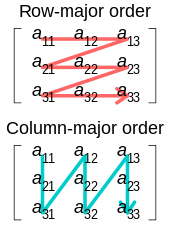
Its slow because we have to do multiplication for each element. You can see from this picture how we traverse along matrix
Optimization
We can see that each role have independent result, So we can do parallel calculation for each row. Then we combine together
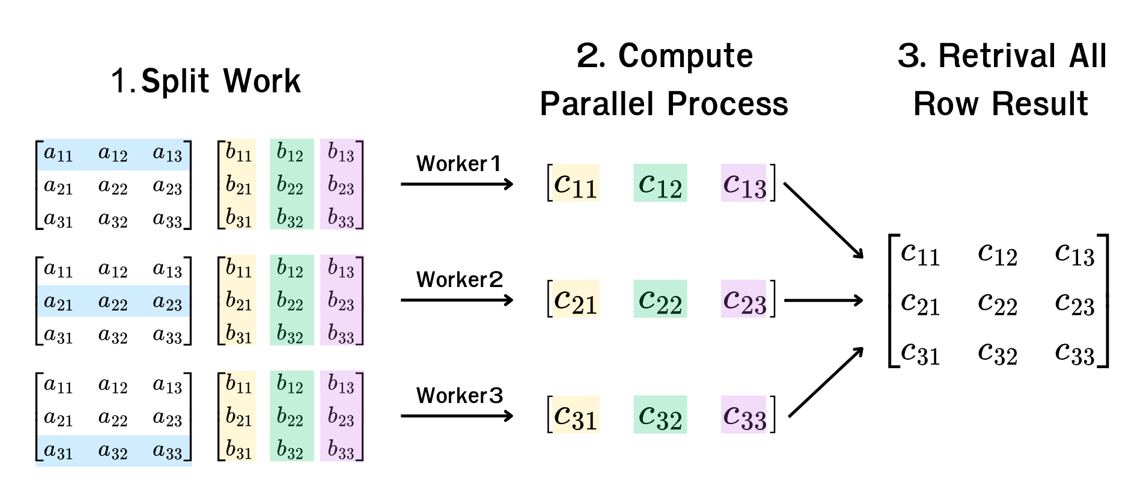
After we analysis new complexity we got this
Time Complexity
- Worst Case (No Parallelism, max_workers = 1): O(n3), equivalent to traditional matrix multiplication.
- Average Case (When max_workers is moderate ) : O(n3/logn) ≈ O(n2.5)
- Best Case (Full Parallelism, max_workers = n): O(n2), where row computations are fully distributed.
Space Complexity: O(n2), as the final result matrix requires n2 storage.
Implementation
Using ProcessPoolExecutor from concurrnt.future library from python
def compute_row(A: np.ndarray, B: np.ndarray, row_index: int) -> np.ndarray:
    return np.array([np.dot(A[row_index], B[:, col]) for col in range(B.shape[1])])


def parallel_matrix_multiplication(
    A: list | np.ndarray, B: list | np.ndarray, max_workers: int | None = None
) -> np.ndarray:
    # Format input array
    A = np.array(A)
    B = np.array(B)

    # Check matrix compatibility
    if A.shape[1] != B.shape[0]:
        raise ValueError("Matrix dimensions are incompatible for multiplication.")

    # Initial Result Matrix
    result = np.zeros((A.shape[0], B.shape[1]))

    # Run Process Pool
    with ProcessPoolExecutor(max_workers=max_workers) as executor:
        # Init parallel process store
        parallel_row_results = []

        # Start parallel compute
        for i in range(A.shape[0]):
            parallel_row_results.append(executor.submit(compute_row, A, B, i))

        # Retrieving all row results
        for i, row in enumerate(parallel_row_results):
            result[i] = row.result()

    return result
Benchmarking
You can run benchmark that I have provided on src/parallelmatx/performance.py you can chose options and select which range you want to test. However, pleas careful about range its may cause your computer lagging
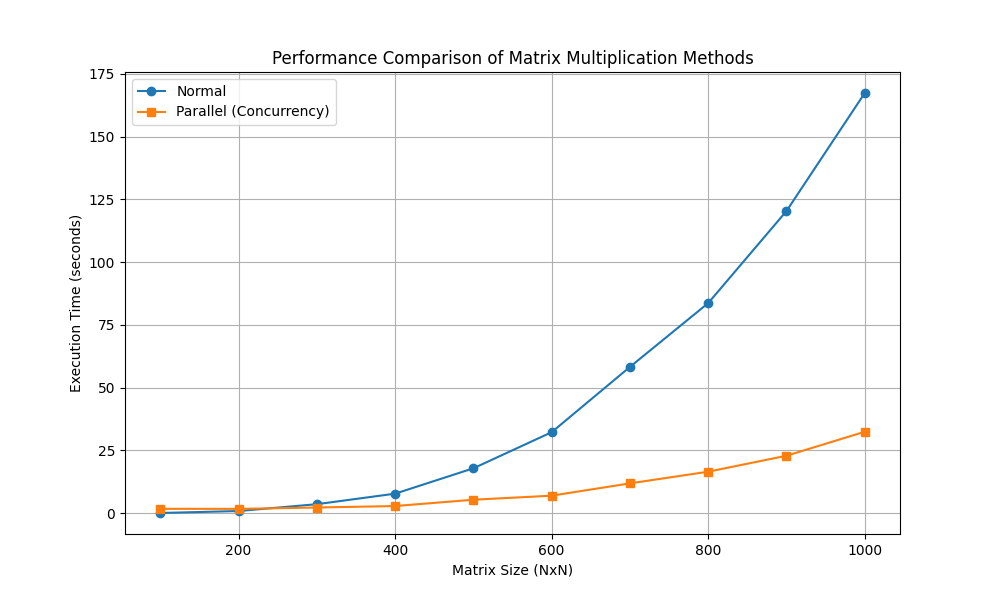
1. Testing traditional approch vs parallel approch
We can take a look that in long range square matrix size from 100 to 1000. Its seem like on the start point parallel took slower than traditional approch because its more time to split & manage task. Also for retriving all answer
2. Testing max-workers
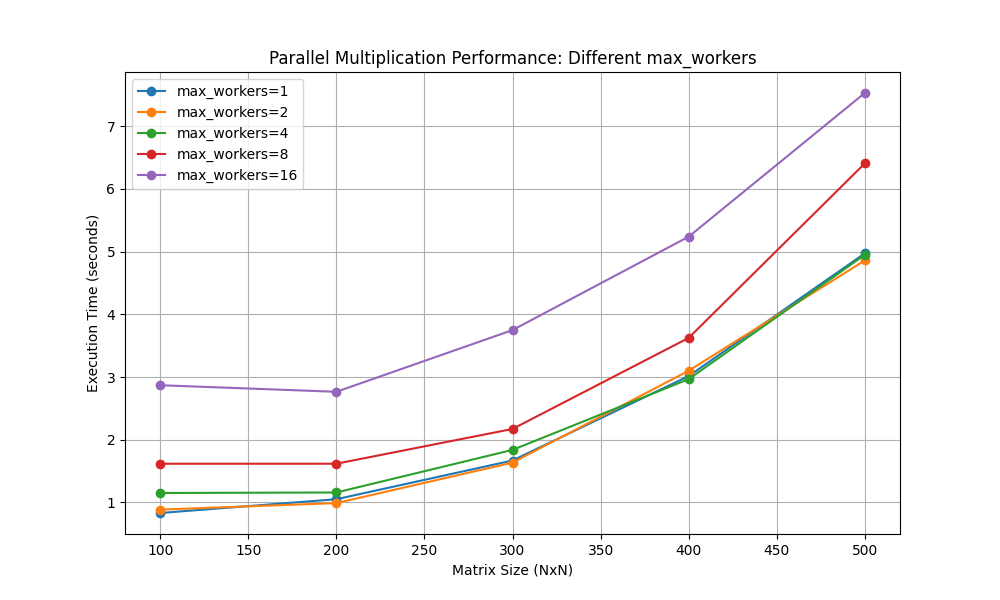
In ProcessPoolExcutor we can limit max-workers. However, In terms of optimization, It's not always better performance with more max-workers.
There some technical factor behind this
- Overhead of Process Creation and Management
- CPU Core Limitations
- Memory Bandwidth Bottleneck
As you can see from the figure, incress number of max-workers don't have significant changes, So just leave your computer select how much max-workers


Download files
Download the file for your platform. If you're not sure which to choose, learn more about installing packages.
Source Distribution
Built Distribution
Filter files by name, interpreter, ABI, and platform.
If you're not sure about the file name format, learn more about wheel file names.
Copy a direct link to the current filters
File details
Details for the file parallematx-1.0.3.tar.gz.
File metadata
- Download URL: parallematx-1.0.3.tar.gz
- Upload date:
- Size: 9.0 kB
- Tags: Source
- Uploaded using Trusted Publishing? No
- Uploaded via: twine/6.1.0 CPython/3.12.9
File hashes
| Algorithm | Hash digest | |
|---|---|---|
| SHA256 |
33ac314ad7d8765ed273668bc87f0e82a35f4823f2a5cc32aadc1acb522427c1
|
|
| MD5 |
089e62e01c8563618b951a2a2055bf3c
|
|
| BLAKE2b-256 |
d5450fc8ab58e683aee40a4293dea6978b9ba97a3927f1900e80e2e44fb5f90c
|
File details
Details for the file parallematx-1.0.3-py3-none-any.whl.
File metadata
- Download URL: parallematx-1.0.3-py3-none-any.whl
- Upload date:
- Size: 9.5 kB
- Tags: Python 3
- Uploaded using Trusted Publishing? No
- Uploaded via: twine/6.1.0 CPython/3.12.9
File hashes
| Algorithm | Hash digest | |
|---|---|---|
| SHA256 |
f6b588b3c11e8bbdc92fac0a9ac4f12641104f14dcf756cced7d29ac34bfcbac
|
|
| MD5 |
7416de9064916650c8c649c57c50b74f
|
|
| BLAKE2b-256 |
ad7a07a40730db413bd5a2e5e31499fdc3705c0ce72bfcb902b5585c74b3fcf8
|






