
MCP (Model Context Protocol) server for ParaView visualization control

Project description
Paraview_MCP
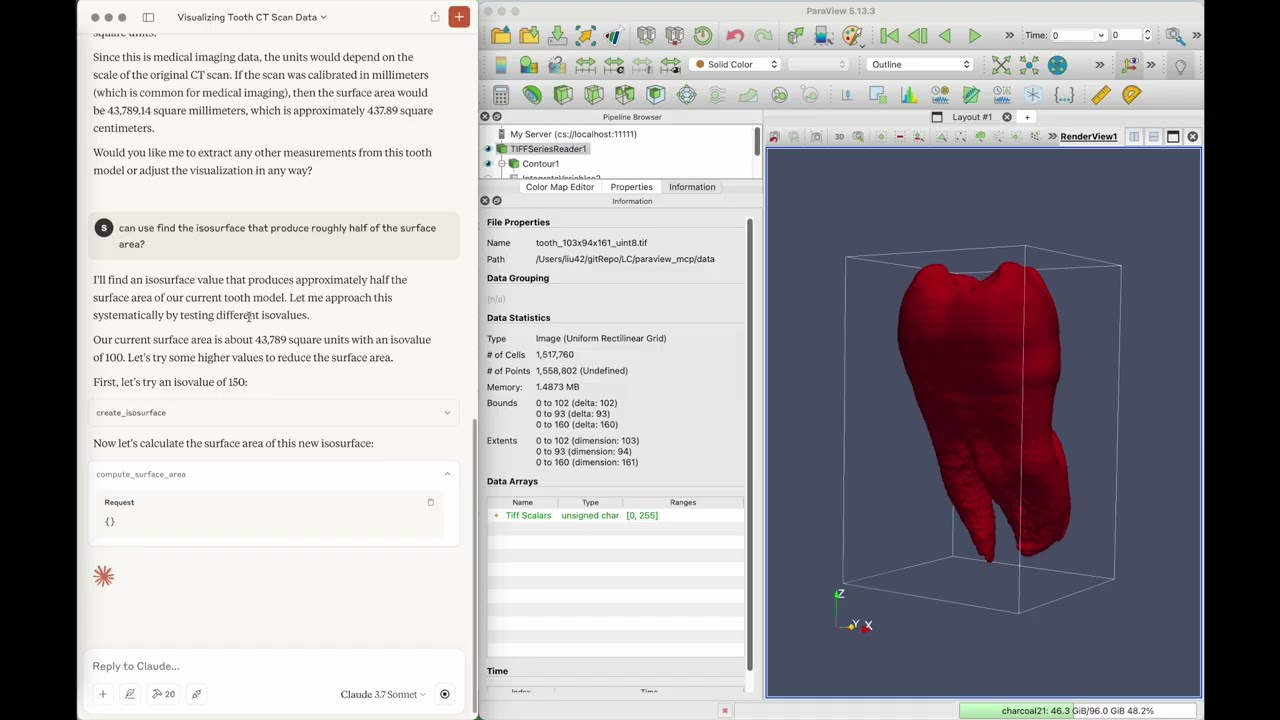
ParaView-MCP is an autonomous agent that integrates multimodal large language models with ParaView through the Model Context Protocol, enabling users to create and manipulate scientific visualizations using natural language and visual inputs instead of complex commands or GUI operations. The system features visual feedback capabilities that allow it to observe the viewport and iteratively refine visualizations, making advanced visualization accessible to non-experts while augmenting expert workflows with intelligent automation.
Video Demo
Click the image below to watch the video:
Installation
git clone https://github.com/LLNL/paraview_mcp.git
cd paraview_mcp

conda create -n paraview_mcp python=3.10
conda install conda-forge::paraview
conda install mcp[cli] httpx
Setup for LLM
To set up integration with claude desktop, add the following to claude_desktop_config.json
    "mcpServers": {
      "ParaView": {
        "command": "/path/to/python",
        "args": [
        "/path/to/paraview_mcp/src/paraview_mcp_server.py"
        ]
      }
    }
Running
1. Start paraview server
pvserver --multi-clients
2. Connect to paraview server from paraview GUI (file -> connect)
3. Start claude desktop app
Testing
Unit and Integration Tests
ParaView-MCP includes comprehensive unit and integration tests to ensure reliability.
Prerequisites
- Install test dependencies:
pip install pytest pytest-cov
- Start ParaView server (required for integration tests):
pvserver --multi-clients --server-port=11111
- Connect ParaView GUI to the server:
- Open ParaView GUI
- File -> Connect -> Add Server
- Host: localhost, Port: 11111
- Connect
Running Tests
# Run live integration tests (requires running ParaView server)
pytest tests/test_paraview_manager_live.py -v

# Run with coverage report
pytest tests/test_paraview_manager_live.py --cov=src --cov-report=html

# Run specific test class
pytest tests/test_paraview_manager_live.py::TestParaViewLive -v

# Run specific test method
pytest tests/test_paraview_manager_live.py::TestParaViewLive::test_create_sphere -v
Test Structure
tests/test_paraview_manager_live.py: Live integration tests with ParaView- Tests real ParaView operations
- Verifies end-to-end functionality
- Requires running ParaView server connected on port 11111
Evaluation
Promptfoo Evaluation Framework
For comprehensive feature testing using LLM evaluation:
Setup
- Install promptfoo:
npm install -g promptfoo
- Start ParaView server (if not already running):
pvserver --multi-clients --server-port=11111
Then connect ParaView GUI to the server (File -> Connect -> localhost:11111)
Run Evaluation Tests
# Run evaluation with Claude
promptfoo eval --no-cache -c eval/eval_claude.yaml --verbose

# Run simple action tests
promptfoo eval --no-cache -c eval/eval_claude.yaml -t eval/simple_action_eval.yaml --verbose

# Run basic feature validation
promptfoo eval --no-cache -c eval/eval_claude.yaml -t eval/basic_features_validation.yaml --verbose
The --no-cache flag ensures fresh test runs, and --verbose provides detailed debugging output.
Data Anonymization
To prevent evaluation bias from metadata or file naming patterns, ParaView-MCP includes a tool to anonymize datasets and test files.
Usage
# Anonymize a test file and copy all referenced datasets
python eval/anonymize_dataset.py test.yaml

# Quick mode - only update YAML paths without copying data files
python eval/anonymize_dataset.py test.yaml --quick

# Custom output directory
python eval/anonymize_dataset.py test.yaml -o my_output_dir

# Preview changes without writing files
python eval/anonymize_dataset.py test.yaml --dry-run

# Save mapping for later reference
python eval/anonymize_dataset.py test.yaml -m mapping.json
What Gets Anonymized
- Dataset names:
aneurism→dataset_001 - Descriptive filenames:
aneurism_256x256x256_uint8.raw→data_001.raw - File paths in YAML: All paths updated to point to anonymized versions
- Directory structure: Organized as
output_dir/dataset_XXX/data/
Output
The tool creates:
test_anonymized.yaml- Updated test file with anonymous pathseval/anonymized_datasets/- Directory containing copied, anonymized data filesmapping.json(optional) - Record of all name mappings
Example
Original YAML:
question: "Load ../SciVisAgentBench-tasks/aneurism/data/aneurism_256x256x256_uint8.raw"
Anonymized YAML:
question: "Load eval/anonymized_datasets/dataset_001/data/data_000.raw"
Citing Paraview_MCP
S. Liu, H. Miao, and P.-T. Bremer, “Paraview-MCP: Autonomous Visualization Agents with Direct Tool Use,” in Proc. IEEE VIS 2025 Short Papers, 2025, pp. 00
@inproceedings{liu2025paraview,
  title={Paraview-MCP: Autonomous Visualization Agents with Direct Tool Use},
  author={Liu, S. and Miao, H. and Bremer, P.-T.},
  booktitle={Proc. IEEE VIS 2025 Short Papers},
  pages={00},
  year={2025},
  organization={IEEE}
}
Authors
Paraview_MCP was originally created by Shusen Liu (liu42@llnl.gov) and Haichao Miao (miao1@llnl.gov)
License
Paraview_MCP is distributed under the terms of the BSD-3 license.
LLNL-CODE-2007260
Release history Release notifications | RSS feed


Download files
Download the file for your platform. If you're not sure which to choose, learn more about installing packages.
Source Distribution
Built Distribution
Filter files by name, interpreter, ABI, and platform.
If you're not sure about the file name format, learn more about wheel file names.
Copy a direct link to the current filters
File details
Details for the file paraview_mcp-0.1.0.tar.gz.
File metadata
- Download URL: paraview_mcp-0.1.0.tar.gz
- Upload date:
- Size: 45.5 kB
- Tags: Source
- Uploaded using Trusted Publishing? No
- Uploaded via: twine/6.2.0 CPython/3.12.9
File hashes
| Algorithm | Hash digest | |
|---|---|---|
| SHA256 |
c386ea2b9cff6dfa8b70fe85c83b381f1be9d8585f9323d754a5f4228d5c6513
|
|
| MD5 |
561cf6caa85eebe49892978ab97deeb8
|
|
| BLAKE2b-256 |
7416dc01a8fab80f87e94fa763fe44a9ebf3e913306202619f07a3b084542664
|
File details
Details for the file paraview_mcp-0.1.0-py3-none-any.whl.
File metadata
- Download URL: paraview_mcp-0.1.0-py3-none-any.whl
- Upload date:
- Size: 41.5 kB
- Tags: Python 3
- Uploaded using Trusted Publishing? No
- Uploaded via: twine/6.2.0 CPython/3.12.9
File hashes
| Algorithm | Hash digest | |
|---|---|---|
| SHA256 |
1cd213c90f042c3093c870b688b755064fa21e4d8a8b3696a8f1273abfe34f25
|
|
| MD5 |
639ba697b447255f9f8f6de2a6c7c3ce
|
|
| BLAKE2b-256 |
c6738f347e9da520367669ced91550581992a8a5b03ebc9360c1b4423e14f3fa
|






