
PareDiffusers
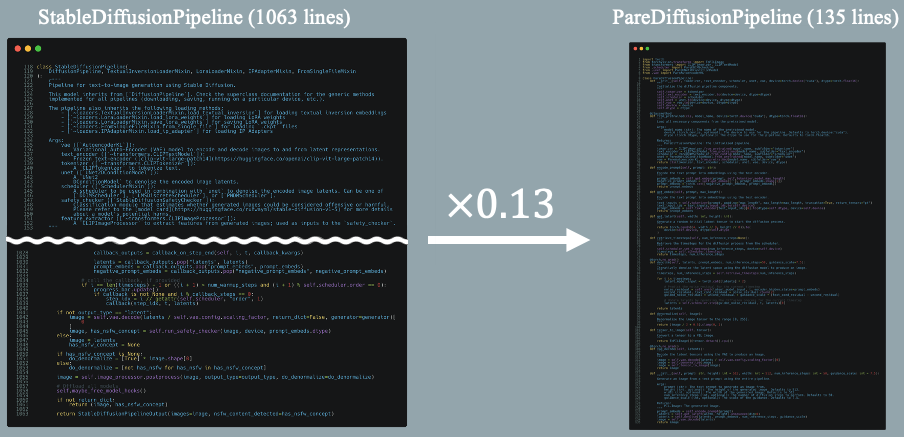

The library pared down the features of diffusers implemented the minimum function to generate images without using huggingface/diffusers functions to understand the inner workings of the library.
Why PareDiffusers?
PareDiffusers was born out of a curiosity and a desire to demystify the processes of generating images by diffusion models and the workings of the diffusers library.
I will write blog-style notebooks understanding how works using a top-down approach. First, generate images using diffusers to understand the overall flow, then gradually replace code with Pytorch code. In the end, we will write the code for the PareDiffusers code that does not include diffusers code.
I hope that it helps others who share a similar interest in the inner workings of image generation.
Versions
- v0.0.0: After Ch0.0.0, inprement StableDiffusionPipeline.
- v0.1.2: After Ch0.1.0, imprement DDIMScheduler.
- v0.2.0: After Ch0.2.0, imprement UNet2DConditionModel.
- v0.3.1: After Ch0.3.0, imprement AutoencoderKL.
Table of Contents
Ch0.0.0 PareDiffusersPipeline 
version: v0.0.0
- Generate images using diffusers
- Imprement StableDiffusionPipeline
- Imprement DDIMScheduler
- Imprement UNet2DConditionModel
- Imprement AutoencoderKL
Ch0.0.1 Test parediffusers
- Test PareDiffusersPipeline by pip install parediffusers.
Ch0.0.2 Play prompt_embeds
- Play prompt_embeds, make gradation images by using two prompts.
Ch0.1.0: PareDDIMScheduler
version: v0.1.3
- Imprement images using diffusers
- Imprement StableDiffusionPipeline
- Imprement DDIMScheduler
- Imprement UNet2DConditionModel
- Imprement AutoencoderKL
Ch0.1.1: Test parediffusers
- Test PareDiffusersPipeline by pip install parediffusers.
Ch0.2.0: PareUNet2DConditionModel
version: v0.2.0
- Generate images using diffusers
- Imprement StableDiffusionPipeline
- Imprement DDIMScheduler
- Imprement UNet2DConditionModel
- Imprement AutoencoderKL
Ch0.2.1: Test parediffusers
- Test PareDiffusersPipeline by pip install parediffusers.
Ch0.3.0: PareAutoencoderKL
version: v0.3.1
- Generate images using diffusers
- Imprement StableDiffusionPipeline
- Imprement DDIMScheduler
- Imprement UNet2DConditionModel
- Imprement AutoencoderKL
Ch0.3.1: Test parediffusers
- Test PareDiffusersPipeline by pip install parediffusers.
Usage
import torch
from parediffusers import PareDiffusionPipeline

device = torch.device("cuda")
dtype = torch.float16
model_name = "stabilityai/stable-diffusion-2"

pipe = PareDiffusionPipeline.from_pretrained(model_name, device=device, dtype=dtype)
prompt = "painting depicting the sea, sunrise, ship, artstation, 4k, concept art"
image = pipe(prompt)
display(image)
Contribution
I am starting this project to help me understand the code in order to participate in diffusers' OSS. So, I think there may be some mistakes in my explanation, so if you find any, please feel free to correct them via an issue or pull request.
1 maintainer

Metadata
1 maintainer
Release files for parediffusers 0.3.2
For a detailed explanation of source distributions (sdists) and built distributions (wheels), please see the package formats documentation.
Source distribution (sdist)
| File | Size | Uploaded | Provenance | Actions |
|---|---|---|---|---|
| parediffusers-0.3.2.tar.gz | 22.8 kB | Without provenance | Details for parediffusers-0.3.2.tar.gz |
Built distribution (wheel)
| File | Interpreter | ABI | Platform | Actions Reset |
|---|---|---|---|---|
| parediffusers-0.3.2-py3-none-any.whl | Python 3 | none | any | Details for parediffusers-0.3.2-py3-none-any.whl |
Total release size: 52.0 kB
Release files / parediffusers-0.3.2.tar.gz
| Download URL | parediffusers-0.3.2.tar.gz |
|---|---|
| Size | 22.8 kB |
| Tags | Source |
|
SHA-256 checksum How to use checksums |
b36620bcbb4f1b715ec0a84a6cb7556ba4b4c0c69480836b4abae2153cab35f7
|
|
BLAKE2b-256 checksum How to use checksums |
6ca25ca58d685964c2e9f6ca8aff7fbd0b19df3455721242baf257552236b54e
|
| Upload date | |
|
Uploaded using Trusted Publishing? What is trusted publishing? |
No |
| Uploaded via |
twine/4.0.2 CPython/3.9.5
|
Release files / parediffusers-0.3.2-py3-none-any.whl
| Download URL | parediffusers-0.3.2-py3-none-any.whl |
|---|---|
| Size | 29.1 kB |
| Tags | Python 3 |
|
SHA-256 checksum How to use checksums |
de504f46f03e2810da15401f59fbca8e9ec38f9dfa675cf8a17fa7d47c23c85c
|
|
BLAKE2b-256 checksum How to use checksums |
9b4349ec19ae4e4579a67093ef31e8e1d2ab0c6598330b05379a96f489c1fa10
|
| Upload date | |
|
Uploaded using Trusted Publishing? What is trusted publishing? |
No |
| Uploaded via |
twine/4.0.2 CPython/3.9.5
|
Security for parediffusers 0.3.2
Provenance
Provenance describes where a file came from. On PyPI, provenance is shared via attestations, which provide a verifiable record of the build or publishing details. View details, limitations and caveats.
No provenance found
None of the files in this release were uploaded with provenance metadata.
A note on package security
PyPI is a repository for distributing packages, not a service for auditing them. While third-party security researchers and our staff do their best to detect and remove malicious packages, PyPI cannot guarantee the quality, security or suitability of any given package.
To learn more about protecting yourself from malicious actors, visit our package security documentation.














