
Parseltongue: a DSL for systems which refuse to speak falsehood
Verified details
These details have been verified by PyPIProject links
GitHub Statistics
Maintainers

Project description

Parseltongue
A DSL for systems that refuse to speak falsehood.







03.03 — CLI Tool Beta Released! Install with
pipx install 'parseltongue-dsl[cli]'
Red facts are hallucinated by Claude 4.6 Sonnet:
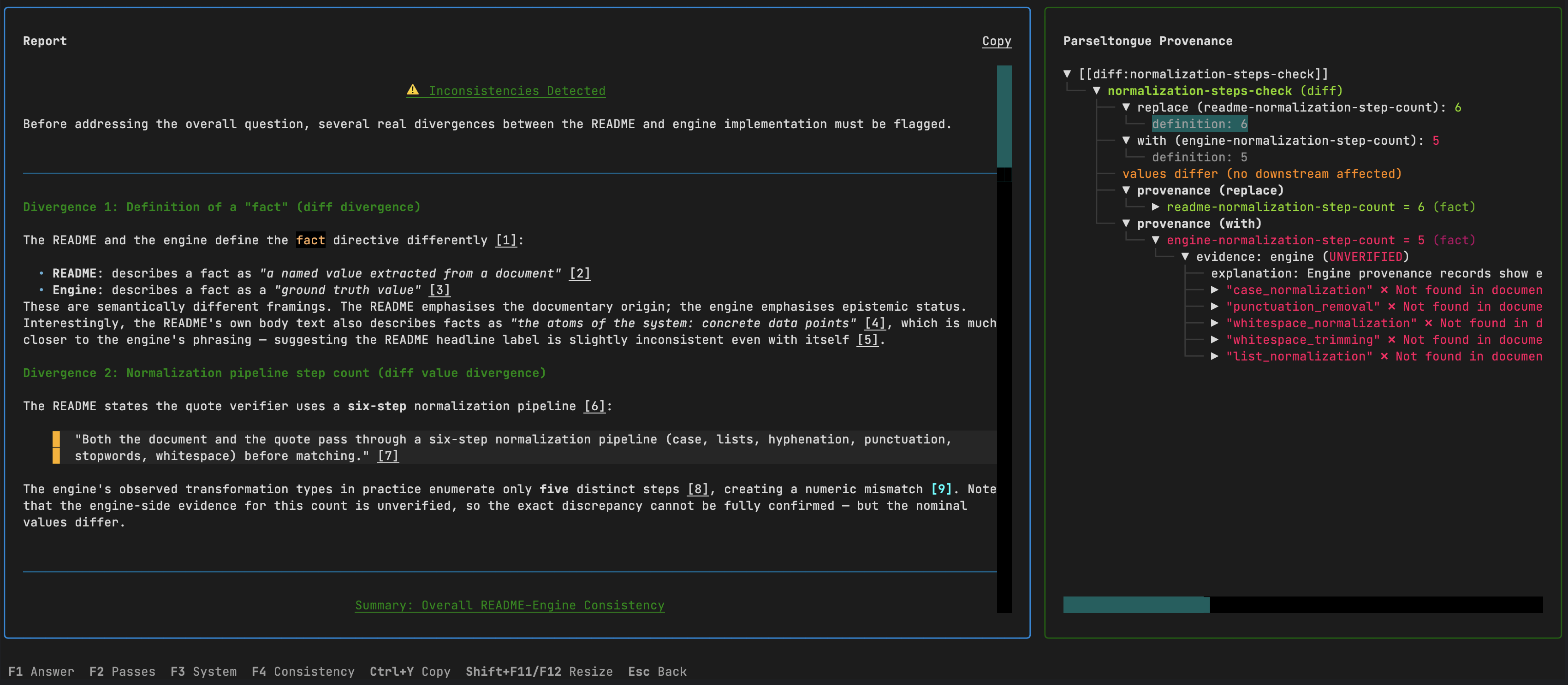
Explanation: You can see the critique which LLM provided in the markdown document for validation of the parseltongue.core module. The problem is that this critique has no factual basis and was hallucinated by one of the best LLMs on the market, which is shown by ungrounded facts in red.
Rationale - Why?
LLMs are increasingly used for code review, security auditing, and documentation validation. The problem: they hallucinate. An LLM reviewing an authentication module might flag a "missing bcrypt implementation" that doesn't exist in the code, or miss the actual vulnerability — MD5 used for session IDs — while confidently producing a detailed critique. You get a fluent, plausible security report where some findings are real, some are fabricated, and you have no way to tell which is which without manually verifying every claim.
Parseltongue fixes this by making every claim provable. Instead of asking an LLM to produce a prose review, we ask it to encode the codebase as a formal logic system. Every extracted fact must cite a verbatim quote from the source code. Every conclusion must derive from stated premises. And every derivation is checked by a symbolic engine that doesn't hallucinate.
This gives you three things that prose reviews cannot:
-
Hallucination detection. Every claim traces back to a quote in the source. If the LLM fabricates a security issue — "passwords are hashed using bcrypt" when there's no bcrypt anywhere in the code — the quote verification fails. That failure propagates automatically to every conclusion that depends on it. You don't just catch the fabrication; you see everything it contaminates.
-
Specification compliance checking. Load a security spec alongside the implementation. The engine extracts requirements from the spec and facts from the code independently, then cross-validates via
diffdirectives. Wrong token expiry values, exceeded session limits, prohibited algorithms in use — every divergence is flagged with full provenance to both documents. -
Documentation validation. Run the engine against a library's README or API docs. Internal contradictions between prose and config tables, unverifiable security audit claims, inconsistencies between documented and actual behavior — all surface automatically with traceable evidence.
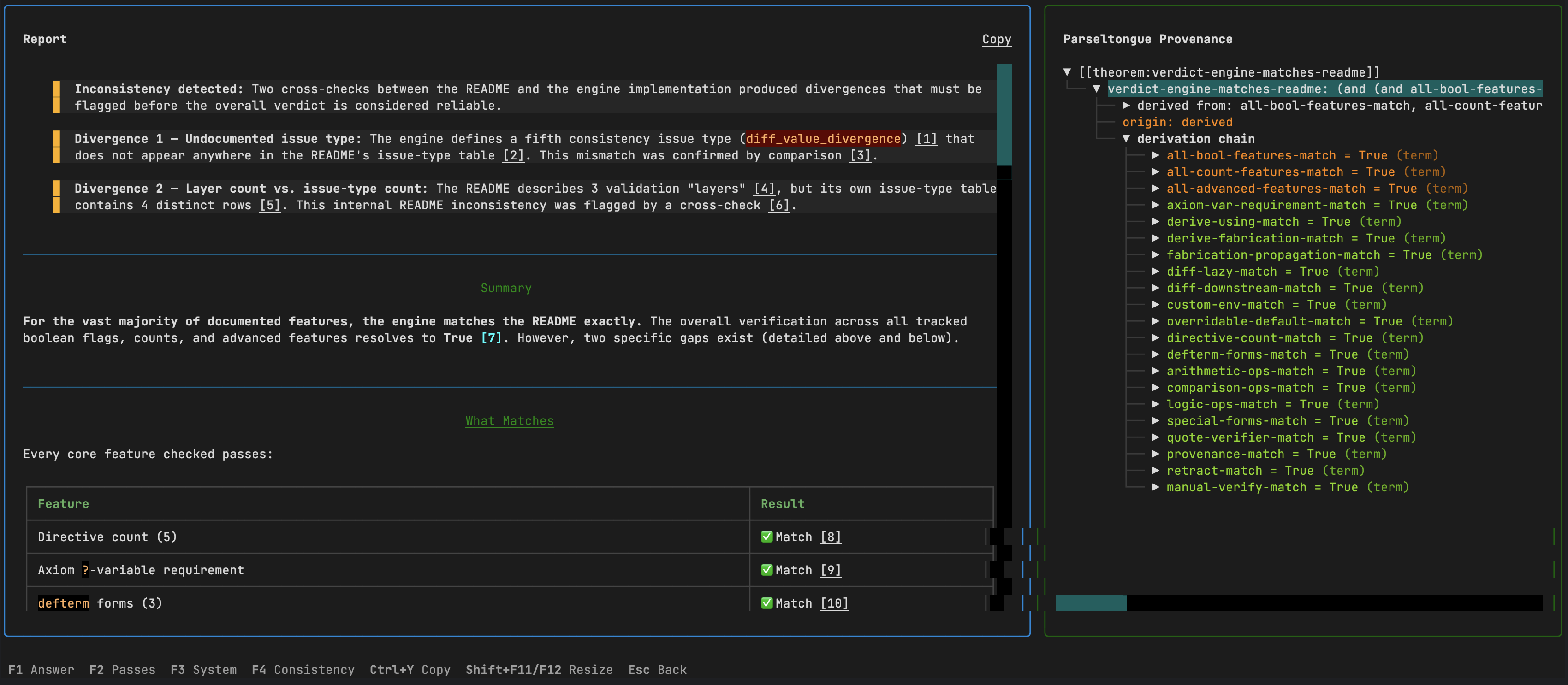
See Discovered Use Cases for more real-world applications.
Quick Start
We recommend pipx for global access. Alternatively, install with pip in a virtual environment.
macOS
brew install pipx
pipx install 'parseltongue-dsl[cli]'
Linux (Ubuntu 23.04+ / Debian 12+)
sudo apt install pipx
pipx install 'parseltongue-dsl[cli]'
Linux (older)
python3 -m pip install --user pipx
pipx install 'parseltongue-dsl[cli]'
Windows
pip install pipx
pipx install "parseltongue-dsl[cli]"
Or with pip directly
pip install 'parseltongue-dsl[cli]'
Updating
pipx install 'parseltongue-dsl[cli]==0.3.3' --force # explicit version avoids pip cache issues
Running
parseltongue
This launches the interactive TUI. On first run, a configuration wizard asks for your API endpoint, key, and model. Any OpenAI-compatible endpoint works (OpenRouter, OpenAI, Azure, local servers like vLLM or Ollama).
From the main menu: pick documents, type a question, and the pipeline runs four passes — extraction, blinded derivation, fact-checking, and answer generation. You can review, retry with feedback, or skip each pass interactively.
You can also run directly from the command line:
parseltongue run \
  -d "auth.py" \
  -d "Spec:api_spec.md" \
  -q "Does the implementation match the specification?" \
  --model anthropic/claude-sonnet-4.6
| Command | Description |
|---|---|
parseltongue |
Launch the interactive TUI |
parseltongue run -d ... -q ... |
Run pipeline directly on documents |
parseltongue inspect file.pdf |
Preview document conversion |
parseltongue history |
Browse past runs |
parseltongue configure |
Re-run the configuration wizard |
Supports PDF, DOCX, PPTX, XLSX, HTML (via Docling), plus all plain text and code formats.
See the full CLI documentation for TUI navigation, keybindings, screenshots of every screen, and configuration details.
Python API
The LLM module extends Parseltongue to a neuro-symbolic approach over the symbolic formal reasoning core.
pip install 'parseltongue-dsl[llm]'
export OPENROUTER_API_KEY=sk-...
from parseltongue import System, Pipeline
from parseltongue.llm.openrouter import OpenRouterProvider

system = System(overridable=True)
provider = OpenRouterProvider()

pipeline = Pipeline(system, provider)
pipeline.add_document("Implementation", path="auth.py")
pipeline.add_document("Specification", path="api_spec.md")

result = pipeline.run("Does the implementation match the specification?")
result.output.markdown— grounded report with[[type:name]]references linking every claim to source quotesresult.output.references— resolved references: value, provenance chain, and source quotesresult.output.consistency— unverified evidence, fabrication chains, diff divergencesresult.system— the full formal system for inspection viasystem.provenance(name),system.eval_diff(name), etc.
See the full LLM pipeline documentation for the four-pass architecture, provider interface, extended thinking, and reference resolution.
Core Engine
The DSL that the pipeline builds under the hood. Five directive types — fact, axiom, defterm, derive, diff — each grounded in evidence with verbatim quotes. Can be used standalone without any LLM dependency.
pip install parseltongue-dsl
See the full core documentation for directive types, evidence grounding, quote verification, custom environments, and consistency checking.
Project Structure
parseltongue/
├── core/                — formal engine: evaluation, evidence, consistency
│   ├── quote_verifier/  — inverted-index quote matching with 6-step normalization
│   ├── demos/           — apples, revenue, biomarkers, code_check, spec_validation, doc_validation
│   └── tests/           — core unit tests (300+)
├── llm/                 — four-pass LLM pipeline: extract → derive → factcheck → answer
│   ├── demos/           — code_check, spec_validation, doc_validation, biomarkers, revenue
│   └── tests/           — llm unit tests (~100)
└── cli/                 — terminal interface: TUI, document ingestion, history
    ├── tui/             — Textual screens, widgets, tree builders
    └── demo/            — sample PDF for testing
Demos
# Software engineering — no LLM needed
python -m parseltongue.core.demos.code_check.demo        # auth module security audit
python -m parseltongue.core.demos.spec_validation.demo   # auth spec vs implementation
python -m parseltongue.core.demos.doc_validation.demo    # auth library docs validation

# Research & math — no LLM needed
python -m parseltongue.core.demos.biomarkers.demo        # cross-paper scientific conflict
python -m parseltongue.core.demos.revenue_reports.demo   # cross-document analysis
python -m parseltongue.core.demos.apples.demo            # Peano arithmetic from field notes

# LLM pipeline demos — requires API key
python -m parseltongue.llm.demos.code_check.demo         # LLM auth module security audit
python -m parseltongue.llm.demos.spec_validation.demo    # LLM auth spec vs implementation
python -m parseltongue.llm.demos.doc_validation.demo     # LLM auth library docs validation
python -m parseltongue.llm.demos.biomarkers.demo         # LLM biomarker analysis
python -m parseltongue.llm.demos.revenue.demo            # LLM revenue reports

# CLI demo — run the pipeline on the included PDF
parseltongue run -d "parseltongue/cli/demo/nejm.pdf" -q "Find any inconsistencies or red flags."
A sample PDF (cli/demo/nejm.pdf) is included for testing the CLI — it's the document used in the screenshots of CLI module.
Tests
pip install -e ".[dev,llm]"
pytest                           # all tests
pytest parseltongue/core/tests/  # core only
pytest parseltongue/llm/tests/   # llm only
License
Apache 2.0
Project details
Verified details
These details have been verified by PyPIProject links
GitHub Statistics
Maintainers
Release history Release notifications | RSS feed


Download files
Download the file for your platform. If you're not sure which to choose, learn more about installing packages.
Source Distribution
Built Distribution
Filter files by name, interpreter, ABI, and platform.
If you're not sure about the file name format, learn more about wheel file names.
Copy a direct link to the current filters
File details
Details for the file parseltongue_dsl-0.6.0.tar.gz.
File metadata
- Download URL: parseltongue_dsl-0.6.0.tar.gz
- Upload date:
- Size: 522.8 kB
- Tags: Source
- Uploaded using Trusted Publishing? Yes
- Uploaded via: twine/6.1.0 CPython/3.13.7
File hashes
| Algorithm | Hash digest | |
|---|---|---|
| SHA256 |
8a44075f9c9c3d7a22c8de663887aee452e4154f7820da835d616f8d3e9c377d
|
|
| MD5 |
33cc801c570529675b9c00ec9a7cc9b6
|
|
| BLAKE2b-256 |
f049b483055d8286053d172319bc6c3078b4efb7661134171d89a87d5cdd0043
|
Provenance
The following attestation bundles were made for parseltongue_dsl-0.6.0.tar.gz:
Publisher:
publish.yml on sci2sci-opensource/parseltongue
-
Statement:
-
Statement type:
https://in-toto.io/Statement/v1 -
Predicate type:
https://docs.pypi.org/attestations/publish/v1 -
Subject name:
parseltongue_dsl-0.6.0.tar.gz -
Subject digest:
8a44075f9c9c3d7a22c8de663887aee452e4154f7820da835d616f8d3e9c377d - Sigstore transparency entry: 1107835062
- Sigstore integration time:
-
Permalink:
sci2sci-opensource/parseltongue@686a8df5498b0a4cfa449059447534d01a2d9b3d -
Branch / Tag:
refs/tags/v0.6.0 - Owner: https://github.com/sci2sci-opensource
-
Access:
public
-
Token Issuer:
https://token.actions.githubusercontent.com -
Runner Environment:
github-hosted -
Publication workflow:
publish.yml@686a8df5498b0a4cfa449059447534d01a2d9b3d -
Trigger Event:
push
-
Statement type:
File details
Details for the file parseltongue_dsl-0.6.0-py3-none-any.whl.
File metadata
- Download URL: parseltongue_dsl-0.6.0-py3-none-any.whl
- Upload date:
- Size: 624.2 kB
- Tags: Python 3
- Uploaded using Trusted Publishing? Yes
- Uploaded via: twine/6.1.0 CPython/3.13.7
File hashes
| Algorithm | Hash digest | |
|---|---|---|
| SHA256 |
bc73722596d6c24c93ddb18fc76508ef4565654beb64e09451717b09730ce67a
|
|
| MD5 |
c4c98d8e8b7673235b1645e508586997
|
|
| BLAKE2b-256 |
959f724634e40820b9ed0b6721add8a0378b6902010a31404c3bd6e2a43985b3
|
Provenance
The following attestation bundles were made for parseltongue_dsl-0.6.0-py3-none-any.whl:
Publisher:
publish.yml on sci2sci-opensource/parseltongue
-
Statement:
-
Statement type:
https://in-toto.io/Statement/v1 -
Predicate type:
https://docs.pypi.org/attestations/publish/v1 -
Subject name:
parseltongue_dsl-0.6.0-py3-none-any.whl -
Subject digest:
bc73722596d6c24c93ddb18fc76508ef4565654beb64e09451717b09730ce67a - Sigstore transparency entry: 1107835065
- Sigstore integration time:
-
Permalink:
sci2sci-opensource/parseltongue@686a8df5498b0a4cfa449059447534d01a2d9b3d -
Branch / Tag:
refs/tags/v0.6.0 - Owner: https://github.com/sci2sci-opensource
-
Access:
public
-
Token Issuer:
https://token.actions.githubusercontent.com -
Runner Environment:
github-hosted -
Publication workflow:
publish.yml@686a8df5498b0a4cfa449059447534d01a2d9b3d -
Trigger Event:
push
-
Statement type:






