
A package for handling symbolic musical information


Project description






Partitura is a Python package for handling symbolic musical information. It supports loading from and exporting to MusicXML and MIDI files. It also supports loading from Humdrum kern and MEI.
The full documentation for partitura is available online at readthedocs.org.
User Installation
The easiest way to install the package is via pip from the PyPI (Python
Package Index):
pip install partitura
This will install the latest release of the package and will install all dependencies automatically.
Quickstart
A detailed tutorial with some hands-on MIR applications is available here.
The following code loads the contents of an example MusicXML file included in the package:
import partitura as pt
my_xml_file = pt.EXAMPLE_MUSICXML
score = pt.load_score(my_xml_file)
The partitura load_score function will import any score format, i.e. (Musicxml, Kern, MIDI or MEI) to a partitura.Score object.
The score object will contain all the information in the score, including the score parts.
The following shows the contents of the first part of the score:
part = score.parts[0]
print(part.pretty())
Output:
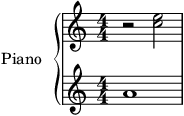
Part id="P1" name="Piano"
 │
 ├─ TimePoint t=0 quarter=12
 │   │
 │   └─ starting objects
 │       │
 │       ├─ 0--48 Measure number=1
 │       ├─ 0--48 Note id=n01 voice=1 staff=2 type=whole pitch=A4
 │       ├─ 0--48 Page number=1
 │       ├─ 0--24 Rest id=r01 voice=2 staff=1 type=half
 │       ├─ 0--48 System number=1
 │       └─ 0-- TimeSignature 4/4
 │
 ├─ TimePoint t=24 quarter=12
 │   │
 │   ├─ ending objects
 │   │   │
 │   │   └─ 0--24 Rest id=r01 voice=2 staff=1 type=half
 │   │
 │   └─ starting objects
 │       │
 │       ├─ 24--48 Note id=n02 voice=2 staff=1 type=half pitch=C5
 │       └─ 24--48 Note id=n03 voice=2 staff=1 type=half pitch=E5
 │
 └─ TimePoint t=48 quarter=12
     │
     └─ ending objects
         │
         ├─ 0--48 Measure number=1
         ├─ 0--48 Note id=n01 voice=1 staff=2 type=whole pitch=A4
         ├─ 24--48 Note id=n02 voice=2 staff=1 type=half pitch=C5
         ├─ 24--48 Note id=n03 voice=2 staff=1 type=half pitch=E5
         ├─ 0--48 Page number=1
         └─ 0--48 System number=1
If lilypond or MuseScore are installed on the system, the following command
renders the part to an image and displays it:
pt.render(part)
The notes in this part can be accessed through the property
part.notes:
part.notes
> [<partitura.score.Note object at 0x...>, <partitura.score.Note object at 0x...>,
> <partitura.score.Note object at 0x...>]
The following code stores the start, end, and midi pitch of the notes in a numpy array:
import numpy as np
pianoroll = np.array([(n.start.t, n.end.t, n.midi_pitch) for n in part.notes])
print(pianoroll)
> [[ 0 48 69]
>  [24 48 72]
>  [24 48 76]]
The note start and end times are in the units specified by the
divisions element of the MusicXML file. This element specifies the
duration of a quarter note. The divisions value can vary within an
MusicXML file, so it is generally better to work with musical time in
beats.
The part object has a property :part.beat_map that converts timeline
times into beat times:
beat_map = part.beat_map
print(beat_map(pianoroll[:, 0]))
> [0. 2. 2.]
print(beat_map(pianoroll[:, 1]))
> [4. 4. 4.]
The following commands save the part to MIDI and MusicXML, or export it as a WAV file (using additive synthesis), respectively:
# Save Score MIDI to file.
pt.save_score_midi(part, 'mypart.mid')

# Save Score MusicXML to file.
pt.save_musicxml(part, 'mypart.musicxml')

# Save as audio file using additive synthesis
pt.save_wav(part, 'mypart.wav')
More elaborate examples can be found in the documentation <https://partitura.readthedocs.io/en/latest/index.html>_.
Import other formats
For MusicXML files do:
import partitura as pt
my_xml_file = pt.EXAMPLE_MUSICXML
score = pt.load_musicxml(my_xml_file)
For Kern files do:
import partitura as pt
my_kern_file = pt.EXAMPLE_KERN
score = pt.load_kern(my_kern_file)
For MEI files do:
import partitura as pt
my_mei_file = pt.EXAMPLE_MEI
score = pt.load_mei(my_mei_file)
One can also import any of the above formats by just using:
import partitura as pt
any_score_format_path = pt.EXAMPLE_MUSICXML
score = pt.load_score(any_score_format_path)
License
The code in this package is licensed under the Apache 2.0 License. For details, please see the LICENSE file.
Citing Partitura
If you find Partitura useful, we would appreciate if you could cite us!
@inproceedings{partitura_mec,
  title={{Partitura: A Python Package for Symbolic Music Processing}},
  author={Cancino-Chac\'{o}n, Carlos Eduardo and Peter, Silvan David and Karystinaios, Emmanouil and Foscarin, Francesco and Grachten, Maarten and Widmer, Gerhard},
  booktitle={{Proceedings of the Music Encoding Conference (MEC2022)}},
  address={Halifax, Canada},
  year={2022}
}
Acknowledgments
This project receives funding from the European Research Council (ERC) under the European Union's Horizon 2020 research and innovation programme under grant agreement No 101019375 "Whither Music?".
This work has received support from the European Research Council (ERC) under the European Union’s Horizon 2020 research and innovation programme under grant agreement No. 670035 project "Con Espressione" and the Austrian Science Fund (FWF) under grant P 29840-G26 (project "Computer-assisted Analysis of Herbert von Karajan's Musical Conducting Style")


Release history Release notifications | RSS feed


Download files
Download the file for your platform. If you're not sure which to choose, learn more about installing packages.
Source Distribution
Built Distribution
Filter files by name, interpreter, ABI, and platform.
If you're not sure about the file name format, learn more about wheel file names.
Copy a direct link to the current filters
File details
Details for the file partitura-1.9.0.tar.gz.
File metadata
- Download URL: partitura-1.9.0.tar.gz
- Upload date:
- Size: 404.7 kB
- Tags: Source
- Uploaded using Trusted Publishing? No
- Uploaded via: twine/6.1.0 CPython/3.13.12
File hashes
| Algorithm | Hash digest | |
|---|---|---|
| SHA256 |
feb1042de1bbdeee8ebae8440cd3655596b0c01df2c4a7ae174a00349049df9d
|
|
| MD5 |
0f89ea79fb2d453e9e6436912282c9ed
|
|
| BLAKE2b-256 |
912fc8dbdfe2192a8930fd8c0d33398c5567adebe053ae556306e1626b5b9e26
|
File details
Details for the file partitura-1.9.0-py3-none-any.whl.
File metadata
- Download URL: partitura-1.9.0-py3-none-any.whl
- Upload date:
- Size: 363.9 kB
- Tags: Python 3
- Uploaded using Trusted Publishing? No
- Uploaded via: twine/6.1.0 CPython/3.13.12
File hashes
| Algorithm | Hash digest | |
|---|---|---|
| SHA256 |
d7e7f73259379dc73d38b31db558763b6c3b59256b189268889fbac90ec5e0d0
|
|
| MD5 |
78669dda1d2fde8db613b4356316821c
|
|
| BLAKE2b-256 |
c66285f327f02c0558c458f6d00ea661b3f22305a836d6dbfc92044f002117c8
|






