

OAuth2 / OpenId Authentication in Plone










Features
pas.plugins.authomatic provides OAuth2 and OpenID login capability for Plone sites by integrating the awesome Authomatic package.
Authomatic is a framework agnostic library
for Python web applications
with a minimalistic but powerful interface
which simplifies authentication of users
by third party providers like Facebook or Twitter
through standards like OAuth and OpenID.
by author Peter Hudec on Authomatic website
Supported Providers
Out of the box, pas.plugins.authomatic supports the following providers
OAuth 1.0
- Bitbucket
- Flickr
- Meetup
- Plurk
- Tumblr
- UbuntuOne
- Vimeo
- Xero
- Yahoo
OAuth 2.0
- Amazon
- Behance
- Bitly
- Cosm
- DeviantART
- Eventbrite
- Foursquare
- GitHub
- PayPal
- Viadeo
- VK
- WindowsLive
- Yammer
- Yandex
OpenID
- python-openid
- Google App Engine based OpenID.
Documentation
This package supports Plone sites using Volto or the Classic UI.
Volto Frontend
- Endpoint
@loginwith GET: Returns list of authentication options - Endpoint
@login-authomaticwith GET: Provide information to start the OAuth process. - Endpoint
@login-authomaticwith POST: Handles OAuth login and returns a JSON web token (JWT). - For Volto sites you must also install @plone-collective/volto-authomatic.
- Plugin configuration is available in the Control-panel
/controlpanel/authomatic(linked under users) - Example JSON configuration (first level key is the PROVIDER):
{
  "github": {
    "display": {
      "title": "Github",
      "cssclasses": {
          "button": "plone-btn plone-btn-default",
          "icon": "glypicon glyphicon-github"
      },
      "as_form": false
    },
    "propertymap": {
      "email": "email",
      "link": "home_page",
      "location": "location",
      "name": "fullname"
    },
    "class_": "authomatic.providers.oauth2.GitHub",
    "consumer_key": "5c4901d141e736f114a7",
    "consumer_secret": "d4692ca3c0ab6cc1f8b28d3ccb1ea15b61e7ef5c",
    "access_headers": {
      "User-Agent": "Plone Authomatic Plugin"
    }
  },
}
Classic UI
- This package creates a view called
authomatic-handlerwhere you can login with different providers. - The view can be used as well to add an identity from a provider to an existing account.
- The provider is choosen in the URL so if you call
/authomatic-handler/PROVIDERyou will use PROVIDER to login. - Plugin configuration is available in the Controlpanel
@@authomatic-controlpanel(linked under users) - Example JSON configuration (first level key is the PROVIDER):
{
  "github": {
    "display": {
      "title": "Github",
      "cssclasses": {
          "button": "plone-btn plone-btn-default",
          "icon": "glypicon glyphicon-github"
      },
      "as_form": false
    },
    "propertymap": {
      "email": "email",
      "link": "home_page",
      "location": "location",
      "name": "fullname"
    },
    "class_": "authomatic.providers.oauth2.GitHub",
    "consumer_key": "5c4901d141e736f114a7",
    "consumer_secret": "d4692ca3c0ab6cc1f8b28d3ccb1ea15b61e7ef5c",
    "access_headers": {
      "User-Agent": "Plone Authomatic Plugin"
    }
  },
}
Installation
Add pas.plugins.authomatic to the Plone installation using pip:
pip install pas.plugins.authomatic
or add it as a dependency on your package's setup.py
    install_requires = [
        "pas.plugins.authomatic",
        "Products.CMFPlone",
        "plone.restapi",
        "setuptools",
    ],
Start Plone and activate the plugin in the addons control-panel.
Configuration
Using Classic UI, go to the Authomatic controlpanel.

Configuration parameters for the different authorization are provided as JSON text in there. We use JSON because of its flexibility.
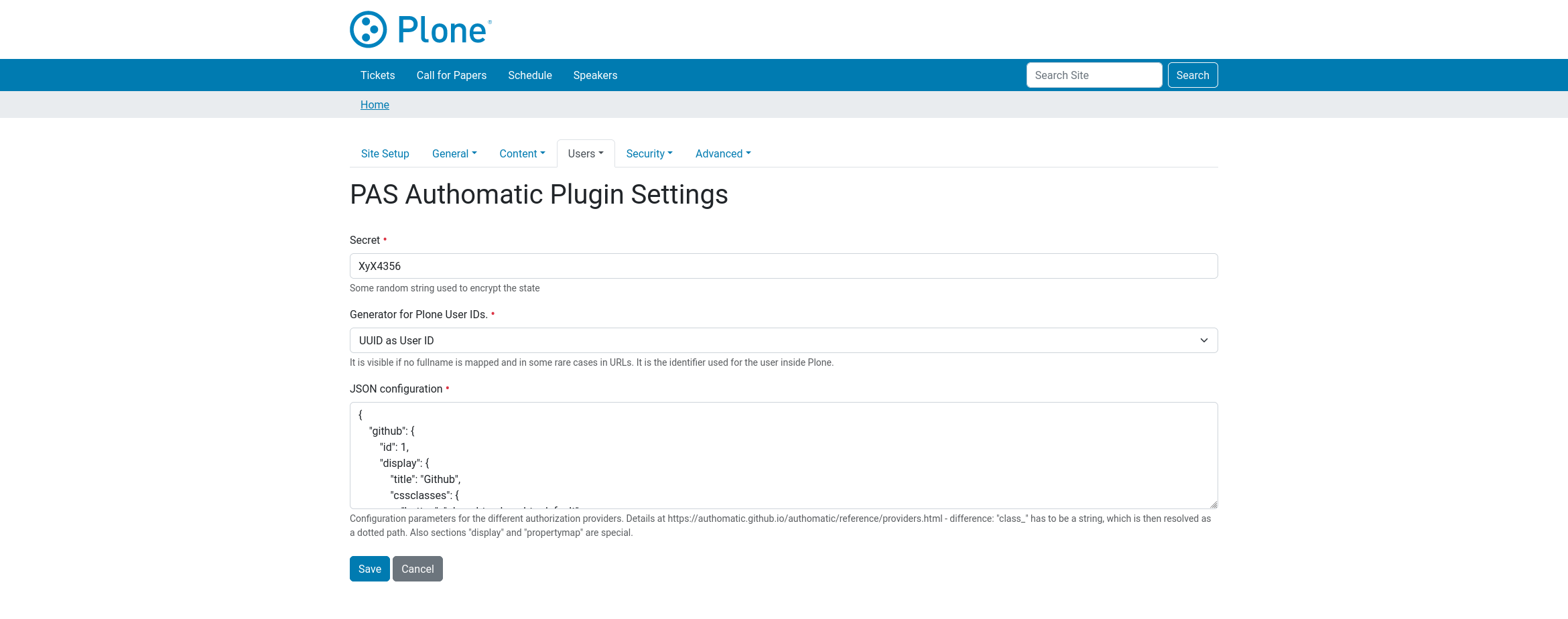
Details about the configuration of each provider can be found at Authomatic provider section.
There are some differences in configuration:
-
Value of
"class_"has to be a string, which is then resolved as a dotted path. -
Each provider can get an optional entry
displaywith sub-enties such as:titlewhich is used in the templates instead of the section name.iconclasseswhich is applied in the templates to an span.buttonclasseswhich is applied in the templates to the button.as_form(true/false) which renders a form for OpenId providers.
-
Each provider can get an optional entry
propertymap. It is a mapping from authomatic/provider user properties to plone user properties, like"fullname": "name",. Look at each providers documentation which properties are available.
Migrating user identities
When migrating a site — for example moving to a new instance — you can export the complete set of user identities stored in the Authomatic plugin to a JSON file and import them again later.
Two helper functions are available in pas.plugins.authomatic.utils.exportimport:
export_plugin_data(path): writes all stored identities to the JSON file atpathand returns the path.import_plugin_data(path): reads the JSON file atpathand restores the identities into the plugin, returningTrueon success (orFalsewhen no Authomatic plugin is installed).
Both accept an optional delimiter argument used to serialize the provider identity keys (defaults to |).
Using the console, to export the identities:
from pas.plugins.authomatic.utils import exportimport
from pathlib import Path
from plone import api
from zope.component.hooks import setSite


path = Path("export_authomatic.json")

app = globals()["app"]
site = app.Plone
setSite(site)

with api.env.adopt_roles(["Manager"]):
    exportimport.export_plugin_data(path)
To import them again:
from pas.plugins.authomatic.utils import exportimport
from pathlib import Path
from plone import api
from zope.component.hooks import setSite

import transaction


path = Path("export_authomatic.json")

app = globals()["app"]
site = app.Plone
setSite(site)

with api.env.adopt_roles(["Manager"]):
    exportimport.import_plugin_data(path)

transaction.commit()
Integration with Entra ID
Enumeration PAS plugin: if you're using pas.plugins.authomatic with Microsoft Entra ID, we recommend pairing it with pas.plugins.eea for proper user enumeration and metadata synchronization. This complementary plugin enables listing all the Entra ID users and groups and is compatible with Plone 6.1 and 6.2.
Source Code and Contributions
If you want to help with the development (improvement, update, bug-fixing, ...) of pas.plugins.authomatic this is a great idea!
Please do larger changes on a branch and submit a Pull Request.
Creator of pas.plugins.authomatic is Jens Klein.
We appreciate any contribution and if a release is needed to be done on PyPI, please just contact one of us.
Development
You need a working python environment (system, virtualenv, pyenv, etc) version 3.11 or superior.
Then install the dependencies and a development instance using:
make install
To run tests for this package:
make test
To lint the codebase:
make lint
By default we use the latest Plone version in the 6.x series.
Changelog entries
The CHANGELOG.md file is managed using towncrier. All non trivial changes must be accompanied by an entry in the news directory. Using such a tool instead of editing the file directly, has the following benefits:
- It avoids merge conflicts in CHANGELOG.md.
- It avoids news entries ending up under the wrong version header.
The best way of adding news entries is this:
-
First create an issue describing the change you want to make. The issue number serves as a unique indicator for the news entry. As example, let's say you have created issue 42.
-
Create a file inside of the news/ directory, named after that issue number:
- For bug fixes: 42.bugfix.
- For new features: 42.feature.
- For internal changes: 42.internal.
- For breaking changes: 42.breaking.
- For documentation changes: 42.documentation.
- For test changes: 42.tests.
- Any other extensions are ignored.
-
The contents of this file should be markdown formatted text that will be used as the content of the CHANGELOG.md entry.
Towncrier will automatically add a reference to the issue when rendering the CHANGELOG.md file.
Releasing pas.plugins.authomatic
Releasing pas.plugins.authomatic is done using a combination of zest.releaser and hatch.
To release the package run:
make release
License
The project is licensed under the GPLv2.


Release files for pas.plugins.authomatic 3.1.0
For a detailed explanation of source distributions (sdists) and built distributions (wheels), please see the package formats documentation.
Source distribution (sdist)
| File | Size | Uploaded | Provenance | Actions |
|---|---|---|---|---|
| pas_plugins_authomatic-3.1.0.tar.gz | 198.3 kB | Without provenance | Details for pas_plugins_authomatic-3.1.0.tar.gz |
Built distribution (wheel)
| File | Interpreter | ABI | Platform | Actions Reset |
|---|---|---|---|---|
| pas_plugins_authomatic-3.1.0-py3-none-any.whl | Python 3 | none | any | Details for pas_plugins_authomatic-3.1.0-py3-none-any.whl |
Total release size: 271.7 kB
Release files / pas_plugins_authomatic-3.1.0.tar.gz
| Download URL | pas_plugins_authomatic-3.1.0.tar.gz |
|---|---|
| Size | 198.3 kB |
| Tags | Source |
|
SHA-256 checksum How to use checksums |
9a53685d92c1e2bd18b80ded5607c0617c8131dad60835f9dd4cfd91dba83f5e
|
|
BLAKE2b-256 checksum How to use checksums |
71468276a43de3019af6b6bca8fd76da42ea0604a700d7289769a479880ddc0a
|
| Upload date | |
|
Uploaded using Trusted Publishing? What is trusted publishing? |
No |
| Uploaded via |
uv/0.13.4 {"installer":{"name":"uv","version":"0.13.4","subcommand":["publish"]},"python":null,"implementation":{"name":null,"version":null},"distro":{"name":"macOS","version":null,"id":null,"libc":null},"system":{"name":null,"release":null},"cpu":null,"openssl_version":null,"setuptools_version":null,"rustc_version":null,"ci":null}
|
Release files / pas_plugins_authomatic-3.1.0-py3-none-any.whl
| Download URL | pas_plugins_authomatic-3.1.0-py3-none-any.whl |
|---|---|
| Size | 73.4 kB |
| Tags | Python 3 |
|
SHA-256 checksum How to use checksums |
fe180b91d864ad1477fd12e3a07feddb08d0fbc17cc92a3de2b597db22689772
|
|
BLAKE2b-256 checksum How to use checksums |
2d3186230428fa949b6cedd0ddb6450c4538ff89761270ede0774035e7633af7
|
| Upload date | |
|
Uploaded using Trusted Publishing? What is trusted publishing? |
No |
| Uploaded via |
uv/0.13.4 {"installer":{"name":"uv","version":"0.13.4","subcommand":["publish"]},"python":null,"implementation":{"name":null,"version":null},"distro":{"name":"macOS","version":null,"id":null,"libc":null},"system":{"name":null,"release":null},"cpu":null,"openssl_version":null,"setuptools_version":null,"rustc_version":null,"ci":null}
|
Security for pas.plugins.authomatic 3.1.0
Provenance
Provenance describes where a file came from. On PyPI, provenance is shared via attestations, which provide a verifiable record of the build or publishing details. View details, limitations and caveats.
No provenance found
None of the files in this release were uploaded with provenance metadata.
A note on package security
PyPI is a repository for distributing packages, not a service for auditing them. While third-party security researchers and our staff do their best to detect and remove malicious packages, PyPI cannot guarantee the quality, security or suitability of any given package.
To learn more about protecting yourself from malicious actors, visit our package security documentation.














