

Pastie for Haier hOn
Make your Haier appliance part of your smart home, without Home Assistant.



Pastie runs on Windows and watches appliances connected through Haier's hOn service. When your dryer finishes, it can:
- 💡 flash your Philips Hue lights
- 🔊 announce it on a Google Home, Nest or Chromecast speaker
- 🖥️ show a Windows notification, with nothing else to set up
- 🔗 fire a webhook: ntfy, Home Assistant, Node-RED, your own script
- ⚠️ tell you about faults, a full water tank and maintenance, which the phone app doesn't
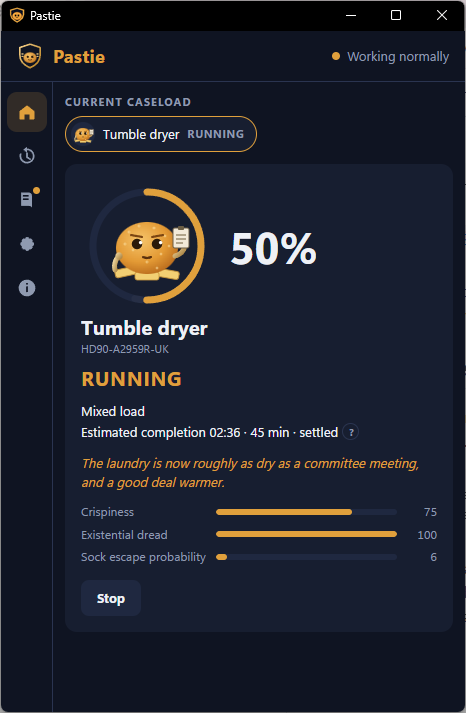
It also shows what the appliance is doing, and can start a programme from your desk once it has been armed at the machine.
Download Pastie for Windows · Will my appliance work? · See how it handles the hard cases
Currently verified against the Haier HD90-A2959R-UK tumble dryer. Own another hOn appliance? Help us verify it. No programming is needed.
Don't run Home Assistant? Pastie is for you. If you already do, use one of the mature hOn integrations; they do far more as an automation platform. Pastie exists for everyone else: it started because somebody wanted the tumble dryer to flash the lights when it finished, and didn't want to install a home-automation server to do it.
Unofficial. Not affiliated with, endorsed by, or supported by Haier. Pastie talks to Haier's hOn service through an unofficial, community-maintained client, so Haier could change something tomorrow and break it. Pastie pins its client version, tests its behaviour against recorded appliance data, and never claims compatibility nobody has verified. MIT licensed. Nobody's paid.
Install
- Download
PastieSetup-<version>.exefrom the latest release. If you'd rather not install anything, take the.zipand runPastie.exefrom wherever you unpack it. To have the zip copy watch from sign-in, put a shortcut toPastie.exe servicein your Startup folder (Win+R,shell:startup). - Run it. It installs just for you, so there's no administrator prompt. Leave "watch the appliance whenever I sign in" ticked, or nothing will be watching unless the window is open.
- Sign in to hOn in the window's settings: the same email and password as the hOn phone app.
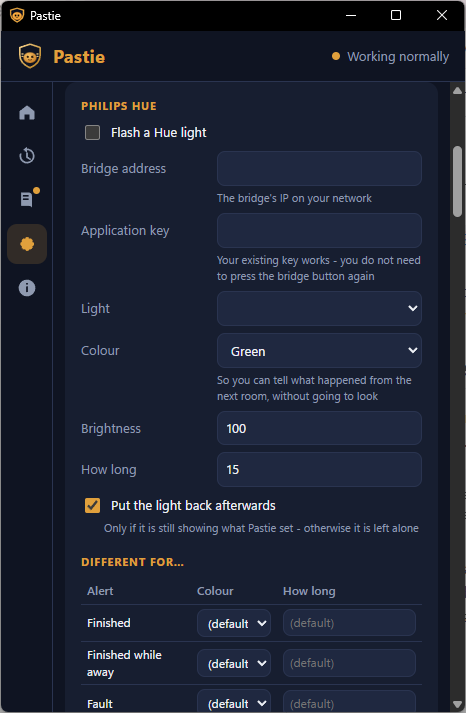
- Choose what should happen: a light, a speaker, a notification, a webhook. Each one has a Test button.
"Windows protected your PC"? The download isn't code-signed, because a
signing certificate costs money this project doesn't have. Windows SmartScreen
therefore warns about it until enough people have run it. Click More info →
Run anyway, but only for a file from this repository's Releases page. Each
release lists SHA256 checksums in SHA256SUMS.txt so you can check the file you
got is the file that was built.
An hOn account created with Google sign-in has no password, and the client can't do OAuth. Set a password on the same email address separately, or use hOn's Family Sharing to add a second account that has a password.
The hard cases, without an appliance
Want to see how Pastie handles the difficult cases? You don't need a dryer, an hOn account or a network:
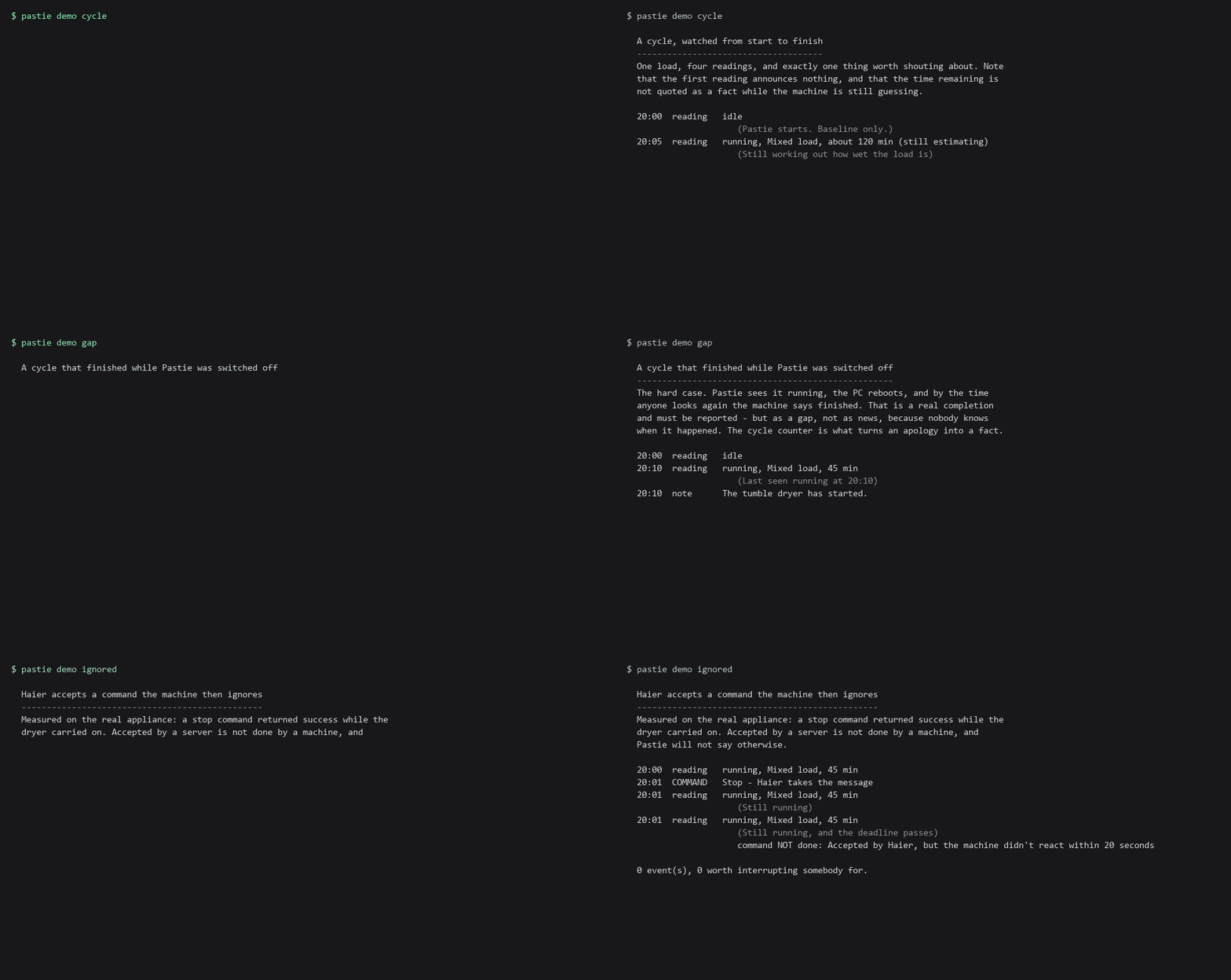
pastie-cli demo gap          (in the download's folder)
pastie demo gap              (from source)
That replays recorded readings through the real connector, the real brain and the real command tracker. There are six scenarios, and each one is a case that's easy to get wrong:
pastie demo ... |
What it shows |
|---|---|
cycle |
A whole load. One announcement, and the first reading deliberately silent |
gap |
A completion nobody watched, reported as a gap rather than as news |
tank |
The water tank filling mid-cycle, twice, recorded off the real dryer |
noise |
The same update twice and a poll two minutes stale. Still one announcement |
ignored |
Haier accepting a stop command that the machine then ignores |
unverified |
An oven reporting mode 6: detected and named, but never interpreted |
Tests pin every claim a scenario makes, so the demonstration can't drift away from the code and start lying.
Will my appliance work?
| Appliance | Model | Status |
|---|---|---|
| Haier tumble dryer | HD90-A2959R-UK | ✅ Verified: state, alerts, remote start once armed |
| Haier washing machine | HW100-BP14357 (X5) | 🧪 Testing: profile written, waiting on real cycles |
| Any other Haier, Candy or Hoover hOn appliance | any | 🔎 Detected: named, raw values only |
The full list, and what each level means, is in docs/COMPATIBILITY.md. "Raw only" means Pastie shows the appliance's own numbers, labelled as raw, and draws no conclusions from them. The same number means different things on different machines (why).
Help Pastie learn your appliance
No programming required. If you own a Haier, Candy or Hoover appliance on hOn that isn't in the table (a washing machine, a dishwasher, an oven, an air conditioner), install Pastie, run a cycle, and tell us what its numbers did. Watching one machine through a few real cycles is the most useful contribution anyone can make, and it's how the table grows.
Pastie or Home Assistant?
| Pastie | Home Assistant | |
|---|---|---|
| Haier hOn appliances | ✅ | ✅ (hOn integration) |
| Hue flash, spoken announcements | ✅ | ✅ |
| Windows notifications | ✅ | via companion app |
| Huge automation ecosystem | ❌ | ✅ |
| A server to run | ❌ | usually |
| Setup | a Windows installer | a home-automation platform |
| Built for | one or two appliances | the whole house |
Already run Home Assistant? Use its hOn integration. As a general automation platform it's far more capable, and Pastie doesn't try to compete.
Don't run Home Assistant, and just want the dryer to flash a light when it's done? That's why Pastie exists.
Webhook recipes
The webhook messenger POSTs one small JSON document per alert:
{
  "id": "0b6f3c9e2d8a4f1c9e7b5a3d2c1f0e9d",
  "key": "3fa94c1e7b20|finished|4",
  "kind": "cycle_finished",
  "appliance": "3fa94c1e7b20",
  "at": "2026-09-30T21:30:00+00:00",
  "message": "The tumble dryer has finished.",
  "detail": {}
}
id is unique per delivery, so a receiver can drop a repeat by it. key names
what happened, so the same event always has the same key. appliance is a hash,
never the machine's serial or MAC. kind is one of cycle_finished,
cycle_finished_while_away, fault, needs_emptying or maintenance_due.
| Receiver | How |
|---|---|
| ntfy (phone push) | URL https://ntfy.sh/<your-topic>?tpl=yes&m={{.message}}&t=Pastie. ntfy's templating turns the JSON into a readable message |
| Home Assistant | A Webhook trigger, then use {{ trigger.json.message }} in the action |
| Node-RED | An http in node (POST). msg.payload is the document above |
| Your own script | Anything that accepts an HTTP POST. The optional Authorisation header setting is sent as Authorization |
| Discord, Telegram, Pushover, IFTTT | These expect their own body shape, which Pastie doesn't send. Relay through ntfy, Home Assistant or Node-RED, or write a messenger (one file) |
Why Pastie behaves differently
Most of this project is ordinary. Three things are not, and they're why it's
built the way it is. Each also has a longer write-up in docs/.
"The dryer finished" is harder than it looks
The obvious version, if the machine says finished, announce it, is wrong in both directions. It shouts about a load that was put away on Tuesday, and it says nothing about the one that finished while the PC was rebooting.
So unknown is a real state. The first reading of a session sets a baseline and announces nothing. Anything that changed since last time is reported as a gap, not as news:
The tumble dryer finished while Pastie wasn't running (one cycle, some time after 20:10).
That sentence can say one cycle because the appliance keeps a counter of completed programmes, in a statistics endpoint separate from its live state. If the counter moved, a cycle finished, and the counter is also what tells a completed cycle apart from a cancelled one. Without it, Pastie says the vaguer, truthful thing instead.
Every announcement is written down before it goes out, so a restart can't fire
it twice. (core/tracker.py ·
the long version)
"Accepted" doesn't mean "done"
Sending a command to Haier's servers returns success as soon as they've taken the message. We proved that means nothing: a stop command returned success while the machine sat there ignoring it.
So every command has three parts (an id, a state that would prove it worked, and a deadline), and you're shown which of them actually happened:
Start requested         20:41:02
Accepted by Haier       20:41:03
Machine confirmed       20:41:06   OK
or
Accepted by Haier, but the machine didn't react within 20 seconds
Success is never reported off the back of a server response.
(core/commands.py ·
the long version)
Trust
Haier's system covers sixteen appliance types. We own a dryer.
Guessing what a number means on a dryer wastes a load of washing. Guessing on an oven or an induction hob is a different matter. So an appliance type is either verified, meaning somebody owns one and has confirmed what its numbers mean, or it isn't. An unverified type gets:
| Unverified | Verified |
|---|---|
| Detected, named, model shown | Everything on the left, plus: |
| Raw values, labelled as raw | Proper state: running, finished, faulted |
| No interpreted state | Progress and time remaining |
| No fault alerts | Fault alerts |
| No commands at all | Commands that have been tested |
Verification is per-mapping, not per-appliance.
(connector/profiles.py ·
the long version)
How it fits together
Haier's servers
      |
  connector      the only code that knows Haier's field names
      |
    core         what state it's in, what changed, what that means
      |
  +---+-----------------+
  |                     |
messengers            app
(Hue, speakers,       (window, settings)
 notifications,
 webhooks)
core imports nothing from the layers around it and no third-party client: no
network, no Windows, no Haier. That's what makes the awkward parts testable
against recorded sequences instead of against an appliance: restarts, duplicate
updates, readings arriving out of order, a cycle that finished while the PC was
off.
If machMode ever appears outside connector, that's a rejected pull request.
The name isn't the problem. Keeping it in one package is what makes a change on
Haier's side cost one file instead of the whole codebase. They did change
something, in June 2026, and everything broke until the community client caught
up.
The background watcher (in the code, the service: pastie service)
holds the only connection to Haier. It's an ordinary program that starts when
you sign in, not a Windows service. The app doesn't open its own connection;
it asks the watcher over a Windows named pipe. That way the two can't
disagree about what the machine is doing, and nothing listens on a network
address that a web page in your browser could reach.
Where things live
pastie where prints it. In short: settings, the encrypted password and what
Pastie remembers live in %PROGRAMDATA%\Pastie. Uninstalling leaves them there.
Delete that folder if you want them gone.
Your hOn password
Pastie encrypts it with Windows DPAPI under the Windows account that runs Pastie's background watcher. Today that's you, because the watcher starts when you sign in to Windows. The encrypted file can't simply be copied to another Windows account or PC and decrypted there. The window hands a new password to the watcher and never stores or reads one, and there is deliberately no way to read one back out.
From source
Windows, Python 3.11 or newer.
git clone https://github.com/Ryan-Clinton/pastie-hon
cd pastie-hon
python -m venv .venv
.venv\Scripts\pip install -e . -c constraints.txt

.venv\Scripts\pastie login      # hOn email and password, encrypted with DPAPI
.venv\Scripts\pastie service    # the background half - leave it running
.venv\Scripts\pastie status     # in another window
.venv\Scripts\pastie-app        # the window; starts the service if needed
The Python distribution is called pastie-hon (pastie on PyPI is somebody
else's project). The commands are still pastie and pastie-app.
powershell -File scripts\install-shortcuts.ps1 puts the window on the Start
menu and the Desktop, and the background watcher in Startup. It runs as you,
at sign-in.
That isn't the same as a Windows service, and the difference is
recorded honestly rather than papered over.
Already running the old prototype? pastie migrate --folder prototype brings
your account and your Hue and speaker settings across. Your existing Hue key
keeps working, with no button to press on the bridge.
Adding a light, a speaker, or anything
A messenger is anything Pastie can poke when something happens. To add one,
write one file, add one line to
messengers/__init__.py, and send a pull
request. messengers/desktop.py is the
shortest example to copy.
You don't write any interface code. A messenger describes its settings, and the settings screen draws itself from that description.
class MyLight:
    name = "mylight"
    label = "My Light"

    def settings(self):        # the settings screen is built from this
        return [Setting("enabled", "Flash my light", Kind.BOOL, default=False)]

    async def discover(self, config): ...   # list what's available
    async def test(self, config): ...       # fire once, on demand
    async def react(self, event, config): ...
Four rules are enforced centrally in
messengers/base.py rather than trusted to
each author:
- A messenger failing must not take anything else down. They run concurrently, isolated, each with its own timeout. A speaker that's switched off must not stop the light flashing.
- Don't strobe. Flashing light can trigger seizures in people with photosensitive epilepsy, and Philips's own terms put that responsibility on the application. Flash rate and duration are capped centrally, and no messenger can get round the cap.
- One alert at a time per target, or two events will both snapshot a light's state and both restore it.
- Never log a password, key or token.
Genuinely useful ones nobody has written yet: LIFX, WiZ and Nanoleaf lights (all talk directly over your network, with no accounts), and native ntfy or Telegram messengers.
Developing
pip install -e ".[dev]" -c constraints.txt
pytest          # no appliance required
ruff check .
ruff format --check src tests scripts packaging
mypy
python scripts/third_party_notices.py --check
Those are exactly what CI runs, on Windows and Linux across 3.11 and 3.12. The
Linux leg exists to prove core stays free of Windows. If the domain layer ever
needs Windows, that job fails, and the design has told you something.
pyinstaller packaging/pastie.spec builds the Windows folder that the release
workflow zips and wraps in an installer. pastie-cli --self-check in the built
folder confirms it carries every native part the service needs.
The tests check what Pastie announced, not what it parsed. A dependency update that quietly changes how a field is decoded shows up as a missing or duplicated announcement, which is what a user would actually notice.
Recorded test data is stripped by keeping only fields known to be safe, never
by removing the bad ones one at a time. Haier's responses carry the appliance's
GPS coordinates, MAC address and serial number, and Haier can add new fields
whenever it likes. The allow-list is
connector/scrub.py. The same applies to
anything you attach to a bug report.
docs/SPEC.md: the design, including everything we know about Haier's system that isn't written down anywhere elsedocs/ROADMAP.md: what's nextCONTRIBUTING.md: how to send a changeSECURITY.md: how to report a security problem (please not in a public issue)prototype/: the working scripts this was built from, kept verbatim as the record of what was actually measured against the hardware
Searching the build history
Most of what's known about this dryer was worked out in conversation, and often
the reasoning behind a decision is only in the transcript.
scripts/history_search.py searches this project's Claude Code transcripts:
python scripts\history_search.py "remote control"
python scripts\history_search.py "machMode" --role all --context 200
It searches the live transcript directory and an archive copy, and prints the
date window it actually covered, so "no matches" can be told apart from "that
session has been pruned". scripts/claude-transcript-archive.ps1 keeps the
archive fed; it mirrors and never deletes. Neither script sends anything
anywhere, and the transcripts live outside the repository.
Why a pastie?
An entry from a guidebook nobody has been able to find a second copy of
Many civilisations across the galaxy have tried to put something in charge of their household appliances. Most of them chose wrongly.
The Vl'hurg put in a supercomputer. It spent eleven thousand years working out the perfect drying temperature for a sock, then announced the answer was "damp", and was switched off by a committee that had long since forgotten why it had been switched on.
The Consolidated Appliance Syndicate of Grenthe sold everyone a kettle with feelings. It was so relentlessly cheerful about boiling that three planets gave up hot drinks altogether, and a fourth gave up on planets.
A small island on a damp planet chose a pastie.
A pastie, for the benefit of those from more fortunate star systems, is minced meat and potato, pressed into a disc, dipped in batter and deep-fried. It is served in a bap. It has no processor, no network stack and no opinions. For running a house, this makes it the most qualified candidate ever found.
Consider its record:
- It has already been through worse. Anything that has survived being battered and deep-fried at 180 degrees regards a tumble dryer as a mild day out. Nothing in a laundry room can frighten it.
- It cannot be hacked. Many have tried. The best any of them managed was to make it slightly soggy.
- It keeps records. When the water tank fills, it doesn't sound an alarm. It notes the time, the circumstances and the tank, and points out, calmly, that somebody should really do something about it.
- It is round. The drum is round. It has been suggested that the universe is round too. The pastie has never confirmed this, but has never been seen to disagree, which is more than can be said for most cosmologists.
- It is always warm. Any system that runs warm and never complains has, by definition, found its purpose in life.
Scholars still argue over why the pastie wanted the job. The most widely accepted theory is that it didn't, and was not consulted. This is also how most people come to run things, and it goes a long way to explaining the state of most things.
And the socks? The pastie knows where they go. It isn't going to tell you. Some knowledge is too heavy for a household to carry, and the pastie, being fried, is already quite heavy enough.
Licence
MIT. Do what you like with it.
1 maintainer

Metadata
1 maintainer
Release files for pastie-hon 0.3.0
For a detailed explanation of source distributions (sdists) and built distributions (wheels), please see the package formats documentation.
Source distribution (sdist)
| File | Size | Uploaded | |
|---|---|---|---|
| pastie_hon-0.3.0.tar.gz | 452.1 kB | Details |
Built distribution (wheel)
| File | Interpreter | ABI | Platform | Reset |
|---|---|---|---|---|
| pastie_hon-0.3.0-py3-none-any.whl | Python 3 | none | any | Details |
Total release size: 873.3 kB
Release files / pastie_hon-0.3.0.tar.gz
| Download URL | pastie_hon-0.3.0.tar.gz |
|---|---|
| Size | 452.1 kB |
| Tags | Source |
|
SHA-256 checksum How to use checksums |
918380e0b1b82d8590afb75b295bee4b3eba592475e17cd169d8fa8b242845d5
|
|
BLAKE2b-256 checksum How to use checksums |
d50d9c183b39eb04c0712705626727be24127db8ebc0ac4f55e62ac9b62ffd79
|
| Upload date | |
|
Uploaded using Trusted Publishing? What is trusted publishing? |
Yes |
| Uploaded via |
twine/7.0.0 CPython/3.13.14
|
Provenance
Provenance describes where a file came from. On PyPI, provenance is shared via attestations, which provide a verifiable record of the build or publishing details. View details, limitations and caveats.


PyPI Publish Attestation
PyPI verified that this artifact, at this checksum, originated from the publisher listed below.
Signed by GitHub Actions, verified by PyPI on Sep 30, 2026.
Transparency logRelease files / pastie_hon-0.3.0-py3-none-any.whl
| Download URL | pastie_hon-0.3.0-py3-none-any.whl |
|---|---|
| Size | 421.2 kB |
| Tags | Python 3 |
|
SHA-256 checksum How to use checksums |
4b591e1a4f0a33add83bfc52e53c4148bb5e7e6e842d61da41ca6272d165f2b8
|
|
BLAKE2b-256 checksum How to use checksums |
d3f02d66b3f496866752ee351fa10eca7f7c32b46ccc23cbcc561ec49f401642
|
| Upload date | |
|
Uploaded using Trusted Publishing? What is trusted publishing? |
Yes |
| Uploaded via |
twine/7.0.0 CPython/3.13.14
|
Provenance
Provenance describes where a file came from. On PyPI, provenance is shared via attestations, which provide a verifiable record of the build or publishing details. View details, limitations and caveats.
PyPI Publish Attestation
PyPI verified that this artifact, at this checksum, originated from the publisher listed below.
Signed by GitHub Actions, verified by PyPI on Sep 30, 2026.
Transparency log












