
PAT Agent
PAT Agent is a smart command-line assistant that can help you work with files, run commands, search code, and automate repetitive tasks.
It is designed to be easy to use, even if you are not a programmer.
Why People Use PAT
- It can read and edit files for you.
- It can run terminal commands safely.
- It can connect to external tools through MCP servers (including OAuth2 providers like Google Workspace).
- It can run specialized mini-agents called subagents.
- It plans, reasons, and verifies steps for higher accuracy in complex tasks.
- It uses embedding-based memory so recall is fast and relevant.
5-Minute Quick Demo
This section is for first-time users.
1) Install
pip install pat-agent
After installation, the CLI command is:
pat-agent
2) Configure API Key and Base URL
pat-agent configure apikey YOUR_API_KEY
pat-agent configure baseurl YOUR_BASE_URL
Pat supports 3 Base urls :
- Open router : https://openrouter.ai/api/v1
- Openapi : https://api.openai.com/v1
- Gemini : https://generativelanguage.googleapis.com/v1beta/openai/
Check what is configured:
pat-agent configure show
3) Start the Agent
pat-agent init
pat-agent
You can now type plain English requests, for example:
- List all Python files in this project.
- Create a new README section for troubleshooting.
- Search for where session data is saved.
4) Run One Prompt and Exit (Optional)
pat-agent --prompt "Summarize this project in simple words"
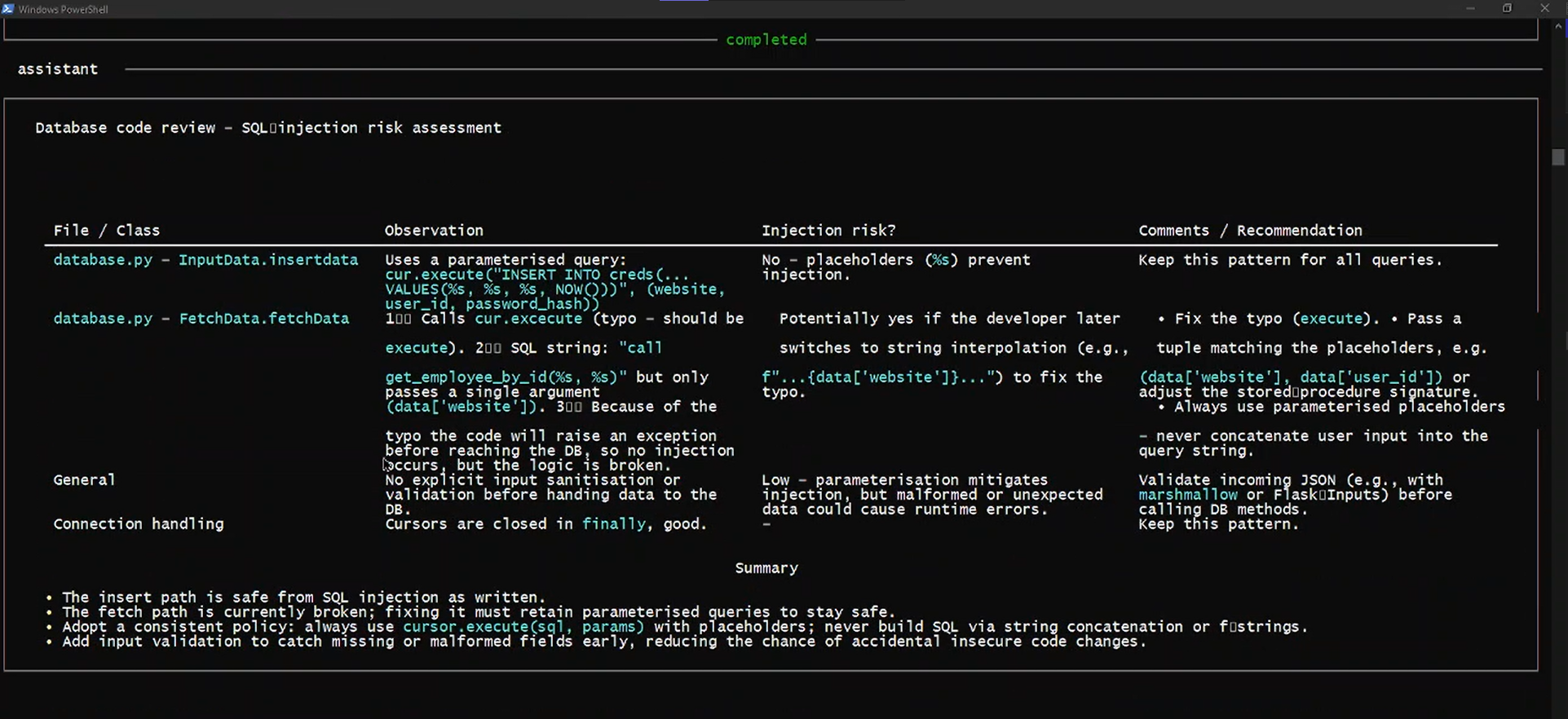
Screenshot / Demo Image
Commands You Will Use Most
Main Command
pat-agent [--prompt "..."] [--cwd PATH]
--promptor-p: run once and exit.--cwdor-c: run PAT in a specific folder.
Configure Commands
pat-agent configure apikey VALUE
pat-agent configure baseurl VALUE
pat-agent configure show
pat-agent configure delete apikey
pat-agent configure delete baseurl
What each one does:
configure apikey: saves your API key securely in OS keyring.configure baseurl: saves API endpoint URL securely in OS keyring.configure show: shows current configured values (API key is masked).configure delete: removes a saved value.
Interactive Commands (Inside PAT)
When PAT is running, type these commands:
/help: show help./clear: clear current conversation./config: show current active settings./model <name>: switch model for this session./approval <policy>: change safety approval mode./tools: list available tools./mcp: show MCP server status./stats: show session stats./save: save current session./sessions: list saved sessions./resume <session_id>: resume a saved session./checkpoint: create a checkpoint./listcheckpoints: list checkpoints./restore <checkpoint_id>: restore a checkpoint./exitor/quit: close PAT.
Configuration System (Simple Explanation)
PAT loads settings from two places:
- Global config on your machine.
- Project config in your project folder.
Project config has higher priority.
Config File Name
config.toml
Project Config Location
.ai-agent/config.tomlinside your project
Example Config (Safe Starting Point)
max_turns = 100
approval = "on-request"

[model]
name = "claude-opus-4.7"
temperature = 1.0
context_window = 256000

[shell_environment]
ignore_default_excludes = false
exclude_patterns = ["*KEY*", "*TOKEN*", "*SECRET*"]
How PAT Handles API Key and Base URL
PAT checks credentials in this order:
- OS keyring (recommended)
- Environment variables
Environment variable fallback names:
API_KEYBASE_URL
Tools, MCP, and Subagents
Built-in Tools
PAT includes built-in tools for:
- File reading and writing
- File editing
- Directory listing
- Pattern search and glob search
- Shell commands
- Web search and web fetch
- Memory and todo tracking
- Multi-file patch application
MCP Support
PAT can connect to MCP servers from config and auto-load their tools. OAuth2-based MCP connections are supported for providers like Google Workspace.
MCP tool names are registered in this format:
server_name__tool_name
Configure MCP Servers (Quick Guide)
Add MCP servers to your project config at .ai-agent/config.toml.
HTTP/SSE MCP server with OAuth2:
[mcp_servers.google_workspace]
url = "https://your-mcp.example.com"

[mcp_servers.google_workspace.oauth]
client_id = "YOUR_CLIENT_ID"
client_secret = "YOUR_CLIENT_SECRET"
scopes = ["https://www.googleapis.com/auth/drive.readonly"]
Notes:
- If you omit
client_idandclient_secret, PAT uses the MCP server's OAuth discovery flow (browser consent). - You can use
auth_tokeninstead ofoauthfor non-OAuth servers. - For local stdio MCP servers, use
commandandargsinstead ofurl.
Example stdio MCP server:
[mcp_servers.local_files]
command = "node"
args = ["server.js"]
Subagents
Subagents are focused mini-agents that PAT can call for specific tasks.
Default subagents:
subagent_codebase_investigatorsubagent_code_reviewersubagent_dependency_tracersubagent_root_cause_investigatorsubagent_regression_huntersubagent_architecture_mapper
You can create your own subagents.
Create Your Own Subagent
Add this to .ai-agent/config.toml:
[[user_subagents]]
name = "doc_writer"
description = "Writes and improves docs"
goal_prompt = "You are a documentation specialist. Write clear and beginner-friendly docs."
allowed_tools = ["read_file", "glob", "grep", "write_file", "edit"]
max_turns = 20
timeout_seconds = 600
Once loaded, the subagent appears as a tool named:
subagent_doc_writer
Approval Policies (Safety)
Available policies:
on-requeston-failureautoauto-editneveryolo
If you are new, start with:
on-request
Plain-Language Architecture
PAT follows a simple flow:
- You ask something.
- PAT sends your request + context to the model.
- The model decides if tools are needed.
- PAT runs tools (with approval checks if needed).
- PAT returns the final response.
Reasoning and Investigation
PAT uses a deliberate problem-solving loop for better accuracy:
- Plans and reasons before acting on non-trivial tasks.
- Verifies results after each major step.
- During debugging or investigation, it builds a system-level understanding first, traces dependencies, estimates confidence, and then answers.
Embedding Memory
PAT stores memory as embeddings so it can search and recall relevant context quickly. This improves long-running tasks without requiring you to restate details.
This loop continues until the task is done.
Troubleshooting
- If PAT says API key is missing, run:
pat-agent configure apikey YOUR_API_KEY
- If PAT cannot reach your provider, check base URL:
pat-agent configure baseurl YOUR_BASE_URL
- If tools are missing, run
/toolsand verify your config is not restricting them. - If MCP tools are missing, run
/mcpand check MCP server config.
Project Structure (High Level)
Pat-Code/
  main.py
  agent/
  client/
  config/
  context/
  tools/
  safety/
  ui/
License
MIT
1 maintainer

Metadata
1 maintainer
Release files for pat-agent 0.1.5
For a detailed explanation of source distributions (sdists) and built distributions (wheels), please see the package formats documentation.
Source distribution (sdist)
| File | Size | Uploaded | |
|---|---|---|---|
| pat_agent-0.1.5.tar.gz | 76.9 kB | Details |
Built distribution (wheel)
| File | Interpreter | ABI | Platform | Reset |
|---|---|---|---|---|
| pat_agent-0.1.5-py3-none-any.whl | Python 3 | none | any | Details |
Total release size: 157.6 kB
Release files / pat_agent-0.1.5.tar.gz
| Download URL | pat_agent-0.1.5.tar.gz |
|---|---|
| Size | 76.9 kB |
| Tags | Source |
|
SHA-256 checksum How to use checksums |
2ff3b47a37ecdff9ffcc73e1c5b4243f2ddeca34a9d68d1dff334a553401b38f
|
|
BLAKE2b-256 checksum How to use checksums |
e2ba67ed7702e41d5b556293496df6513744e66f85c9eed1340e57df7440818d
|
| Upload date | |
|
Uploaded using Trusted Publishing? What is trusted publishing? |
No |
| Uploaded via |
twine/6.1.0 CPython/3.13.12
|
Release files / pat_agent-0.1.5-py3-none-any.whl
| Download URL | pat_agent-0.1.5-py3-none-any.whl |
|---|---|
| Size | 80.8 kB |
| Tags | Python 3 |
|
SHA-256 checksum How to use checksums |
28d3dfd5e8cac4354d4da2292c16489406e8f8c4862f68781d6308fb2bc3a1d3
|
|
BLAKE2b-256 checksum How to use checksums |
e726928841e6cb82b4a8cd8f2bf235d7e03c0ac3ea4045d3e159cd255d955722
|
| Upload date | |
|
Uploaded using Trusted Publishing? What is trusted publishing? |
No |
| Uploaded via |
twine/6.1.0 CPython/3.13.12
|














