
PatAutoEdit
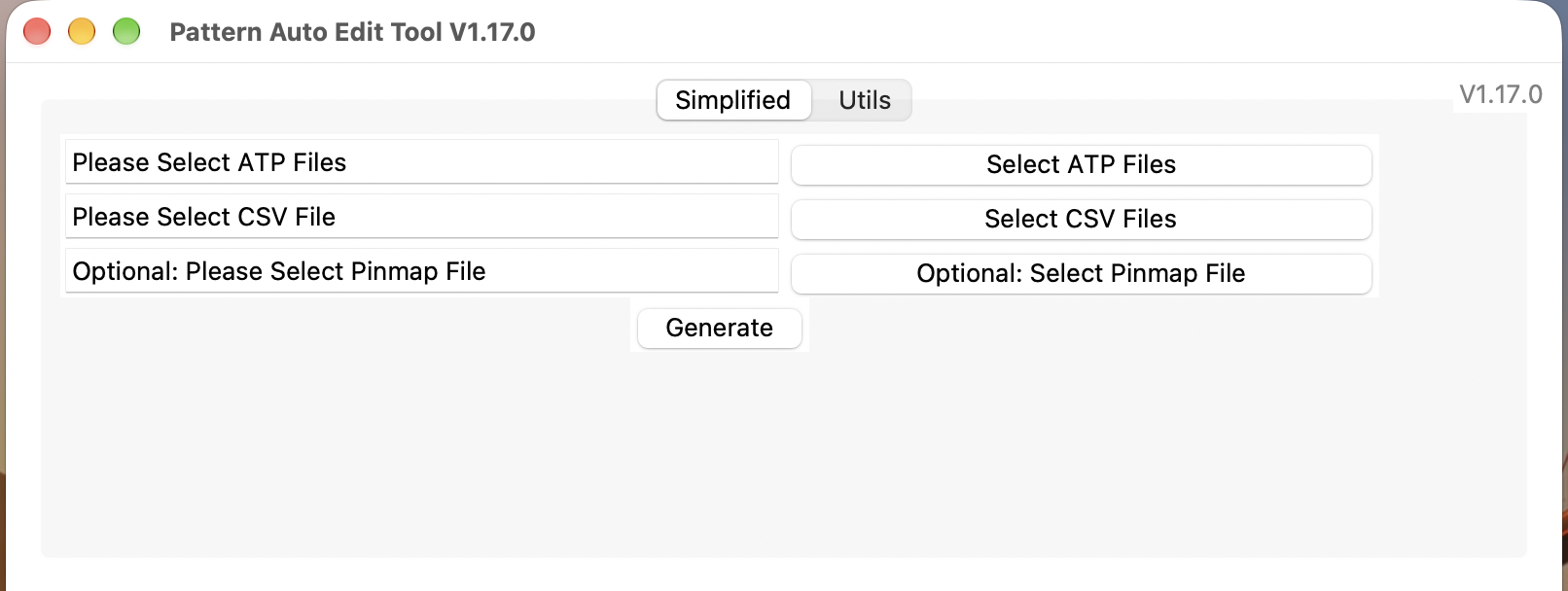
An ATP Pattern Auto-Edit Tool for DSSC/CMEM/HRAM




This repository contains a desktop app, a web app, and a command-line tool. The PyPI package ships the command-line tool only; see Command line.
How to use the desktop or web app:
- Prepare the config CSV file — see Config file format below;
- Choose the ATP file, config file, Pin Name (single pin support only), edit method and time mode.
- Supported edits:
- DigCap/DigSrc;
- HRAM/CMEM;
- Expand Repeat (remove "repeat N" and "repeat cX"); "Expand Pattern" is the old name of the same mode and will be dropped in a future version;
- Expand Loop (flatten "loop"/"end_loop" in srm_vector modules, which then become vm_vector);
- Counters loaded by the test program: give their values in User String — see Counters loaded by the test program;
- Compress Pattern (add "repeat");
Command line
Install it with Python 3.10 or newer:
pip install patautoedit
From a repo checkout, pip install -e . gives the same command, and
python -m patautoedit works without installing.
patautoedit run config.csv --atp-dir path/to/atps
patautoedit run config.csv --atp-dir path/to/atps --output-dir out/run1 --json
patautoedit check config.csv --atp-dir path/to/atps
patautoedit modes
In a repo checkout, Sample/ holds example ATPs. The counter examples are in
Sample/expand_loop/.
runapplies the config. Edited files go toOutput/under the current directory unless--output-diris given.checkvalidates the config and prints what would run. It writes nothing.modeslists the Process Types and the fields each one needs.--jsonprints one JSON object on stdout; log lines go to stderr.- Exit codes:
0success,1a rejected config, a failed file, or no matched file,2usage error. run --jsonreturnsok,version,config,output_dir,outputs,failed,skipped,warnings,problems, andcounts. Eachoutputsitem hassource,output, andoperations; eachfaileditem hassourceanderrors.check --jsonreturns the same top-level keys, butplanreplacesoutput_dir,outputs, andfailed; each plan item hassourceandoperations.modes --jsonreturns a list of{"process_type", "requires"}.--atp-dirdefaults to the config file's folder. It scans that folder only, not subfolders.--atp FILE(repeatable) names candidate files explicitly and overrides--atp-dir.- A
Patternthat matches no candidate file is a warning and a skip, not an error. If nothing matches at all, the run exits 1. - The CLI uses the config CSV path: Single time mode and Cycle index. Dual-mode or vector-index files need the desktop app's Classical tab.
The desktop and web apps run from a repo checkout: python PAE.py or
streamlit run PAE_webapp.py.
Config file format
One row is one operation. Rows that share the same Pattern form a chain and
are applied top to bottom — each step reads the output of the step above it, so a
file can be edited as many times as you need.
Instance,Pattern,Status,Process Type,Pin or Method,Cycle,User String
,Sample_ATP.atp,Done,DSSC Capture,TDO,[7-7];[12-12],
,Sample_ATP.atp,Done,DSSC Source,PORN,[13-14],
,Sample_ATP.atp,Done,DSSC Source,TDI,[9-9],
,Sample_ATP.atp,Done,WFLAG,,[8-8],
,Sample_ATP - 1.atp,Done,DSSC Source,TDI,[7-7];[9-9],
,Sample_ATP - 1.atp,Done,DSSC Capture,TDO,[7-7];[12-12],
Sample_ATP.atp above gets four chained operations; Sample_ATP - 1.atp gets two.
| Column | Notes |
|---|---|
Pattern |
ATP filename. Required. |
Process Type |
One of: DSSC Capture, DSSC Source, CMEM/HRAM Capture, Expand Pattern, Expand Repeat, Expand Loop, Compress Pattern, WFLAG, Add Opcode, Remove Opcode. Required. |
Pin or Method |
Used only by DSSC Capture, DSSC Source, and CMEM/HRAM Capture. |
Cycle |
[a-b];[c-d] form. Used by DSSC Capture, DSSC Source, CMEM/HRAM Capture, WFLAG, and Add Opcode. |
User String |
The opcode text for Add Opcode / Remove Opcode. For Expand Repeat, Expand Loop and Expand Pattern: optional counter run counts, e.g. c0=<count>; c7=<count> — see Counters loaded by the test program. Other modes ignore it. |
Instance, Status |
Ignored. Kept for your own bookkeeping. |
Column names are matched case-insensitively and column order does not matter. Your whole config is checked before anything runs, so a mistake is reported up front rather than half-way through a batch.
Note: the older 9-column format, where one row held two operations, is no longer supported. Such a file is rejected with a message showing the rows to use instead.
Expand Pattern, Expand Repeat, and Compress Pattern always use single
time mode; use the Classical tab for dual-mode files. Expand Loop supports
single mode only.
Counters loaded by the test program
Some patterns run loop cX or repeat cX on a counter that the test program
(VBT) loads before the pattern starts, so the ATP has no set cX to read.
Give those values in User String on the Expand Loop and Expand Repeat
rows:
Pattern,Process Type,Pin or Method,Cycle,User String
march_full.atp,Expand Loop,,,c0=<count>; c7=<count>; c8=<count>
march_full.atp,Expand Repeat,,,c0=<count>; c7=<count>; c8=<count>
Sample configs for both are in Sample/Sample_ATP - simple.csv:
Sample/expand_loop/counters_preloaded_mto.atp takes its values from
User String, and Sample/expand_loop/counters_set_in_atp.atp sets its own
counters, so it needs none.
- Write
cN=run countpairs separated by;: countersc0toc15, decimal values from 1 to 268,435,455, each counter once. - A run count is how many times the loop or repeat runs: the
Ninset cX N. A VBT lineTheHdw.Digital.Patgen.Counter(tlPgCounterN) = Xloads the counter register directly, so its run count isX + 1. - The values act as if the VBT loaded them just before the pattern starts:
- A
set cXin the ATP wins from that vector on. It still needs its ownset_msbfirst. - A counter the mode needs, with no value and no
set, fails the file. - Values the mode does not need are ignored, with one info line in the log, so the same string can go on every Expand row.
- A
- The tool never reads the test program (why). When one pattern runs with different values, for example under two test instances, make one renamed copy of the ATP for each set of values; each copy gets its own rows.
The words used here are defined in GLOSSARY.md.
License
MIT. See LICENSE.
1 maintainer

Metadata
1 maintainer
Release files for patautoedit 1.17.1
For a detailed explanation of source distributions (sdists) and built distributions (wheels), please see the package formats documentation.
Source distribution (sdist)
| File | Size | Uploaded | Provenance | Actions |
|---|---|---|---|---|
| patautoedit-1.17.1.tar.gz | 31.5 kB | With provenance | Details for patautoedit-1.17.1.tar.gz |
Built distribution (wheel)
| File | Interpreter | ABI | Platform | Actions Reset |
|---|---|---|---|---|
| patautoedit-1.17.1-py3-none-any.whl | Python 3 | none | any | Details for patautoedit-1.17.1-py3-none-any.whl |
Total release size: 63.5 kB
Release files / patautoedit-1.17.1.tar.gz
| Download URL | patautoedit-1.17.1.tar.gz |
|---|---|
| Size | 31.5 kB |
| Tags | Source |
|
SHA-256 checksum How to use checksums |
4b65c896651be3bf6c84c5ccdc8e177adb9725e18ff9d338e0f128b894e4719b
|
|
BLAKE2b-256 checksum How to use checksums |
689bc035acd6969af4679a61cad14b60353252873e826d41c1e6c8a49f65a7ac
|
| Upload date | |
|
Uploaded using Trusted Publishing? What is trusted publishing? |
Yes |
| Uploaded via |
twine/7.0.0 CPython/3.13.16
|
Provenance
Provenance describes where a file came from. On PyPI, provenance is shared via attestations, which provide a verifiable record of the build or publishing details. View details, limitations and caveats.


PyPI Publish Attestation
PyPI verified that this artifact, at this checksum, originated from the publisher listed below.
Signed by GitHub Actions, verified by PyPI on Nov 21, 2026.
Transparency logRelease files / patautoedit-1.17.1-py3-none-any.whl
| Download URL | patautoedit-1.17.1-py3-none-any.whl |
|---|---|
| Size | 32.0 kB |
| Tags | Python 3 |
|
SHA-256 checksum How to use checksums |
50a81eacca33ffeea4d779a731564aee8bd18e61660923a6f5208ce97cc16608
|
|
BLAKE2b-256 checksum How to use checksums |
ac42a04d91d0843fa0bef30c3d5663f333a691d9e6f4c0881eeccbc8c61b2581
|
| Upload date | |
|
Uploaded using Trusted Publishing? What is trusted publishing? |
Yes |
| Uploaded via |
twine/7.0.0 CPython/3.13.16
|
Provenance
Provenance describes where a file came from. On PyPI, provenance is shared via attestations, which provide a verifiable record of the build or publishing details. View details, limitations and caveats.
PyPI Publish Attestation
PyPI verified that this artifact, at this checksum, originated from the publisher listed below.
Signed by GitHub Actions, verified by PyPI on Nov 21, 2026.
Transparency logSecurity for patautoedit 1.17.1
Provenance
Provenance describes where a file came from. On PyPI, provenance is shared via attestations, which provide a verifiable record of the build or publishing details. View details, limitations and caveats.
Full provenance
Both files in this release have been uploaded with provenance metadata.
Attestation for patautoedit-1.17.1.tar.gz
PyPI Publish Attestation
PyPI verified that this artifact, at this checksum, originated from the publisher listed below.
Signed by GitHub Actions, verified by PyPI on Nov 21, 2026.
Transparency logA note on package security
PyPI is a repository for distributing packages, not a service for auditing them. While third-party security researchers and our staff do their best to detect and remove malicious packages, PyPI cannot guarantee the quality, security or suitability of any given package.
To learn more about protecting yourself from malicious actors, visit our package security documentation.














