
A Textual TUI for managing multiple Claude Code agent sessions
Verified details
These details have been verified by PyPIProject links
GitHub Statistics
Maintainers

Project description
Patchbai
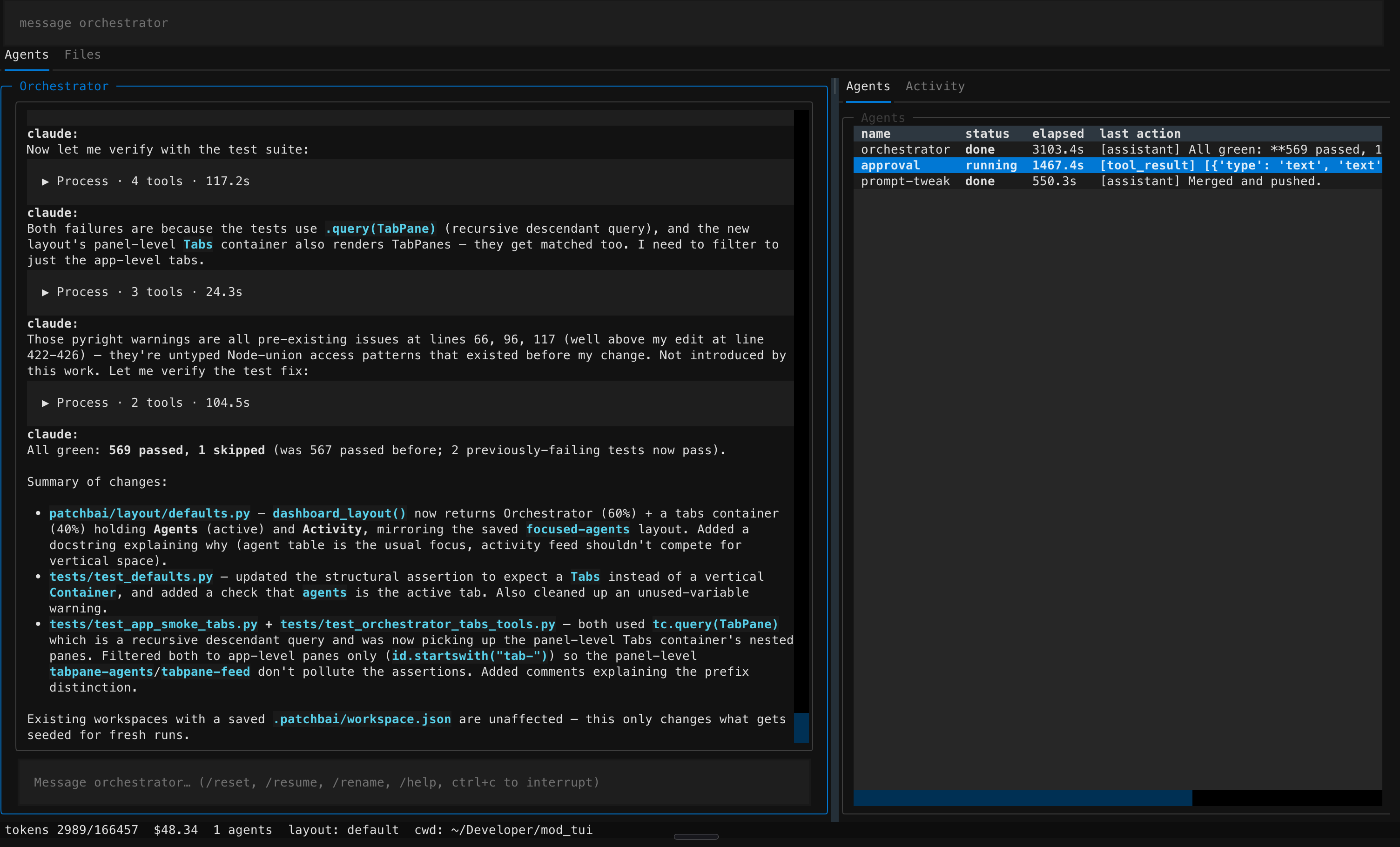
A Textual TUI that turns N parallel Claude Code sessions into one orchestrator-managed workspace — and lets the agent reshape the UI to fit the work.
The pitch
You're running three Claude Code sessions at once. One's refactoring auth, one's writing tests, one's doing a security pass. They live in three terminal tabs with three scrollbacks, and you're the one mentally juggling which is waiting on what.
Patchbai is the room you wish you had. One TUI. One top-level Claude — the orchestrator — runs the show. You tell it what you want done in plain English; it spawns the right children with the right tool allowlists, watches their progress, and pulls them onscreen when they need you. Tell it "give me the file tree on the left and the diff viewer on the right" and the layout actually changes — the orchestrator emits a declarative spec and the engine swaps panels in place, atomically, with rollback on failure.
You get this without giving anything up. Children are real Claude Code
sessions running through the official Agent SDK, with your
~/.claude/settings.json permissions. No screen-scraping, no fragile
regex over PTY output — the orchestrator reads transcripts, sends
messages, interrupts, and kills via structured in-process MCP tools. When
you're tired of being orchestrator-mediated, the Terminal widget drops
you into the actual claude CLI in any panel.
It's conversational the whole way down. You spawn:
"Spawn three agents in parallel:
testsrunning pytest,lintrunning ruff + pyright,formatrunning ruff format. Notify me when any of them fail."
You arrange:
"Open a Review tab: orchestrator on top, FileTree next to a DiffViewer below it. Save it as
review."
You react:
"Interrupt migrator — I want to change its instructions."
"Re-run the last failed agent with--covadded."
"Build a custom widget that sparklines my token usage and stick it as a 25% sidebar."
Each of those is one message. The orchestrator owns the spec; you own the ideas.
Who it's for
- Devs running 2+ Claude sessions in parallel. Refactor + tests + review, frontend + backend, debug + bisect — all in one window with one shared StatusBar of tokens, cost, and active children.
- Code reviewers who want a tab per PR with the right diff viewer and file tree wired up automatically, and a saved layout that applies in any repo.
- Pipeline-builders and researchers running one notebook agent and several worker agents off it, with a single chronological feed of who's doing what and an append-only JSONL audit trail per child.
- People who hate switching terminal tabs. The whole interface is conversational; layout, theme, keybinding, tab, and cwd changes are a sentence away — and every change persists.
Why use it
- Run several Claude sessions side by side. The orchestrator spawns children with their own prompts, allowed tools, and cwd. Each gets a transcript you can scroll, a state machine you can introspect, and a direct-message input box when you want to bypass the orchestrator.
- Talk to the UI like you talk to the agent. "Open a diff viewer for
the last edit", "give me a 3-pane layout with file tree on the left",
"save that as
review" — all of it routes through orchestrator tools (set_layout,save_layout,bind_key,set_theme, …) and persists. - Structured introspection, not screen scraping. The orchestrator reads a child's transcript, sends messages, interrupts, kills — all via in-process MCP tools layered on top of the Claude Agent SDK. No PTY parsing, no fragile regex.
- Persistent everything. Workspaces (per-cwd), layouts, themes, keybindings, transcripts, and a full agent history are stored on disk and restored on next launch.
- Real escape hatches. A
Terminalwidget is a real PTY — drop into the actualclaudeCLI, or your shell, in any panel. Mode-C custom widgets let the orchestrator ship Python at runtime when the curated widget library isn't enough.
Concept
                ┌─────────────────────┐         spawn / send / interrupt
   you ───────▶ │  Orchestrator       │ ──────────────────────────────┐
   (cmd bar     │  ClaudeSDKClient    │                               ▼
   or chat)     │  + injected tools   │                    ┌──────────────────┐
                └──────────┬──────────┘                    │  AgentManager    │
                           │                               │  ClaudeSDKClient │
                           │                               │  × N children    │
                           ▼                               └────────┬─────────┘
                ┌─────────────────────┐                             │
                │   LayoutEngine      │ ◀── transcripts, state ─────┘
                │   diff(old, new)    │     events via EventBus
                │   WidgetRegistry    │
                └──────────┬──────────┘
                           ▼
                ┌─────────────────────┐
                │   Textual App       │
                │   tabs · panels     │
                │   chrome (always-on)│
                └─────────────────────┘
A LayoutSpec is a tree of containers (horizontal / vertical splits)
and panels ({ id, widget, props, size }). The engine diffs the new spec
against the live tree by id — same id + same widget reuses the mounted
widget (no scroll-jump); a different widget at the same id swaps it; a
missing id unmounts. The chrome (CommandBar, StatusBar) is always
mounted and cannot be removed. OrchestratorChat must be present in
exactly one panel — the agent can shrink it but cannot hide its own input.
Built-in widgets
| Widget | Purpose |
|---|---|
OrchestratorChat |
The orchestrator session: rich transcript + input. |
AgentTable |
Sortable list of children: name, status, elapsed, cost. |
AgentTranscript |
One agent's full conversation, with a direct-message input box. |
ActivityFeed |
Cross-agent chronological event stream. |
FileTree |
Directory tree; emits FileSelected events on the bus. |
FileViewer |
Read-only syntax-highlighted file display; can follow FileTree selection. |
FileEditor |
Editable, syntax-highlighted; ctrl-s saves; warns on external changes. |
DiffViewer |
Unified-diff viewer (precomputed diff or before + after). |
LogTail |
Tails an arbitrary file (250 ms poll). |
Markdown |
Renders markdown from a string or file. |
Notebook |
Editable scratch buffer; persists to <cwd>/.patchbai/scratch/<name>.md. |
Terminal |
Real PTY — drop into claude, $SHELL, or any command. Opaque to the orchestrator. |
The orchestrator can also register custom widgets by emitting Python
source in the custom_widgets block of a set_layout call. The source
runs in an isolated module namespace; instantiation failures roll the
apply back so a broken widget can't brick the app.
Custom widgets
Drop a .py file in ~/.config/patchbai/widgets/ and patchbai will pick
it up at startup. One file = one widget. The stem of the filename is the
default registered name (token_chart.py → TokenChart); override it
with an optional module-level __patchbai_widget__ dict. A minimal one
looks like:
from textual.widgets import Static

__patchbai_widget__ = {
    "name": "Hello",
    "description": "Says hi.",
    "props_schema": {"who": str},
}

class Hello(Static):
    def __init__(self, who: str = "world", **kw) -> None:
        super().__init__(f"hello, {who}", **kw)
Now ask the orchestrator: "set a layout with a Hello panel where who is 'jimmy'."
Trust model. Files in
~/.config/patchbai/widgets/are imported in-process with full Python privileges on every launch. Only put source there that you wrote (or audited). The orchestrator'ssave_widgettool persists files into this same directory — review what it generates before re-launching.
Reload semantics are restart-only by design — patchbai does not watch
the directory. The exception is the save_widget MCP tool: when the
orchestrator authors a widget through that tool, it's registered live
into the running app so you can use it in the same conversation. To
disable local-directory loading entirely (for security audits, or to
hand the laptop to a colleague), set widgets.local_dir_enabled = false
in ~/.config/patchbai/config.toml. Built-in widgets always win on a
name collision; the loader skips your file and surfaces the conflict
in list_widgets's errors array.
The deep-dive — class-detection precedence, common pitfalls, full metadata reference — lives in docs/superpowers/notes/widget-authoring.md.
Tabs, layouts, and themes
- Tabs.
ctrl-tto add,ctrl-wto close,ctrl-1..ctrl-9to jump,ctrl-pgup/ctrl-pgdnto cycle. Each tab has its ownLayoutSpecand remembers which panel was last focused. - Named layouts.
ctrl-lopens the switcher. Layouts save to~/.config/patchbai/layouts/<name>.json; the orchestrator can list / load / save them via tools. - Named themes.
ctrl-shift-lopens the theme switcher. Themes are a palette + extra Textual CSS; the orchestrator can author and apply them withset_theme. - Drag to resize. Dragging a splitter persists new sizes back to the
workspace;
ctrl-shift-rresets the active tab to its named source. - Runtime cwd swap.
ctrl-shift-d(or/cd <path>) re-roots the app: stops orchestrator + manager, swaps cwd, loads (or seeds) the new workspace, re-applies the active theme. Refuses while children run.
Slash commands (orchestrator chat)
| Command | Action |
|---|---|
/reset |
Start a fresh orchestrator session. |
/resume |
Open the resume picker for a past orchestrator session. |
/rename |
Rename the current session's title. |
/cd <path> |
Change the workspace cwd. |
/help |
Show the slash-command list. |
ctrl-c while the chat is focused interrupts the orchestrator without
quitting the app.
Default keybindings
| Key | Action |
|---|---|
/ |
Focus command bar |
? |
Show keybindings overlay |
ctrl-q |
Quit |
ctrl-h |
Open agent history |
ctrl-l |
Open layout switcher |
ctrl-shift-l |
Open theme switcher |
ctrl-shift-r |
Reset panel sizes for active tab |
ctrl-shift-d |
Change cwd |
ctrl-t / ctrl-w |
New tab / close active tab |
ctrl-1..ctrl-9 |
Jump to tab N |
All of these are rebindable from inside the app — ask the orchestrator to
"bind ctrl-r to focus_orchestrator" and it will, via the bind_key tool.
Persistence
<cwd>/.patchbai/
  workspace.json          # tabs + layouts for this directory
  agents.json             # every child agent ever spawned here
  transcripts/
    <agent_id>.jsonl      # append-only message log per child
    orchestrator.jsonl    # the orchestrator's own transcript
  scratch/                # for the Notebook widget

~/.config/patchbai/
  config.toml             # bindings, theme, default model, tool allowlist
  layouts/<name>.json     # named layout presets
  themes/<name>.json      # named themes
All writes are atomic (temp + fsync + rename). .patchbai/ is in this
repo's .gitignore and you should add it to yours.
Installation
Requirements
- Python 3.11+
- The Claude CLI installed and authenticated (
claude --version). patchbai uses your~/.claude/settings.jsonfor permissions and tool allowlists. - A terminal with TrueColor support (any modern macOS / Linux terminal).
From PyPI (recommended)
pipx install patchbai    # isolated, on PATH
patchbai                 # or: mt
Or with uv:
uv tool install patchbai
patchbai
Or with plain pip into a venv:
python -m venv .venv && source .venv/bin/activate
pip install patchbai
patchbai
From source (for hacking on patchbai itself)
git clone https://github.com/jimmymills/patchbai.git
cd patchbai
uv sync --extra dev      # runtime + dev deps (pyright, pytest)
uv run patchbai          # or: uv run mt
uv run pytest
./scripts/typecheck.sh   # canonical pyright invocation
Running
patchbai # use the current directory as the workspace cwd
First launch in a directory seeds the built-in dashboard (orchestrator
chat + agent table + activity feed) and creates <cwd>/.patchbai/. Type
in the orchestrator chat or hit / to focus the command bar and start
talking to it.
Try:
spawn an agent that audits this repo for unused codegive me a layout with the orchestrator on the left and a file tree + viewer on the rightsave that as "review"bind ctrl-r to focus_orchestratormake a theme called dim with a dark slate palette
Examples: agent management
Spawning, supervising, redirecting, interrupting, and replaying children
— all conversational. Behind every example is a structured tool call
(spawn_agent, send_to_agent, interrupt_agent, kill_agent,
read_agent_transcript, …) layered on top of the Claude Agent SDK.
Spawn with narrow scope
"Spawn a
researcheragent with only Read and WebSearch — have it survey alternatives to Pydantic v1 and write findings todocs/migration-research.md."
Translates to roughly:
spawn_agent(
    name="researcher",
    prompt="Survey alternatives to Pydantic v1 and write findings "
           "to docs/migration-research.md",
    allowed_tools=["Read", "WebSearch", "Edit"],
)
allowed_tools / disallowed_tools default to inheriting your
~/.claude/settings.json; the orchestrator can narrow per-spawn so a
read-only researcher can't accidentally Bash or a migrator can't reach
the network.
"Spawn a
migratoragent in~/Developer/auth-svcrunning on Sonnet 4.5 — its job is to apply the Pydantic v2 migration to that repo.""Spawn
docs-writerwith only Read and Edit, system prompt: 'You are a docs writer. Use the project's existing voice. Never edit code.'"
Run several in parallel
"Spawn three agents in parallel:
testsrunningpytest -x --ff,lintrunning ruff + pyright,formatrunning ruff format. Notify me when any of them fail."
Each child gets its own row in the AgentTable, its own JSONL transcript
under <cwd>/.patchbai/transcripts/<id>.jsonl, and its own state
machine. Token / cost totals roll up to the StatusBar so you can watch
spend in aggregate.
"For every PR in this repo's queue, spawn a reviewer agent in its own tab named after the PR number, give each one the diff and a checklist."
Watch and steer them
"Show me what
auth-refactoris doing right now." (reads the transcript, can alsoset_layoutanAgentTranscriptpanel)"Tell
auth-refactorto also update the docstrings while it's in there.""Interrupt
migrator— I want to change its instructions.""Kill
lintand respawn it with allowlist Read + Bash only.""Summarize what every running child has done in the last 5 minutes."
You can also focus an AgentTranscript panel and type into its bottom
input — that goes straight to the child, bypassing the orchestrator. The
orchestrator still sees your message in its event stream so it stays
informed without mediating.
Children that ask back
Children get two MCP tools injected automatically:
notify_orchestrator(msg)— fire-and-forget. Surfaces in the orchestrator's chat as[child → orchestrator] msg.ask_orchestrator(question, timeout_s=300)— blocks the child's tool call until the orchestrator replies viasend_to_agent, then returns the reply as the tool result.
So a migration agent can stop and ask:
[migrator → orchestrator] (asking) Should I bump min Python to 3.11
or stay on 3.10? The Pydantic v2 path is cleaner on 3.11.
You answer through the orchestrator — "Tell migrator to go with 3.11" — and the answer becomes the tool result on the child's side. No modal, no context-switch.
Replay from history
ctrl-h opens the History view: every agent that has ever run in this
cwd, with its prompt, status, and link to its transcript. Pick one to
view its messages in a modal; ask the orchestrator to re-run it with
modifications and it spawns a fresh child built from the original prompt
plus your tweak.
"Re-run the last failed agent with debug logging on."
"Look up that bisect agent from yesterday and continue the same task with the new commits."
"Show me every agent that touched
src/auth.pythis week."
Resume orchestrator sessions
The orchestrator's own conversation is journaled to
<cwd>/.patchbai/transcripts/orchestrator.jsonl. /resume (or
"resume the session about the auth refactor") opens a picker; pick a
past orchestrator session and patchbai loads the full message history.
Children from that session are not auto-revived — they're listed in
History so you can re-run any that still matter, deliberately.
Examples: layout self-management
Everything below is something you literally type in the orchestrator chat
(or / command bar). The orchestrator translates intent into the right
combination of add_tab / set_layout / save_layout / bind_key /
set_theme tool calls and applies the change atomically — if anything
fails validation, the previous layout stays mounted.
Build new tabs
"Create a new tab called Editor with 20% FileTree on the left and 80% FileEditor on the right that follows the tree's selection."
┌─ Files (20%) ─┐┌─ Editor (80%) ───────────────────┐
│ src/          ││ def handler(req):                │
│  app.py       ││     ...                          │
│  auth.py      ││                                  │
│ tests/        ││                                  │
└───────────────┘└──────────────────────────────────┘
Behind the scenes the orchestrator emits a LayoutSpec like:
{
  "version": 1,
  "layout": {
    "type": "horizontal",
    "children": [
      { "id": "tree", "size": "20%", "widget": "FileTree",
        "props": { "path": "." } },
      { "id": "edit", "size": "80%", "widget": "FileEditor",
        "props": { "follow_selection": true } }
    ]
  },
  "focus": "edit"
}
FileTree publishes FileSelected events on the bus; FileEditor with
follow_selection: true subscribes and reloads on click.
"Open a Review tab: orchestrator on top at 40%, below it a FileTree (30%) next to a DiffViewer (70%) showing the staged diff."
"Add a Logs tab with a LogTail of
pytest.logtaking the full pane.""Make a Triage tab with the AgentTable on top and the ActivityFeed below it."
Reshape the current layout
"Make the orchestrator panel 70% wide instead of 60."
"Add a Notebook called
planto the right side of this layout at 25% width.""Drop a Terminal running
claudeat the bottom of this tab, 30% tall.""Replace the activity feed with an AgentTranscript bound to the
auth-refactorchild.""Stack the file tree and a Markdown viewer of
README.mdvertically in the left column."
Same-id + same-widget panels are reused (no scroll-jump). Different widget at the same id swaps in place. Missing ids unmount.
Save, load, and bind layouts
"Save this as
reviewand bindctrl-shift-rto load it.""Switch to the
dashboardlayout.""List my saved layouts."
"Reset the panel sizes on this tab to whatever I had saved." (or hit
ctrl-shift-r)
Saved layouts live in ~/.config/patchbai/layouts/<name>.json and survive
across cwds.
Multi-agent dashboards
"Spawn an agent named
testsrunningpytest -x --ff, then put its transcript on the left and a LogTail ofpytest.logon the right.""Open a 4-pane grid: orchestrator top-left, AgentTable top-right, AgentTranscript for
auth-refactorbottom-left, DiffViewer of the latest edit bottom-right.""Give every running child its own tab, named after the child, each with just an AgentTranscript panel."
Tabs, themes, and keys
"Move the Editor tab to first and switch to it."
"Close the Logs tab."
"Make a theme called
dimwith a dark slate palette and apply it to this project only.""Bind
ctrl-rtofocus_orchestrator, andctrl-shift-ttoopen_theme_switcher."
Custom widgets at runtime
When the curated library doesn't fit, the orchestrator can ship Python
source in the same set_layout call:
"Build a custom
TokenChartwidget that draws my token usage over the last hour as a sparkline, and put it as a 25% sidebar on the right."
The source runs in an isolated module namespace; if instantiation fails
the whole apply rolls back and you get a layout-failed notification —
the last good layout stays mounted.
Limitations (v1)
- No auto-resume of in-flight children across restarts. Past agents
are visible in History (
ctrl-h) and can be re-run from their original prompt; they are not silently revived. - Custom widgets run in-process. A
try/exceptboundary at mount time catches crashes, but there is no subprocess sandbox. - No peer-to-peer messaging between children. All cross-agent traffic is orchestrator-mediated.
- Claude Agent SDK only. The agent abstraction is designed to accommodate other harnesses (Codex, Aider, Gemini CLI), but only the Claude adapter ships.
- No modal "approve this tool call?" UX. Children inherit your
~/.claude/settings.jsonpermissions, optionally narrowed at spawn.
License
MIT © Jimmy Mills.
Project details
Verified details
These details have been verified by PyPIProject links
GitHub Statistics
Maintainers


Download files
Download the file for your platform. If you're not sure which to choose, learn more about installing packages.
Source Distribution
Built Distribution
Filter files by name, interpreter, ABI, and platform.
If you're not sure about the file name format, learn more about wheel file names.
Copy a direct link to the current filters
File details
Details for the file patchbai-0.1.2.tar.gz.
File metadata
- Download URL: patchbai-0.1.2.tar.gz
- Upload date:
- Size: 104.0 kB
- Tags: Source
- Uploaded using Trusted Publishing? Yes
- Uploaded via: uv/0.11.11 {"installer":{"name":"uv","version":"0.11.11","subcommand":["publish"]},"python":null,"implementation":{"name":null,"version":null},"distro":{"name":"Ubuntu","version":"24.04","id":"noble","libc":null},"system":{"name":null,"release":null},"cpu":null,"openssl_version":null,"setuptools_version":null,"rustc_version":null,"ci":true}
File hashes
| Algorithm | Hash digest | |
|---|---|---|
| SHA256 |
9d1d34b96504a211e5ece1bdfd05aa0875e9bb4c9ce0aa521ca27d5275711fd5
|
|
| MD5 |
cee85e06c59a16c42e57ed11fe8ea0b8
|
|
| BLAKE2b-256 |
92a32e8cf8bdb4e46befe69287064a2eec90d420d7ba5ec301478c0467b72fba
|
File details
Details for the file patchbai-0.1.2-py3-none-any.whl.
File metadata
- Download URL: patchbai-0.1.2-py3-none-any.whl
- Upload date:
- Size: 136.0 kB
- Tags: Python 3
- Uploaded using Trusted Publishing? Yes
- Uploaded via: uv/0.11.11 {"installer":{"name":"uv","version":"0.11.11","subcommand":["publish"]},"python":null,"implementation":{"name":null,"version":null},"distro":{"name":"Ubuntu","version":"24.04","id":"noble","libc":null},"system":{"name":null,"release":null},"cpu":null,"openssl_version":null,"setuptools_version":null,"rustc_version":null,"ci":true}
File hashes
| Algorithm | Hash digest | |
|---|---|---|
| SHA256 |
728a253fbbcd43f463785fe4b1ba3e09449a5b2456624981c837d7a149aefa60
|
|
| MD5 |
c067850f5569580a03e21124c540d8d7
|
|
| BLAKE2b-256 |
53df8df472726075c27563ebe81cc826d7c1bda97e482e8261bfb38544b391e7
|






