
Django based patch status monitoring tool for linux systems

Project description
Patchman
Summary
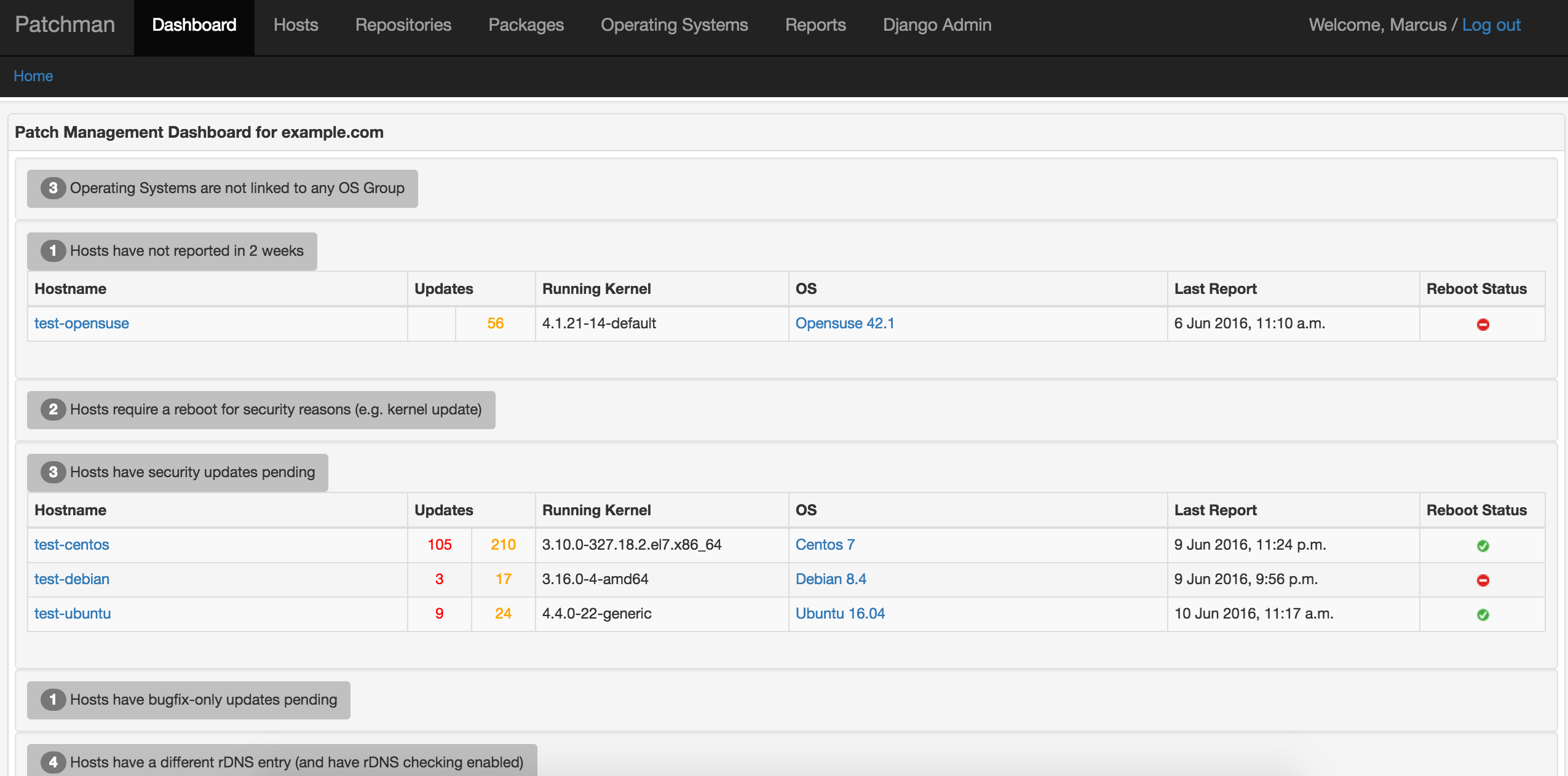
Patchman is a Django-based patch status monitoring tool for linux systems. Patchman provides a web interface for monitoring the package updates available for linux hosts.
How does Patchman work?
Patchman clients send a list of installed packages and enabled repositories to the Patchman server. The Patchman server updates its package list for each repository and determines which hosts require updates, and whether those updates are normal or security updates. The web interface also gives information on potential issues, such as installed packages that are not from any repository.
Hosts, packages, repositories and operating systems can all be filtered. For example, it is possible to find out which hosts have a certain version of a package installed, and which repository it comes from.
Patchman does not install update packages on hosts, it determines and displays what updates are available for each host.
yum, apt and zypper plugins can send reports to the Patchman server every
time packages are installed or removed on a host.
Installation
See the installation guide for installation options.
Usage
The web interface contains a dashboard with items that need attention, and various pages to manipulate and view hosts, repositories and mirrors, packages, operating system releases and variants, reports, errata and CVEs.
To populate the database, simply run the client on some hosts:
$ patchman-client -s http://patchman.example.com
This should provide some initial data to work with.
On the server, the patchman command line utility can be used to run certain
maintenance tasks, e.g. processing the reports sent from hosts, downloading
repository update information from the web. Run patchman -h for a rundown of
the usage:
$ sbin/patchman -h
usage: patchman [-h] [-f] [-q] [-r] [-R REPO] [-lr] [-lh] [-dh] [-u] [-A] [-shro | -uhro] [-sdns | -udns] [-H HOST] [-p] [-c] [-d] [-rd] [-n] [-a] [-D hostA hostB] [-e] [-E ERRATUM_TYPE] [-v] [--cve CVE] [--fetch-nist-data]

Patchman CLI tool

options:
  -h, --help            show this help message and exit
  -f, --force           Ignore stored checksums and force-refresh all Mirrors
  -q, --quiet           Quiet mode (e.g. for cronjobs)
  -r, --refresh-repos   Refresh Repositories
  -R REPO, --repo REPO  Only perform action on a specific Repository (repo_id)
  -lr, --list-repos     List all Repositories
  -lh, --list-hosts     List all Hosts
  -dh, --delete-hosts   Delete hosts, requires -H, matches substring patterns
  -u, --host-updates    Find Host updates
  -A, --host-updates-alt
                        Find Host updates (alternative algorithm that may be faster when there are many homogeneous hosts)
  -shro, --set-host-repos-only
                        Set host_repos_only, requires -H, matches substring patterns
  -uhro, --unset-host-repos-only
                        Unset host_repos_only, requires -H, matches substring patterns
  -sdns, --set-check-dns
                        Set check_dns, requires -H, matches substring patterns
  -udns, --unset-check-dns
                        Unset check_dns, requires -H, matches substring patterns
  -H HOST, --host HOST  Only perform action on a specific Host (fqdn)
  -p, --process-reports
                        Process pending Reports
  -c, --clean-reports   Remove all but the last three Reports
  -d, --dbcheck         Perform some sanity checks and clean unused db entries
  -rd, --remove-duplicates
                        Remove duplicates during dbcheck - this may take some time
  -n, --dns-checks      Perform reverse DNS checks if enabled for that Host
  -a, --all             Convenience flag for -r -A -p -c -d -n -e
  -D hostA hostB, --diff hostA hostB
                        Show differences between two Hosts in diff-like output
  -e, --update-errata   Update Errata
  -E ERRATUM_TYPE, --erratum-type ERRATUM_TYPE
                        Only update the specified Erratum type (e.g. `yum`, `ubuntu`, `arch`)
  -v, --update-cves     Update CVEs from https://cve.org
  --cve CVE             Only update the specified CVE (e.g. CVE-2024-1234)
  --fetch-nist-data, -nd
                        Fetch NIST CVE data in addition to MITRE data (rate-limited to 1 API call every 6 seconds)
Client dependencies
The client dependencies are kept to a minimum. rpm and dpkg are
required to report packages, yum, dnf, zypper and/or apt are required
to report repositories. These packages are normally installed by default on
most systems. which, mktemp, flock and curl are also required.
For Protocol 2 (JSON-based reports), jq is required. If jq is not available,
the client will automatically fall back to Protocol 1 (text-based reports).
deb-based OS's do not always change the kernel version when a kernel update is
installed, so the update-notifier-common package can optionally be installed
to enable this functionality. rpm-based OS's can tell if a reboot is required
to install a new kernel by looking at uname -r and comparing it to the
highest installed kernel version, so no extra packages are required on those
OS's.
Concepts
The default settings will be fine for most people but depending on your setup, there may be some initial work required to logically organise the data sent in the host reports. The following explanations may help in this case.
There are a number of basic objects: Hosts, Repositories and Mirrors, Packages, Operating Systems Releases and Variants, Reports and Errata.
Host
A Host is a single host, e.g. test-host-01.example.com.
Operating System Releases and Variants
A Host runs an Operating System Release, e.g. Rocky 10, Debian 13, Ubuntu 24.04. The particular version running is called a Operating System Variant. e.g. Debian 13.1, Ubuntu 24.04.4 and Variants are linked to a Release. For some OS's like Arch Linux, there are no Variants.
Package
A Package is a package that is either installed on a Host, or is available to
download from a Repository mirror, e.g. strace-4.8-11.el10.x86_64,
grub2-tools-2.02-0.34.el10.rocky.x86_64, etc.
Mirror
A Mirror is a collection of Packages available on the web, e.g. a yum or
apt repo.
Repository
A Repository is a collection of Mirrors. Typically all the Mirrors will contain the same Packages. For Red Hat-based Hosts, Repositories automatically link their Mirrors together. For Debian-based hosts, you may need to link all Mirrors that form a Repository using the web interface. This may reduce the time required to find updates. Repositories can be marked as being security or non-security. This makes most sense with Debian and Ubuntu repositories where security updates are delivered via security repositories. For rpm security updates, see the Erratum section below.
Repositories can be associated with an OS Release, or with the Host itself. If
the use_host_repos variable is set to True for a Host, then updates are found
by looking only at the Repositories that belong to that Host. This is the
default behaviour.
If use_host_repos is set to False, the update-finding process looks at the
OS Release that the Hosts Operating System Variant is associated with, and
uses that Releases Repositories to determine the applicable updates. This is
useful in environments where many hosts are homogeneous.
Report
Hosts create Reports using patchman-client. This Report is sent to the
Patchman server. The Report contains the Hosts running kernel, Operating System,
installed Packages and enabled Repositories. The Patchman server processes the
Report records the information contained therein.
Erratum
Errata for many OS's can downloaded by the patchman server. These Errata are parsed and stored in the database. If a PackageUpdate contains a package that is a security update in an Erratum, then that update is marked as being a security update. CVE and CVSS data is used to complement this information.
Release history Release notifications | RSS feed


Download files
Download the file for your platform. If you're not sure which to choose, learn more about installing packages.
Source Distribution
Built Distribution
Filter files by name, interpreter, ABI, and platform.
If you're not sure about the file name format, learn more about wheel file names.
Copy a direct link to the current filters
File details
Details for the file patchman-4.0.9.tar.gz.
File metadata
- Download URL: patchman-4.0.9.tar.gz
- Upload date:
- Size: 196.5 kB
- Tags: Source
- Uploaded using Trusted Publishing? No
- Uploaded via: twine/6.2.0 CPython/3.14.2
File hashes
| Algorithm | Hash digest | |
|---|---|---|
| SHA256 |
385e40260606a153d0e9788c08183110021c05c3449b6600d91c799f7c6a7992
|
|
| MD5 |
ef3f983fa86e33fb68a551201442c7df
|
|
| BLAKE2b-256 |
d1e4cb18f25f06bbcaa6670d8b467b96fb283f65e104730c9c64d8efdb5949eb
|
File details
Details for the file patchman-4.0.9-py3-none-any.whl.
File metadata
- Download URL: patchman-4.0.9-py3-none-any.whl
- Upload date:
- Size: 835.6 kB
- Tags: Python 3
- Uploaded using Trusted Publishing? No
- Uploaded via: twine/6.2.0 CPython/3.14.2
File hashes
| Algorithm | Hash digest | |
|---|---|---|
| SHA256 |
69abb9c39a94c203ee73d818b8482f0eb9ca7aaa53927a8c41428149fa8984a6
|
|
| MD5 |
bfc94504200421079e6a8c68566893ee
|
|
| BLAKE2b-256 |
180377b089014921d0e5cd72f665d3d39d40bb5a6ed37e93cc52696706d3f110
|






